

Unclaimed: Are are working at Ccleaner ?
Ccleaner Reviews & Product Details
CCleaner is a solution that allows users to clean, speed up and free up space on business endpoints. Scheduled cleaning means PCs run at optimum performance without disrupting internal processes and maintaining efficiency within teams. It is known as one of the more reliable options today as it helps reliably free up valuable disk space by cleaning unused files and settings.

| Capabilities |
|
|---|---|
| Segment |
|
| Deployment | Cloud / SaaS / Web-Based, Desktop Mac, Desktop Windows, Mobile Android |
| Support | 24/7 (Live rep), Chat, Email/Help Desk, FAQs/Forum, Knowledge Base, Phone Support |
| Training | Documentation |
| Languages | English |





Compare Ccleaner with other popular tools in the same category.

The best thing about Ccleaner is that after running the cookie cleaner, the temporary files and the registers of our computer, we can see that our RAM speed works perfectly and we have more memory space.
Until now there is nothing of Ccleaner that causes me errors or inconveniences, it is a software designed so that anyone can use it without having technical knowledge.
Thanks to Ccleaner we can eliminate the files, errors and inconveniences that arise in the operating system when there is no adequate preventive maintenance.

I like this program because it guarantees me to improve the performance of the operating system or the speed with which the programs are executed, since it cleans all kinds of temporary files, registry and cookies, it is very easy to use and you can program it to be run alone or you manually activate it, for me it is the best tool to have the equipment fully operational and clean
This should be used with extreme care because when used badly it can cause damage to our system, apart from this you can delete files that are in the trash can not be recovered
It is very helpful to keep all our PCs totally clean of unwanted files that make them work slowly, it is very easy to execute, and what is better does not take much time to run clean the PC in a very short time, thus avoiding damages of workstation computers

without a doubt the best cleaner for our PC, I like it because it repairs the entries that are bad, and files that are not necessary and with this improves the work performance, helps to keep the equipment fast as it frees it from unwanted files, It is very easy to use and we can do it whenever we want
the only negative thing I see about this cleaner is that it erases without being able to recover what is in the wastebasket, otherwise I have nothing more negative than to limit
cclenear has been a very fundamental tool since this has allowed us to keep the equipment with the best performance, you can program it to run only several times a week or manually activate it without taking much time
I like CCleaner because it allows me to thoroughly clean all my computer, erase cache, history, sessions, among others. This tool allows me to uninstall and also repair programs in my operating system. A great option is that it helps us find files of all kinds on the entire hard drive, and tells us which file is duplicated, and if so we can delete it. Your custom cleaning option is very good because we can tell you which files we want to delete and which ones we do not. I really like your Registry tool, with it we can see all the missing files in our computer and it is able to repair all the existing problems.
I have been using this application for many years and it does not have any disadvantage. The only thing is that the program has remained in the same service for many years. It has not given much more than it did a few years ago.
With CCleaner I can maintain all my computers simultaneously, and I save a lot of time and money. It also allows me to optimize my employees' computers. It has helped me with the comprehensive performance of many computers throughout these years, without a doubt an excellent application.

I like ccleaner because it has served me as a great tool to have the PC free of unnecessary files that make it work slowly, helping to improve its performance, one of its advantages is that it has a free version for unlimited time, allowing you to do cleanings more followed to the pc or you can program it so that one day a week it becomes automatic
In my opinion I have nothing negative to say about this cleaner because it is easy to use and leaves the PC free of unnecessary files
This has been very helpful since we can keep the workstation equipment with a good performance because they are free of files with errors, thanks to Ccleaner and its option to schedule the cleaning day, this has allowed the repair of several records of systems in different computers of the company

is a free tool or payment that allows us to clean our computers of those files that we no longer need or that our computer uses to surf the internet that occupy an unnecessary space or the files that are sent to the recycling bin with this tool automatic way with a single click eliminates all those files giving more storage space to the computer and releasing the unnecessary file memory in turn also allows you to modify and clean the windows registry of those programs that were uninstalled and files were left in the system.This great tool allows you to keep your computer out of risk or viruses that are saved in the registry or temporary files.
it can be dangerous in case a file that is necessary for the system is deleted, the paid version has many applications and improved tools.its use is easy but you should know what to discard from your pc.
this tool allows to have the operating system in a clean way and keep the registry without temporary files also allows to create backup copies for future system restorations and uninstall applications more easily and quickly.you give more performance to the teams in the office

I like the scheduled cleaning option since it can be assigned one day a week, maintaining a good performance in the system, another very useful function is to uninstall applications from the same panel of Ccleaner tools as well as repair or purge the registry of the system. Ccleaner offers a free version that allows you to use the most important functions of system cleaning, you can configure in a personalized way how the system will be cleaned, choosing which software or which browser you want to clean. I do not like
With Ccleaner I have not had problems, for which I do not see what I do not like about this software, since it is a complete and simple software, that fulfills its functions in an effective way,
Ccleaner has maintained the performance of the workstations, avoiding the slowness of the system and the records in an adequate manner. And it has made it easy to uninstall some unnecessary software that is sometimes downloaded without the user noticing or being overlooked. Programmed scheduled cleaning has maintained the proper functioning of the system.

I like this advanced cleaning tool because it has a very intuitive and easy-to-use interface for everything related to removing error correction from unwanted file registration and many other functions. you only need one click to scroll through your hard drive and get rid of what you no longer need
I do not like it because it has few configuration options and should be updated constantly, which makes it a bit annoying and, finally, is that advanced cleaning sometimes takes a long time to complete the analysis of the rest. I can not find anything more negative to say. about this useful tool
In the company we use it mainly to keep the disk much cleaner and more organized without unnecessary files and to solve registry errors. I also personally open the application when I forget some details of my system.

What I like is that it is a very light program that consumes minimal resources, is very easy to use and does its job efficiently, among which we can mention obsolete registry entries, invalid entries, temporary files, cookies, among others. . Many functions work very well, both on the Windows platform and on Mac OS. I can say that it is one of the best programs to clean the hard drive of unnecessary files.
I do not like that, as end users, we are not properly informed about the consequences that may have to eliminate certain types of data, for example, all browser cookies or all the contents of the folder. "Downloads". Although the data is technically temporary, they have great potential to accidentally remove important information. It would be an excellent tool if it could detect malware and, finally, it should be constantly updated, which in many cases generates problems.
With this tool, I enjoy the benefits of keeping my PC always clean and up-to-date, and it helps me save space, which translates into long-term benefits for my computer system as such.

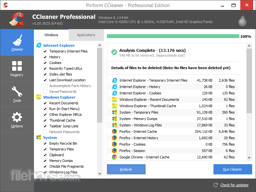
CCleaner It is a light Software that has many utilities. Its main function is to free hard disk space, cleaning unnecessary files (such as temporary internet files, history, cookies, empty the trash, etc). Although it also allows you to clean the registration (you can also create a copy of this), uninstall programs, see the programs and applications that start with Windows. It is also available in the android system, with the same quality occupying little space. In this system it allows to free ram memory when your cell phone is slow, eliminate system components (having permissions rum). CCleaner has many tools that makes it an ideal product for any type of person or user.
In the time that I have been using CCleane I have not had anything bad to say, all the functions work perfectly.
Every couple of months my pc becomes slow, the main reason is that the files that remain during the internet browsing (cookies, temporary files, history, etc.), this causes many difficulties to work. CCleane has allowed me to clean my PC of any files that consumes space and I encouraged my system.