

Unclaimed: Are you working at Chatbase?
Chatbase Reviews: 4.7/5 — Highly Rated
Chatbase is a SaaS platform for building, training, deploying, and optimizing AI agents (chatbots/virtual assistants) trained on your own data (websites, documents, help-desk tickets, etc.). Agents can handle customer support, email, live chat, voice and messaging across channels and are configurable with multiple model choices, analytics, and compliance controls.
| Company | Chatbase Inc. |
|---|---|
| Year founded | 2023 |
| Company size | 11-50 employees |
| Headquarters | San Francisco, California, United States |

| Capabilities |
AI
API
|
|---|---|
| Segment |
Small Business
Enterprise
|
| Ease of use |
Beginner
|
| Deployment | Cloud / SaaS / Web-Based |
| Support | FAQs/Forum, Knowledge Base |
| Training | Documentation, Videos |
| Languages | English |
Chatbase Pros and Cons
- Rapid setup and easy onboarding; "agent ready in minutes" experience.
- Supports many AI models and flexible model choice.
- Strong compliance and security features (SOC2, GDPR, HIPAA-eligible).
- Multichannel support including chat, email, voice and messaging.
- Real-time analytics, sentiment and topic detection.
- Message credit costs vary by model and can create cost uncertainty.
- Annual billing required for premium pricing discounts; monthly is significantly more expensive.
- Lower tiers limit agents, seats and data size.
- No confirmed open-source or self-hosted offering.
- Less customizable than a fully bespoke self-coded solution for highly complex workflows.
Chatbase gets a working support agent trained on your own content live in about ten minutes, which is genuinely the fastest route into this category. Point it at your website and documents, describe the agent’s job in plain language, and it answers customers over chat, email, voice and messaging. The pricing looks equally simple — $40, $150, $500 a month — but it is metered in message credits, and a credit is not a message. Pick a heavier model and the same conversation costs more, which is where budgets in this category tend to go wrong.
- What it is: A no-code platform for building AI customer support agents trained on your data.
- Best for: Small and mid-sized support teams who want deflection without an integration project.
- Pricing: Free, then $40 / $150 / $500 a month. 20% off yearly. Verified August 2026.
- The honest catch: Credit burn varies by model, so your real monthly cost is not the sticker price.
What Is Chatbase?
Chatbase is a build-and-deploy platform for AI support agents, founded in 2023 and based in San Francisco with a team of 11–50. It is bootstrapped and profitable, which is worth noting in a category where several competitors are burning venture money on pricing.
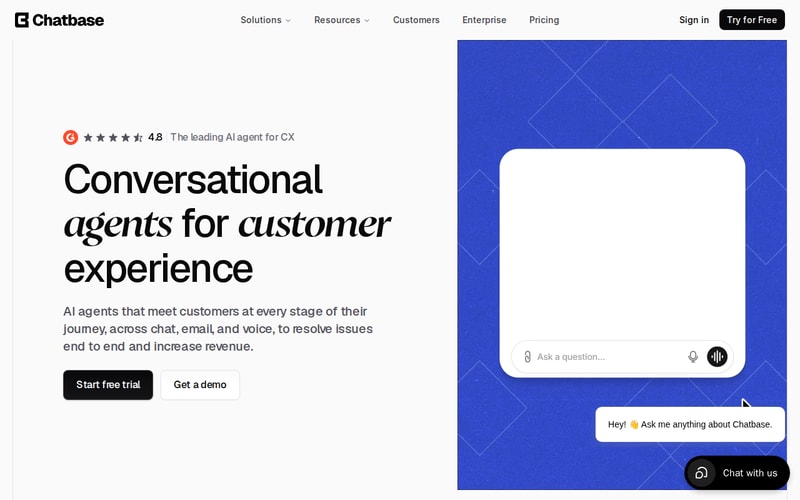
You train an agent on websites, PDFs, documents and existing helpdesk tickets, then set its behaviour in natural language rather than building decision trees. It runs across chat widgets, email, voice and telephony, and messaging channels, escalating to a human with full context when it cannot resolve something.
The other distinguishing choice is model agnosticism — you pick which LLM backs the agent, and can compare them. That is genuinely useful, and it is also the source of the pricing complexity below.
How Chatbase Works
- Train on your own sources: website crawl, PDFs, DOCX, help-desk ticket history.
- Configure in plain language rather than flowcharts.
- Test before shipping in a built-in environment.
- Deploy across chat widget, email, voice, telephony and messaging.
- Actions let it look up orders, process refunds or hit internal APIs.
- Escalate to a human into your existing helpdesk with context attached.
- Choose the model behind each agent, with fallback behaviour.
- SOC 2, GDPR and HIPAA-eligible handling.
Chatbase Pricing
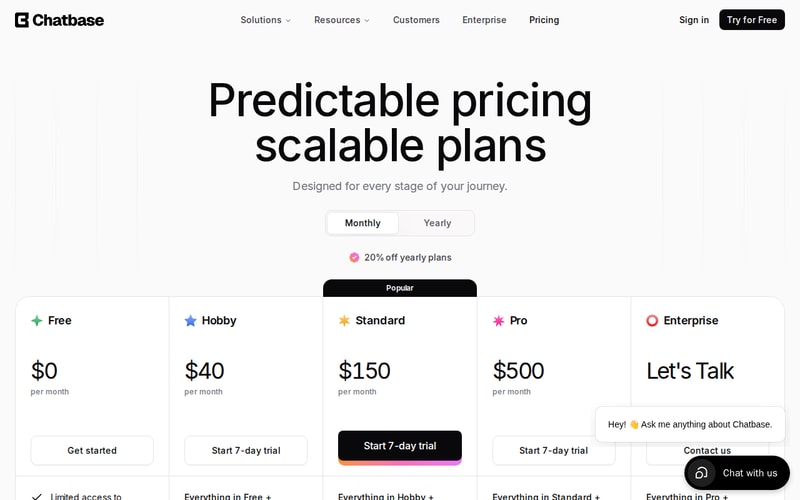
| Plan | Monthly | Credits/month | Members |
|---|---|---|---|
| Free | $0 | 50 | 1 |
| Hobby | $40 | 700 | 2 |
| Standard | $150 | 4,000 | 3 |
| Pro | $500 | 15,000 | 5 |
| Enterprise | Custom | Custom | Custom |
Yearly billing takes a further 20% off every paid tier. Standard adds the things most support teams actually need — helpdesk integration, voice, telephony, outbound campaigns, API access, personalisation and automatic retraining — so it is the realistic starting point for a team rather than an individual.
Unlike most credit systems, Chatbase’s rate improves as you move up:
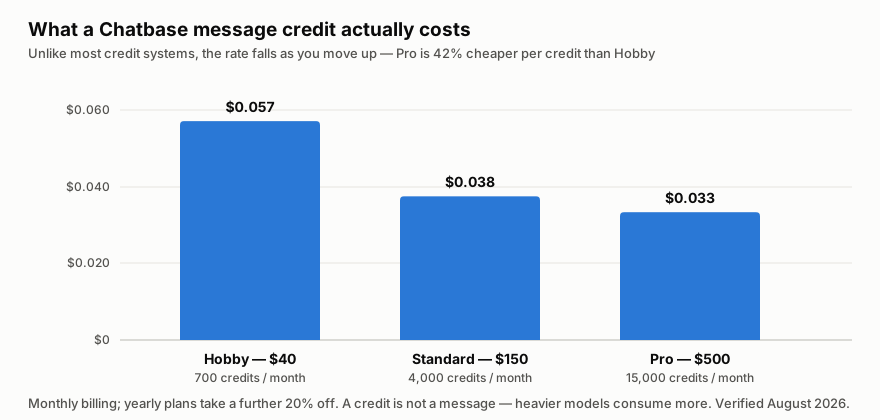
Pro is 42% cheaper per credit than Hobby, and Standard is already 34% cheaper. That inverts the usual advice to start small: if you expect steady volume, the cheap tier is the expensive one per unit of work.
Now the part that decides your actual bill. A message credit is not a message. Credit consumption varies by the model you select, so two teams on Standard with identical conversation volume can pay very differently. Chatbase’s own materials acknowledge this creates cost uncertainty. Budget by running a fortnight on your real traffic before committing to a tier, not by dividing 4,000 by your ticket count.
One more thing worth knowing before you rely on the free tier: agents are deleted after 14 days of inactivity on the Free plan. It is fine for evaluation, not for a low-traffic agent you intend to leave running.
Who Should Use Chatbase
Chatbase suits small and mid-sized teams with a high volume of repetitive, answerable questions — order status, returns policy, plan differences, setup troubleshooting. If your knowledge already exists as help-centre articles and past tickets, the training step is close to free and deflection arrives quickly.
The multi-channel reach makes it a reasonable fit for retail, SaaS, travel and financial services teams handling inbound spikes, and the compliance posture clears the usual procurement hurdle.
It fits badly in two situations. If your support depends on complex bespoke workflows across many internal systems, a configured platform will hit a ceiling that a custom build would not. And if your seat count is high, the member limits are restrictive — five members on a $500 plan is a small support team, and you will be pushed to Enterprise for headcount rather than capability.
Honest Pros and Cons
Strengths
- Genuinely fast setup. An agent trained on your content, live in minutes, is the core promise and it holds.
- Per-credit cost falls as you scale, which is unusual and works in your favour at volume.
- Model choice rather than a single locked provider, with comparison and fallback.
- Real multi-channel: chat, email, voice, telephony and messaging, not just a website widget.
- Compliance is covered — SOC 2, GDPR and HIPAA-eligible handling.
- Escalation with context into your existing helpdesk rather than a dead end.
- Bootstrapped and profitable, which lowers the risk of an abrupt repricing.
Limitations
- A credit is not a message. Model choice changes burn rate, so the sticker price is not the bill.
- Free-tier agents are deleted after 14 days of inactivity — not a place to park a low-traffic bot.
- Member limits are tight: 2 on Hobby, 3 on Standard, 5 on Pro.
- The 20% discount requires annual commitment, and monthly is meaningfully more expensive.
- Lower tiers cap agents and data size, so growth forces a tier change rather than an add-on.
- No self-hosted or open-source option, which rules it out under strict data-residency policies.
Chatbase Alternatives and How It Compares
The category splits by starting point. Intercom Fin and Zendesk AI start from an existing helpdesk — if you already run one, they bolt on with less setup and price per resolution rather than per credit, which is easier to forecast. Chatbase starts from your content instead, which is why it is faster for teams without an incumbent helpdesk and cheaper at the bottom.
Against building on raw model APIs, Chatbase is buying you the training pipeline, the channel connectors and the testing environment. That is most of the work, and $150 a month is well under what rebuilding it costs.
The honest summary: Chatbase wins on time-to-live and loses on cost predictability. Competitors that price per resolution give you a number you can forecast; Chatbase gives you a number that depends on your model choices.
The Verdict
Chatbase is the quickest credible way to get an AI support agent answering real customers, and for teams without an entrenched helpdesk it is the sensible first move. The multi-channel coverage is real, the compliance story is adequate, and the pricing curve rewards volume rather than punishing it.
Go in with one discipline: measure credit burn on your own traffic before you pick a tier. Run a fortnight on Hobby with the model you actually intend to ship, then extrapolate. If you skip that step, the plan you choose will be based on a ticket count that has little to do with what you are billed. And if you expect steady volume from the start, Standard is better value per credit than Hobby, not worse.
FAQ
How much does Chatbase cost?
Free covers 50 message credits a month and one member. Hobby is $40/month for 700 credits, Standard $150 for 4,000, and Pro $500 for 15,000. Yearly billing takes 20% off. Enterprise is custom-priced. Verified August 2026.
Is a Chatbase message credit the same as one message?
No, and this is the most important thing to understand about the pricing. Credit consumption varies with the model backing your agent, so a heavier model costs more per conversation. Run your real traffic for a couple of weeks before committing to a tier.
Does the Chatbase free plan keep my agent forever?
No. On the Free plan, agents are deleted after 14 days of inactivity. It works for evaluation, but not for a low-traffic agent you want to leave running unattended.
Which Chatbase plan should a support team start on?
Standard at $150. It is where helpdesk integration, voice, telephony, API access and automatic retraining appear, and it is already 34% cheaper per credit than Hobby. Hobby suits an individual or a trial, not a team.
Is Chatbase secure enough for regulated industries?
It holds SOC 2 and GDPR compliance with HIPAA-eligible handling, plus audit logs, data-retention controls and role-based access. There is no self-hosted or open-source option, so if your policy requires data to stay on your own infrastructure it will not qualify.

Chatbase is a chatbot or AI software which makes it easy to manage files, documents and can handle various file formats like PDFs, word documents, text files and many more. Through this one can make his or her easier by ingestion and transcription, semantic search, etc.
The things to dislike about chatbase is that you can not integrate your chatbot without coding skills, it is also unable to solve multiple queries, and they also have limited replies and solution that makes user unsatisfied.
Chatbase helps the developers and the businesses to track their growth and performance of theirconversational AI sysstems and find the scope for improvement. The benefits that chatbase is providing is personalizedd experiences, deliverr multillingual support, provide proactive customer service, collect customer feedback.
This was my initial experience with the tool, and I'm truly impressed. I uploaded a 15-page PDF and posed questions to Chatbase, and it provided accurate responses. It's often frustrating to search through lengthy PDFs for specific information, but this tool simplifies the process for us. I'm really impressed the way it works. It just takes few minutes to have a chatbot that could answer the queries on the uploaded content.
This is such a awsome tool, i liked the way it works. Nothing to dislike at the moment.
It just takes few minutes to have a chatbot that could answer the queries on the uploaded content.
Chatbase is helpful with adding widgets to your website. You get to customiza it and make it yours with the widgets make it original.It is one of the best widgets compared to other widgets.
Nothing it seems to be workiing well so far so good.
The ease of customaizing my websites.
It is very user friendly Chatbase. It seamlessly integrates with my chatbot without requiring any coding skills. It efficiently handles queries. Provides a variety of responses.
I find it challenging that there arent customization options available in Chatbase. This limitation makes it difficult to tailor the chatbot to business requirements. The lack of flexibility in design and functionality restricts the ability to create an personalized conversational experience.
Chatbase tackles the challenge of understanding customer conversations. Through its analytics and insights we can enhance customer engagement identify bottlenecks and optimize our chatbots performance. This has benefits, for our business as it improves the customer experience increases efficiency and drives more conversions. In short Chatbase revolutionizes chatbot analytics.
Takes almost no time to set up, you simply link your data to it, and it calls ChatGPTs API using that. A great no code solution that allows easy integration into projects or websites.
Less customizability. If you were to code this from scratch, which I have done, you could alter the prompts to better fit your needs. This however isnt a problem for most applications.
Allows customers or users of a website to get human like answers from a comprehensive database of information. cutting back on support costs and delivering a high quality solution. I am currently testing in for release on my company website and am fairly satisfied with the ease of use and quality of service.