

Unclaimed: Are you working at Float?
Float Reviews: 4.2/5 — Solid Choice
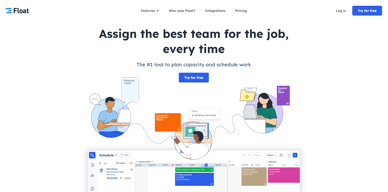
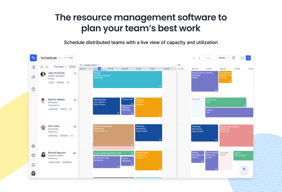
Float is one of the best resource management tools for robust scheduling and time tracking, trusted by companies like BuzzFeed and Deloitte. Project scheduling is easy with its click-and-create and drag-and-drop interfaces and users can set tasks easily and assign them to the relevant people/teams. Float’s scheduling tool also is simple and visual, giving you a clear picture of your team’s workload, as well as project progress all from a single dashboard. With Float, you can easily plan, manage and monitor projects and teams. Time tracking is simple, task management is streamlined, and the platform provides accurate forecasting based on gathered data.

| Capabilities |
API
|
|---|---|
| Segment |
Small Business
Mid Market
Enterprise
|
| Deployment | Cloud / SaaS / Web-Based, Mobile Android, Mobile iPad, Mobile iPhone |
| Support | 24/7 (Live rep), Chat, Email/Help Desk, FAQs/Forum, Knowledge Base, Phone Support |
| Training | Documentation |
| Languages | English |


I really like the colours and how Float displays the overall info. Also the reports are quite useful.
I can not import a calendar to get information from, for instance, Google Calendar.
We have now the control of what is happening with each project/person in a simple view.
Pretty straight forward, what it does it does really well.
Somewhat limited in features and functionality. Not the most flexible tool out there.
Better than using spreadsheets.
Float allows for easy capacity management of employees. It's simple, no frills.
The functionalities are limited and the visuals could be improved.
Employee resource capacity management. This enables easy knowledge at all levels of resources who are available or not.
User interface Allocations module : easiness
Reports section (templates and limited options)
Allocations
The app is very polished, and I often get the feeling apps are very bloated, but this app works very well. It is simple, and does not have too many features, but that's good compared to trying to do this in other software. We used to use outlook to manually signal when we would use PTO or be on projects, but now it's all in one place.
The schedule view is a bit cumbersome, since there is so much data represented. It can feel cumbersome scrolling through two dimensions of time and all of our users trying to find anything.
We are able to see in one place who is on what project, and using PTO. We are not using it to its full potential for sure. We've needed a dedicated tool for this, but it is hard to see the benefit without trying.
That the software is really fast, even for a big organisation. The filter works great for everything.
I can't figure out how to add national holidays for an organisation. It is not convenient to do it separately for each person.
Better planning people's occupancy. Having someone 100% occupied, while another one - 60% is a great overview how to improve the work for each person.
Overall visibility, able to see how my time is allocated for the week across several projects
Lack of ability to shift my own schedule
Allocating time between multiple projects

The integration into other applications we are using is one of the main reasons for using this application.
Till now we haven't encountered any problems with the application.
As a company where scheduling is critical, we need a reliable solution to assist. Our scheduling is made easy with this application.
Different functionalities like assigning team members and color for each team so the visibility is great. Tags are also cool, I can search for similar projects to see how long they took.
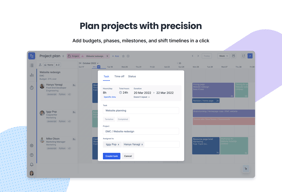
The project set up takes a few minutes but once you're done you can easily change task and put different milestones.
Project management, it helps us keep track of the timings.
It's a nice visual tool that encourages collaboration.
Integration with another tool would be helpful to reduce the software stack.
Float enables us to work more collaboratively and have a complete overview of each person's workload.
all daily tasks are easily visible, I like possibility to requests holidays via Float
not possible to copy tasks for whole month, not possible to create monthly repeated tasks
overview, who doeas what in mine team,
The fact that it's easy to get an overview of what everyone on the team is doing.
That it's difficult to add things to your own timeline.
We get an overview of what everyone in the team is doing. This means it's easier to know what kind of capacity is available.
I like the visual features and how it allows for resourcing to be made easier.
Slow and laggy and how it will delete or duplicate things when not promoted.
Resourcing
Really good UX/UI Lots of features Well designed API
Really bad performance of the website make using Float a really pain.
More visibility for the entire company on the staffing.
I like the fact you can filter and search by people and/or project
I don't like that you cannot see 3months in advance on 1 screen. It's still laggy when scrolling, we have 70 people timesheeted and we have project managers filling this in, they find it cumbersome. The repeating tasks are not well formed, as in if you set a repeating weekly task then want to edit one week to be say 3 days, it won't let you do it. We have other awkward things around adding contractors or people leaving jobs, it would be nice if Float had more sample data as I think sometimes we uncover usecases they haven't tested for - atleast tested the UX for. I'd love it to improve, as the last speed improvement they did was a step in the right direction, but more customisation is needed.
Agency people management. Benefit of seeing when people are available to work on other projects.
It was easy to see what my team members were up to week to week.
Would like better capacity for integrations. We also use teamwork for project management and ultimately shifted from float because it did not integrate.
visual project management across teams
Intuitive interface for easy and quick appraisal of project streams
Poor user documentation, lacking in some features offered by other solutions
Relatively simple, all-inclusive interface for users and admins alike to identify project streams and capacity.
Easy to understand, and not hideous to look at (like most programs).
Would be good to be able to look at overall projects, not just people. Project overviews instead of people.
Time management, seeing when designers have been overloaded with work.
It's a quick handy platform to manage the forecast for the staffing professionals and for the consultants to keep a track of their current and upcoming assignments
It should add features for the consultants to add comments in case there is an issue in the forecast. At the moment, the challenge is that for any change, the consultants have to reach out to the staffing professional over emails while by adding this feature, they can exactly add comments to where the changes are required
Easy tracking and managing of my project forecast. Also, one feature that can be added in this tool is to calculate the billable percentage of the consultants based on the forecast entered. This will give the consultants a view about their utilization and to plan accordingly
Visibility of everyone's resourcing at the same time Helps even out resource allocation and also respect the time of employees
Not integrated with other platforms e.g. timesheets
Overtasking some people, project management is improved as we have a bit better indication how much time is expected of us to spend on a project in a given week
The ease of use and my expectations towards it were all filled
Nothing that I can point out. Float works well and I had no issues with it
Made scheduling clearer and I didn't have to constantly ask the PMs for the next step
Alternative for other project planning tools, this is simple to use
user interface is not appealing, UI feels like outdated
Availability planning of the resouces and tracking of project activities
It's easy to schedule a task and move it around. The API is available which is great to get the data out of the tool.
I don't like how the tool looks, visually. Especially the project planning part. Many basic features that are available in other project management tools are not available, for example the Gantt chart is not really there. The reporting part is very weak. A lot of people in the office like the tool, I think, but for me it's not the best because of some basic things are missing. We ended up using Qlik to build reporting part and the Gantt chart.
Task scheduling and data extraction via API. I can use the data I get to represent it on the Qlik dashboards.
I like the UI/UX interface. It's very friendly and clean to see the task.
It's not sensitive when I entering my tasks.
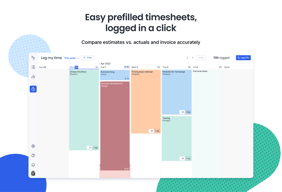
It make our timesheet very clear to see and check.

The calendar view is clean and makes it easy to see who is working on what / for how long throughout the week.
Adding and assigning new projects / tasks isn't intuitive. Also wish there were a more streamlined way to assign a project throughout non-consecutive days within one scheduling form than having to click in and out of individual dates.
Ability to assign project time across creative team members' calendars in one view.
How easy is to check my schedule, and edit my tasks
It lacks some features to become my main project manager app. Like: Tasks personalization.
Project Management,
I like seeing my week's expectations and then filling in the reality in similar views.
I don't like the limited set of keyboard shortcuts. I wish it were easier to add items without mouse click-and-drag. I often accidentally make changed and need to revert. I wish it included a stopwatch style counter like competitors (e.g., Toggl)
It allows our team to manage time spent across various contracts
the way it presents the information and colors
some times for some reason it doesn't load
make it easy to employees the check for what they suppose to do, and make i loooong history of every day of work
User Friendly Interface. Flexibility that allows customization
Float is not in sync with the timesheet software in our company
Scheduling and staffing problems
It's easy to use and the visual overview makes it very intuitive to see what my colleagues are up to
It would be nice to have a plug in that automatically tracks how much time I'm working on a certain project.
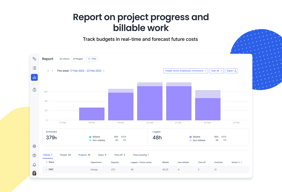
I'm able to track my team's billability and understand how we are spending our time.