Unclaimed: Are you working at GoTo Connect?
GoTo Connect Reviews: 4.4/5 — Solid Choice
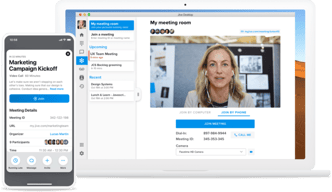
GoToConnect is a unified communications platform that essentially combines voice, messaging, and video tools in a single, centralized system. The platform offers useful features such as call routing, voicemail, and even conference calling.
| Company | LogMeIn, Inc. |
|---|---|
| Year founded | 2003 |
| Company size | 1001-5000 employees |
| Headquarters | Boston, MA, United States |
| Social Media |

| Capabilities |
API
|
|---|---|
| Segment |
Small Business
Mid Market
Enterprise
|
| Deployment | Cloud / SaaS / Web-Based, Desktop Mac, Desktop Windows, Mobile Android, Mobile iPad, Mobile iPhone |
| Training | Documentation |
| Languages | English |

Compare GoTo Connect with other popular tools in the same category.
Tech support is the most beneficial aspect of the GoTo platform. They are available 24/7.
I have found that button programming information will not fully or correctly save. This bug began over a month ago for all our team members and has been reported on multiple occasions. The ability to duplicate programming among a group of phones would be a great way to compensate for lost time.
We use GoTo as an alternative to excessive carrier charges. In almost every case it has saved the customer money.
We like how easy it is to change our phone schedule.
We have had no issues so far. The phones have worked consistently.
GoTo allows us to use our office number for texting and gives us the phone lines and auto attendant we need.
All of my phone system's settings are in one place, I can make staffing moves from my office without ever needing to visit their new location. It is easy to learn how to do anything you need to do from the help guides.
Things do tend to feel hidden under layers of other settings for the first few uses. I have had issues with some changes not saving one or two times, and having to redo the changes until it sticks.
GoToConnect is solving the issues we had managing the phone systems of 10 different locations, which were all on different phone providers previously, and putting everything in one easy to use space.
Having everything in the same app. Text VM seeing what is in the VM without opening.
Software updates. They seem to come when you least expect them.
Texting and viewing VM.
I like best that Goto is an easy-to-use platform with a significant number of options. The system is scalable, up or down anytime my needs require. Adding the mobile application as needed while on the road ensures that my clients can get in touch, so I don't have to worry about missing any important calls. And the call quality has been great. The other great feature is the customer service. In my experience, I have been treated in a professional and courteous manner.
I really can say that I have any complaints about the GoTo service. I would say if there were a downside, it is that there are so many options available to create a personalized platform. Sometimes so many options can get confusing, but that is really a function of my non-tech skills. Thankfully the customer service and tech departments are there to assist.
I can't say that I have had any real problems that must already have been completed as my system has functioned to my expectations
I like that we are able to create out own voicemail and set our hours the same as business hours. If we missed a call they send us an email with the customer's message.
Sometimes it does drop calls on my computer and phone.
Solving all the technical questions for me and making it easy for me to have this service.
GoTo Connect allocates UCaas and VoIP tools in a central place which makes it a breeze to communicate in real-time.
It's been a while ever since I encountered a bug when using GTC.
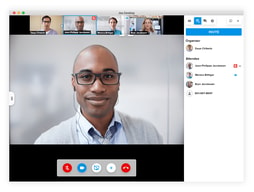
Allows me to get in touch with customers rapidly via calls (audio and video).
convenience, cost effecitive, could be charged according to the service you use, not a whole big package
The sound when the phone call connected always scares me and I can not delete it
landline, make company contact way more formal
I like how easy GoTo's interface is to use. How seamless it works across devices. How simple it is to customize every aspect of your account to suite the needs of your customers and your business.
There is not much that I dislike. The platform is never down. Customer service is prompt to answer any questions or issues that arise (which is rare). The pricing is very affordable.
We did have an issue with our business number showing up as "spam" when we were calling out, but GOTO provided us with the information we needed and helped us get it taken care of very quickly.
It has cloud-based and on-premises programs which are all pretty easy to use. Offers a single VoIP number that can be used across multiple devices.
I can't really figure out any downside on GoTo Connect and I use it on a daily basis.
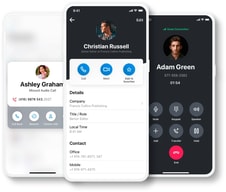
It allows me to get in touch with customers with just a click from anywhere through my iOS app.
Perfect for small businesses who want a presence in a particular area code, but don't want the expense of multiple landline numbers. Entry into a new area is as simple as a few clicks for an additional number - and deciding to leave a market (delete a number) is just as painless.
No downsides so far, this is perfect for us. The initial setup with voicemail and forwarding took some tinkering, but once it was set up it's been great.
Grasshopper is a low cost way to enter various markets (have an an 800 number) that is perfect for small business or the solo consultant. Having a number with the local prefix is still seen by many as a legitimatizing feature for a business number, and Grasshopper is an affordable way to do that.
Hard to say.. I like so much... the back-end interface is super easy to use and allows many configurations and fast modifications. Support is phenomenal and fast!
The mobile app has its quirks, and the desktop app has to be restarted fairly often, and it is clunky to do so. Still, I am happy enough with it as it is now.
I have a fast-changing team of sales people with 4 offices... moving people around to different desks and offices is super easy for resetting desk phones.

How it allows me to easily connect with customers via video and audio calls.
GoTo Connect barely dissapoint me even on a single moment.
GoTo Connect saves time by allowing me to offer support via video calls.
As a business owner, any application for work must be extremely easy to use! Time is money, and we don't have time to fight with a webinar application while trying to impress our clients. GoTo Connect is by far the easiest to use. It allows for accessible data collection and easy interaction with the audience. This is my GoTo App!
I have not found anything as of yet! I will let you know when I do.
I feel this question is redundant. I would not be writing a positive review if the App was not a help to my business.
Very flexible. Provides us the ability to grow and add additional people to our system with ease.
I haven't run into a feature I disliked yet
Easy to maintain and control use. All of our workers are remote so it works well for them and gives the appearance of being in a centralized office.
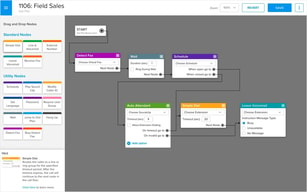
I currently use GoToConnect as an admin and a user. From the admin perspective, the admin portal is very user-friendly and not complicated to understand. After using other systems, GoTo is definitely the less difficult to use, with flexible and useful features, such as the dial plan editor. Dragging and dropping the nodes to visually build a call flow and give it the direction you need is less time-consuming and less tedious!
I feel like the new portal needs to bring some of the old portal features back, such as seeing the extension number in the Devices area. It's confusing not knowing what extension each device is. Most of the time, I need to relate the user's name with the extension assigned. I have to click on the device and go to button configuration to see the extension number corresponding to that person; it creates more unnecessary button clicking.
Customer satisfaction by easy troubleshooting steps and fantastic online support, learning center, and resources. When needing to know how to implement customers' requests for their phone system, the online resources provided on the support website save me a lot of time, allowing me to be more productive and resourceful. Additionally, the GoTo Partner Support line is very helpful when it comes to more complicated troubleshooting steps.
Softphone or physical phone options are great to have.
New user setup is a bit complicated so allow sufficient time for it.
Provides an excellent soft PBX allowed us to rid ourselves of a very old Avaya hardware stack.
It is easy to start cloud-based phone calls with a video calling feature. The software is affordable for everyone and the same time, so portable and can be used from anywhere. The best part is the software generates a report regarding detailed information about any phone call. It is one of the best IVR tool {Interactive Voice Response}. Another fantastic feature is the VoIP feature for collaborating more with other organizations and other interfaces.
When speaking with customers via phone calls or video conferences, the stability of the audio or video does not remain constant due to poor internet connection. Its web application sometimes does not respond appropriately on time due to poor connectivity.
Taking the help of this software to communicate with all my teammates to discuss the running projects and tasks and also connect and listen to our clients every time to resolve their problems by sharing ideas and information with them. Using it for scheduling and conducting webinars for training or providing some informational stuff via conferences.
The interface of this software is too unique and affordable for small-sized businesses. This platform can be used for internal and external communication for an organization. No cluck is seen in the dashboard of the system.
While using this platform on your device, no virtual background is provided on the mobile phone. When the updates are performed, it impacts the integration with the other applications.
Routing the customer's calls to the employee who can talk to the customer and understand and analyze their problem to give them more appropriate solutions.
I have always had a great experience with GoToConnect and that matters as a customer. Overall customer service has diminished over the last two years since the pandemic; however, GoToConnect has ensured exceptional customer service.
There has not been anything I dislike about GoToConnect and this is important because there are so many things people can dislike about a company. They seem to know what their customers want, need, and like.
GoToConnect is helping me connect with other businesses that provide products and services that give their customers exceptional services. This is relevant to all businesses.
I enjoy the easy-to-use platform of the iPhone application and the desktop options. It was easy to set up and start using the system right away. Also, setting up the greeting was not hard to complete.
Not set in Canadian dollars for Canadian customers. Also, it would be nice to be able to set up the payments for the system through Pre-authorized Debit to not worry about making credit card payments.
Making an on-the-go phone system for my business is the best option over the cost needed to purchase multiple phone lines and phones to accomplish the same outcome for service.
The video conferencing is the best plus we use the record feature all the time, Sometimes I wont catch certain conversations or slides, and i can refer back to the team recording.
Sometimes we have recording issues, and it can be annoying to locate the file or even find the file on the computer.I will tro to locate the file on the actual GoTo site and the video wont be there.
Customer support will reach out to me via email and there was an instance where i called customer service since it was very important to get this recording and support was kind enough to help.
GoTo Connect has helped me keep in touch with my teammates because there has never been a connectivity issue during a conversation. This platform can respond to every client call on mobile, desktop, and laptop devices immediately by recording the conference, which is a fantastic feature. This platform integrates seamlessly with a variety of third-party apps.
There is currently no annotation screen available, which I hope will be added in future updates.
GoTo Connect is very simple to set up and make VoIP calls, schedule appointments, and organise client calls. Thanks to GoTo Connect, I've never had any connectivity issues while speaking with my clients, likely to result in a superb customer experience.

Allows me to support juniors and customers remotely via video calls.
I have not had any bad experiences with GTC.
Ease remote support from anywhere over the internet. File sharing and screen sharing.
The software includes all the features like calling, messaging and organizing in one place. Integrating with applications and planning for VoIP for calling in broadband technology. It helps the users to engage the meeting attendees face-to-face over webinars. Planning, arranging and executing online webinars is now more accessible with this platform.
The voice quality is sometimes reduced for larger audio or video files while sharing through mail or other platforms. Whenever a fluctuation is seen in the internet connection during a running call, the calls automatically get disconnected, and even the ring recording is not saved.
With this software, our customers are now happier because everyone's call is being attended to, no one is waiting, and there is no delay in answering the calls. The system automatically tranfers the call to the team member who is already free and is able to attend the call.
It will help you to work from home and helps to get access your work from anywhere. This software can quickly answer every work call on mobile, desktops, and laptops. You will be able to do calls and receive calls from mobile and desktops. This software can easily be integrated with most third-party applications. The voice quality is fantastic, and no connection problem is seen during the call.
When there are more messages, the message history is difficult to be maintained. The trouble has been seen while reconnecting the software with the server or the connection after sleep mode or shutting down.
We are in regular touch with all our employees and clients, even who have settled abroad. organizing video conferences for conducting remote events and trainings.

GoTo Connect connect me with the rest of colleagues in one space.
The then errors has been resolved by automatic update on my iOS.
Sharing codes and insights via communication channels.
It is the best, most compatible, and very helpful software for all kinds of businesses. The connection during every call is stable, and there is no network issue in the middle of the call. The platform also helps in recording the calls and storing them for future use. There is also a feature for arranging and scheduling online events and meeting and maintaining them remotely.
The reports generated and analyzed on this platform are not reported ideally and have some errors. There is no markup screen feature available in the screen sharing process of this platform.
Allowing all my team members for flexible in attending every business call on time without any delays. This software can share every piece of data on the screen with all the attendees of the webinar.
it is fantastic software. It is really cost effective and yet it gives access to all their features. it allows me to do everything I need to do with many minutes within the plan. The feature VoIP is great it helps to select my business plans nicely. The graphical IVR editor is basically the greater one. The UI is also interactive. some of its features were- * PBX feature * Hot Desking * VOIP collaboration.
Sometimes some of its features create bugs like the have features of it create bugs to handle software which sometimes makes issues for me while organizing the meeting. it should include the salesforce CTI integration. Sometimes create problem in call recordings.
It is basically awesome software. it helps me to arrange my conferences for my clients. it has a very easy admin portal that helps me to schedule hours and holidays. the route mapping for inbound calls was also very simple to set up.