
Unclaimed: Are are working at Later ?
Later Reviews: 4.5/5 — Highly Rated
The leading visual social marketing platform for Instagram, Facebook, Twitter, Pinterest, and TikTok. Plan, publish, and analyze your media.

| Segment |
Small Business
|
|---|---|
| Ease of use |
Beginner
Intermediate
|
| Deployment | Cloud / SaaS / Web-Based |
| Support | Email/Help Desk |
| Training | Documentation |
| Languages | English |

Compare Later with other popular tools in the same category.
I love the month layout. It allows me to preview our posts for the month in a visual way that's clear and helpful. I also like that you can preview your grid from the platform, so you can see how all your posts will look lined up on your profile. The media library section is also useful as you can tag photos with certain labels (used or unused) and even add notes to the photos.
The section to schedule stories is a bit confusing and hard to read at times. Maybe I just haven't gotten the hang of it, but it hasn't been straightforward for me. I also wish they had a feature to directly copy a whole post to post it on another social channel.
We are solving the big problem of managing all our social channels in one place. We are just trying to maintain a social media presence; we are not big influencers nor do we post anything fancy. But it's been great for being a centralized place for everything. I also love that it can all be done from the computer. I dislike being on my phone a lot, and my phone is a distraction at work. Using their features on my work laptop has been a great benefit to me.
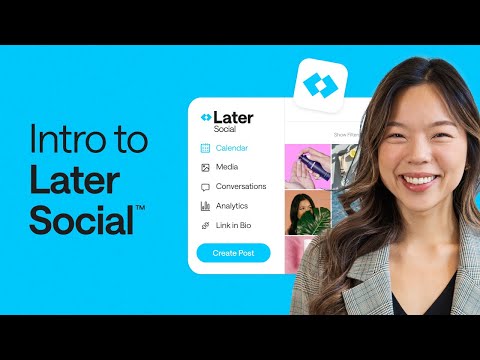
The scheduling feature is very visual appealing - it's easy to see what's coming up at a quick glance. I also love how easy it is to move scheduled posts around by dragging the scheduled post from one spot on the calendar to another. If something new pops up, it's easy to adjust the schedule. I also really like the "Analytics" pages -- again, very visually appealing and easy to understand. Finally, we ended up going with Later over other platforms because of the way the linkinbio appeared on our Instagram profile page. It's clean and simple. It also provides great data on the amount of clicks back to our website and helps me understand more about our audience. Finally, I love the preview feature -- it allows me to see what my feed looks in case I want to move things around.
I don't like that videos or multi-image posts have to be pushed to your phone to post manually at the scheduled time instead of scheduling and posting automatically. It makes me always have to be by my phone, and I prefer to have it all automatic. (Or at least give me the option to choose between automatic and manual.) I also would love it if I could include a link in the Stories when I schedule, versus having to add the link in the actual Instagram app on my phone. It feels like an extra step that could be planned for in the Later platform.
Using Later helps us plan and schedule Instagram content. It also gives us good insight into our audience, what they're engaging with and what content resonate the most.
I love the fact that I can schedual out my posts and content weeks ahead of time. Saves me so much effort!!
I wish picking the emojis were better/easier . Of course that's something small, but that's the only real issue I have with it
I am solving the amount of time i have to spend on Instagram content
The interface for later is easy to understand and is intuitive.
That the no of platforms available for posting were'nt optimized when I was using it.
To manage my client's regular social media posts. I can schedule for an entire week or month in advance and can let Later do the rest of the job.

An easy way of uploading all your images. Also, planning captions, planning first comment and location.
That it is not that easy to upload stories.
It eliminates time management issues and (content) stress when creating social media content.
The desktop site is just as easy to use as the app, and there is little to no gap between the scheduled posting time and actual post time of content to Instagram (the most used platform). Later also seamlessly connects the "link in bio" feature to the rest of the post content, simplifying the post process and automating it so that we don't have to update any links on Instagram manually, which is an incredible time-saver.
The layout can sometimes get clogged up and aesthetically confusing, with images on top of each other in the calendar. In addition, some of the unused images that are marked unused can't easily be marked used or quickly deleted. More batch actions would also be welcomed in future iterations.
We are streamlining our social media content posting process using Later's automated scheduling features, which is an incredible improvement on manual posting and reduces the need to rely on employees to manually post while doing other work.
I like how easy Later is to use! You can drag and drop content and immediately start scheduling. Also includes good basic insights into follower engagements on posts
Some of the features aren't intuitive to use without researching, like how to create a carousel post, or how to know what images have been used in a post already.
Later helps me schedule out in advance a month of content so I can set and forget!

Later provides you with an easy-to-see and understand the visual layout of your social media postings. It can save tags, suggest tags and templates speed up the posting process.
The platform is centered around Instagram, it would be helpful to have some more analytics for the other platforms they support such as Facebook and Twitter.
The ability to have a visual planner to see what posts are upcoming and to easily move the posts to a preferred time.
Later is excellent; it has helped us a lot in terms of social network management. It has a spotless and well-organized user interface, which makes it very easy to use. What I liked the most is how effective it is for planning and executing the publication of content; it has not given us any problem.
I would like it to be less limited for sharing content on specific social networks such as LinkedIn or Twitter.
It has been beneficial in managing the social networks that are contained in my organization and the timely publication of content to them to show the audience that we are always active in this way. With Later, we do not overlook anything, and our social networks are kept up to date.
I use this tool strictly for Instagram posting. I love being able to easily schedule IG posts (not having to push a reminder to your phone) and being able to add a linkin.bio! It has been extremely helpful in ensuring my audience is able to simply find the information that they need when they see one of our posts.
I wish you could upload videos, but this might be due to the Instagram API and not the later.com platform. I could be mistaken and this might be a paid feature but I currently have the free version.
It is a lot easier to keep Instagram posts organized in one place for my work. I also can't stress enough how great linkin.bio is! It's great to be able to add a link to every post and not have to go physically change the link in your bio every time you need to direct people to your link. I also love that you can go back and add a link after the fact, which is useful for updating a link or if it was forgotten when the post was originally created.