

OpenVPN Access Server Reviews: 4.4/5 — Solid Choice
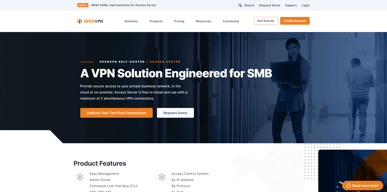
OpenVPN Access Server offers an enterprise VPN solution for businesses. It’s an open-source VPN protocol that allows secure online access from point to point, which is what makes it stand out from the competition. This means users get to enjoy a secure network in the OpenSSL Library with a worldwide community supporting the development of modification of the code.

| Capabilities |
API
CLI
|
|---|---|
| Segment |
Small Business
Mid Market
Enterprise
|
| Deployment | Cloud / SaaS / Web-Based, Desktop Linux, Desktop Mac, Desktop Windows, Mobile Android, Mobile iPad, Mobile iPhone, On-Premise Linux, On-Premise Windows |
| Support | 24/7 (Live rep), Chat, Email/Help Desk, FAQs/Forum, Knowledge Base, Phone Support |
| Training | Documentation |
| Languages | English |

Compare OpenVPN Access Server with other popular tools in the same category.
OpenVPN is a great VPN tool. A lot of operating systems natively support VPN, however try to set one up and you will notice the limitations. OpenVPN is incredibly easy to setup and use. We use this tool to allow users to access the same network. Connecting is a breeze and there are no bugs. The software is also very secure. Importing certificates is also easy and with literally ever other VPN tool out there this is not the case at all.
When you first install it through a web browser, you will be asked to login. I have found that for some reason this screen just hangs and does nothing. Not sure what that is about but it does not effect the functioning of the software. T
OpenVPN is used to allow users to access our internal network without being directly connected.
The best feature is the ability to run multiple ports and protocols with a single appliance.
Not integrated with SD WAN capabilities.
With OpenVPN we build fast and functional VPN gateways for are customers enabling compliance and data protection.

The system is easy to setup and easy to configure, server our corporate solution perfectly!
The Linux client can be difficult but our new routers all have built in openvpn so no longer a concern
We are an international software firm, your product allows us to support people world wide
Reasonable price and easy to deploy. I like that it integrates with LDAP so easy to roll out to users. Admin screen is easy to use and logical.
Needs mixed mode authentication, I have both AD and non-AD users. Also would like for server updates to be much easier. The product needs a way to deploy updates to the clients.
Allow remote users access to critical systems. Easy to deploy and maintain

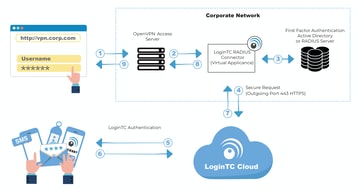
- The OpenVPN Access Server AMI is a great out of the box VPN solution for your AWS VPC. - We were able to easily connect to our Active Directory in AWS to the OpenVPN Access Server and enable 2-factor requirements via Google Authenticator. - Supports PAM, RADIUS, and LDAP. - This solution replaced our clients deprecated PPTP solution. OpenVPN is consistently rated among the most secure VPN solutions which is why we went with it.
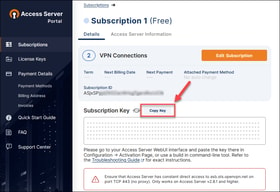
License management on the openvpn.net could be improved in one regard: allowing users to deactivate and move a license between servers. As you spin up an instance you may need to reconfigure our move your license to a newer server and that requires involving OpenVPN Support to reissue your license. This can take a few hours before they respond but typically they are pretty fast so not a huge negative for us.
Simple way to connect to our AWS VPC with 2-factor authentication tied to our Active Directory.
Flexibility, scalability, redundancy capability and LDAP integration.
Windows client is sometime buggy, better than before but still need some improvement for first time users (inexperienced users may require assistance from helpdesk initially).
We use this for all our managed services solutions, allowing our customers to access their infrastructure securely, with any device and using their central authentication system (AD).
Easy to use and minimal errors when connecting.
Difficult to set up for use in a non-business environment
Our IT department uses OpenVPN for remote access on physical machines to allow Administrator privileges.

OpenVPN offers users a very simple and secure VPN option that is both economical and quick to install. Users are able to easily install it on their client devices.
The update process is very poor. It is very hard to determine the name of the version to use with 'wget' when updates are available. There is no single place to look. Adding users to security groups in AD does not easily translate to VPN access rights.
We typically find customers who have open RDP ports to their network and we can quickly secure that by using OpenVPN.
OpenVPN provides the ability to activate MFA for an installation.This is very useful for high-security environments.
Sometimes the OpenVPN log on the client grows very large and requires a client server reboot
Provide secure access from client computer to private network in the cloud. It allows us to improve security to the cloud by limiting firewall rules.

It just works! I love how easy it is to access my server and get VPN access going on any device, laptop, tablet, or smartphone. It's easy to install and configure, and I never have any problems with it. Configuring and updating my own server is super simple. In my experience, I've always had some difficulty setting up hardware VPN appliances, but OpenVPN was no-nonsense. I also love that because it's server-based, I have the ability to virtualize the appliance and take advantage of all the benefits that gives me.
There's nothing really I dislike. I'm very content with the way OpenVPN works for my company.
Offering VPN access on a wide range of devices from smartphones to laptops. We have access back into our network no matter what device we are using.
Ease of setup and ease of install are the best features. Also it's nice to be able to tie security permissions to specific active directory groups. very easy to install updates and manage on a server. one of our least troubleshot applications across the organization. also being provided simple rpms and packages further allows for ease of use.
confusing website layout and lack of insight into the vpn connection experience. would be good to have a verbose setting on the client to see any potential connection issues. also phone or chat support to get direct response would be awesome to get immediate response.
affordable vpn that is easy to setup and manage. even our help desk and student assistants that joined can easily manage users, troubleshoot issues. this saves us in labor time and labor costs so our information systems team can focus on other initiatibves that impact the company's bottom line rather than troubleshooting vpn issues or worrying about costs.

OpenVPN has provided us with a solid low cost VPN option giving our user the "in office" experience they are looking for when they are working remotely. We are a small company with a small IT staff. Rolling out OpenVPN to our users was simple and painless.
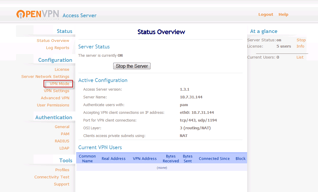
I would like if it the GUI was able to do everything you can do in the command line interface. For those of us weak in Linux working with the command line can be a challenge.
The OpenVPN virtual appliance allows us to give users an "in office" experience when they are working remotely.

I like that it's easy to install in AWS. Easy to configure options, add users, and that it has two factor authentication built in. You can configure the system to allow connections on common ports so that you're able to connect from pretty much anywhere in the world. You can also setup certain public IPs to route through the VPN in order to make use of static IP whitelisting.
That you cannot reset someone's two factor authentication via the web interface. Also, that you cannot reset locked users via the web interface.
Secure access to our sensitive environments and enabling remote employees.
Having the ability to limit users on what subnets then can connect to.
Older versions would drop connections always stating that I was logged on from another location. Also, the VPN would start during boot up when I would have it set to not start at boot.
Private external access to our internal networks.
Ease of deployment and support. Runs well on all tested devices.
Nothing, haven't had any issue using/deploying.
Secure remote access to all devices. Easy to get working in difficult network environments over a single TCP or UDP port and speeds surpassed a dedicated $3000 VPN appliance while running from a modest VM.
We like that OpenVPN is... well... open. It works with Mac, Windows, iOS, Android, you name it. We're not vendor locked.
The support offering is a little light, but given the upside and cost, that's completely understandable.
We have a lot of mobile users around the US, getting them connected using an SSL, TCP, UDP adaptive VPN solution is critical given the types or networks our team is accessing from.
I'm a big fan of the administrative UI that simplifies the management process as well as the lightweight footprint and install time.
Really not much to dislike about the product, you're getting exactly what you pay for and more.
OpenVPN has solved our need to access secure cloud systems from different remote locations without exposing any of those systems directly to the web.
Based on solid, widely used open source technology, so we can extend as needed. But has additional GUI management that makes life easier. Multi platform client support. Ships as easy to maintain Ubuntu VMware image.
Logging could be better, can be difficult to figure out why someone didn't connect MS-windows client occasionally glitches and needs re-installation (but this could be because Microsoft is a rubbish OS).
VPN services for our roaming staff
The best things about OpenVPN are the simplicity and broad client support. It is a very cost effective solution to setup and run, doesn't require a lot of maintenance, and requires very little hardware.
I don't any issues that I would say I "dislike" about it.
Secure remote access for users.
The entire solution is managed via a web-gui and the pre-packaged installer files.
No complaints here, been using for years
We use if for all of our technicians that are needing access to company files when on the road.
Easy to set up and configure, open source core. Multi-platform clients. No problems on some public WiFi like IPsec/GRE clients can experience.
ActiveDirectory integration could be easier. Source code complexity/legacy cruft: Products like WireGuard seem to be simplified in comparison.
Road warriors, and replacement of the insecure PPTP VPN previously in use.
Ease of deployment, ease of maintenance, simple to on-board new users. Administration of the system is straightforward. Incredibly responsive support.
In a cloud environment where you bring your own license, a small change to the underlying instance (stopping and starting the host machine) requires a new activation key. Thankfully, their support is incredibly responsive, however, would be lovely not to require this step.
Simple and secure remote access. Bastion host for cloud environments.
nice lightweight application that provides us with vpn access for internal company documents and websites.
It can be a little difficult to set up by yourself if you don't have proper instructions
giving access to confidential information and services.
OpenVPN it's a free software that works really good. It's efficient, secure, and the clients can be of any operative system, all are compatible. You can tune totally your configuration and there are lots of possibilities. It's good for people that wants to create a customized VPN tunnel.
It's really hard to start with OpenVPN, there are much options and isn't easy to get it up. The desktop application of mac don't work properly.
We use to connect to the work computers in a safe way. With OpenVPN we can create a private tunnel from our laptops to the firewall server of our company and keep connected to work computers in a safe way.
OpenVPN it's a little but powerful program to create VPN tunnels from your computer to another, or from a computer to a full network. It's totally safe, and if you scale the server, can deal with a big number of connections.
At difference with other commercial softwares, OpenVPN needs that you work in the configuration during a few hours, isn't install and ready, and there are some options that are a bit difficult to set.
We use to connect from our homes to the network of the work, using as a server a firewall that redirects the traffic.
There are several things that I like about open vpn, it is a free software and you can make modifications to the code, the wide variety of servers that it offers so that users can try several and thus stay with which we feel more comfortable navigating the Internet, it does not weigh much, you can get it as an extension of chrome, download in the playstore for devices with android. In cell phones it is so simple to use that only one chooses the server and that's it. The support on your website is very useful.
It really is very good, for code modifications if it is recommended to have an advanced knowledge of programming because each user has different preferences and sometimes they need to adjust the software specifications in order to satisfy their needs.
Open VPN has solved problems in the company, as are the restrictions that you have to access internet pages that have been blocked for the IP of the country where we are located.
When you travel from on continet to anotger for work, using just one server will reduce your internet speed, specially when in some places the local internet speed is less than 1 meg per sec, therefore using a server in us whike you are in Africa is not fissible.
Sometime I receive security error when I am using this VPN, and it usually gets fixed by changing the server
In many places internet access to many websites, even telegram and skype are filtered
It seems to separate VPN traffic from Internet traffic so as to utilize the local IP arrangement.
I can't think of anything I dislike about this tool!
Easy corporate intranet access

The option to configure a whole site for all profiles created within that site.
Sometimes it disconnects from the network automatically, so have to manually re-connect it, though we have found a way to not disconnect and a few workarounds.
We are connecting the Dr.'s database to the Dr's website, so that other referring docs can see patients stats. Also patients can log in and update their info and set appointments.
I like that this product can be used with multiple diffrent venders verses just one. Can be used on any operating system and is mobile. Keeps password so you don't have to login every time. Works with iOS even when apple breaks things on each update with Wi-Fi
The setup isn't easy and must use the application on all devices. iOS and Android devices must open app to start and end VPN connection.
Making sure that when on a public connection that our data stays safe.