

Unclaimed: Are you working at Papermark?
Papermark Reviews — Pricing, Features & The Honest Take
Papermark is an open-source virtual data room and secure document sharing platform focused on confidential decks, contracts, fundraising, M&A diligence and tracked document distribution. It combines document security (watermarks, NDA gating, granular permissions), analytics (page-by-page engagement, visitor tracking), and automation (API, CLI, webhooks) with a SaaS offering plus an option to self-host under enterprise licensing.

| Capabilities |
API
CLI
OSS
|
|---|---|
| Segment |
Small Business
Mid Market
Enterprise
|
| Deployment | Cloud / SaaS / Web-Based, On-Premise Linux, On-Premise Windows |
| Support | Email/Help Desk, Knowledge Base |
| Training | Documentation, Videos |
Papermark Pros and Cons
- Strong security & compliance (SOC 2 Type II, ISO 27001; GDPR/HIPAA/CCPA workflows)
- Open-source core with self-hosting option
- Rich analytics: page-by-page engagement and visitor tracking
- Feature-rich mid tiers including watermarking, NDA gating and screenshot protection
- Wide integration and automation options (webhooks, Zapier, Make, n8n)
- Enterprise pricing is custom and can be opaque; EUR pricing may complicate some buyers
- No confirmed native mobile apps or offline sync; relies on responsive web UI
- Some advanced features reserved for higher tiers
- Self-hosting requires enterprise license and technical resources
- Official demo video links were not found in public sources during this research

Papermark is the rare document-sharing tool you can read the source of and run on your own servers. It covers the DocSend job — send a deck as a tracked link, watch page-by-page engagement — and extends into full virtual data rooms for M&A, fundraising and due diligence. It carries ISO 27001 and SOC 2 Type II certification and says 70,000+ companies use it, which is a serious posture for an open-source project. The thing to understand before comparing prices is that it sells two separate product lines, and the cheap tiers are the document-sharing one.
- What it is: Open-source document sharing and virtual data rooms, self-hostable.
- Best for: Founders sending decks, and deal teams who need a data room without enterprise pricing.
- Pricing: Free, then $29 / $69 a month for sharing; data rooms from $119. Verified August 2026.
- The honest catch: Per-seat add-ons stack up — extra members are $20–$40 each a month.
What Is Papermark?
Papermark is a link-based document sharing platform with a data room product on top, and it is open source with a supported self-hosting path.

The base case is simple: upload a deck or PDF, share a link instead of an attachment, and see exactly which pages someone read and for how long. That page-by-page analytics signal is the reason founders use this class of tool at all — knowing an investor spent four minutes on your financials tells you something an email receipt never will.
The data room side adds what deals require: unlimited permissioned rooms, granular folder and file access, NDA gating in one click, dynamic watermarking stamped with viewer details, screenshot protection, audit logging, a Q&A module and AI redaction on the higher tiers.
How Papermark Works
- Share links, not attachments, with per-link controls.
- Page-by-page analytics on who read what and for how long.
- NDA gating in one click before a viewer sees anything.
- Dynamic watermarking with viewer details burned in.
- Screenshot protection and allow/block lists.
- Custom domain and branding so documents look like yours.
- Webhooks, MCP, API and CLI from the Business tier.
- Self-hostable — the codebase is open source.
Papermark Pricing
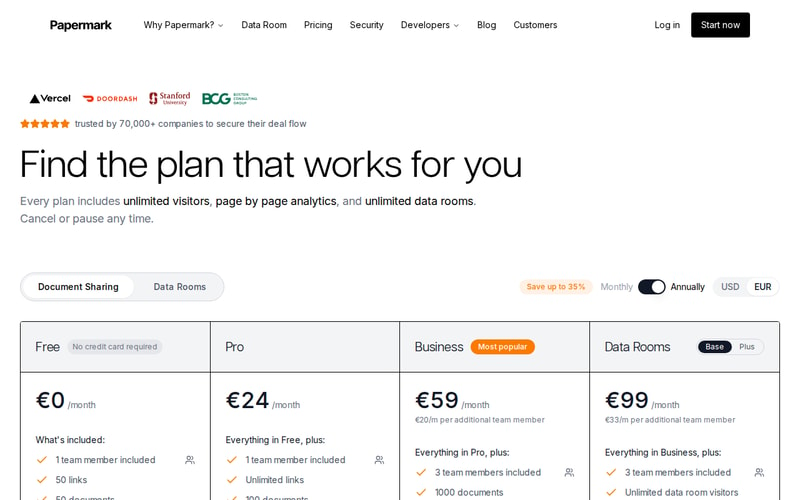
Papermark prices in both USD and EUR via a toggle, and advertises up to 35% off annual billing. The figures below are the monthly USD rates.
| Plan | Monthly | Line | Key limits |
|---|---|---|---|
| Free | $0 | Sharing | 1 member, 50 links, 50 documents |
| Pro | $29 | Sharing | 1 member, unlimited links, 100 documents |
| Business | $69 | Sharing | 3 members, 1,000 documents, custom domain, API/CLI/MCP |
| Data Rooms Plus | $119 | Data rooms | 3 members, unlimited data room visitors |
Every plan — including Free — includes unlimited visitors, page-by-page analytics and unlimited data rooms, which is unusual and genuinely generous. Most competitors meter viewers.
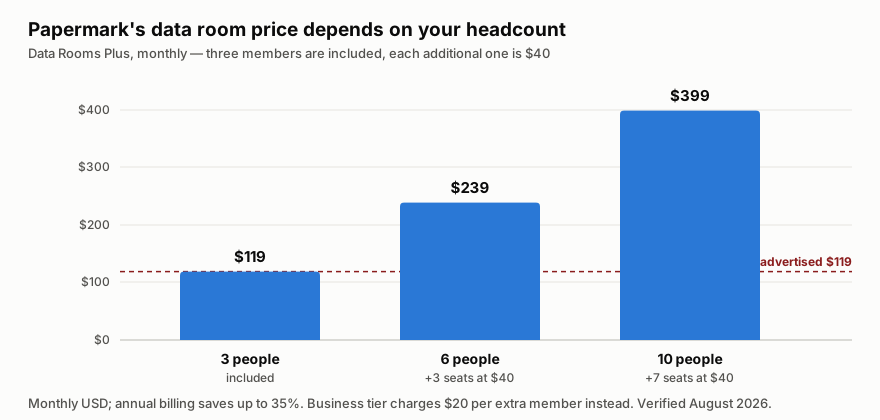
The cost that catches people is per-seat add-ons. Business includes three members and charges $20 a month for each additional one; Data Rooms Plus includes three and charges $40 each. A six-person deal team on Data Rooms Plus is $119 plus three extra seats at $40 — $239 a month, not $119. Model your actual headcount before comparing this against DocSend.
The other thing worth flagging: Business is where the technical capability lives — webhooks, API, CLI and MCP all appear there, not on Pro. If you intend to wire document sharing into your own product, $69 is your real entry price.
Who Should Use Papermark
Founders raising money are the clearest fit, and the free tier is close to sufficient. Fifty links and fifty documents covers a fundraise, and page-by-page analytics on your deck is exactly the signal you want.
Small deal teams running M&A or due diligence get a data room at a fraction of what incumbents charge. The NDA gating, watermarking, Q&A module and audit logging are the features that actually matter in a diligence process, and $119 a month against traditional VDR pricing is a substantial saving.
Regulated or privacy-sensitive organisations should look hardest at the self-hosting path. Being able to run the whole thing on your own infrastructure, with ISO 27001 and SOC 2 Type II on the hosted product as evidence the security model is taken seriously, is a combination almost nothing else in this category offers.
It fits poorly for large enterprise deals with complex multi-party workflows, where established VDR vendors have process tooling Papermark does not, and for teams who need long-term document collaboration rather than controlled distribution — this is a sharing tool, not a document editor.
Honest Pros and Cons
Strengths
- Open source and self-hostable, which is the differentiator and a real one for regulated teams.
- ISO 27001 and SOC 2 Type II — serious certification for a product at this price.
- Unlimited visitors, analytics and data rooms on every plan, including Free.
- The free tier genuinely covers a fundraise at 50 links and 50 documents.
- Strong security controls: NDA gating, dynamic watermarking, screenshot protection, allow/block lists, audit logs.
- Developer surface — webhooks, API, CLI and MCP from Business.
- Much cheaper than traditional data rooms for equivalent core function.
Limitations
- Per-seat add-ons stack quickly — $20 a member on Business, $40 on Data Rooms Plus.
- Two product lines confuse comparison. The cheap tiers are document sharing, not data rooms.
- API and CLI are Business-only, so technical integration starts at $69 rather than $29.
- Document caps on lower tiers (50 on Free, 100 on Pro) bite sooner than link limits do.
- Self-hosting is real operational work, not a checkbox.
- Not built for complex enterprise deal workflows where incumbent VDRs have deeper process tooling.
Papermark Alternatives and How It Compares
DocSend is the incumbent for the sharing use case and the direct comparison. It is more polished and more widely recognised by investors, but it is closed, more expensive per seat, and has no self-hosting story. Papermark’s argument is price, openness and the fact that its free tier covers what most founders need.
For data rooms specifically, the incumbents — Datasite, Intralinks, Firmex — serve large, complex transactions and price accordingly. Papermark is not trying to displace them on a billion-dollar deal; it is making a competent data room available to companies for whom those vendors were never realistic.
The self-hosting option has no meaningful competitor. If your requirement is that deal documents never touch a third party’s infrastructure, this is close to the only supported answer in the category.
The Verdict
Papermark is an unusually good deal for founders and small deal teams, and the open-source licence turns it into a genuine option for organisations that could not otherwise use a hosted document tool at all.
Start on Free — it is sized for a real fundraise, not a demo. Move to Pro at $29 when you hit the 100-document ceiling, and to Business at $69 if you need a custom domain or want to wire it into your own systems via the API. Take Data Rooms Plus at $119 only for an actual diligence process, and when you do, count your seats first: at $40 a head beyond the included three, the sticker price and the invoice diverge quickly.
FAQ
How much does Papermark cost?
Free is $0 with 50 links and 50 documents. Pro is $29 a month and Business $69 for document sharing; Data Rooms Plus starts at $119. Prices toggle between USD and EUR, and annual billing saves up to 35%. Additional team members cost $20 a month on Business and $40 on Data Rooms Plus. Verified August 2026.
Can I self-host Papermark?
Yes. Papermark is open source with a supported self-hosting path, which is the main reason regulated and privacy-sensitive teams choose it over DocSend. Running it yourself is genuine operational work, but the hosted product’s ISO 27001 and SOC 2 Type II certification indicates the security model is well considered.
Is Papermark a good DocSend alternative?
For most founders, yes. It covers the same core job — tracked links with page-by-page analytics — at a lower price, with a free tier that comfortably covers a fundraise, plus source access and self-hosting. DocSend is more polished and more familiar to investors, which is worth something in itself.
What is the difference between Papermark’s plans?
Pro and Business are document sharing; Data Rooms Plus is the data room product. Pro lifts the link limit, Business adds a custom domain, screenshot protection, webhooks and API, CLI and MCP access, and Data Rooms Plus adds unlimited data room visitors and the diligence tooling.
Does Papermark limit how many people can view my documents?
No. Unlimited visitors and page-by-page analytics are included on every plan, including Free — which is unusual, since most competitors meter viewers. The limits that do apply are on documents, links and team members.

Compare Papermark with other popular tools in the same category.
Sorry, no reviews are available for this product yet.
Be the first one to review Papermark !