

( 551 )
Unclaimed: Are you working at Superhuman?
Superhuman Reviews: 4.7/5 — Highly Rated
Superhuman is an AI-powered productivity suite centered on email (Superhuman Mail) and expanded to include AI writing, collaborative docs and workflows (Docs), and a cross-app intelligent agent workspace (Go). It automates inbox triage, email drafting, reminders, shared documents, and agent-driven automations and integrates with CRM and productivity tools. The product targets knowledge workers and teams and offers enterprise-grade security and admin controls.
| Company | Superhuman Ltd. |
|---|---|
| Year founded | 2014 |
| Company size | 501-1000 employees |
| Headquarters | San Francisco, California, USA |

| Capabilities |
AI
API
|
|---|---|
| Segment |
Small Business
Freelancer
Enterprise
|
| Ease of use |
Intermediate
Advanced
|
| Deployment | Browser Extension, Cloud / SaaS / Web-Based, Desktop Mac, Desktop Windows, Mobile Android, Mobile iPhone |
| Support | Email/Help Desk, FAQs/Forum, Knowledge Base |
| Training | Documentation, Live Online, Videos, Webinars |
| Languages | English |
Superhuman Pros and Cons
- Highly polished UI and speed; extensive keyboard shortcuts and efficiency tools.
- Strong AI assistance for drafting, summarization, automated follow-ups, and auto-labeling.
- Deep integrations with CRM and productivity tools and external AI models.
- Robust team and enterprise features including shared collaboration and advanced security.
- Relatively high price for full Mail and business tiers; may be cost-prohibitive for some individuals or small teams.
- UI localization of menus and system text is not yet broadly supported.
- Some advanced features are in beta or have limited trial access.
- Core product is proprietary (not open source).

Superhuman is the fastest email client most people will ever use, and it costs $300 a seat a year to find that out. The speed is real — keyboard-first navigation, sub-100ms interactions, triage that genuinely moves faster than Gmail. What trips buyers up is not the price but the packaging: Superhuman now sells two different products under one brand, and the Free and $12 tiers you will see quoted do not include the email client at all.
- What it is: A premium email client plus a separate AI docs and agent workspace.
- Best for: People who spend hours a day in email and can put a dollar value on the time saved.
- Pricing: Mail starts at $25/member/month billed annually. Business is $33. Verified August 2026.
- The honest catch: The cheap tiers are the Docs product. Mail begins at $300 a seat a year.
What Is Superhuman?
Superhuman launched in 2014 as a rebuilt email client for people who live in their inbox, and its reputation rests on speed and keyboard control rather than features nobody uses.
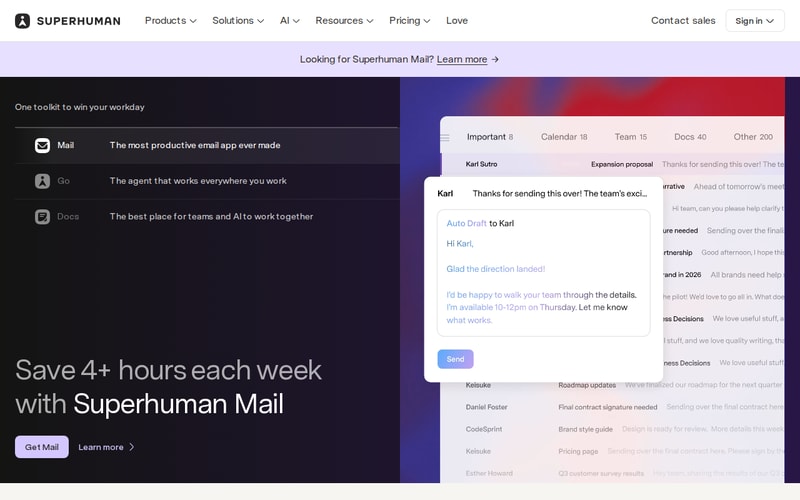
The homepage now leads with three products rather than one, and carries a “Looking for Superhuman Mail?” prompt in the header — a fair signal of how easily buyers end up on the wrong one.
The core experience is a stripped, fast interface over your existing Gmail or Outlook account, driven almost entirely by shortcuts. Split Inbox separates real mail from noise, AI drafts replies in your voice, Ask AI searches across your history conversationally, and auto-labels file things without rules you have to maintain.
Since then it has expanded into Docs (collaborative AI writing) and Go (a cross-app agent workspace). Those additions are why the pricing page is confusing, and they matter to what you actually get for the money. The company is now in the 501–1000 employee range, based in San Francisco.
How Superhuman Works
- Sits on top of Gmail or Outlook — it is a client, not a new mailbox.
- Keyboard-first, with shortcuts for essentially every action.
- Split Inbox and auto-labels for triage without manual filters.
- AI drafting in your writing voice, plus Ask AI across your mail history.
- Follow-up reminders, snooze, send later, undo send as standard.
- CRM integrations — HubSpot and Pipedrive on the higher tier.
- Runs on macOS, Windows, iPhone, Android, web and as a browser extension.
Superhuman Pricing
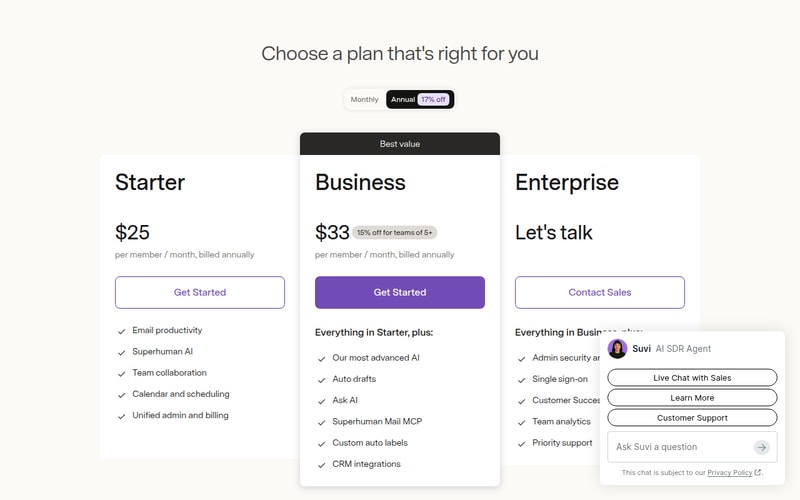
Read the plan names carefully, because two product lines share one page:
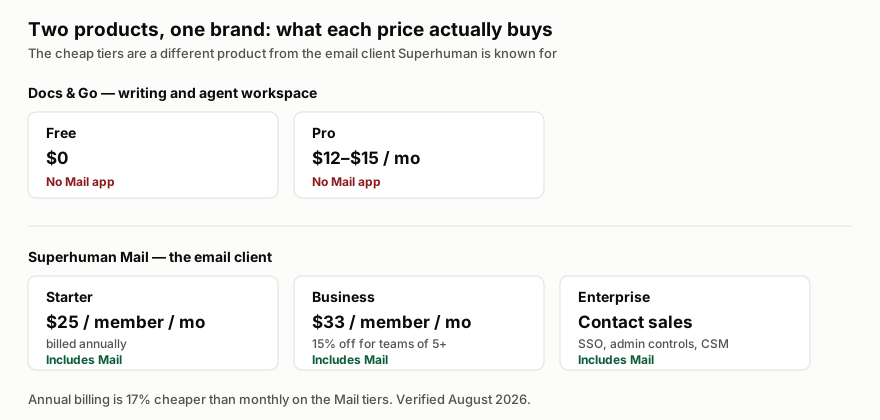
| Plan | Price | Includes Mail? |
|---|---|---|
| Free | $0 | No — Docs and basic writing only |
| Pro | $12–$15/month | No — advanced Docs and writing |
| Starter | $25/member/month, billed annually | Yes |
| Business | $33/member/month, billed annually | Yes |
| Enterprise | Contact sales | Yes |
Starter at $25 a month billed annually is $300 a seat a year — the real entry price for the product Superhuman is famous for. Business is $396. Annual billing saves 17% against monthly, and Business carries a further 15% discount for teams of five or more.
What Business adds over Starter is the AI: auto drafts, Ask AI, the Mail MCP connector, custom auto labels and CRM integrations. If you are buying Superhuman for AI assistance rather than raw speed, Starter is not the tier you want, and the effective entry price is $396 rather than $300.
Who Should Use Superhuman
The arithmetic is unusually simple here, and it is the right way to make this decision. At $300–$396 a seat a year, Superhuman needs to save roughly an hour a month to pay for itself at a typical knowledge-worker rate. For someone processing 150 emails a day, that is a low bar and the tool clears it comfortably.
For someone processing 20 emails a day, it does not, and no amount of polish changes that. Volume is the variable that decides this purchase, not preference.
It also fits sales and customer-facing teams specifically well, because the CRM integrations and follow-up reminders map onto work that has revenue attached. The case is much weaker for internal roles where email is incidental to the job.
Honest Pros and Cons
Strengths
- The speed is not marketing. Interaction latency is genuinely below what Gmail and Outlook deliver, and it compounds over a day.
- Keyboard control is exhaustive, which is the actual source of the time saving.
- AI drafting is good and trained on your own voice rather than generic business English.
- Split Inbox and auto-labels cut triage without rule maintenance.
- Real enterprise posture: SSO, encryption, audit logs, SOC 2 and BYOK.
- Broad platform coverage — desktop, mobile, web and extension.
Limitations
- It is expensive. $300–$396 a seat a year against a free, competent default.
- The product split is genuinely confusing. Free and Pro do not include Mail, and the pricing page does not make that obvious at a glance.
- AI features are gated to Business, so the advertised entry price gets you the fast client and not much of the intelligence.
- UI localisation is limited — menus and system text are not broadly translated.
- Some features are in beta or have restricted trial access.
- You are still on Gmail or Outlook underneath, so provider-level limits and outages remain yours.
Superhuman Alternatives and How It Compares
The honest competitor is Gmail with keyboard shortcuts turned on, which is free and, for a low-volume inbox, sufficient. Superhuman’s answer is that shortcuts alone do not give you the latency, the triage or the AI — which is true, and worth $396 only at volume.
Among paid clients, Missive and Front target shared team inboxes rather than individual speed, so they solve a different problem; if your need is collaborative support triage rather than personal throughput, they fit better and usually cost less.
Against Wispr Flow, there is no real overlap — Flow speeds up the writing itself across every app, Superhuman speeds up the mail client. Heavy correspondents often run both.
The Verdict
Superhuman is a very good product with a pricing page that works against it. The speed claim survives contact with daily use, the AI drafting is better than most, and for high-volume email the payback maths is comfortable.
Do two things before buying. Work out your actual daily email volume — under about 50 a day, the numbers do not support it. And be clear you are buying Business at $396, not Starter at $300, if the AI features are what attracted you, because that is where they live. If email is not central to your day, this is a luxury, and it is fine to say so.
FAQ
How much does Superhuman cost?
Superhuman Mail starts at $25 per member per month billed annually ($300/year) on Starter, or $33 ($396/year) on Business, which is 15% cheaper for teams of five or more. Annual billing is 17% less than monthly. Enterprise is contact-sales. Verified August 2026.
Is there a free version of Superhuman?
There is a free tier, but it does not include the Mail app. Free and Pro ($12–$15/month) cover the separate Docs and writing product. The email client Superhuman is known for begins at Starter.
What is the difference between Starter and Business?
Starter gives you the fast client, Split Inbox, calendar and team collaboration. Business adds the AI layer — auto drafts, Ask AI, the Mail MCP connector, custom auto labels and CRM integrations with HubSpot and Pipedrive.
Does Superhuman replace Gmail or Outlook?
No. It is a client that sits on top of your existing Gmail or Outlook account, so your mail, provider limits and any provider outages stay where they are. You can stop using it and your mailbox is unaffected.
Is Superhuman worth it?
It depends almost entirely on volume. At $300–$396 a seat a year it needs to save around an hour a month to break even at typical knowledge-worker rates — easy at 150 emails a day, not achievable at 20. Work out your own volume before deciding.

Superhuman is a joy and delight to use. The highly customisable split inboxes make email so much easier to manage. I've not seen this done so effectively anywhere else. The keyboard shortcuts mean I can fly through my email. The development team are constantly improving the experience. The customer service team are highly responsive, friendly and helpful. There really is nothing else like Superhuman on the market.
There's little to dislike about Superhuman. The learning curve is perhaps a little steep initially, but the support team are always happy to help.
Keeping on top of email is always problematic, especially if you have a number of facets to your life and work. Superhuman makes it easy to keep on top of emails related to these many facets.

I'd like to share my admiration for this platform that has truly been a game-changer for me. It not only aids in my day-to-day tasks but also frees up a significant amount of my time. The support team deserves a special mention for their impeccable organization. They respond promptly and accurately to any query thrown their way. What really delighted me was how they addressed my specific needs. When I mentioned how certain features could solve my business challenges, the response was, "Yes, we've already thought of that, and here's how you can do it." This level of foresight and responsiveness is remarkable! Wishing the team continued growth and success.
I've encountered a bit of a hiccup with the platform that's been slightly inconvenient. After setting up all the necessary email accounts on the desktop version, I expected a seamless transition to the mobile app. However, upon downloading and logging into the mobile application, I found only one primary email account was visible. This means I'll have to manually add the other accounts again on the mobile app. It's a minor issue, but it is inconvenient.
using several emails

The best part of using Superhuman is the feeling of flying when using the email client. You can work without even touching the mouse or trackpad.
"Probably the worst part is the lack of customization of various factors such as the calendar."
The speed in task execution
Easy to get to inbox 0, but then also have emails come back if there's no response.
cost? and lack of support for hubspot. I could really use a hubspot integration.
If an email isn't responded to, it comes back so I can remember to respond or follow up
My favourite parts of the Superhuman email client has got to be the effective inbox filtration into categories, a blazing fast unsubscribe feature & integrated AI that actually works. I am also a huge fan of the iPhone and iPad app. I feel the Superhuman email client is often overlooked due to the price, and to those who cannot justify spending the amount - I understand. Although you will without a doubt make that money back in hours saved. I can gurantee that.
The price is obviously the biggest downside to Superhuman, but I can assure you that the time saved through using Superhuman justifies the price.
Before superhuman I was stuck in an endless cycle of wanting Inbox Zero, but being too daunted by the 4000+ unread spam emails flooding my account that just kept coming & coming! Superhuman helped me to take the important step of saying goodbye to it all and starting fresh. Hear me out. Superhuman didn't delete all my old emails, but instead it allowed me to archive all emails older than 2 weeks. They aren't gone, but they clogging up my inbox and demotivating me from changing my bad email management habits. Now, all three of my email accounts never have over 10 emails that havent been reviewed and taken action on. Most the time Im at that sweet sweet inbox zero. Through helping me make the first step, and then maintaining a good management pattern, Superhuman has saved me countless of hours mindlessly deleting, archiving or sometimes missing important emails! Thank you Superhuman!
The biggest aid to my email workflow has been the forced simplicity of the folders, and the ability assign different senders to a few key buckets. Then, I can clear out my "Important" folder to inbox-zero every day—without wasting time getting distracted by random newsletters, non-urgent updates, or billing receipts. Everything drops in right where I need it to, and I can batch that type of email when I'm ready! The ease of implementation helped me avoid having to clean up my emails first—their personalized onboarding tips and guidance gave me the confidence to start fresh (without losing any messages). Their customer support and ease of integration are incomparable in today's complex SaaS world. Superhuman team really understands the value of simple systems.
The only downside is the cost investment, but committing to the annual plan is worth the savings. The keyboard shortcuts took a few minutes to learn, but are paying me back in hours of saved time every week.
Superhuman gives me all of the features I need to manage my email system effectively, without any of the extra stuff that never gets used. The app also runs extremely fast on my Macbook and iPhone, with no pinwheel of death or frozen screens.
Many things. I love how easy it is to get through emails and get to a decision on them - the ability to get to an email later is life changing. When sending invites, I can now create an event/meeting invite in 10 seconds vs 1 minute on google or apple email. The AI responses help a lot and I can also triage emails better. I implemented and integrated the shift to super human quite easily. Onboarding and customer support is great with their helpful nudges. I use it everyday.
Not a lot. I wish Superhuman would build additional functionality for the mobile app, especially the ability to create meeting invites. Otherwise, perfect for me
Time, ability to coordinate meetings, write good succinct replies
the "inbox zero" screen is a delight to receive!
superhuman isn't free to use like iOS mail or gmail
Superhuman saves me time by using tight filters to show me just the important emails. I check email many fewer times a day and have more bandwidth for other priorities thanks to that!
It definitely helps me get through all my emails, and more importantly helps me respond to all my emails. The remind feature is essential to this, because sometimes I just can't be bothered to think about an email, so having the prompt to deal with it later helps me get through it. It was very easy to install, and I found the commuunication with the customer service responsive. I definitely use it every day, and have adapted to using it very quickly.
There is no feature that I'm unhappy with. The price point is a little high for me though.
Superhuman helps me not let emails pass me by. It's benefitting me by making me more productive.
This software has allowed me to take control of my inbox when before it was controlling me. My inbox used to be overwhelming to say the least. Now I actually look forward to reaching inbox zero!
Team snippets need picture ability, link ability, and more organization. I should be able to categorize them and maybe attach by a # phrase. Otherwise I LOVE it! Customer service has been prompt and helpful. I use this platform about 5 times a day.
Organizing and streamlining my inbox.
I love the hotkey feature and the "search" feature for any action I want to do with an email. The initial tutorial was incredibly helpful and now I can quickly navigate by hot key. I also love the "remind" feature in that I can schedule emails that I have either receieved or sent to pop back up in my inbox. I can follow up with contractors or clients, whether I'm waiting to hear back or need to get information before supplying. I also love that it automatically splits my emails into appropriate categories. It keeps the important things in one place and the daily email blasts in another.
No downsides yet! Currently very happy with the app.
The main solution it has provided is scheduling reminders so I do not forget to follow up with either clients or contractors.
Keyboard shortcuts and snippets accelerate everything and keep me from dropping critical balls.
No Mail Merge fuction (would be amazing to have; could reduce the number of external services I use). No chat function/integration with Gchat (makes me switch tabs to collaborate internally).
Cluttered inbox and arduous email construction. With Superhuman, I'm much more organized and faster.
The way that it intuitively knows which emails are important and which ones are not is super helpful. I also love the way that I can clear out my inbox in an organized workflow. You never have to use your mouse if you master all of the easy-to-use hotkeys.
As a sales person, I wish it had better CRM integration.
It clears up the clutter that naturally builds in my inbox. It filters out al of the junk mail and let's me focus on relevant emails.
Super fast. Inbox zero is the right approach. Shortcuts essential.
Customizable split tabs would make the experience better.
Clearing email is slow.

I am someone who absolutely hates email - I have wrestled with being up to date for a decade on email...until I tried Superhuman. The desktop is especially amazing with the ease of use of the command shortcuts - the product is so well designed, it is as if the creators tapped unique human behavioral insights to create an ideal app. It is almost like email is a fun game - and finally one I can win. I use Superhuman 5-6 times a day instead of when I would check email once or twice a day max without it.
The mobile apps are good not great...yet. I am happy to have the app on mobile and ipad but i find I am slightly less efficient with it on those platforms compared to desktop.
As ceo, I can't afford to miss an email - yes, a lot of them are spam or trash but the one in a million could change everything. Superhuman allows me to find the signal in the noise. I have also just started to use the beautiful in email calendar search functions and find it very easy and effective. This solves a lot of inefficiencies with providing times for meetings or connecting with my teams.

I'm able to get through email lightnening fast. I was a little nervous about utilizing the app with all the shortcuts, but they take you through a 3 minute "training" that teaches you very quickly how to integrate and implement it into your day. The customer support has been on point and they are quick to respond. I utilize Superhuman everyday and love the fact that I can easily see all of my options with command K. It's now my favorite tool of my day!
There is nothing that I dislike about superhuman. I utilize it daily.
Ease of reviewing mail and ease of responding/being reminded - I also love that the calendar immediately comes up when someone references a date.
The split inbox feature has been the most helpful by far. Gmail only allows 5 (with names you can't change). Having an unlimited number of split inboxes has allowed me to segment all the spam messages I get, emails from different third party vendors, clients and more so that I can more quickly triage important messages. Also never having to take your hands off the keyboard to get through your email is a huge time saver.
It could use a few additional features (font changes, being able to pin your calendar, filtering based on email body text), but those things are small in comparison to the positives.
Superhuman helps turn an overwhelming number of emails per day into manageable sections.
The ai feature, the planning and organization features and the navigation
The least helpful, for me personally, is the autocorrect feature that does not support Portuguese and keeps correcting it to Spanish
Dealing with different subjects and people in a very organized and fast way

extremely easy to be able to have your inbox at zero emails every day. You can make ai generated responses. Great customer support. Very easy to to integrate.
nothing. I love every single feature about it
it's solving the way we do inbox zero and making it more efficient to go through emails
Superhuman is an incredible product that increases my response speed 3x. I have also found it much easier to tackle to-dos in an organized and systemized way.
I haven't found a down-side to using superhuman.
Superhuman helps me stay on top of tasks and to-dos
I never managed to get anywhere close to inbox zero with gmail, no matter how many extensions I tried. Superhuman has super smart and intuitive filtering that helped me not only clear my inbox but also surface important messages I had missed.
Some of the shortcuts require a bit of onboarding to master. The mobile app uses the opposite shortcuts of the native Gmail app, which trips me up still.
Superhuman saves me time spent on my email inbox by filtering out the less important messages.
I absolutely love the remind me later feature. I was trying to rely on marking unread or pinning important emails in my inbox and then would always forget about them. Now the program simply pops them up at the top of my email!
The app crashes a bit -- especially on my phone. It's prob the only real negative.
I am much more efficient and responsive to internal and external stakeholders. I also can do a quick email check if I'm out of the office and send a reminder to myself for the important emails.
Scheduling and booking meetings!! Like the rest of the world, I have a booking link with mixed results. In Outlook, you have to bounce from calendar to email. Superhuman allows you to check the calendar as you type the day, book the meeting from the same screen, and invite ALL the participants from the email with one click. Also, the daily tips emails are great and really help you learn the product without being overwhelming, meaning it's easy to get up and running.
The feature above is currently only on desktop.
As a founder, I am time-poor, and I get a lot of email emails.
Superhuman allows me to effortlessly fly through my inbox and respond to all my clients in a timely fashion. The best part is the feeling of hitting inbox 0. Gmail can feel very clunky at times and leveraging Superhuman has given me control of my inbox in a fun/productive way!
That I can never look at Gmail the same. I do think the platform has opportunities to improve on email threads. One thing I did like about g-mail was a 3rd party app that allowed me to reverse thread an email, so the newest email was at the top instead of the bottom. If Superhuman could this as a feature I'd be ecstatic!
Time management, communication and organizations are the biggest problems I'm solving with Superhuman. Since using Superhuman I have been at inbox 0 for close to 8 weeks in a row! It's great to be able to get back to clients in a quick/effective fashion.
In general...i hate email. Email and meetings are the worst. I love that this is helping me to get time back. I'm not exaggerating when I say I get 150+ emails per day and there have been times I have worked a 19hr day bc I feel the need to get through all the topics in my inbox for fear of missing something major. Also... I talk entirely too much, as you can tell, and I sometimes need something to help shut me up and work faster. As for the technical... The integration into our primary email app (Gmail) is fantastic. I used outlook moreso at my last job and am glad this support is there, but I have yet to test that integration yet. That said, the standalone app runs very well. I appreciate the hotkey guidance. I used to work in audio production and became very hotkey dependent and this is helping me to get back to that mentality with email. The AI support is clutch, especially when you're writing an email that you need help with (be it reduction of emotional content, reduction of message length, or simply content generation). But even better is the AI summary of long threads. This is a massive time-saver and helps to be focused on the primary points. Inbox splitting is a huge help. I can quickly and easily see emails on certain topics or from certain people that are considered higher priority. Lastly, the minimalistic design really aids in staying focused, minimizing unnecessary cognitive shifts between topics, and keeping unwanted stimuli out of the way. Oh. Also, their team is phenomenal. They are responsive and communicative whether it's about feedback or questions or whatever.
This has taken an adjustment. I previously filed everything into certain folders or labels. It was a HUGE time investment but I knew where to go for anything. Instead, I am now archiving topics im finished with and, if something comes up that was prevkiusly archived.l, I search for it. This can consume some time and is tough to acclimate to. I'm adjusting, but it does make me nervous admittedly. Everything is still there, depending on your company's retention policy, but it can be a bit of a challenge to find that exact email sometimes. AI is also a bit stiff and I'm still learning how to give it 'my voice.' once I can have this thing writing like I do, it's going to be hard to commit to writing anything myself, but we're not there yet.
It's helping me to work in a different way that is more efficient and productive. It saves me valuable time.
Processing email with keyboard shortcuts instead of using my mouse has been transformative and it took almost no time to get up to speed. The amount of time it takes to clear my inbox has been dramatically reduced and the processing time my assistant used to spend filing emails is almost completely gone.
The biggest drawback I've found it's not as easy to format the appearance of emails as it is in Outlook, so there are some emails that I still use Outlook. Not very often, but there are some emails that I'm very particular about the formatting.
I get a lot of email and processing it takes more time that I'd like. Using the keyboard shortcuts has increased my speed dramatically so I can get in, get back to Inbox Zero, and then get back out to do my work.
I didn't realize how much I needed Superhuman until I started using it. It filters out all of the junk (without you having to spend time going through and unsubscribing from things) and automatically gives you an "Important" inbox that only has the important emails you actually need to see. I used to feel overwhelmed by the amount of emails in my inbox and now it feels easy to get through my inbox every day.
They have a feature called Split Inboxes, which is great, but it difficult to manage what contacts go into each inbox.
It solves the problem of feeling overwhelmed by a completely cluttered inbox and it's saved me so much time and stress.

I receive and send a LOT of emails, and Superhuman makes it manageable. I love being able to quickly process my messages, dismissing the ones that i don't need to act on, and scheduling the ones that I do need to deal with. Its really easy to get started with the tool and you can be an inbox zero very quickly. Their support is very good.
Superhuman builds an address book for you based on everyone you have ever emailed with in the past. I wish there was a way to edit it. I keep accidentally emailing people at their old email addresses. I also wish that the attachments were handled better. I find that I often can't find files that I have downloaded.
Superhuman is a good solution for a disorganized, overwhelming inbox.
I have never seen a shortcut messaging feature in email where it pops up subliminally to reinforce the value of the shortcut system within superhuman. It serves as a gentle reminder that you could have saved time using that specific shortcut and then you can use it next time! It is also incredibly easy to use and the design is very high quality.
There is a learning curve and it is a new system that you may not be used to initially, but that is expected for anything you do for the first time!
Saving me time and energy to get to inbox zero
You can do everything on a keyboard, and it helps you remind to follow-up on stuff you might otherwise forget. Customer support is great, as there are a ton of resources available, including live sessions, to get you onboarded.
It still doens't fully support calendar operations such as setting up recurring meetings or manipulating calendar items.
It makes it much faster to go through my email, clearing out my to-do list and helping me remember things that might otherwise be forgotten just because things move fast on a daily basis.