

Unclaimed: Are you working at Adobe Connect?
Adobe Connect Reviews: 4.0/5 — Solid Choice
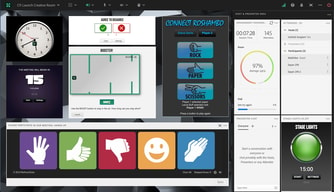
Adobe Connect is a web conferencing platform that lets companies conduct online meetings, webinars, and training sessions. It’s a reliable solution that lets users share presentations and other multimedia right from your desktop—delivering multimedia rich experiences to hundreds of participants. It’s designed to recreate the learning environment of physical classrooms to define a more engaging and collaborative communication experience. The solution offers immersive virtual experiences with useful storyboarding tools and design features where you can plan, host, and track all your events.
Adobe Connect is a web conferencing platform that lets companies conduct online meetings, webinars, and training sessions. It’s a reliable solution that lets users share presentations and other multimedia right from your desktop—delivering multimedia rich experiences to hundreds of participants. It’s designed to recreate the learning environment of physical classrooms to define a more engaging and collaborative communication experience. The solution offers immersive virtual experiences with useful storyboarding tools and design features where you can plan, host, and track all your events.

| Capabilities |
API
|
|---|---|
| Segment |
Small Business
Mid Market
Enterprise
|
| Deployment | Cloud / SaaS / Web-Based, Desktop Mac, Desktop Windows, Mobile Android, Mobile iPad, Mobile iPhone, On-Premise Linux |
| Support | 24/7 (Live rep), Chat, Email/Help Desk, FAQs/Forum, Knowledge Base, Phone Support |
| Training | Documentation |
| Languages | English |
Adobe Connect Pros and Cons
- Easily inegrates with popular CRM software such as Salesforce and Eloqua
- Option to create unique registration pages
- Provides extensive template options that are customizable for virtual environments
- Bad recording quality and audio and video issues espeically when used on mobile
- Requires extensive support to resolve issues




The extra function that should work as the were suppose too.....generally help desk is available
Everything since Dec of 2020. The system hardly works correctly, whether its the audio portals not opening, or the severe delay that has happened with adobe share screen....Sad to watch a GREAT product pull a 180 like this
We used it because the FDA uses it....but since everything started to stop working correctly we will be meeting with the FDA in an attempt for them to move their meeting from this platform
The interactive whiteboard is nice, and breakout rooms work very well. It's also good for contacting international students that I can't call on the phone.
Screenshare is awful (slow and doesn't work all of the time). Also, the video recordings are not actually videos (it seems to be fully interactive with all of the pods) and this could be good in some situations, but it also makes the recordings glitchy. It would be good to have the option to just record it as a video so it will play on all computers and will appear exactly as it did during the meeting. And it's great that there's finally a flash-free version, but it doesn't work right when the meeting host is still using the flash version. It's also difficult to play a video during a meeting (we usually end up having to just put a link in the chat and then everyone watches it on their own). Also, it can be very unstable whether using the browser or the app. Sometimes it stops responding or kicks me out of my room and I have to reload it. If it's open in the background, such as during office hours when students can drop by, then it doesn't even warn me if it has lost connection or closed the room. Sometimes I have to try over and over for several minutes to even get into the room. It's very frustrating.
We use it for interactive lessons, and for meeting with students individually to answer their questions.
Using as a teacher it is great for being able to see who is in the room, raise hands, and turn on and off mics. I also like using the polls and Q&A to keep students engaged.
Adding and removing pods is really annoying. Having to hide, go back up to the top, open it again takes forever and is really annoying. Not being able to play videos in the app with sound is annoying too, you have to screen share to youtube and then play the sound out loud. Another thing I don't like is how it looks, it looks like it hasn't been updated since 2002. Another issue is that when you use a lot of videos at the same time it crashes on the i Pads. Lastly, breakout groups take forever to start, you have to click each person and add them to a breakout one by one. Wastes about 3 mins of classtime for this.
We are using it to do virtual school. It is good for engaging with studnets with the use of polls and Q&A's.
I like how you can have multiple pods up to run a classroom.
1- When using power point slides, the students slides do not stay synced with the teacher that is presenting the slides. When I am teaching a slide, I expect my students to be on the same slide as me! 2-Private chat needs to be enabled for just host/students. When private chat is enabled, it allows everyone to chat with each other instead of just the teacher and student. If a student messages the host, the host then has to select the student to type back causing the conversation to occur in 2 windows. 3- When multiple users are on camera, students should be able to choose grid view to see everyone instead of a forced view of one person and all others are very small.
I would love Adobe Connect if these issues that are occurring in our entire school were FIXED! It's frustrating that nothing has been done to resolve these issues for months now.
I loved the product for over 10 years, as a professional Training organization I took great pride in the "bulletproof" capabilities and innovation. I was running Breakout rooms before people even understood what they were (as an example).
In November we were "pushed" into our upgrade. (to overcome the end of Flash). It is a disaster, today I still have audio issues, users who can not join the meetings, unable to share screens and even when I share content not every user sees the same thing (resolution differences). Overall the WORST rollout and experience of any software product ever. Try to get "help" from Adobe.. Good Luck. When the products work they are fantastic, when they don't it is a total disaster. I am moving on to Teams.. losing some functionality but gaining the only thing that matters in meeting software, STABILITY.
I run a professional Training Organization, we train over 1000 students a year across dozens of companies.
User Friendly, Audience does not have technical difficulties as before. The New update is good for non-Mac users.
We are experiencing issues when we download the recording. THE AUDIO IS COMPLETELY OUT OF SYNC. This was not fixed by Adobe. The quality of our conferences has not been up to the mark because of this issue. The support team are doing their best, however they are not able to resolve this issue. Even the fixed version is pretty bad.
Out of sync audio issues with the recording. It's not of any use so far.
Adobe Connect does not have many positive features, but it does have a few good layouts that work well for presenting slides. In addition, you can use breakout rooms, but they often crash and managing the pods can be very difficult. Another feature that is nice is that you can change the access to only allow registered users to enter the classroom which can be handy at times.
Adobe is very dated, crashes often, and doesn't allow good interactions between the students. You have to pre download presentations in order to get them to upload into Adobe Connect. In addition, the webcam feature can't be used with more than just a few users at a time or it crashes. Also, the user inter face of the software does not really allow students to interact with each other. The microphones do not cancel each other out, so unless every one is using ear buds, there is a very loud echo that sometimes turns into a screech unless everyone's mic is turned off. In addition, it is hard to co teach using the software, because although you can have multiple hosts, you can't have the same teachers using the same link, so if one teacher can't get in then the other teacher can't as well.
I am using Adobe Connect as a tool for teaching and presenting for students. I have not realized many benefits as I have tried to get my administration to move to a different software for over a year. Over the course of my time using the app I have had so many problems.
I did like its features, it was easy to have a webinar with many people having everything under control
during covid it did not work properly and this was a problem for my job
the rooms of the webinar allow to have a dynamic meeting
I liked the white board and the chat, useful.
It bug a lot, we lost sound or image, it lag. Impossible with a big group (more than 5 people), I had a lot of bugs.
Nothing
Some advanced layout features for the Presenter, e.g. showing multiple "mini screens" within the overall presenter screen view.
We used Adobe Connect in a 2 day corporate training course, with 1 instructor and ~20 attendees. The software kept crashing for several attendees (including me) throughout the 2 days, which everyone found very frustrating. Through trial and error we realized the system would crash anytime there were more than 6 attendees with their video "on"; eventually we all had to turn our video off in order for it to run without glitches. It is very difficult to run and participate in a 2 day virtual course with that many attendees and not have video working. By comparison, I have used Zoom (probably the best), GoToMeeting, Google Meet, and WebEx, and despite each of those having their wrinkles, none would crash as much or give me as many issues as Adobe Connect where it seriously impacted our group's productivity.
Group video conferencing in a virtual classroom setting.
I like that multiple people can join. Has the same functions as Skype.
It can be a bit iffy. Usually there are issue with audio, video is fine. Have used in different areas with audio issues. Technical support are useless.
I haven’t realised any benefits so therefore I am keep to Skype for their services
Simplicity to log in the tool. Good User Interface
This application is really full of bugs. Every time you click on it, you have to restart because it gets stuck
Really none
Easy enough process. Short learning curve to get up and running.
When previewing and testing the presentation, we found most but not all Powerpoint animations failed. We eliminated the problem animations and kept the ones that worked. Then during our live broadcast, it was a very different story. Slide animations that worked just failed to show.
Promotional outreach program. Lead generation.
I like how Adobe Connect allows the presenter to share his or her screen, upload a document or PowerPoint, and allow audience to answer polls.
Adobe Connect has terrible connection problems. It doesn’t matter how great your internet connection is, the program skips and hearing presentations is very difficult.
Connecting with others located in other areas of the county.
Not reliable Easy to use and relatively easy to troubleshoot.
It crashes a lot and requires the audio wizard to be run regularly .
We do training for agents around the country