

Unclaimed: Are are working at Adobe Learning Manager ?
Adobe Learning Manager Reviews: 4.0/5 — Solid Choice
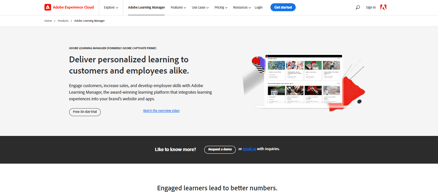
Adobe Learning Manager is a cloud-based learning management system (LMS) that creates personalized learning experiences at scale for customers, partners, and employees alike. It uses a headless learning platform that allows for integrations with Experience Manager Sites or any other CMS through open APIs.

| Capabilities |
API
|
|---|---|
| Segment |
Small Business
Mid Market
Enterprise
|
| Deployment | Cloud / SaaS / Web-Based, Mobile Android, Mobile iPad, Mobile iPhone |
| Support | 24/7 (Live rep), Chat, Email/Help Desk, FAQs/Forum, Knowledge Base, Phone Support |
| Training | Documentation |
| Languages | English |


Compare Adobe Learning Manager with other popular tools in the same category.
Tool is really great for simulation of an any tool or site
Nothing to dislike yet but it would be great if the glitches are lesser while developing the heavy content
Its the same as other LMS in the market with just cost difference
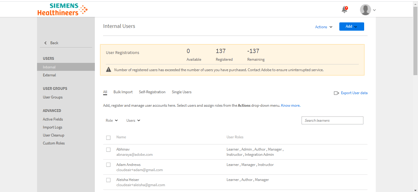
The ability to create custom users within the ALM is a bonus for our teams; I am able to create administrators for specific team content and modify the access based on what is needed. It keeps individuals that are less knowledgeable about the system from being overwhelmed. The ability to have external users and peer accounts are also features that could have been incredibly beneficial had our partner organizations choose to use the ALM. The ALM team is constantly working to modify and update the user expereience based on feedback as well.
Because there has been some push back on transitioning to the ALM for some training groups, having the ability as a manager/admin/instructor to upload third party certificates (like Red Cross) to each learners completion task would be helpful. The only way to currently add a file for an employee is 1) the employee does it themselves or 2) an admin must impersonate a user. We also have certain certifications that have a 4 or 5 year life span before needing renewal. So, it would be useful if the ALM tracked certifications that long.
We needed a streamlined process on how to track employee learning across our organization. The ALM allows us that opportunity. In addition, it provides a platform that is flexible for our matrix structure.
changing the e-mail templates for all courses / certifications in one step; or also changing these templates individually for courses; Registration of users is easy; Videos and tests from the content library can be assigned to any courses and certificates.
It is not possible to change the language by the adminstrators; Users have to do this by themselves - it would be easier, if the language can be set together with other user settings like mail, position and so on.
With the online trainings it is much easier to train many users at the same time without much effort in scheduling etc. These online trainings are also much more comfortable for users, as they can manage their own time to complete the trainings. From the administrator's point of view it is also a support, because all reminder emails are sent automatically from the system and you don't have to check and write them for each user individually.
ALM is a very powerful tool. Its quite easy to manage and selp explaining. It has impressive functionality. The support we are getting from the ALM Team is amazing.
Till now I have not faced any issues to dislike ALM.
ALM has a very easy course setup with instances.
Adobe Learning Manager provides most of the features my company like to use to manage learning. The technical support is very helpful.
Sometimes it takes a while to get a support person response quickly, as most of the staff are in India. It would be nice to know about the bug fixes that happen with a new release. Some are listed in the release notes, but not all of them.
ALM allows us to track, assign, and report on learning. It has a LinkedIn Learning connector, which allows easy access to those courses in the LMS.
I like the seamless ability to create courses, learning paths, and the cataloging system.
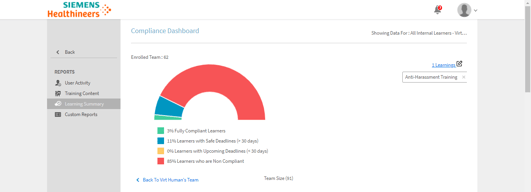
I wish it had better reporting features, especially around L1 and L3 feedback.
It's solving the problem of managing our training courses and deploying training, especially for compliance purposes.
As an Instructor, I'm able to print off a sign-in sheet for participants easily and quickly mark their attendance after the course. As an Administrator, I love the "Impersonate User" option which allows me to help employees troubleshoot issues they bring to me. Sometimes the user just needs a little education on how the LMS works and being able to log in as them helps me figure out what they are seeing on their end so that I can help with a solution.
Probably a feature within the Learning Path. I like the option of grouping courses together; however, if someone misses a course, I can't unenroll them becuase it unenrolls them from the path AND the course. If it only unenrolled them from the course, that would be helpful.
Adobe Learning Manager makes it super simple for employees to extract their own learning transcripts. With hundreds of employees, this definitely saves me time!
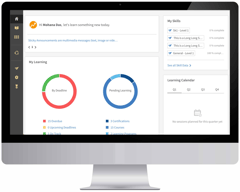
To start, I like the simplicity of the user interface. The navigation is straightforward. We rarely have clients getting confused on the site. Love the calendar widget that shows what webinars are coming up so folks can easily sign up for them from the homepage. In terms of the features, there's a great foundation set with gamification, social boards, recommendations, and general learning functionality (webinars, courses, etc.). Also the ability to share links to courses/posts/social boards has been very helpful. As an administrator, I greatly appreciate the approach to role-based permissions rather than customized permissions for individuals. I have worked with other learning management systems that did the latter and it was very difficult to manage and troubleshoot.
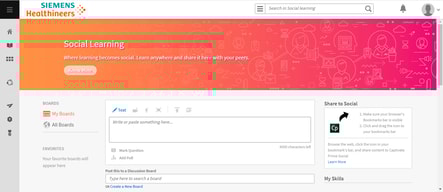
It's a good product with a strong trajectory to being great. The homepage and Social boards area could use a facelift to look modern and inviting with wider branding options. Social board features need a revamp on functionality and posting capabilities. For posts, the text should automatically stay saved when switching to add an image or recording. Also, should be able to upload images or add images directly in the post. If possible, the recording functionality should be embedded into the interface rather than being a separate software (ALM Desktop) to download. Being able to subscribe or follow a social board (i.e. get email notifications on new posts) is an absolute must. Leaderboard & Badges should be configurable on the client's end as HTML boxes and the ability to add sections. Use Case - we want to give out swag to those folks who are engaging with the site and consuming the content. But we have no place to outline how our points work and what would be received at various points. Also, a badge for reaching various milestones (i.e. 1,000 or 5,000 points) and an email to the admin would be incredible. It would also be nice if resources were linkable and allowed multiple attachments within one resource. Also, a download option for course content if it's a document or image OR allow multiple attachments/links within the Course (outside of Resources). The search functionality could be improved and the catalog could use a major facelift as well. Filters should all be configurable with the option to select custom user fields. Broader custom reports and dashboard features are needed. Lastly, it's a great product with continuous improvements and enhancements being made.
It has boosted client engagement with our client community as a whole. Webinar registrations and attendance have greatly increased. We've been able to use it as a temporary knowledge base and being able to see the data on usage showed us for the first time how much of our content is being consumed. The self-registration along with the back-end registration option has allowed us to meet our clients where they are and have a broader reach. The ability to share links to courses, posts, and social boards have been very useful.
The level 1,2,3 feedback surveys are unique and what I like most
The reporting feature is very compliacted. Assigning annual courses for compliance is also complicated
Having a LMS in place
It is very reliable. We rarely have to deal with system outages or connectivity isssues.
The user interface good be more intuitive. It is not as easy to navigate. I would love to see more invested in the reporting options. The user transcript needs more wok.
It is an LMS


