

Unclaimed: Are are working at Atom ?
Atom Reviews: 4.4/5 — Solid Choice
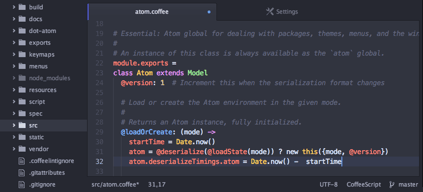
Atom is an open-source text editor used by software developers. The platform is free and features tools that allow cross-platform editing, code autocomplete and Git integration. With Atom, developers can streamline workflows while ensuring better collaboration with team members with the goal of creating high-quality software.

| Capabilities |
API
CLI
OSS
|
|---|---|
| Segment |
Small Business
Mid Market
Enterprise
|
| Deployment | Cloud / SaaS / Web-Based, Desktop Linux, Desktop Mac, Desktop Windows |
| Training | Documentation |
| Languages | English |


The support for version control systems like git makes the Atom Editor an extremely awesome tool. Finally a tool which syncs the development content with other team members!
It uses so much RAM compared to other editors. It should be a problem when you multi tasking.
You can use it to maintain servers of your infrastructure. Also the databases are very easy to maintain with Atom editor and PHP scripts are also very easy to be edited.

Atom is extremely great for editing text files and other minor coding files. It is extremely customizable and works like a charm for anything you could be using it for. The color change abilities are great for those who have sensitive eyes.
I can't say I have much I dislike about atom, I have never had any issues with it and it is lightweight and easy to understand.
I solve minor coding issues when I do not want to open a full fledged IDE in order to correct a missing semi colon. It is a great tool to use between projects, take notes, and more.
Atom is very easy to use. It shows colorful discrimination of every keyword in the language you are writing the code. It will be helpful for the developers to correct any mistakes either it can be spelling or syntax with color discrimination. It also has an option to enable or disable the autocompletion or auto-suggestions. When you are writing a length code these features are really helpful to ease your task.
Atom is doesn't support to edit a few types of files. For eg. .md files cannot be created using Atom. These files are generally used to write ReadMe files of projects you maintain GitHub.
We can easily import packages in the files.

ATOM is the most powerfull, intuitive and reliable tool i've ever use in my career as a programmer. Studying electronics, i was able to program my embedded systems from Atom in my MAC. Able to program Arduino, PIC, mbed and even STM products from Atom! Not only for electronics but for general programming in C++, Python, JS, etc.
It may be to heavy to support in some computers. The accuarcy to found the right add-on is not the best. it should have more colored themes to personalize the UI. In Windows, the UI seems bad thanks to the Windows upper bar "not yet supported" (?)
Working with ATOM in macOS, i was able to create electronic solutions with STM products using MCU like the Cortex M4 to M0. Able to programm PIC chips and Arduino code from the same interface. Having all the tools from Web development, to IoT in the same program is the best thing ever.
Atom is easy to use with a very smooth workflow to edit code with ease.
It’s difficult to know which of the hundreds of packages to install and there can be some performance lag at times.
Easily edit HTML and CSS code, customizable editor.
I like atom bc it’s a simple text editor that allows me to easily organize my files.
I have not found something that I dislike so far
I use Atom to develop code
- Shortcuts - Custom shortcuts - hackable/highly-customizable interface - Easily manageable compilers, libraries, and dependencies
- Steep learning curve. The user has a lot to learn. It is not the same as vim or emacs.
Ease of implementation. It is easy to traverse across a large code base.
Atom is easy to use, and has a ton of support from the community. There are plugins for lots of different languages, and working styles, to get you setup how you need.
It has a harder time than Sublime Text with really large files, I feel. Getting started with installing plugins could be easier.
Coding in several languages to support part of our platform makes using an IDE not convenient some times. And we have a much easier time convincing clients to install Atom than a few IDEs for us to work in their environments.
I like best that it has a clean looking design. The darker colors are easy in the eyes which make a big difference in programming workflow. Also, it is easy to organize your files and view multiple files at one time.
I dislike that it is based on your local machine versus an online platform. I am worried at times about losing my files because they are not backed up automatically to the cloud like a platform such as Cloud Nine
I am solving the problem of easier programming workflow with darker colors and an easy to use layout.


