
Unclaimed: Are you working at Ccleaner?
Ccleaner Reviews: 4.5/5 — Highly Rated
CCleaner is a solution that allows users to clean, speed up and free up space on business endpoints. Scheduled cleaning means PCs run at optimum performance without disrupting internal processes and maintaining efficiency within teams. It is known as one of the more reliable options today as it helps reliably free up valuable disk space by cleaning unused files and settings.
| Capabilities |
CLI
|
|---|---|
| Segment |
Small Business
Enterprise
|
| Deployment | Cloud / SaaS / Web-Based, Desktop Mac, Desktop Windows, Mobile Android |
| Support | 24/7 (Live rep), Chat, Email/Help Desk, FAQs/Forum, Knowledge Base, Phone Support |
| Training | Documentation |
| Languages | English |

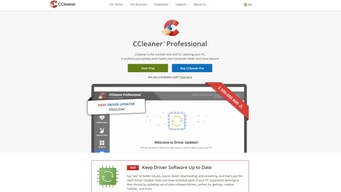

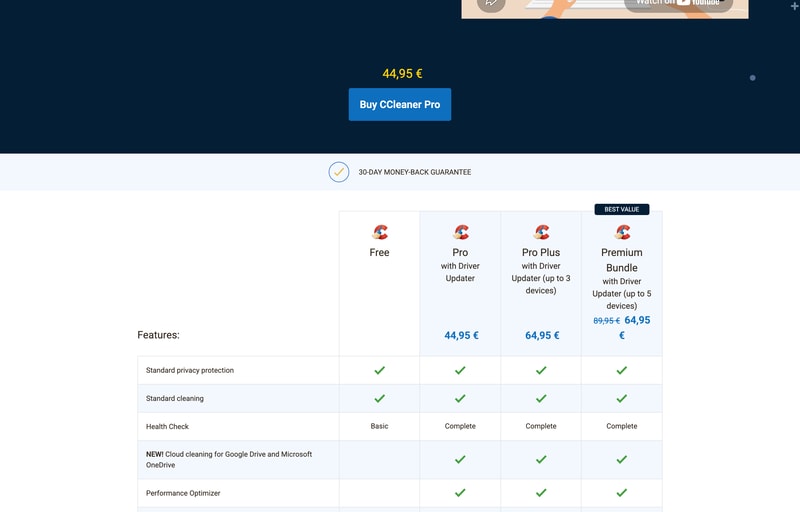
CCleaner Pro Plus costs €64.95 and covers up to 3 devices. The Premium Bundle costs €64.95 and covers up to 5 — plus 24/7 technical support and Kamo. Identical price, two more devices, two more inclusions. Pro Plus is strictly dominated by the plan sitting next to it, and CCleaner’s own “BEST VALUE” badge points at the right one. The other thing missing from the page: no plan states whether the price is a one-off or a subscription.
- What it is: The long-established PC cleaning and privacy tool — disk cleanup, driver updates and tracker removal.
- Best for: Households with several Windows PCs; the Premium Bundle at €12.99 a device is the value point.
- Pricing: Free €0; Pro €44.95; Pro Plus €64.95; Premium Bundle €64.95 (from €89.95). Verified July 2026.
- The honest catch: The pricing page never says whether these prices recur.
What Is CCleaner?
CCleaner clears junk files, cleans browser history and trackers, updates out-of-date drivers and software, and runs a “Health Check” that bundles those into one pass. It has been around since 2005 and holds a 4.5-star average across more than 600 Findstack reviews — one of the largest review counts in this survey.
It is now owned by Gen Digital — the company behind Norton and Avast — which is worth knowing when comparing it against Norton Utilities or Avast Cleanup, since those are corporate siblings rather than independent alternatives.
How CCleaner Works
- Four tiers, one free.
- Device count is the main meter — 1, 3, then 5.
- Pro Plus and Premium Bundle cost the same.
- Driver Updater requires a paid plan.
- 30-day money-back guarantee.
- No billing period is published.
CCleaner Pricing
Captured from CCleaner’s pricing page in July 2026 on the euro price list.
| Plan | Price | Devices | Per device | Adds |
|---|---|---|---|---|
| Free | €0 | — | — | Standard cleaning, basic Health Check |
| Pro | €44.95 | 1 | €44.95 | Driver Updater, cloud cleaning, Performance Optimizer, priority support |
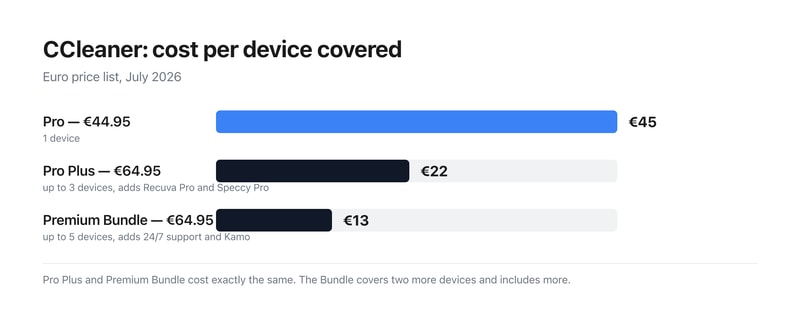
| Pro Plus | €64.95 | up to 3 | €21.65 | Recuva Pro, Speccy Pro |
| Premium Bundle | €64.95 (from €89.95) | up to 5 | €12.99 | 24/7 support, Kamo |
What actually decides your cost:
- Pro Plus has no reason to exist at this price. Both it and the Premium Bundle are €64.95. The Bundle covers five devices instead of three, and adds 24/7 premium technical support and Kamo, the anti-tracking tool. Every feature Pro Plus has, the Bundle has too. Unless the €89.95 list price returns, there is no configuration in which Pro Plus is the right purchase.
- The Premium Bundle is where the per-device maths lands. €64.95 across five devices is €12.99 each, against €44.95 for a single-device Pro licence — a 3.5-fold difference. For a household with a few Windows machines, the Bundle is the only tier that reads as good value.
- No billing period appears anywhere on the page. Searching the pricing page for “year”, “annual”, “subscription”, “monthly” or “renews” returns nothing. So a buyer cannot tell from published information whether €44.95 buys a perpetual licence or a year of one. Given how much that changes the cost of ownership, it is the first thing to establish at checkout.
-
The screen-reader price text on two plans reads “Was EUR 0”. CCleaner marks up its prices with hidden
sr-onlyspans for assistive technology. On Pro that span reads “Was EUR 0 Now EUR 44,95”, and on Pro Plus “Was EUR 0 Now EUR 64,95” — announcing a previous price of nothing. Only the Premium Bundle’s span carries a real comparison (“Was EUR 89,95 Now EUR 64,95”) matching its visible strikethrough. Sighted users see no such claim; screen reader users are told the price rose from zero. - The free tier is narrower than it once was. Standard cleaning and privacy protection remain, but Health Check drops to “Basic”, and cloud cleaning for Google Drive and OneDrive, the Performance Optimizer, Driver Updater, automatic tracker removal and automatic history clearing are all paid features.
- Three of its obvious competitors are the same company. Gen Digital owns CCleaner, Norton and Avast, so Norton Utilities and Avast Cleanup are not independent points of comparison. CCleaner’s own footer carries the disclosure: “Gen Digital may receive a commission for purchases made through this product.”
Who Should Use CCleaner
- Households with several Windows PCs. The clearest case — €12.99 a device on the Bundle.
- People who want driver updates automated. Driver Updater is the main paid draw.
- Privacy-conscious users. Automatic tracker removal and history clearing, plus Kamo on the Bundle.
- Anyone wanting basic cleanup free. The free tier still does standard cleaning.
It fits poorly for anyone considering Pro Plus, which the Bundle beats at the same price; for buyers who need to know the renewal cost up front; and for macOS-centric users, where the Windows-focused feature set matters less.
Honest Pros and Cons
Strengths
- A permanent free tier with standard cleaning and privacy protection.
- €12.99 per device on the Premium Bundle.
- 30-day money-back guarantee on every paid plan.
- Recuva Pro and Speccy Pro bundled from Pro Plus.
- 24/7 technical support on the Bundle.
- Twenty years of continuous development.
Limitations
- Pro Plus costs the same as the better Bundle.
- No billing period is stated anywhere on the page.
- Screen-reader text announces “Was EUR 0” on two plans.
- Health Check is downgraded to Basic on the free tier.
- Driver Updater is paid-only.
- Several “competitors” share an owner with CCleaner.
CCleaner Alternatives and How It Compares
- Norton Utilities and Avast Cleanup are the closest competitors — both owned by Gen Digital, as CCleaner is.
- iolo System Mechanic is the main independent commercial rival.
- Glary Utilities offers a comparable free tier.
- BleachBit is the open-source option, free and cross-platform.
- Windows Storage Sense is built in and handles basic cleanup at no cost.
The Verdict
CCleaner has been doing this for twenty years and remains the best-known name in PC cleanup, with a free tier that still handles standard cleaning and privacy protection permanently. The paid draw is Driver Updater, alongside cloud cleaning for Google Drive and OneDrive, the Performance Optimizer, automatic tracker removal and priority support — a reasonable package if keeping a Windows machine tidy is something you would otherwise do by hand.
The plan choice, though, takes about ten seconds once you look at the numbers. Pro Plus and the Premium Bundle are both €64.95. The Bundle covers five devices rather than three, and adds 24/7 premium technical support and Kamo on top of everything Pro Plus includes. There is no trade-off to weigh — the Bundle is better in every dimension at an identical price, and CCleaner’s own “BEST VALUE” badge sits on it. That works out at €12.99 per device against €44.95 for single-device Pro, so anyone with more than one machine should be looking at the Bundle and nothing else.
Two things the page should say and does not. Nowhere does it state whether these prices are one-off or recurring — no “per year”, no “annual”, no “renews”, nothing. For a product historically sold as an annual subscription that is a significant omission, and it is worth resolving at checkout before committing. And an accessibility detail worth flagging: CCleaner’s hidden screen-reader price text announces “Was EUR 0 Now EUR 44,95” on Pro and “Was EUR 0 Now EUR 64,95” on Pro Plus. Sighted users see no such comparison; only the Bundle has a genuine one. Finally, if you are comparing CCleaner against Norton Utilities or Avast Cleanup, note that Gen Digital owns all three — those are corporate siblings, not independent alternatives.
FAQ
How much does CCleaner cost?
On the euro price list captured July 2026: the free version is €0, CCleaner Pro is €44.95, Pro Plus €64.95 for up to three devices, and the Premium Bundle €64.95 for up to five devices, reduced from €89.95. All paid plans carry a 30-day money-back guarantee. The page does not state whether these prices are one-off or annual.
Should I buy CCleaner Pro Plus or the Premium Bundle?
The Premium Bundle, without hesitation. Both cost €64.95, but the Bundle covers five devices instead of three and adds 24/7 premium technical support and Kamo, on top of everything Pro Plus includes — Recuva Pro and Speccy Pro among them. At the current pricing there is no scenario in which Pro Plus is the better purchase.
Is CCleaner a subscription or a one-time purchase?
The pricing page does not say. No mention of “per year”, “annual”, “subscription” or “renews” appears anywhere on it, so the recurring cost cannot be established from published information. CCleaner Pro has historically been sold as an annual subscription, but you should confirm the term at checkout rather than assuming.
What does CCleaner’s free version include?
Standard cleaning and standard privacy protection, plus a “Basic” Health Check. What requires payment is the Complete Health Check, cloud cleaning for Google Drive and Microsoft OneDrive, the Performance Optimizer, Driver Updater, automatic software updating, automatic browsing-history clearing, automatic tracker removal and priority customer support.
Who owns CCleaner?
Gen Digital, the company that also owns Norton and Avast. That matters when shortlisting, because Norton Utilities and Avast Cleanup — two of the most commonly suggested CCleaner alternatives — come from the same parent. CCleaner’s own footer notes that “Gen Digital may receive a commission for purchases made through this product.”

Compare Ccleaner with other popular tools in the same category.

Este es un programa de licencia gratuita o Freeware creado por Piriforms, que está orientado a facilitar el proceso de mantenimiento preventivo y limpieza de nuestro disco duro y del sistema operativo asi como tambien se encarga de mantener nuestra PC limpia de todos los archivos que no se necesiten en nuestro equipo que permite optimizar el sistema, quitando los archivos no usados y temporales. Protege también la intimidad personal quitando las huellas de los sitios web visitados y los archivos que hemos abierto y a su vez analiza y corrige cualquier error y entradas viejas en el registro de sistema. También verifica atajos viejos en el menú de inicio y el del escritorio.
este tipo de programas pueden acabar produciendo modificaciones en el registro del sistema que degeneren en errores graves si no se maneja de forma correcta, hasta tal punto que sea necesario realizar una reinstalación completa del sistema operativo. Es importante resaltar que si se usa de forma correcta no posee algun tipo de desventaja y es muy recomendable usarlo.
Limpiar mi ordenador y mantenerlo a salvo de atchivos y cookies malisiosos o inutiles en el mismo, asi como tambien evitar que mi sistema operativo vaya lento.

Simplicity, ease of use, ability to customize what you're 'cleaning,' and I love the additional tools such as the software updater, uninstall options, and startup options.
It is constantly updating, which is good, but it gets a little tedious with how often I have to download the update. I also wish they would stop bundling their browser as an optional download during installation.
I tend to save a lot of business documents and don't delete things regularly which slows my computer down. CCleaner gets rid of those issues and also provides additional tools to help speed up your computer.

CCleaner is an excellent PC management software with various features to boost its performance. It can help optimize system performance by removing unnecessary files, temp files, and invalid registry entries. You can free up disk space and improve the system's speed. CCleaner has tools to clean the browsing history, cookies, and temporary internet files, which can help protect your privacy and prevent unauthorized access to sensitive information stored on your browser. You can uninstall unwanted applications and manage startup apps, making the bootup time quicker and smoother. Using various options and settings, you can customize the cleaning process according to your specific needs. CCleaner is regularly updated to address security vulnerabilities and compatibility issues with new OS updates, ensuring that you have access to the latest features and improvements. Furthermore, CCleaner's ability to remove unwanted files and apps helps reclaim disk space, thus reducing the need for more storage devices and delaying hardware upgrades.
The only thing I dislike about Ccleaner is that it's not user-friendly for beginners. If it's not used carefully, it can remove files needed by specific applications and lead to functionality issues. Although it can help with privacy protection, it doesn't guarantee security as an antivirus software.
I use CCleaner weekly for clean-ups. It is part of my system maintenance routine to keep my PC optimized and running smoothly. While troubleshooting software, managing and uninstalling applications using CCleaner helps isolate complex software or conflicting dependencies. We also use it to benchmark system performance after specific software changes or optimizations, allowing us to measure the impact of our modifications on the systems. CCleaner has dramatically improved my productivity as it boosts my PC's performance. It has streamlined remote work as I use my PC for both work and personal use, thus increasing the number of unwanted files twofold.

CCleaner is an all-in-one computer cleaning software with various tools to remove unwanted files and errors from the disk. CCleaner is a multipurpose platform with multiple features like Health Check, Performance Optimizer, Driver Updater, and Registry Cleaner. You can use the Health Check scan to see how well your computer is performing and what's causing it to slow. The Performance Optimizer shows you which applications are causing more load on your CPU, including start-up applications that launch and run in the background as soon as you turn your computer on. The Driver Updater is an essential tool that looks for new updates for all the drivers you use so that your system runs fast and is as secure as possible. The Registry Cleaner does an excellent job cleaning the registry by deleting old and unwanted values, broken paths and directories, broken thumbnails, etc. CCleaner is a collection of several features that collaboratively aim to help you maintain your computer's speed and overall performance.
I've not had any issues with CCleaner after using it for over a decade. I'd previously used it on my laptops as they would become slow over time. But with CCleaner, I've been able to keep both my desktop computer and my laptop as good as new by deleting unwanted files.
My colleagues and I have been working from home full-time since the beginning of 2020. Since we don't have access to office computers, we use our personal computers or laptops to work. In general, laptops are not built for long hours of continuous usage. CCleaner is an ideal software in these situations that aid in cleaning the system of any junk or unwanted files, thereby increasing its speed as no memory is allocated for these files. You also get a lot of storage space back from clearing them. CCleaner helps keep your PC as elegant as it was when you first bought it. It also scans for browser plugins, so you can manage them all in a single platform if you're a multi-browser user. CCleaner can also be used to find duplicates of files in your storage. CCleaner can also restore your system to a previous state if you've backed it up. I run CCleaner on my laptop every week when I don't work so that it can scan thoroughly throughout the hard disk to look for errors, fragmentations, corrupted files, etc.
1. Swift cleaning of cookies 2. Able to include or exclude multiple levels of scanning depth ...for example you could exclude scan (removal) of email client passwords since that one is used daily. 3. Strong registry cleaning 4. Paid version has a wonderful driver update version and thus is well recommended if your system is more than 2 years old (especially laptops)
Using since 12 years, no complaints as yet ;)
Privacy protection. Mobile version is equally effective

When you talk about cleaning your windows computer this is number one. It does exactly what it says clean.
CPU Usage. It uses up a lot of my CPU that's the only downside.
Normally when I finish using my laptop for the day this is what I use to clean my trash all-out making my pc run smoothly.

It provides all necessary tools in one software that helps users to remove registries, software, history, cache files, passwords, and much more. It can also remove items from the clipboard and recycle bin. Its user interface is very simple. All the above operations can be performed in just one click. With the help of this, you can optimize your system and make your computer work fast.
I have been using Ccleaner for a very long time, and to date, I haven't faced any issues. It may also use a heavy Ram that can slow down your system. It sometimes delete those files which we do not want to delete.
I can clear all the unnecessary files, including software and registries, with just a single click. With this, it helps me to make my computer work fast and get the maximum computer performance.

CCleaner is available for free with an excellent set of features to help you keep your computer running as good as new. Combined with a robust anti-virus software, CCleaner is the icing on the cake to ensure that your computer doesn't slow down. You can use it to delete unwanted files automatically or at your will. CCleaner has the tools to delete cache files, clear your browser's cookies and caches to speed it up, and disable any software causing your CPU to have high load times. You can use it to remove junk files and app data from Windows software and any software that you've installed manually. It has other tools for optimization and defragmentation of the disk drives for better load time and seamlessness of use. CCleaner comes with a Pro version that has additional features to help maintain the top-notch running of your computer, such as cleaning the system files and analyzing the registry for any issues or leftover files from uninstalling any software. CCleaner also shows you a list of all the software you have installed and the last time you used them. This list can give you an idea of which software you no longer use and uninstall them accordingly to save space and improve your computer's speed. CCleaner is like an overseer of your computer, helping you manage all file and software-related information that would be a pain to keep track of manually. It does an excellent job in this regard, and it's a vital software for every computer for it to continue functioning like it's brand new.
I don't dislike anything about CCleaner, a free software that I've upgraded to Pro due to years of usage and satisfaction. It's excellent in what it's supposed to do, and I've never come across any issues with it thus far.
CCleaner is one of the most valuable and vital software I have on my computer to keep it running despite years of heavy usage. Even now, it runs as fast and reliably as it did when I first bought it. Thanks to CCleaner, I can monitor and control all unwanted files and app caches that build up over time. I use my computer for work primarily, and since I have a lot of essential files and documents saved in it, I must keep it running smoothly so that it doesn't lead to any issues. CCleaner helps me maintain the cleanliness of my computer by offering suggestions on which areas I should clean, such as unused registry values, non-existent directories, cache files, files leftover after an app has been uninstalled, etc. Even on the hardware side of things, it helps me defragment and clean my drives for a healthy HDD and SSD, where all my files are saved. There are many applications that computers often start in the background without your consent, and CCleaner offers ways to disable them as they can heavily impact how quickly your computer starts up.

Ccleaner is easy to use. It provides various functions like cleaning cache, updating drivers, cleaning hard drives. It is useful to ensure good health of our PC's.
I haven't noticed any downsides as yet. The software is excellent!
Cleaning Hard Drives, Clearing browser cache, updating PC drivers.

The nicest thing about this software is that it allows me to remove all of my undesirable files, particularly trash and cached data, in one easy and convenient step with just one click.
The software actually needs a lot of improvements on the UI/UX part although it is easy to use but lacks the appealing UI which it can have according to its demand and popularity.
I am easily able to analyze and delete all the unwanted files on my local PC and remove them with a single click it also helps me in removing the unwanted registry and related stuff in all it is my go to software when it comes to cleaning my PC and freeing up some space
Automate the cleaning functions because when you perform an action with browsers (for example), they are automatically cleaned.
Not to have an online profile inside their website.
I have automated the complete and deep cleaning of the browsers when they open and close. In this way, every time I close the window (or windows) of the different browsers, they are cleaned and optimized.
It can clean my disk drive better than the already-installed programs.
You do have to pay a one-time a year fee but it's worth it.
My computer is faster.

CCleaner is an essential tool for maintaining the good health of your PC. It's easy to use and has an intuitive UI with all the tools easily accessible. It comes with in-built tools for cleaning your PC, cleaning the system registry, and several tools to optimize and improve your PC's performance. You can clean Windows files and Applications data. The Windows files include data from Microsoft Edge, thumbnail cache, Recycle Bin, temporary files, log files, and file fragments. All of these files are junk that accumulates from using your PC daily that serves no purpose. You can delete these files safely through CCleaner to free up RAM, disk space and increase load time while using the PC. You can also clear applications data, such as the internet cache, download history, and session information for any other browser you use. CCleaner does an excellent job of tracking any other application you regularly use to find any junk files they create for quicker deletion. CCleaner has system optimization tools to uninstall any application, disable startups, and analyze and defragment disks for improved hard disk performance. If any application on your desktop isn't functioning correctly, you can use CCleaner to repair it. CCleaner also allows you to manage, enable, disable, and delete all your web browser extension for any browser you have installed on your PC. It also differentiates plugins from extensions and shows their current version so you can easily make updates if needed. The disk scanner is excellent and scans your PC to find which types of files are using the most disk space. CCleaner automatically categorizes pictures, music, documents, video, etc., to give you a more comprehensive view of all the files so you can delete any unwanted files manually. The registry cleaner is as important as the system cleaner as it allows you to clean the registry. You can scan for issues in windows services, startup apps, obsolete software, applications, libraries, etc., and CCleaner will give you the option to fix the selected cases. One of the best features of CCleaner is the System Restore, where it scans your PC for any system backs you have created to restore the PC to its previous state if you run into any significant problems.
I use CCleaner daily and haven't had any issues or complaints so far. It's a free software that anyone can download, so I highly recommend it as it's very user-friendly and allows you to delete unwanted files without any risks securely.
CCleaner is the solution for keeping my PC free of any redundant files or software that can impact its performance negatively. I use my PC daily for work, and I rely on weekly CCleaner clean-ups to ensure that my system can continue to run smoothly. CCleaner allows me to clean my Windows registry, get rid of all junk files and cache, and remove any error-filled files at any time. It can also automatically detect browser junk data and asks me for permission to close the browser first before cleaning. One of the benefits of this software is that it allows me free reign to choose what I want to clean and what I want to delete. I can choose to keep any of the files if I need them. With CCleaner, I can also see which newly installed software has an automatic start-up enabled so that I can disable them. Doing so will reduce the time it will take for my PC to boot up. Additionally, from time to time, I see 100% disk usage in the task manager when opening a software, which is often caused by disk errors. With CCleaner, I can selectively scan the particular drive in which that software is installed and look for errors. CCleaner allows me to defragment the drive to get rid of any hard disk issues pretty quickly. There exists an option to exclude files, folders, and registry entries while scanning and cleaning, which is a handy feature to ensure that CCleaner doesn't accidentally delete anything you need. For advanced users, you can change the settings to control how CCleaner functions. You can set it to automatically delete files in the Recycle Bin that are older than 24 hours. You can also have it close the application or shut the PC down after cleaning.

The personalized and scheduled cleaning allows us to optimize the operation of our equipment with just a couple of clicks; Immediately after using this software, we can notice the difference in the performance and speed of our devices. Best of all, it addresses the removal of cookies and tracking programs that steal private information, files, and data.
It is essential and extraordinary software that I have used for many years without any problems or errors.
Cleaning and maintenance of the operating system directly influence productivity and speed when working from a computer, laptop, or mobile device.
I've tried other similar programs in the past and this is by far the best and easiest to use.
There's nothing I dislike about this program.
It quickly gets rid of unneeded files in my computer and instantly speeds things up after cleaning.
I love the power of CCleaner. That gives you many options to keep your system in a good shape. Custom clean allows you to select exactly what you want to be cleaned, so you can choose only what is useless for you. I also use the Registry Cleaner to delete entries left behind by some uninstalled software. There are much more than that, but I just don't use anything else.
I actually don't dislike anything and the fact that there is a free version is really good because I can use it on all my computers without having to buy a bunch of licenses.
With CCleaner I'm able to set my computers up to get the maximum performance.
How easy it is to use - just one click and my computer is faster.
I wish I knew more about the tool - it seems like we're only using a small part of it.
My computer is not slow because of it's age, but is slow because of all the rubbish left behind after I work and browse the web.

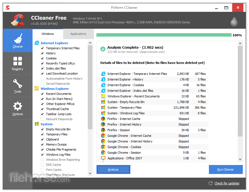
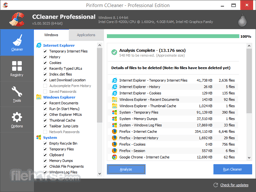
It helps keep my PC clean of any cache and temporary files that occupy space unnecessarily. Not only can it clean recycle bin, it can also be used to clear cache from applications that you use on a regular basis. The interface is really simple and you can select which files you want to clean individually. Upon clicking on the Analyze button, it'll scan and show you the free space. Then, clicking on Run Cleaner will start the cleaning process which is done in less than a minute. With CCleaner you can also do the same with the system registry to delete invalid directories, remove file extensions that are no longer of use, and delete unwanted registry entries.
I don't dislike anything about CCleaner but it would be an all-round complete tool if it could also act as an anti-virus in scanning for them.
My computer sometimes slows down from continuous and heavy usage. With CCleaner I'm able to resolve this issue by scanning and removing unwanted files, duplicate files, cache files, disabling startup applications, and keeping my registry clean. CCleaner has excellent support with frequent updates to improve the functioning of the software and to fix bugs. One of the benefits that CCleaner offers is that it allows you to monitor the applications you have installed in your PC and sort them by date of use and installation. This will help you find out which applications you don't use anymore so that you can uninstall them make more space.

Its ease of use and its constant improvements are two fundamental characteristics that I love about this program. With a couple of clicks, this program is running a process of cleaning or optimizing existing files on my device. Also its uninstaller and registry cleaner options are very useful to have my computer with less junk files
There is nothing negative to mention. Its usefulness is very wide and it behaves very well. Its price is very adjusted to what it offers.
It removes a lot of garbage from my computer, and delivers a detailed report for each program analyzed, knowing exactly which files will be cleaned. It also helps me to repair errors in the Windows registry that occur with use, due to the installations, updates and uninstallations of all the programs that my device has. It also helps me in the elimination of programs that you cannot uninstall through the control panel or the program manager. All this makes my devices not slow down or have excess junk files and thus work more optimally in my daily activities

I recommend this tool for its great analysis mechanism and fast and effective cleaning without inconvenience with third-party programs, very easy to install, the download of the software is fast and does not take major configuration and we can program its functionality and cleaning for its greater efficiency, I recommend use it
I consider that it has a lot of annoying advertising and messages, but the rest its true benefit is its functionality, I like how we can automatically clean our computer while we perform other tasks simultaneously without affecting or slowing down the computer.
I consider a great useful program for our company to keep our computer clean and tidy, it is very easy to use and has been integrated into most of our department to keep computers clean, and well in my particularity I like it very much for its great utility with it. My backup copy of the operating system and I analyze the files that start the operating system allowing the boot to be faster and easier.

They recommended it to me and I loved it, the truth is a multifunction tool that allows its users to clean the cache of the operating system giving faster and better speed to the system, at the same time it also allows us to efficiently erase the histories and files downloaded from the browsers allowing to free the accumulated space of junk files inside the computer.
Undoubtedly, it is a software that is usually annoying and full of advertising in terms of the android version, but it is very useful since it gives us greater efficiency of the operating system with the ability to uninstall corrupt programs that are hosted on my system operating as well as stopping and deleting junk files that start at system startup.
It is efficient, light and very practical to handle, which allows many of its users to learn to handle it even without having much computer knowledge. It has been implemented in the company and during all this time it has achieved its goal of keeping computers clean of unnecessary files that accumulate causing slowness in the system. now with a single click our computer is automatically cleaned while we perform routine office tasks.

Ccleaner has been developed to help keep the operating system clean of junk files that accumulate from uninstalling programs and using browsers. Ccleaner indicates to us by means of a single click the automation of the cleaning of the operating system and also brings us multiple functional utilities.
I feel that Ccleaner is a very practical and easy-to-use software, however it is recommended for its utility to study its operation, since we can lose important documents or programs if we do not know how to use said program. However, it is usually a very good program and is one of the most used
It is a software that I really like a lot because it allows us to free up space on the hard disk, one of its great advantage is that it can work and clean it while I browse or perform different operations on my computer without any inconvenience. deleting all junk files. I feel that it is a very useful and appropriate software that gives us quick benefits since it has made my operating system work faster and has freed me a considerable amount of unnecessarily occupied space.
Ccleaner is an ideal software to keep your computer running efficiently. The system may record some references that cause malfunctions. I love it because I usually use software to test them and I stop using it for a long time. Ccleaner informs me when I have software that takes up space and from the same system I can eliminate them.
Ccleaner is very good at what it was built for, I came across a junk file filtering detail, but it's a matter of knowledge I think people who don't have software knowledge will find it difficult to adjust Ccleaner's functions.
It is ideal because it eliminates any moment of activity on my pc, the Google stories after using it I just run the program and voila, there is no trace of my activities, I also free up space on the hard disk, while I browse many junk files are stored that are accumulate on the hard disk, since I use Ccleaner the operation and performance of my pc is much better. I stop being slow

I wanted to talk about this little tool that has helped me keep my work devices in optimal condition since it allows me to clean properly and with a few clicks I can perform many tasks that will help me improve the performance of my devices
There is nothing negative. Quite the opposite! only positive things, it is really very useful to keep the devices I work with clean
With Ccleaner my devices are always in optimal condition helping me to eliminate many remaining files that only become junk on my device. It also helps me to uninstall programs in a more thorough way and also allows me to correct registry files in a very efficient way. My devices are kept active and not slowed down by junk files that always remain when installing and uninstalling programs

I am always looking after my computers because I use them for my day to day work and I like to have them working fast and with good internet connection. Ccleaner is my great support to have my computers clean and fast as it helps me get rid of garbage files that make the computer slower and with this tool I can make my PCs work fast and comfortable I can uninstall programs and harmful files for my PCs and its price is very good for all the favor that makes me
I have no complaints about Ccleaner, but I would like you to repotencien this tool with a version never seen where they integrate this wonderful cleaner of files and web logs with an antivirus that is the upgraded version of ccleaner would be great
A slow computer would never help me in my work area. For that reason I am a fan and reliable user of ccleaner since it keeps my computers clean of viruses and harmful files and keeps my PC fast and working impeccably for that reason my work capacity increases and that favors our company

Lo que mas me gusta de este programa para el mantenimiento de mi equipo es que es muy sencilla y sus resultados espectaculares. Nos permite recuperar esa velocidad y limpieza de equipo recién comprado. Liberando los archivos innecesarios en disco duro. También puede detectar y eliminar archivos duplicados. CCleaner no contiene software espía, ni virus, ni malware. Es un excelente limpiador.
Segun el uso de este programa no he encontrado ninguna deficiencia. ha sido muy util a la hora de utilizarlo ya que antes de borrar, CCleaner me permite especificar qué elementos quiero eliminar y cuáles prefiero conservar.
Esta herramienta me ayuda a que mi equipo con el tiempo no llegue a estar lleno de errores y ajustes rotos que producen problemas. CCleaner contiene un limpiador de registro repleto de opciones para obtener un sistema sin errores y ni defectos. podemos realizar una limpieza a fondo del PC de una forma sencilla, con lo que conseguiremos ganar espacio en el disco duro y evitar que el PC se ralentice.

Es bien conocido por todos que existen en el mercado gran variedad de herramientas tecnológicas que coadyuvan a mantener el sistema de nuestros ordenadores en perfecto estado. Quedaría de nuestra parte saber escoger entre tantas opciones. En este sentido, les voy a decir algunos de los motivos o las razones por las cuales esta herramienta tecnológica me gusta: Realiza una profunda limpieza mejorando obviamente su rendimiento. También elimina ficheros o archivos que son algunos de los responsables de que tu PC se vuelva lento. Otra cosa que les digo, elimina los registro de Windows, En fin, estos son mis argumentos para contestar a esta pregunta con un ME GUSTA. . Estas optimas condiciones que observo en mi ordenador, es el resultado de usar dicha herramienta. Observo, con mucha exactitud como mi PC aligera de una manera más rápida e instantánea cuando ejecuto sus funciones. Por todo lo dicho anteriormente, me gusta en todo sus aspectos.
En mi vida personal como profesional, casi siempre he medido las cosas por sus resultados. Esta aplicación, es muy versátil, lo sabemos. Me ha dado excelentes resultados. Por lo cual sería algo injusto no darle el merito que merece. No localizo un punto determinar para cuestionar algo sobre esta herramienta.
Para nadie es un secreto que uno de los principales o más habituales problemas que pueda presentar un ordenador es su velocidad, a veces depende de que tan potente sea tu señal de internet, pero también se presenta el caso de que no cuentas con buen limpiador. Sabiendo esto quiero manifestar, sin ánimo de parecer repetitivo que la lentitud o parsimonia con la que venía desempeñándose mi ordenador fue el inconveniente que resolví. Por otra parte comentando de los beneficios o bondades de esta herramienta comentaría lo siguiente; Optimiza tu computador como ninguno, Te limpia a profundidad tu disco duro como ningún otro lo hace, es mi opinión muy particular. De igual forma te eliminar cualquier rastro de navegación. Para concluir mis opiniones, les comento que esta aplicación me permitió de manera específica cuales elementos quiero eliminar y cuales prefiero conservar. .
This excellent small program helps you to maintain good performance of your computer. All you need is to periodically run it and let it to clean up your system. CCleaner contains a large database of the locations and filenames, where the commonly used software stores it's temporary files. Using that database, CCleaner knows where's to look for the redundant files and removes them. The other powerful feature is to clean up the Windows registry from the obsolete entries. There are also other features, such as startup management, browser plugin management and utilities such as duplicate finder to further help you to reclaim disk space.
It looks like Microsoft if overzealous about the outrageous success of the CCleaner application, so it's adding the app to the list of the potentially unwanted applications in Windows Defender. The official answer is that utilities like CCleaner could be unsafe for your system amid the fear that they will remove important system files or registry entries due to the implementation errors.
I mostly use the CCleaner to clean up my work PC.

CCleaner es uno de los programas que todo usuario debe tener instalado, por cuanto ayuda a suprimir todos los archivos basura generados mediante la navegación por internet, este software ayuda a limpiar el disco duro, además de liberar memoria RAM. En este orden de ideas, CCleaner posee un interfaz muy sencilla y agradable a la vista. De esta manera, CCleaner ofrece gran variedad de funciones que ayudan al computador a trabajar eficientemente. Así mismo, realiza copias de seguridad, elimina el historial de navegación y los cookies aumentado la privacidad del usuario, por último la función que más me gusta es que corrige algunos errores en el sistema operativo.
En ocasiones este programa presenta problemas durante el primer escaneo, siendo necesario un segundo escaneo.
CCleaner me ha servido para que mi computador trabaje a su máxima capacidad, mi disco duro tiene más espacio libre y mi privacidad cada vez es mayor. Entre los beneficios que he optenido destaca un aumento en la velocidad de mi computador, además de la solución a algunos de los problemas presentados en el sistema operativo. Cabe mencionar que, la opción de copia de seguridad ayuda a tener un respaldo en caso de presentarse algún problema.

No mercado, existem várias opções de ferramentas para limpar e otimizar seu computador, no entanto, devemos ter certeza de que ele oferece os melhores benefícios, no meu caso particular, e porque sou usuário desse aplicativo há mais de 2 anos, gosto muito de trabalhar devido à sua eficácia na exclusão de arquivos, conforme necessário, acumulados ao longo do tempo em nosso PC, também elimina as configurações que não usamos e a eliminação de cookies de navegação que constantemente cortamos Isso implica uma melhoria considerável no seu navegador, pois ele possui muita precisão, pois o computador acelera muito mais rápido e instantaneamente ao executar seus trabalhos. Você é a gentileza que esta ferramenta oferece, porque eu a uso e gosto.
Não tenho nenhum aspecto de que não goste nesta ferramenta, minhas opiniões positivas derivam dos bons resultados que obtive usando essa ferramenta.
A lentidão que o meu computador apresentava era o meu principal problema. Com essa ferramenta, pude perceber com clareza e precisão como eu aumentava a velocidade na inicialização, ao fazer qualquer download ou ao abrir qualquer arquivo, otimizava sua funcionalidade em tudo relacionado a software