
Unclaimed: Are you working at Ccleaner?
Ccleaner Reviews: 4.5/5 — Highly Rated
CCleaner is a solution that allows users to clean, speed up and free up space on business endpoints. Scheduled cleaning means PCs run at optimum performance without disrupting internal processes and maintaining efficiency within teams. It is known as one of the more reliable options today as it helps reliably free up valuable disk space by cleaning unused files and settings.

| Capabilities |
CLI
|
|---|---|
| Segment |
Small Business
Enterprise
|
| Deployment | Cloud / SaaS / Web-Based, Desktop Mac, Desktop Windows, Mobile Android |
| Support | 24/7 (Live rep), Chat, Email/Help Desk, FAQs/Forum, Knowledge Base, Phone Support |
| Training | Documentation |
| Languages | English |

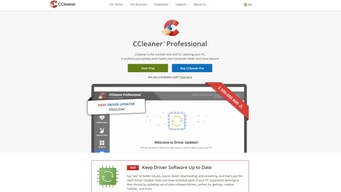


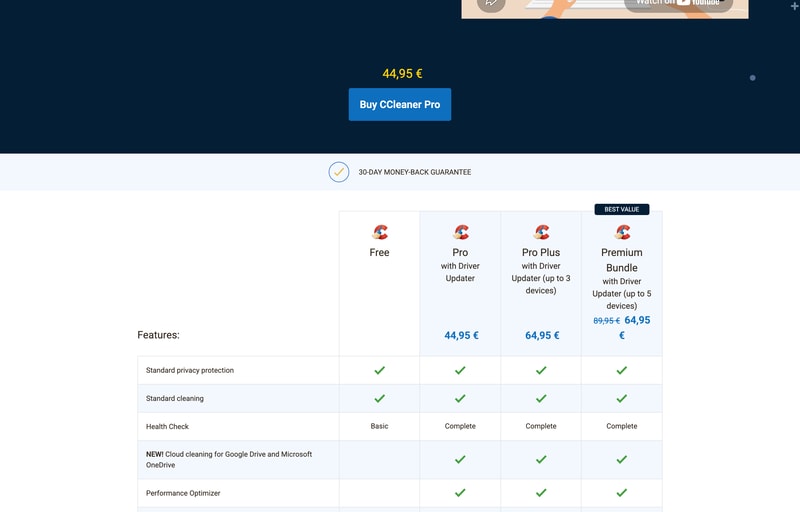
CCleaner Pro Plus costs €64.95 and covers up to 3 devices. The Premium Bundle costs €64.95 and covers up to 5 — plus 24/7 technical support and Kamo. Identical price, two more devices, two more inclusions. Pro Plus is strictly dominated by the plan sitting next to it, and CCleaner’s own “BEST VALUE” badge points at the right one. The other thing missing from the page: no plan states whether the price is a one-off or a subscription.
- What it is: The long-established PC cleaning and privacy tool — disk cleanup, driver updates and tracker removal.
- Best for: Households with several Windows PCs; the Premium Bundle at €12.99 a device is the value point.
- Pricing: Free €0; Pro €44.95; Pro Plus €64.95; Premium Bundle €64.95 (from €89.95). Verified July 2026.
- The honest catch: The pricing page never says whether these prices recur.
What Is CCleaner?
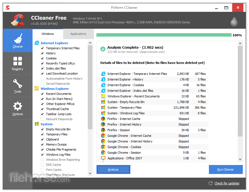
CCleaner clears junk files, cleans browser history and trackers, updates out-of-date drivers and software, and runs a “Health Check” that bundles those into one pass. It has been around since 2005 and holds a 4.5-star average across more than 600 Findstack reviews — one of the largest review counts in this survey.
It is now owned by Gen Digital — the company behind Norton and Avast — which is worth knowing when comparing it against Norton Utilities or Avast Cleanup, since those are corporate siblings rather than independent alternatives.
How CCleaner Works
- Four tiers, one free.
- Device count is the main meter — 1, 3, then 5.
- Pro Plus and Premium Bundle cost the same.
- Driver Updater requires a paid plan.
- 30-day money-back guarantee.
- No billing period is published.
CCleaner Pricing
Captured from CCleaner’s pricing page in July 2026 on the euro price list.
| Plan | Price | Devices | Per device | Adds |
|---|---|---|---|---|
| Free | €0 | — | — | Standard cleaning, basic Health Check |
| Pro | €44.95 | 1 | €44.95 | Driver Updater, cloud cleaning, Performance Optimizer, priority support |
| Pro Plus | €64.95 | up to 3 | €21.65 | Recuva Pro, Speccy Pro |
| Premium Bundle | €64.95 (from €89.95) | up to 5 | €12.99 | 24/7 support, Kamo |
What actually decides your cost:
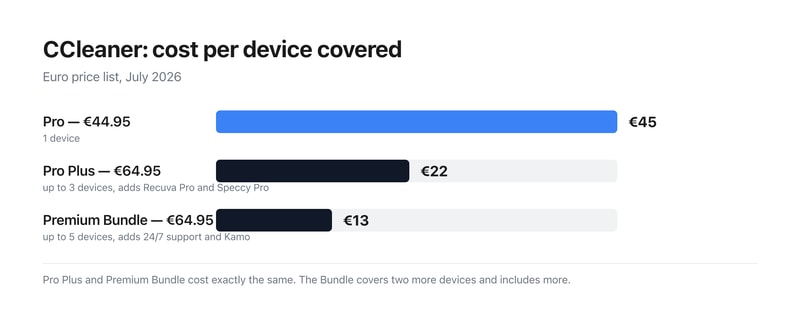
- Pro Plus has no reason to exist at this price. Both it and the Premium Bundle are €64.95. The Bundle covers five devices instead of three, and adds 24/7 premium technical support and Kamo, the anti-tracking tool. Every feature Pro Plus has, the Bundle has too. Unless the €89.95 list price returns, there is no configuration in which Pro Plus is the right purchase.
- The Premium Bundle is where the per-device maths lands. €64.95 across five devices is €12.99 each, against €44.95 for a single-device Pro licence — a 3.5-fold difference. For a household with a few Windows machines, the Bundle is the only tier that reads as good value.
- No billing period appears anywhere on the page. Searching the pricing page for “year”, “annual”, “subscription”, “monthly” or “renews” returns nothing. So a buyer cannot tell from published information whether €44.95 buys a perpetual licence or a year of one. Given how much that changes the cost of ownership, it is the first thing to establish at checkout.
-
The screen-reader price text on two plans reads “Was EUR 0”. CCleaner marks up its prices with hidden
sr-onlyspans for assistive technology. On Pro that span reads “Was EUR 0 Now EUR 44,95”, and on Pro Plus “Was EUR 0 Now EUR 64,95” — announcing a previous price of nothing. Only the Premium Bundle’s span carries a real comparison (“Was EUR 89,95 Now EUR 64,95”) matching its visible strikethrough. Sighted users see no such claim; screen reader users are told the price rose from zero. - The free tier is narrower than it once was. Standard cleaning and privacy protection remain, but Health Check drops to “Basic”, and cloud cleaning for Google Drive and OneDrive, the Performance Optimizer, Driver Updater, automatic tracker removal and automatic history clearing are all paid features.
- Three of its obvious competitors are the same company. Gen Digital owns CCleaner, Norton and Avast, so Norton Utilities and Avast Cleanup are not independent points of comparison. CCleaner’s own footer carries the disclosure: “Gen Digital may receive a commission for purchases made through this product.”
Who Should Use CCleaner
- Households with several Windows PCs. The clearest case — €12.99 a device on the Bundle.
- People who want driver updates automated. Driver Updater is the main paid draw.
- Privacy-conscious users. Automatic tracker removal and history clearing, plus Kamo on the Bundle.
- Anyone wanting basic cleanup free. The free tier still does standard cleaning.
It fits poorly for anyone considering Pro Plus, which the Bundle beats at the same price; for buyers who need to know the renewal cost up front; and for macOS-centric users, where the Windows-focused feature set matters less.
Honest Pros and Cons
Strengths
- A permanent free tier with standard cleaning and privacy protection.
- €12.99 per device on the Premium Bundle.
- 30-day money-back guarantee on every paid plan.
- Recuva Pro and Speccy Pro bundled from Pro Plus.
- 24/7 technical support on the Bundle.
- Twenty years of continuous development.
Limitations
- Pro Plus costs the same as the better Bundle.
- No billing period is stated anywhere on the page.
- Screen-reader text announces “Was EUR 0” on two plans.
- Health Check is downgraded to Basic on the free tier.
- Driver Updater is paid-only.
- Several “competitors” share an owner with CCleaner.
CCleaner Alternatives and How It Compares
- Norton Utilities and Avast Cleanup are the closest competitors — both owned by Gen Digital, as CCleaner is.
- iolo System Mechanic is the main independent commercial rival.
- Glary Utilities offers a comparable free tier.
- BleachBit is the open-source option, free and cross-platform.
- Windows Storage Sense is built in and handles basic cleanup at no cost.
The Verdict
CCleaner has been doing this for twenty years and remains the best-known name in PC cleanup, with a free tier that still handles standard cleaning and privacy protection permanently. The paid draw is Driver Updater, alongside cloud cleaning for Google Drive and OneDrive, the Performance Optimizer, automatic tracker removal and priority support — a reasonable package if keeping a Windows machine tidy is something you would otherwise do by hand.
The plan choice, though, takes about ten seconds once you look at the numbers. Pro Plus and the Premium Bundle are both €64.95. The Bundle covers five devices rather than three, and adds 24/7 premium technical support and Kamo on top of everything Pro Plus includes. There is no trade-off to weigh — the Bundle is better in every dimension at an identical price, and CCleaner’s own “BEST VALUE” badge sits on it. That works out at €12.99 per device against €44.95 for single-device Pro, so anyone with more than one machine should be looking at the Bundle and nothing else.
Two things the page should say and does not. Nowhere does it state whether these prices are one-off or recurring — no “per year”, no “annual”, no “renews”, nothing. For a product historically sold as an annual subscription that is a significant omission, and it is worth resolving at checkout before committing. And an accessibility detail worth flagging: CCleaner’s hidden screen-reader price text announces “Was EUR 0 Now EUR 44,95” on Pro and “Was EUR 0 Now EUR 64,95” on Pro Plus. Sighted users see no such comparison; only the Bundle has a genuine one. Finally, if you are comparing CCleaner against Norton Utilities or Avast Cleanup, note that Gen Digital owns all three — those are corporate siblings, not independent alternatives.
FAQ
How much does CCleaner cost?
On the euro price list captured July 2026: the free version is €0, CCleaner Pro is €44.95, Pro Plus €64.95 for up to three devices, and the Premium Bundle €64.95 for up to five devices, reduced from €89.95. All paid plans carry a 30-day money-back guarantee. The page does not state whether these prices are one-off or annual.
Should I buy CCleaner Pro Plus or the Premium Bundle?
The Premium Bundle, without hesitation. Both cost €64.95, but the Bundle covers five devices instead of three and adds 24/7 premium technical support and Kamo, on top of everything Pro Plus includes — Recuva Pro and Speccy Pro among them. At the current pricing there is no scenario in which Pro Plus is the better purchase.
Is CCleaner a subscription or a one-time purchase?
The pricing page does not say. No mention of “per year”, “annual”, “subscription” or “renews” appears anywhere on it, so the recurring cost cannot be established from published information. CCleaner Pro has historically been sold as an annual subscription, but you should confirm the term at checkout rather than assuming.
What does CCleaner’s free version include?
Standard cleaning and standard privacy protection, plus a “Basic” Health Check. What requires payment is the Complete Health Check, cloud cleaning for Google Drive and Microsoft OneDrive, the Performance Optimizer, Driver Updater, automatic software updating, automatic browsing-history clearing, automatic tracker removal and priority customer support.
Who owns CCleaner?
Gen Digital, the company that also owns Norton and Avast. That matters when shortlisting, because Norton Utilities and Avast Cleanup — two of the most commonly suggested CCleaner alternatives — come from the same parent. CCleaner’s own footer notes that “Gen Digital may receive a commission for purchases made through this product.”

Compare Ccleaner with other popular tools in the same category.
Clean hidden, feel my computer run smoothly
Cannot setup clean deep period (ex: defragment)
Keep our computer run smoothly

This solution does exactly what it is was created for and does it well. Plus this is a very low end product, so does not use a lot of space or computing power.
I do not have many dislikes, the only one I can really think of off the top of my head is that the program is not very GUI friendly. Most of the users that use it are afraid to click anything because they do not want to mess anything up.
This solution is used as a fix for certain shortcuts and links on users PCs. Since we are a majority of PC users on the campus, this program helps destroy broken or unwanted temp files and shortcuts. This also helps the privacy of our users.

Easy to use, it can make backup copies automatically, i can fix many errors in my OS, it has a great app administrator, it runs fast, you can use it to keep your PC away from some malware.
It doesn't work in all OS's and devices.
I use it to keep my PC clean to have a better performance in general, it works fast and it's easy to install.
CCleaner does an excellent job of finding a lot of stuff you don't need, or want, on your PC. It also has one of the best registry cleaners and uninstallers out there. It does these jobs really well from one single tool and makes a seriously significant contribution to your security and health of your PC. Just doing a weekly clean will highlight just how much crap your PC accumulates, and it makes a big difference when you run it regularly. The basic version is free and works really well, so definitely recommended for anyone running a Windows PC.
It doesn't do everything (no tool does) so needs to be run in tandem with other applications. The biggest bugbear is that there's no option to purchase multiple licences with a concession. If you run more than a couple of PCs, your annual bill for CCleaner could be significantly higher than many other security suites. It may be argued that the more PCs you have, the less cost effective the paid version becomes - a big fail on the part of the Developers. One minor bugbear with the free version is with updates: You are notified of an update, have to open a browser to download, hop through several web pages to get to the right download page, then once downloaded, close the web browser (CCleaner doesn't work well if a browser is open) then install and scan. The process is far more convoluted than it need be and while I understand why that is, it doesn't encourage me to pay for it, it just becomes additional hassle to endure.
A great "first line" security application I know that I'm not filling my PC with stuff I don't want, and therefore reducing my security risks. I'm keeping my registry in good shape, therefore reducing processing lag and thus making sure my PC is operating as close to nominally as possible.

CCleaner does its job in that it cleans up a lot of temporary data from your systems. It's nice to have a solution working on both Windows and Mac OS.
The end user is not adequately informed about the consequences of deleting certain data, for example all browser cookies or the whole contents of the "Downloads" folder. While technically temporary data, this has great potential for accidentally deleting important information.
It's a solid solution for freeing up disk space and cleaning old, unneeded temp files and configs.
Eliminates trojans and other viruses. This tool cleans your system and eliminates all unnecessary junk files. If you use your computer a lot, download CCleaner to free up gigabytes of disk space and speed up computer performance. Cleans up old files and makes computer run faster.
Long scan times! Required to update firmware constantly. Did I say long scan times?
Faster running, safer computers!

CCleaner can bring about actual improvements with system performance and storage space on old PCs. It has a rich feature set that can remove unnecessary files taking up space on a PC. The UI is also intuitive. The free version also has most of the features unlocked.
CCleaner bundles other software during installation, and its not very easy to opt out of. The recent data breach and malware attacks only compound problems of the software. This means that people need to think twice before installing CCleaner.
CCleaner saved me a lot of disk space on my old PC. It also helped improve boot times and general performance. While I cannot vouch for its registry cleaning prowess, its disk cleaning performance is commendable.
CCleaner is free software, which is always nice. Furthermore it removes the temporary and unused files from your computer in a thorough and efficient manner. I have heard it also does defragmentation, which also improves the speed of your computer.
The update is to be bought and is very expensive. Personally, I think it is not worth the additional investment for the few features you can get extra.
We use CCleaner exactly for what its name suggests, to clean our computer. It removes cookies and other worthless files to create space and speed up your device.
CCleaner thoroughly checks your PC for files that are either temporary, or unused. This way, the program is able to clean your PC. After using CCleaner, you will have more free disk space, and your computer will run faster and smoother.
Currently, we are only using the free version of CCleaner. As a side-effect of this choice, I am regularly getting pop-ups of CCleaner to tell me what I could do with their Pro Version or that they have a "special offer" for me. That gets quite annoying after a while.
Ccleaner does what its name promises. It cleans your PC by removing files you don't need/use anymore and defragmenting the other files. This way, we make sure our computers are clean and run smoothly.

I like that it is a program that helps a lot to clean the hard disk of the computer, I can also delete temporary files and remove programs from the system.
I do not have problems with ccleaner I really like the program although sometimes it happens that I do not delete almost all the files from the hard disk of the computer.
A business problem that may have been solved is that now it is not necessary to request the technical service very often, perhaps with the use of the program the computers are damaged less, I think that maybe this is a benefit for the company.

CCleaner does a great job of cleaning my computer a few different ways. It cleans temporary files, unused applications, and does a good job cleaning the registry without causing any problems.
I have heard there was an update that was allowing the software creator to spy on computers, so I am skeptical of this software now.
Over time, computers seem to gather 'digital dust' which slows down the computer, and this seems to clean it out well.

The organization to selectively remove data from every place. The developers did a very good job at it. It even has a button "Analyze" so you can see where you can save space, without running it. Also, the scheduling options in the Pro version are a good point.
The install process, bloatware in the webpage when you try to install it and then trying to force you to install Avast. Also, the hacking that took place some time ago. I have not been informed at all about CCleaner themselves. That's a very bad point And the last thing is that the monitoring has been activated without ability to turn it off in the last version. That's a great invasion for our privacy.
Throughout my career, I have been using CCleaner in different companies where saving space was a need. I had to maintain some Windows computers of different clerks and this was a key piece to the health of the Windows computer I was managing.
You can clean your computer for junk files and free space, remove bad plugins, optimize your computer startup time by decide which apps initiate on startup and more. Using CCleaner and few clics you can decide who perform a clean up of you PC. Is a lightweight tool that can be used for free as well.
Basic customization. You can select which file to exclude from cleanup process. Scan process does not include folder & files of uninstalled application that won't are deleted after app uninstall process.
This tool help me to make a quick clean up of my computer
E' il miglior strumento per la pulizia del pc da files non necessari e vecchi files di installazione del s.o. che portano via molto spazio. Utile anche il gestore delle applicazioni in avvio che si possono selettivamente disattivare, scegliendo quali programmi far avviare con il pc. Molto intuitiva e utile anche la ricerca dei files duplicati che fa risparmiare tanto spazio
L'ottimizzazione e correzione del registro di sistema a volte crea problemi ai software installati, specialmente quelli di nicchia o sviluppati in house. Infatti, alcune voci di registro di programmi in house vengono viste come non necessarie/removibili in quanto non catalogate nel software; ciò comporta il mal funzionamento di tali software. In un caso particolare, non è stato più possibile avviare il pc per problemi al registro, se non dopo un ripristino. Consiglio quindi sempre un backup del registro stesso
L'utilizzo primario di CCclearer è stato nel mio caso esclusivamente mirato all'efficientamento del pc, disabilitando i software in avvio non necessari e cancellando i files non necessari o duplicati dal pc, liberando spazio necessario per altri utilizzi
It cleans up files and goes thru and cleans file history in apps. It can clean up hard to find things in apps Plus things that you are not given the option in the app to clean. In the past this was the best in class program and I installed it whenever these types of file cleanup was needed.
Well, the vendor has changed hands and the main owner is "interesting" to say the least. They have pushed updates without notice and also without prompting. Changes to data collected. Now data is being sent out on usage of pc and what apps are installed. This is a cleaning app not a monitoring app. If you disable the app monitoring it will restart once app is opened or if set to launch on boot. With my current employer this is a Big NO NO. So, I use the app when needed at home, etc.
It cleans files that are hard or near impossible to clean in the host app. Problem is are the had offs worth it anymore? I only use it as a last app to clean out something stuck and when finished I remove it completely I find it sad as it used to be a mainstay in my tech tool kit.
Easy to use interface, and a one click button that tells the user that the app is 'cleaning' the phone. On a phone with higher memory, it clears up to 2GB at a time, which can be a relief at times, due to the pent up cache being cleared.
However on devices with limited memory (Lenovo A328) even repeated cleaning failed to clear useful memory. Apps like Facebook and Instagram and Google Play Services eat up a chunk of memory that often remains untouched. Also, on the free version the ads are annoying.
Clearing my phone's cache, mostly. It does not solve any other major purpose. No visible benefits, probably just a placebo.
Quick and easy way to give your computer a little boost. Once was a necessity back in windows XP
It has become littered with "extra features" and unneeded and wanted utilities. You cant expect the update messaged, upgrade ads and active monitoring features. CCleaner is not more of a pain to have on the computer then to just deal with a slightly slower pc. That's not good.
Quick and easy pc tuneup. good for the average user. Would recommend disabling active monitoring whether or not you pay for the full solution.
Easy to remove junk files from computer and save some disk space. Easy to install with a minimal amount of advertisements during the install process. It's free.
Windows doesn't need a registry cleaner nowadays, can do more harm than good.
None. This is a program better suited to individual home PC users.
It removes all (for every program) the cookies and other temporary files on my computer in an efficient manner.
I personally do not see the added value of this program. I can delete cookies in every browser and my antivirus software suggest to remove unused or dangerous files.
I use CCleaner to speed up my computer when it is getting clogged by cookies and other temporary or unused files slowing the device down.
CCleaner gives the promise of freeing disk space and making your computer run faster. That's all good, but does it actually work? Ig you choose to use it, be sure you understand what it is doing. By cleaning up cookies, and browser settings, you might delete passwords and login authentication you don't know how to get back.
It still seems to be "too" powerful. I would expect a product like this to only allow me to do things that are safe, but it can make massive changes to the system registry and delete files you might actually need.
My computer was slow and cluttered. I was looking for a way to get rid cache and temp files that may be slowing down y computer. I have since found it is much safer to do these things manually. If you don't know how, ask someone with technical knowledge how or Google it. It's better to do cleanup tasks one at a time and understand what you're doing.
On my PC, CCleaner runs beautifully. On my Andrpid phone, it's unstable and buggy.
On Android, the app is slow to launch, freezes frequently, and crashes regularly.
On PC, it's served us well by helping us keep our computers in good working order. On the phones, we've gone with a different option.
It was once a great, nearly all in one tool for hard drive maintenance. It had a simple layout from which you could execute a handful of batch scripts to clean out your cache, delete cookies, format a drive, and so on.
bought out by Avast!, apparently the software was compromised maliciously and shipped out a compromised update to end users. Whether it was patched or not, this kind of lassiez faire attitude towards security from an antivirus company is disturbing and shows a lack of adequate precautions being taken.
I am no longer solving any buisness problems with this software for some of the reasons I've listed in the dislike segment of this review. It was once a great utility for a wide variety of hard drive related tasks such as clearing your internet cache, cleaning out old logs, memory dumps, erroneous registry entries and much more.