
Unclaimed: Are you working at Front?
Front Reviews: 4.7/5 — Highly Rated
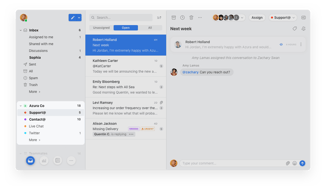
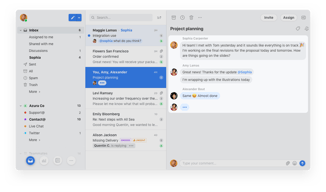
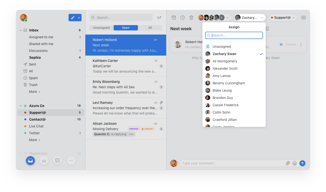
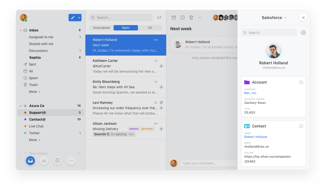
Front is a customer communication hub that features a highly lauded modern interface inspired by email clients, which team members love because it’s familiar and easy to use. Front features powerful automation capabilities that eliminate manual workflows across systems, and provide essential analytics to boost team performance and the health of customer relationships.

| Capabilities |
API
|
|---|---|
| Segment |
Small Business
Mid Market
Enterprise
|
| Deployment | Cloud / SaaS / Web-Based, Desktop Mac, Desktop Windows, Mobile Android, Mobile iPad, Mobile iPhone |
| Support | 24/7 (Live rep), Chat, Email/Help Desk, FAQs/Forum, Knowledge Base, Phone Support |
| Training | Documentation |
| Languages | English |


The organization in tags and the comments
Anything, I like front a lot I cannot think about anything I don't like.
My organization and productivity has increased a lot since I've start using front.
I like how easy is to use, also easy to find conversations and coworkers. It helps me complete my daily tasks and it provides me the option to save them.
I don't really like how it removes my starred conversations when moved from skill.
I solve technical and financial problems with the front app as we are constantly using it, also it állows me to help and resolve any customer concerns.
This is the best office set up I have ever seen! SUPER user friendly!
Wish there was a way to show duplicates or matching tasks so that nobody on the team is working on the same one, a way to filter maybe?!
Helps prevent duplicate work and ease of communication with co-workers.
The assigning feature and commenting in conversations is the most used and helpful feature for our usecase. It makes working as a team very easy. Also switching between Inboxes or giving people access to different inboxes is great.
We send a lot of mass emails to our users, and this is doable with Front sequences, but the feature is not that intuitive and chic. We would prefer to have this not for the whole team but inbox/channel-specific or different folders. It's can get a bit messy when we all work with sequences.
Our use case of working with a team in one inbox and different inboxes is solved with Front. Also, communicate on conversations is a big benefit. It's definitely a efficiency gain for us
The chat feature, the assigning so things leave your inbox and it's off your plate. Very efficient program.
Nothing I can think of, honestly. Will let you guys know if something comes to mind.
Quick communication for fast decisions about quotes and products

I love the team inboxes. Makes it really easy to move messages around without having to forward/reply. It's also great that you can comment on an email for other team members to see. We also often use the ability to reply to an email as someone else on the team.
Didn't find any it was a great fit for our customer support team yet. Seemed like it was going to take too many integrations to match what we're already using.
Didn't find any yet. Best experience so far!
I like how I can include other co-workers in my emails and how we can separate tasks based on teams while still having visibility of everyone's emails.
As of right now, I wish Front had an easier way to include all the needed information my company needs to log emails in our main platform (for compliance reasons). Right now we have to do a workaround to this by selecting "Forward," scrolling down to the three dots at the bottom, and copy and paste all the pertinent information from the email from there into our main work platform. This method works for now, but not the most efficient.
We are solving problems between appraisers and major lenders that service appraisals for thousands of borrowers.

Easy to operate within the team and organisation. Accessible to whole team. Make team tags for ease of operations and quick reverts to clients. User-friendly!
It gets a bit slow sometimes, but usually it's very accessible!
Team communication Quick reverts to clients Regular interaction within and outside stakeholders Time stamping East data tracking
Being able to assign emails to the right team member and work as a team on responses in the same window is brilliant
I would like to be able to easily turn on and off vacation responder
Student Support and Email templates that can be quickly accessed, alongside my calendar in one view is a great timesaver
Teammate assignments, tags, rules, and email ownership and tracking
Current price levels, export & upload restrictions surrounding contacts, and auto signature restrictions (phone number inclusions).
Timeliness of communication and customer service. Emails are highly organized. We've never had a cleaner and more organized inbox.
You can communicate with all your working colleagues in one place get answers fast and results. It incorporates email and has a fantastic live chat facility to speak with clients and handle queries directly.
I haven't found one thing missing from this program. It really does fulfill all our communicative needs.
Being able to communicate with colleagues and clients all in one place has enabled us to get results faster and help clients more efficiently. It has led to an increase in business performance.
The sharing of drafts and commenting on teammates' threads is invaluable to my productivity. I'm able to get internal approval 5x faster than before!
I wish the mobile app had the full functionalities of the desktop app, like adding hyperlinks to emails, using canned responses, etc.
We use Front to create client solutions and address any concerns. We also use it to market our new products and features!
The ability to assign emails, write comments, and mention fellow teammates under an email (instead of forwarding). It's clean and eliminates a lot of back and forth communication especially if you have multiple departments work together to you happen to need input from different people about a topic before responding. It's very user-friendly and you can merge conversations together and set an email to be sent at a later time. It also provides great stats!
I wish if it had multiple theme customization and also more writing text colors on the emails
Eliminating a lot of the back and forth of internal communication, providing great stats, and also encourages the team work
I like how easy it is to put a call in for service calls. The call stays there as well and is easily accessible anytime.
The only thing I don't like about Front is the fact you can't delete a response once you've sent it.
I am solving unit issues, such as if one of our rented units is down, it goes through front and it helps me solve the issue. The quickness of it all.

Front's collaboration features make it possibe for us to gather details behind the scenes from multiple teams and then provide our customers with accurate information in minutes. Front makes it's effortless to manage all of our customer communications in a shared place where automation and workflows take care of the heavy lifting. It's a dream to use, we love it.
The tagging system is powerful, but you can't replace an existing tag with another, which means extra clicks for my team. It'd be great to replace a status tag, for example, with another status tag to make quick work of updating a ticket based on the action taken.
We've solved the problem where email communication was separate from internal team messaging. Front combines everything into a single thread, which means we're more productive and can close tickets faster than ever before.
Seemless shared inbox experience. The chat features (and recent chat highlight features) are probably my favorite. Discussions! Front is a dream email platform for teams that offers so much more.
I wish the export/import features were a little better (e.g., contacts), and being able to auto add phone numbers to signatures, etc., would be excellent. The pricing packages were better previously, in my opinion (changed in the last 1-2-years).
Where do I begin? When I first started searching for a better-shared inbox experience for my team, the inbox (distro group) was cluttered with sent mail; mail was being lost in the "shuffle," and average time to reply was high. Communication suffered. After finding and introducing Front, everything changed. If you ask the team now, they would say they couldn't live without it. It changed the level of support overnight.
Single inbox for all messaging. Multiple emails, sms, social messaging platform all under 1 inbox for me and my team. Send later feature.
Some UI is bulky. Other than that I can't think of a feature that is needed at the moment.
Unified inbox. Lower cost of training. Single password to use to get to all the inboxes. Robust rules features that can forward and do other things with the messages recieved.

Everything. I'm a serial snoozer, this is huge. And the Message Template too.
Nothing. At all. Maybe some rules classement, difficult, and we NEED to auto sync our contact with external app as Google Contact, etc
Winning time, better answer, better language, we work happier :)
I like being able to tag some colleagues and discuss about and email, it is very practical and makes it easy to share information.
I sometimes find it hard to search for a specific email. The search function could be improved by being able to add some filters.
Dealing with pears is easy and once you are done you can archive the discussion.
I love that I can connect with my team and makes notes.
We can only send so many photos at a time I wish we could send more
Being able to talk with my team in the notes and kept everything together. This also helpful when searching through old emails
Internal commenting, easy to configure rules, and quick email assignments to individual members of my team.
The search bar functionality can be more user-friendly like that of google's.
Solving: Wasted time looking over emails that don't pertain to the recipient. Reduced email clutter. Quicker turnaround time.
Information I need to proceed with corrections of files I work for clients is readily available and in simple terms that are easy to understand. Front has tools needed to navigate the issues that could be very complicated. When a problem occurs , FRONT has my BACK!
There arent many downsides to Front; a handful of times have I not been able to find a specific tool needed; however, questions quickly addressed by a team member to satisfy the required correction.
Many corrections on the files I work in post-closing corrections are puzzling. I can search Front for anything; an answer to a correction is similar or closely related. Front will recognize issues and provide relevant feedback
The option to assign team mates to email easily even when they are not in cc.
The search box , I mean the way to search a concrete email
Team management and time of response
The canned responses are really easy to use, especially with the auto-filled fields. The rules are practical and it's easy to create one. I also love the "contact" tab, where I can see everything the contact already sent and what we sent them.
The search module doesn't run through the spam so sometimes I miss some emails. It would be great if they could appear in the contact tab at least. That way, you would be able to check when someone tells you that they wrote previously but their email ended up in the spam.
We were using Thunderbird, and it was bugged entirely and sooo slow. I can work so much faster with Front and always keep track of the emails. I immediately see what remains to do. I can always send an adequate response since I can quickly check what I sent to our contact earlier. Also, we can work collaboratively. I can see if someone from the team already handled an email and who. We can discuss and share the drafts. A colleague can also point out something directly in Front.
Front forced me to change my relationship with email. At first, I resisted and tried to use the same methods of organization that I levered for over 17 years with Outlook. After I let go of my habits, I fell in love. And I fell in love HARD. Archiving emails is the new method of filing. Instead of having to send and proceed to file the email, Front swiftly removes the email from my inbox as soon as I respond. I no longer need to forward emails to my colleagues to keep them in the loop. I simply tag them in on a thread and archive the email! This doesn't affect their inbox, but they can read and archive it too. Need to follow up? Then the Front system offers the "Snooze" feature that removes it from the inbox but brings it back at a later time. I get a little boost of excitement when I reach inbox zero and that encourages me to reach that goal multiple times each day. The "Titans" might have a hard time adopting the new method of email management, but for the nimble teams who are fluid and ready to GTD, this is the inbox of the 21st century. Teams can work from anywhere and still be connected, and this solution brings everything front and center!
Front pricing includes a charge per seat. The solution works best when everyone has their own user account so the pricing can get pretty expensive for larger teams.
Our team has a ton of communication channels and it was hard to get to inbox zero. Front solves the need to forward emails for complete cross-team collaboration. We were able to eliminate our support ticketing solution and we use Front for this too.
My favorite aspect of Front is the ability to tag other team members within an email chain. If you need to ask your boss a question about an email you received, you can just tag them by typing "@" and then their name. No need to "forward emails" and gunk up your inbox - it's all on the same chain. The best part? Nobody within the email (body of the email) knows about the discussion. It's like having an instant messenger built-in every email. No more embarrassing misunderstandings!
There isn't much to dislike about Front. It is the most accessible application to use. If there is something that I would suggest, it would be that when you categorize an email into a folder, it remains there. Right now, it will appear in your folder/tag AND show up in the inbox. This could be troublesome if one were to accidentally archive an email that really should have remained in the folder (and wouldn't have been if it was only reflected in the folder).
What's impressive about Front is that it also has a "snooze" button and a "send later" option. You can customize it any way you want. This feature has saved me so much time remembering what I needed to do and when. The snooze button has resolved my email clutter while I'm working on resolving other issues at work. The "send later" option has allowed me to finish tasks when I need to work late but only sends the email in the morning (so I don't disturb others when they are off work). I love it!
The most helpul thing about Front to me is the ability to archive and not delete your emails. This way you can always go back and see anything you are questioning or need. I also like the ability to message co workers.
I don't know if there is anything I dislike about Front. If I had to choose, I would say I dislike when you search for something it has to be the exact way it reads, or you will not be able to locate it. Maybe there could be a "similar" function.
I am new to the company. This is always a scary time. With Front, I feel WAY more confident because I can search for a keyword that someone gives to me, and I can find where others have given similar advice or where I can see the answer to the question.
Discussions inside and outside email conversations, collaborative contents with my team. personal and company settings, invite people to an existing email without unstopable forwarding
The search mechanism is poor (compared to other features), the way emails are grouped by subject can be dangerous in case of forwarding later.
No more unnecessary email forwarding, content sharing with the whole team, access from anywhere, integrated chat.
- Snooze system - seen receipts - analytics
Some tiny bugs about load balancing assignation
better qualification of questions and better priority management
The Send & Snooze feature, to not miss any of my discussions with my leads, prospects. The ability to have a comment & tag section for your colleagues.
The notifications feature between Mobile/Desktop is not really clear.
So much time saved by tagging your colleagues directly in the email, rather than forward and wait for them to reply