

Unclaimed: Are are working at Interact ?
Interact Reviews: 4.6/5 — Highly Rated
Interact is a quiz maker software that helps make sites more engaging to users. The platform is designed to make quizzes easy to create and supports great customizable features to help personalize your marketing efforts. The intent behind the software isn't just to simplify quiz making but to help brands generate quality leads and increase your visibility online.

| Capabilities |
API
|
|---|---|
| Segment |
Small Business
Mid Market
Enterprise
|
| Deployment | Cloud / SaaS / Web-Based |
| Support | 24/7 (Live rep), Chat, Email/Help Desk, FAQs/Forum, Knowledge Base, Phone Support |
| Training | Documentation |
| Languages | English |
Interact Pros and Cons
- Extensive selection of templates
- Analytics allow to easily track engagement and provide quiz statistics
- Advanced logic building features and wide range of integrations
- Affordable pricing with a free plan
- GDPR compliant
- Limited selection of quiz types
- Slower support response times outside of the United States


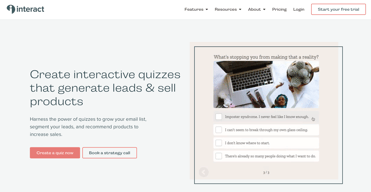


Welcome to this review of Interact (TryInteract.com), an online quiz maker that helps businesses and marketers generate leads and site traffic that can lead to sales.
Interact is one of the better online quiz makers we’ve found. And today, we’re going to show you why this might be the right platform for you.
Not only will we tell you how you can make your own lead generation quiz, but we’ll also let you know what other features this quiz builder has to offer.
With all of that said, let’s get started with the review.
What Is TryInteract?

Interact is quiz software that’s designed to help anyone generate leads for a business.
For those unfamiliar with the term, lead generation—at least in the business context—simply refers to the practice of collecting useful information from interested individuals to convert them into customers down the line.
The most sought-after data that businesses try to get are a potential customer’s name and email address. However, some marketers can ask for more personal information like phone numbers. You can ask for anything, really — but whether the customer will give up that data or not is where things get complicated.
That’s where tools like Interact come in.
People need a good reason to submit their information. And assessment quizzes could be your way in. Creating online quizzes is a good way to engage with your audience and get their data in the process.
You can then use the data you collected to launch an email marketing campaign to introduce your leads to your company and products.
This quiz maker has all the tools you’ll need to launch a lead generation campaign on your website or social media pages. It gives you access to customizable templates and management tools to help you stay on top of your leads.
The company itself was founded back in 2014 with the goal of having companies use quiz builders to get to know their customers more in a conversational manner. Since the creation of Interact, it’s been able to publish 9 million quizzes with 42,000 leads generated each day. According to the company, 80% of quiz takers manage to finish the quiz.
The Interact Experience
So what is it like to use Interact?
In this section, we’ll give you a glimpse of Interact’s user interface so you’ll know what to expect after signing up for an account.
Navigating the Main Dashboard
The main dashboard is about as simple as they come. After logging in, you’ll default to the Quizzes tab. If you’ve already been creating online quizzes, you’ll find your collection here.

The other tabs you can switch to are Polls and Giveaways. Visually, both tabs will look the same as the Quizzes tab — only there you’ll be able to find the polls or giveaways you’ve previously created depending on which tab you selected.
If you don’t have a poll or giveaway, you could be prompted to start one from scratch.

Whichever tab you choose, you will find a button that will let you create a quiz, poll, or giveaway.

When you’re ready, click the Create New Quiz button to get started.
Choosing a Quiz Template
After clicking the Create New Quiz button, you’ll get redirected to the quiz template selection screen. Here, you’ll see different quiz designs that you could choose from. Though it should be noted that you can design a quiz from scratch if you want to.

To help you make a selection, you can filter the designs by industry. You’ll find a list of industries in the sidebar.

Hovering over a specific template will bring up two more options: Use Template or Preview. Use the Preview feature to see what the entire quiz will look like. And if you liked what you saw, you only need to click the Use Template button to edit the template.

You’ll be redirected to another page where you can edit the design of your quiz.
Designing a Quiz
Now onto the fun stuff.
Interact makes the whole setup process a breeze. Whether you’re designing a personality quiz, an assessment quiz, or a personality test — you should be able to come up with a design in minutes.
The first thing Interact will suggest is for you to set up your cover page. A pop-up window will appear to let you know what you need to update. These include the quiz title, cover image, quiz description, and call to action.

Clicking on a topic will reveal tips on how to make significant changes to your quiz design.
The Interact Quiz Builder itself is pretty self-explanatory. You’ll only need to go over it for a minute or two to understand how everything works.

The tool will allow you to make changes to the cover image like editing the cover image, updating the quiz title, and entering a quiz description. You’ll want to spend some time updating this section since this will be the first thing that your audience will see.
Once that’s settled, you can move on to entering your quiz questions and answers. Not only that, but you can also insert a question image. That’s ideal for questions that require a visual component. Answers can come in the form of images as well.
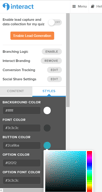
You can update the colors to match your company branding.
There’s also a feature called Result Correlations. Use this to present results based on the answers chosen.

If you want your quiz takers to provide multiple answers, you can do so by toggling the option in the Answer Settings.

There’s also a feature called Branching Logic. The idea behind the feature is to use nodes to link questions and answers together so that you can take a user down a certain path based on the answers given.

You can add or remove questions as needed using the sidebar menu. It’s also through the sidebar menu that you can access some of the features mentioned earlier.
Once you’re done with the questions, you can proceed to the Results section. Here you can add as many results as you want. You just have to connect them to the questions you asked for the results to pop up at the end of the quiz.
Setting Up the Lead Generation Form
We should mention that you’re not required to set up a lead generation form if you don’t want to. For instance, those who simply want to hear what their customers think about the brand aren’t forced to collect information that they don’t need.
But for marketers, having a lead generation form is always a good idea.
With Interact, it doesn’t take long to set up a lead generation form.

First, you’ll need to specify what contact fields a quiz taker needs to provide. The primary options are email address, company name, first name, last name, phone number, and ZIP code. However, you have the option of adding new fields if you want the user to provide information that isn’t included in the initial list.
You also have Form Settings. This will allow you to set whether the lead generation form is a requirement to take the quiz or if the user can skip it.
Then there’s the Edit Form Content section where you’ll have the chance to make changes to the opt-in form.

When you’re happy with your choices, you can move on to the next step — Integration.

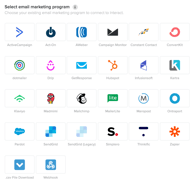
For the lead generation tool to work, you’ll have to connect it with whatever email marketing platform you’re using. There are plenty of integrations available so no matter what platform you’re using, it’s bound to be on the list.
You’ll also have to map your quiz data to your email list.

Once settled, you can continue making changes to the quiz or test it out to see if it’s ready for publishing.
Promoting Your Quiz
Interact provides ways for you to promote your quiz. After all, the quiz isn’t worth much if nobody’s ever going to see it.

So what are your options?
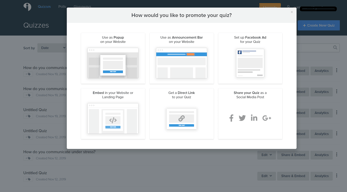
You can share the live link with your audience either through social media or by giving them the link directly through other means. It’s also possible to embed the quiz on a website.
There’s also an option to have an announcement bar which you can activate by entering a code snippet to the <head> tag of your website. Or you can have the quiz pop up when a user lands on one of your landing pages.
If you have the means to do so, you can promote the quiz using Facebook Ads. Interact will try to walk you through the process if you’re unfamiliar with it.
Generating Polls and Giveaways
The process of generating polls and giveaways on Interact isn’t that different from making quizzes. Some of the options will change but the Quiz Builder itself will look the same.
Just power through all of the fields that you need to edit and you’ll end up with professional-looking polls or giveaways in no time.
How Much Does Interact Cost?
Before we dive into the plans available, we should point out that Interact has a 14-day free trial and that you can pay monthly or annually. The pricing below will reflect the annual plans which allow you to save 40%.

There are four plans in total: Free, Lite, Growth, and Pro. See Interact pricing for current rates.
The biggest difference between the plans is the number of qualified leads that you can capture. The Free plan doesn’t let you capture leads at all. Lite will let you capture up to 60,000 per year. With Growth, you can capture up to 120,000 leads a year.
Only the Pro plan will allow you to get as many leads as you want.
Other differences include custom branding, integrations, and the availability of some features like Branching Logic and Conversion Tracking. Needless to say, you’ll have more access to features the higher up the ladder you go.
Interact Pros and Cons
While there are plenty of things to like about Interact, it’s not a perfect quiz software. Here’s a list of pros and cons to help you decide if Interact is the right quiz maker for you.
Pros
Ease of Use — With Interact, you can create quizzes in just minutes, regardless if you’ve done it before or not. It does a fantastic job of walking users through all of the options. There are even helpful tips so that you can make the most out of your quiz.
Free Plan — If all you need is to create a quiz and have no need for the lead generation capabilities of Interact, then there’s no need for you to go beyond the free version.
Monitoring — Interact gives you ways to monitor the progress of your campaign. You can check how many people answered your quiz, see which answers had the most responses, and understand your conversion rate.
Cons
Lack of Quiz Variety — There aren’t that many quiz variety types available. It would be nice to have some more options.
Integrations — While there are plenty of integrations available, some of them are locked behind higher plans. For instance, the Lite plan will only give you the basic integrations. But if you want to integrate with HubSpot, Infusionsoft, or Maropost, then you’ll be forced to switch to a higher plan.
Email Lead Limits — There’s an annual limit on how many leads you can capture with your quizzes. The only plan not to have a limit is Pro which happens to be the most expensive plan.
TryInteract Quiz Builder – Conclusion
So is Interact worth the subscription? Or should you look at other quiz makers in the market?
There are plenty of reasons to love Interact — but pricing might not be one of them. Some might have an issue with the monthly cost, especially businesses that are just starting.
However, if you’re running the type of business that relies heavily on lead generation and that publishing quizzes are your go-to solution, then Interact’s pricing might very well be worth it.
What we’ll say is that as far as simplicity goes, creating quizzes using Interact doesn’t get any easier. It’s a great product for anyone who wants to explore lead generation through online quizzes.

Can be easily maintained by non-technical staff.
Would be good to have a few additional functional components ie. accordions.
Communications in a time of national crisis - the intranet is the key tool to communicate essential information to frontline staff.

It's so intuitive and easy to use, what we envisage in our heads we can do! So many great features and widgets to choose from, the flexibility is excellent. 18 months in and it has made internal comms and culture and whole new world of fantastic!
Not much at all, and the bits I don't like are the bits I am not yet using or are familiar with, which is my bad!
All staff are now on board, before we had an old rubbish system everyone hated. 85% of staff regularly use it and contribute to it, and know its the place to go for all info, which stops all staff emails and rumour and acts as a central hub for culture, fund and business touchpoints.

You don't have to be a web developer to make the most out of Interact. The user friendly interface can empower stakeholders throughout the company to centralize their resources and make them more widely available, no matter how tech savvy they are.
I wish the forms and workflows section was more extensive.
We are initiating a lot of company-wide knowledge management initiatives through Interact. Primarily, we are centralizing our resources and utilizing the content management tool that comes with Interact to ensure documents and resources are up to date. We are also strengthening our communication channels by creating archives and banners resharing information. Our next move is to create role-based experiences for tools and resources.
Interact is constantly refining and improving their platform. We find them very easy to work with and they are very responsive to feedback and offer swift support if a problem arises.
When using a platform (vs. your own designed site) you give up some custom features. For the most part, Interact is pretty good at working with us in getting some scripts written to help with some "customization" but we are still limited. That is an issue with any provider - not unique to Interact. I will say that one point of frustration early on (not so much recently) is that they often take way too long to fix a known bug. There have been times when some of the functionality was limited due to a known bug and it took months to get it fixed. I would like to see them jump on bugs quicker.
Interact has improved the use of our company intranet. We have a geographically diverse workforce and several diverse divisions. Having custom home pages for each division allows us to alter the pages based on the needs of each division. This also makes the division's employees feel as though we are communicating more directly with them versus a "corporate" banner.
What drew us to Interact was that out of the box the UI is modern and provides the pre-built functionality that most intranets rely on. Our 1k employee org was able to rapidly migrate from another platform with almost no vendor training because the system is extremely intuitive and easy to setup. Has a vibrant customer community which helps each other with q/a and product enhancement suggestions. Frequent upgrades bring new features and bug fixes in reliable intervals. Ease of administration with single click upgrades whether you are an on-premise or SaaS customer.
When we first became a customer their support was only provided out of the UK which was a drawback, but in recent years they've added US based support teams which provide us the support hours that we need.
Interact allowed us to scale back the amount of FTE staff that had to maintain our intranet, and our physical footprint in our data center while simultaneously providing us dramatically more capabilities and usability than our prior platform.
Interact regularly updates their product so that we have the newest versions.
Bugs in new releases can take a while to get fixed.
White labeled intranet SaaS allows us out of the box functionality with customizable utility.
Interact offers a great intranet solution. It's engaging, detailed and very user friendly. Completely transformed our internal comms.
The blogs feature needs to be improved to reflect the flexibility you have with pages
No issues currently
I find Interact's intranet really easy to use, looks visually appealing and has a lot of flexibility on how we can make the most of the tools included
I sometimes find the formatting frustrating in terms of creating newsletter articles that have words and pictures side by side. It can be done by creating a table in Microsoft Word and hiding the borders but it's not perfect
We've seen significantly increased usage by colleagues over the last two years, and particularly since the first Covid lockdown. We're seeing increased engagement from colleagues who feel better represented in understanding our journey and why our people are so critical to that
There isn't a huge learning curve, its fairly easy to navigate once you get the hang of it
There are some limitations, but I believe they listen to feedback and plan accordingly
Having information readily available to employees
Interact is an excellent platform with new features and improvements constantly being developed and implemented. Customer service is also excellent.
There are niggles as there are with any platform, but the Interact Team is keen to rectify issues and develop the site.
Interact has enabled our network to collaborate through the site, asking questions, leaving comments, sharing knowledge etc.