

( 565 )
iSpring Suite Reviews: 4.6/5 — Highly Rated
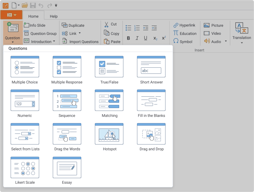
iSpring Suite is a perfect authoring toolkit for those who need to create diverse eLearning content quickly, with no previous experience in course development or special training. The software works as a PowerPoint add-in, so you can build courses in the familiar PPT environment. You can start with an existing presentation and enrich it with more advanced learning content: quizzes, screencasts, video lectures, role-play simulations, and interactions.
To allow you to create polished courses even faster, iSpring’s Content Library includes over 134,000+ royalty-free templates, characters, locations, icons, and buttons. iSpring Suite also comes with a shared drive for content collaboration. You can store all your content and collect feedback on it from your team in a shareable online space.
| Company | iSpring Solutions Inc |
|---|---|
| Year founded | 2001 |
| Company size | 201-500 employees |
| Headquarters | Alexandria, VA |
| Social Media |

| Segment |
Small Business
Mid Market
Enterprise
|
|---|---|
| Deployment | Desktop Windows, On-Premise Linux |
| Support | 24/7 (Live rep), Chat, Email/Help Desk, FAQs/Forum, Knowledge Base, Phone Support |
| Training | Documentation |
| Languages | English |


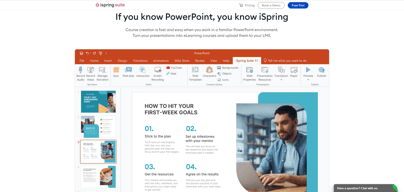
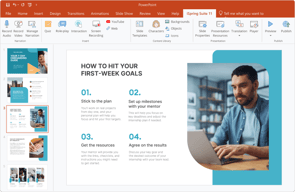

Easy to use, everything is available on the ribbons plus you don't need to have proper training to use it. Tech team is excellent in helping with troubleshooting.
I'm having challenge with managing the narration at times due to glitch but it's still workable as long as you save everything before syncing the graphics. The avatar voices are awesome, it's like a real person talking.
Publishing courses and converting the slides to videos. It's faster compared to the one I'm using before.

I am using iSpring for a big project requiring 508 compliance and it felt expensive but the investment has been worth it. The learning curve wasn't too steep and the tutorials, support docs, and especially the messaging support made every penny spent worth it. The time I save by being able to message support and have an answer almost immediately means more time is spent creatively meeting my client's needs. Thank you, iSpring!
It's a newer product in the space I'm working and my client's accessibility QA was not familiar with it, so I faced initial skepticism. But, it's done a great job and we are going to be able to meet the set 508 standards.
Interactive training that is 508 compliant. This is a challenge and iSpring has made it possible for two people to do a really big job.

iSpring Suite allows us to create professional-looking training content with relative ease. Although it is a powerpoint add-in, the training material looks better than a traditional powerpoint presentation. There is very little training needed to start creating content. The online tutorials help when we have questions about how to use the various add-in features.
In the past, we had to purchase each add-in separately, which sometimes got confusing. The features have been combined into one purchase recently, allowing us to anticipate the annual costs for using the product.
We are a smaller organization, and we create all our internal training materials onsite. iSpring allows us to easily create content for our employees. It is a cost-effective way for us to provide top-notch training to our employees.

My company was only using PowerPoint before I started. iSpring seamlessly fit into the program they were familiar with using and made content interactive for our learners.
To update the program requires you to delete the previous version. Not a problem usually, but with our IT settings, I need to have help and approval each time I update. This hopefully won't be an issue for others.
iSpring Suite allowed me to take the content that was already developed and turn it into engaging, interactive content with just a few steps. I don't have to re-create the wheel, unless I want to!

Ispring is easy to use, and the services are quick and helpful. I have had my account for over five years and have never experienced a problem.
I have no problems with the Ispring company. I use the quiz maker and their storage ability.
I have not experienced problems using the quiz maker and the storage area. Customer service is convenient and helpful.
can easily compress files to upload to our LMS
can be hard to navigate for first time users
compressing files to upload to our LMS
There are so many functions and abilities that it makes each course unique. The end product is efficient and engaging for the user.
It takes time to learn the software, but that's with any product. If you want the best product, take the time to learn.
We provide elearning training to multiple clients and this helps us brand training programs for specific clients.
Ferramenta simples, de fácil entendimento, excelente a interação através do power point. Suporte técnico excelente! Todas as minhas necessidades e dúvidas foram prontamente atendidas pelo Sr Micael Stulov, de forma rápida e objetiva.
Gostaria que tivesse mais opções de vozes para narrar os slides, bem como opções de elaboração de games.
Ferramenta permite o desenvolvimento de treinamentos muito interativos.
Support is very thorough and helpful, and the product is right in front of you, you're not having to navigate from one page to another to find how to use the product.
When working with text to speech I'm unable to change the narrator over the whole script, I have to edit one slide at one time. .
Building our own content is a huge asset to the business and is easy and user friendly. More productive and lesser cost. .
Easy interface, quick and helpful customer service and technical support.
As a relatively new user, I do not have any dislikes at this time.
Company trainings.

Easily converts PowerPoint slides with additional interaction into a full elearning module which publishes very quickly
cant think of any - it does what it says it will do an easily caters for our needs
The ability to produce quick eLearning modules from existing PowerPoint means we can create our own in-house modules quickly. The tests & surveys are easy to build and report accurately so that we can assess the competence of our users in the highly regulated industry we work in. The screen capture, editing and voice-over parts have been essential in producing our system training
Support & guidance is very good. Very prompt replies.
Nothing to dislike. All were good'. The product is backed by good support.
Supporting with promptness for the issues, even if it small ones.
iSpring Suite is easy to use and learn. iSpring Support is amazing
Nothing at all. It just works and works well. When you have a question they're available to help you.
Helps me create great courses and host them in an excellent LMS
Customer service. Alexandra helped me resolve several complex problems with my subscription and the Ispring suite. She did an amazing job! Thanks so much
not much at this point, although would prefer that when you send a presentation to a student they would be the only ones who could access that file. currently, if they forward your email to another person they can also access the presentation.
providing presentations online to students
iSpring is very easy to use, the tech support is extremely helpful and quick, and there are many different resources online that help you to learn everything quickly.
None that I can think of as iSpring is performing very well for us currently and we are very happy with how we are able to use all of the features of iSpring for our scholars.
Our experience with iSpring has been fantastic. We are really thankful to have found this program and the support team and individuals that we've interacted with have been so phenomenal in helping us with our inquiries. We use the program to train our scholars in our program on how to effectively research.
Tech Support always is very helpful and answers emails very quickly. We have been using the product for a long time and we will continue using iSpring.
Not able to do Zoom in and zoom out in a browser. Something they should add in the backlog and deploy soon.
Problem in conversion
The ease of work within PowerPoint. The ability to add quizzes.
Sometimes it freezes in audio recording.
The ability to record a zoom and upload it through ispring.
It works with Microsoft PowerPoint and it has a very good ribbon with lots of tasks, options, configurations. The design of the addin, look and feel and performance are great.
Not much to be honest. It is very complete for general applications. Will be very good to have more templates for designs.
I need to generate learning material with easy and great quality.
Ease Of Use - Outstanding Technical support.
Some of the ISpring functions are not as intuitive as I'd like for them to be.
Today I needed to create an online survey where the questions changed based on a previous question's answer. With the quick response from support through chat, I had it up and fully functional in no time.
prompt support from a support group when contacted
Nothing that comes to mind at this time!
The use and understanding of terms like SCORM
I like iSpring's ease of use and its versatility. It is overall a great product.
Everythign is great so far. The service is fast and responsive and the tool itself is simply wonderful.
I am able to digitize our workbook and provide our students with times quizzes and tests. This makes us much more productive.

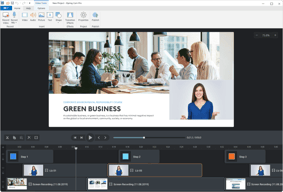
What I like the most about iSpring Suite is that you can create a course from slides, record the camera and the screen, narrate as you show the slides and it is easier to upload videos to YouTube after making the course or video in Spring Suite.
There is nothing I do not like on Spring Suite so far.
iSpring Suite is helping us with creating courses for our new Sales Development Rep onboarding. This helps us know and makes it easier to help a new employee with onboarding.

Ease of use, reliability and video edit.
Extra questions types in the quiz such as a multi-question + multi answers feature
As a change management consultant, I can quickly create state-of-the-art and outstanding e-learning modules for my clients without involving an agency, the HR team, etc. It enables me to dramatically shorten the timeframe of the e-learning project and reduce the costs for my client...

Using iSpring Suite is pretty easy and intuitive, but whenever I came across with as little as a doubt, the support team has come way and above the line no matter what time of the day. UPDATE: Implementing iSpring Suite is waaaay faster than reviewing it on G2. #TrueStory
Well... 40 characters remaining to say there is nothing I dislike about it except for maybe the ability to use it on my mac without using windows.
It is super easy to make custom online courses. It is full of tools and resources that have made it even easier than reading this review.

iSpring provides access to creating SCORM content in an easy, approachable way. It integrates directly in Powerpoint, giving you a familiar platform to create on.
Some of the more advanced processes are not immediately evident, however iSpring technical help has always been highly responsive.
I quickly create SCORM content for use in our LMS. Employees access this training with ease.
I love most things about iSpring, but their customer support goes above and beyond. Every time I have a "chat" with a tech, they solve my problem, are very patient and provide excellent service and answers.
Nothing at this point! Sometimes its hard to find things, but support is always there to help me!
Easy training and quiz creation! I can create (and recreate) trainings so easily that I can load onto our LMS.

It's easy to use and very funtional. The customer support is the best I have ever had.
Minor. I'd like to be able to have colored font in QuizMaker.
It's easy to use. I use QuizMaker and it's great because you don't have to have an LMS, only email. Everyone has email!
La facilité de l'utilisation et les nombreuses applications disponibles.
Le coût est quand même assez élevé pour un organisme à but non lucratif.
Notre quiz avait été créé sous forme de présentation au lieu d'un quiz. Nous ne voulions pas être obligé de le recommencé, le support technique nous a permis de le faire facilement. Nous avons également été en mesure de faire des suggestions d'amélioration.
I love all the PowerPoint extras -- the quiz maker, the characters, etc -- just incredible. Also, the support is excellent.
It is expensive --- my dislike is that is it not available for MAC
I can write a course and get ARELLO approval -- ispring allows me so much flexibility. With everything that iSpirng offers, it makes creating a course exciting.