

Unclaimed: Are you working at Riverside?
Riverside Reviews: 4.8/5 — Highly Rated
Riverside is an online audio and video recording platform that allows users to run and record webinars in 4K video quality, straight from their browser. It’s ideal for users who want to create studio-quality webinars and remote interviews, regardless of where they’re recording them from. Riverside also supports tools that let users separate audio and video trackers, Livestream Twitter, YouTube, and Facebook. Transcription is also available on higher tiers and collaboration is easier on the platform’s shared work environment.

| Capabilities |
AI
|
|---|---|
| Segment |
Small Business
Mid Market
Enterprise
|
| Deployment | Cloud / SaaS / Web-Based |
| Training | Documentation |
| Languages | English |
Riverside Pros and Cons
- Lets you record your webinar in full HD
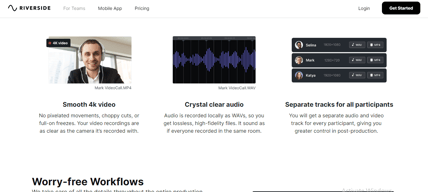
- Helps you save time by automatically recording each participant on individual tracks
- Provides a call-in feature that helps boost audience engagement
- Mobile app available only for iOS
- Uploading complaints have been reported, especially for progressive uploads.
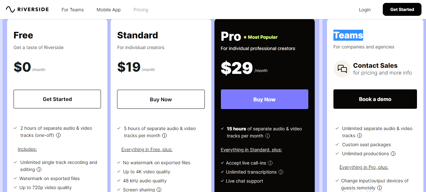
- It can be costly for heavy users as it follows hourly pricing


Compare Riverside with other popular tools in the same category.
Riverside is very easy to use and intuitive. The edit/transcription function makes it easy to find the clip you are looking for. The ability to download each person's audio is a game-changer, especially when 1 or more guests has sound quality issues like background noise.
I haven't found anything I dislike yet. Some features I would love to see in the future: advanced editing capability, the ability to use video backgrounds seamlessly, and full integration with podcast distribution services like Buzzsprout, so that it is truly a one-stop shop for podcast producing.
I needed a low-cost, easy-to-use podcast recording platform for a new show I am hosting. As a new podcaster myself, Riverside checked all the boxes.
Great product, use it to interview clients x By far the best on the market as it gets rid of network issues via local recording and records audio to multiple tracks
Nothing. Riverside is exactly as it should be.
I run social media accounts for my clients and need a way to get high quality interview footage of them. Riverside has enabled me to do this.
As a beginner in podcasting, I needed a tool that would allow me to have my own virtual recording studio. It works for both visual and audio-only podcasts. The platform is very intuitive and I can do everything I need in one place. I have recommended Riverside to my journalism students, professors, and people who produce their own podcasts.
I think the editing feature has some areas for improvement, so it may be easier to edit multiple files at once. I use Hindenburg for some edits. If Riverside could help make editing less time-consuming, I'd keep this as my only go-to platform.
I don't have the equipment or recording studio that other content creators have, so I needed a platform that would help me produce high-quality audio from the comfort of my home. Guests like Riverside because it is easy to use.
The upside to using Riverside. fm is that it allows us to bring together both clients, agency folks and subjects to obtain authentic 4k video content. Riverside is lightyears ahead of ZOOM. Zencaster was not offering 4K at the time we needed it ( not sure if they currently do) = The studio set up is simple and effective.
Initially, we ran into audio quality issues. We don't want our interviewees to wear headphones so audio quality can be spotty recently though audio has improved.
This allows us to obtain high-quality, authentic interviews with people nationwide without leaving our respective offices. I love the the safety net that the platform offers to back content up and archive.

I enjoy that it is a user friendly platform with high quality audio and video. I especially like that seperate audio and video tracks are recorded which enable me to edit more clearly.
My video will not match the sound if I start and stop a recording in the same session
Podcast platform
Promptly offered me the best solution I didn't even knew it was available in order to solve my issue. Much appreciated, made my decision to upgrade a more comfortable one.
Editing in the platform could be improved in so much, if there's improvements on this area it would avoid the need for external tools and services. It's getting there but it is still not ideal.
Recording locally in the highest quality possible, uploading and syncing, solves several technical issues I've had for over 5 years of podcasting. Simple and extremely useful.
The interface is simple to use and helps me create the content I need to for my channel. The audio is absolutely flawless and the video is always clear. Sharing is easy and sharing what I make is just as easy.
Downloading tracks sometimes takes awhile, but that is to be expected. Honestly I have never had a problem with the system so I don't have a whole lot to complain about.
It is recording my video and that is the biggest help. Having a place to capture my video and seamlessly share my content makes my life as a creator so much easier.

I was once an technical director for a television network. I know sound quality!! I only this this quality on Riverside.
I am still having trouble when I have a guest.
I want to record guests but I cannot hear them. The benefit would be to meet my launch deadline.
Simple, seamless and focuses on what it's good at vs. trying to do everything.
Encountered a few small bugs, but nothing major!
It makes remote recording for video podcasts simple.
Its key feature is the ability to record high quality audio and video from any location. This is particularly useful for remote recording, as it ensures professional sound without the need for expensive equipment or a soundproof studio. Riverside also excels at collaboration, allowing podcasters to work seamlessly with co-hosts, guests or production teams. Its easy-to-use interface enables real-time file sharing, editing and chat. Riverside also makes it easy to monetise content with ad integration and real-time tracking of ad performance. Podcasters can also benefit from the platform's robust analytics dashboard, which provides insights into listener demographics and engagement metrics. In conclusion, Riverside is a game changer for the podcasting industry, offering advanced features, seamless collaboration and accessibility. Its innovation makes it a must-have for both new and experienced podcasters, who can use it to improve recording quality, monetise content and gain insight into audience engagement. Overall, highly recommended.
The only thing that bothered me personally was the lack of ability to change the administrator's email address. For security reasons, I had to get a letter signed and stamped by the CEO to change the email address. A feature for some, but a nuisance for me!
Simultaneous production of video and audio podcasts in 48Hz or 4K quality
I have worked in radio for 30 plus years. so much hassle over that time trying to connect with people in a studio environment. I once had isdn at home and it just kept dropping out. This is perfect. I am working at the moment from Lancashire to Adelaide, Australia with somebody with limited technical nous. This is the perfect and only solution. The transcript option is brilliant too.
I wish I had a few more hours each month but that is all.
i can now deliver quality podcasts
Riverside FM, makes recording people remotely a hassle-free experience. Quality is fantastic, gives you a nice amount of control to produce a show, and pre-record videos, with multiple people, it has some great functionalities like transcriptions, gives you high res synced mp4s available to download, and even builds you an adobe prem project file to get editing in. Nice noise cancellation feature too.
Creating new shows and getting the link to the room could have fewer clicks before generating the link, would be great if it adopted some ai live enhancement of audio or picture.
High res video recording made easy. it allows multiple people to be recorded at the same time, and gives me controls that other software doesn't seem to have, It lets clients log in to watch, I may well start using it to live stream from.
We have been delighted with Riverside and the video quality we can capture online. Zoom and MS Teams don't even compare. It's the wave of the future.
As I mentioned earlier, many of our clients are working from home and would like the option of choosing a background that would be placed behind them. I'm still getting familiar with your interface but that will come in time.
High-quality video files are the most significant benefit of using Riverside. We can bring video files directly into our edit suite and get right to work. Both the audio and video quality have been superb.

I like the short video tutorials. They are easy to understand with great vibes. The platform is simple with no complications. The people I've interviewed have been amazed at how easy the recording system is.
I do wish it has a "face filter" so I could look a bit younger! :-) But then again, it keeps things real and natural.
Saving me time and money.
The ability to quickly record quality videos of customers that need little editing!
Sometimes I don't know the quality of the video while recording because it can me blurry or muffled sound, but always ends up great!
The ability to use customer voice throughout our marketing efforts!
We started trialing Riverside to improve the quality of our video interviews and haven't looked back. The functionality of Riverside is so advanced yet easy to use, and it has dramatically improved recordings. The local recording really increases the quality of picture and audio. Using the auto transcribe and being able to clip out sections in one place, rather than having to use multiple productivity tools like in the past, has been a big upgrade.
Greater compatibility with devices and browsers would be good, but sure this will be coming over time.
Producing high resolution video interviews for news and feature content.
The clarity, simplicity, and the audio quality. We can also export our audio to edit in other software or application if desired. All in all, we love this product for our show.
None. The audio quality is the top priority, sometimes causing the video to lose quality, but this is acceptable, especially under poor connection conditions, weather, etc.
Audio quality recorded from Zoom calls simply wasn't good. Even with the best audio equipment, good microphones, etc., it still suffered. Riverside provides the sound we want at a much more affordable rate.
Possibility to easily collaborate with other colleagues in the production of the episodes. Easily review, export in multiple formats and the new transcription tool.
That the transcription option is not in the most basic option.
Collaborative production and exporting in multiple formats
Audio is recorded locally as separate tracks. That means you can fix a number of audio problems from guests in the the post edit. There are a number of recordings that would have not been useable if I had been using Teams or Zoom to record the podcast. Awesome product
It would be great to have separate URL's for different recording sessions like a Teams meeting. At the moment any past guest could join the studio. I have turned on the lobby so it's not a major issue - but would be good to have a virtual studio for each episode.
Creating high quality podcasts that I can use to engage with my current and future customers.

Great, simple to use tool that really helps for a newbie podcaster to get started right away. It's fuss free and also and easy experience for my guests to join
Not much really - Riverside is able to fulfill all my needs
Need to record video and audio in HD but other tools like Zoom compress the quality. Riverside provides good quality recordings
I like to be able to get the audio split for the different interviewers etc. Sometimes the mics are at different levels. This saves me time!
Sometimes I have trouble getting continuity camera to function.
Enables me to get quality podcasts for yourube.

The quality of the video and audio is a game changer.
I would love to be able to have more nuanced control of the timeline such as zooming for more precise editing.
Improving the quality of my podcast and creating social media clips.
I enjoy Riverside for the ease of use, and most importantly the new search and transcript features. I can't say how much the built in editor has helped us scale our podcast. At the beginning of 2023, I wanted to move to video, however producing an in-person video for a podcast just didn't seem reasonable for the scale, cost and time involved. I tried competitors but Riverside's editing feature within the app is what led me to the platform. After 3 months I have been so impressed I decided to up my subscription to include transcription, which I have been looking for the last year and change. Win/win!!
There is nothing I dislike about Riverside.fm.
Riverside has helped me take an audio podcast, and move it to a visual podcast. The audio quality features are great, and the video editing portion is seamless.
The best thing about Riverside.fm is the high-quality recordings and the fact that each interviewee is recorded separately, this is much better than Zoom for example.
I'm not sure if I haven't figured this out yet, but the fact that we cannot see the full shot while recording makes us miss part of what ends up being in the shot.
It allows us to record interviews for broadcast as separate tracks. I didn't realize we also get a quad split recording and reference files. Looking forward to using this throughout the season.
UPDATE: We left seeking greener pastures, and ended up coming right back. Riverside is undeniably the best in its class. As a podcaster and producer, Riverside helps take the technical complexities out of working with other hosts and guests. I can monitor everyone's connections and both audio and video quality on-the-fly! It lets me get back to the main job of focusing on the content.
Zapier integration would be a valuable feature. Especially with the impending AI innovations coming, and the new/revised Riverside features with improved transcription, transport to services like Descript, and the ability to create clips/markers in a session. Zapier would come in very useful to distribute elements of our recorded sessions to other platforms/service bureaus for additional editing, processing, or publication.
My level of stress about clean audio tracks from various sources is nearly gone! Knowing that Riverside is recording studio-quality audio and video gives me great comfort.
The platform is very intuitive for both the producer and the guest. The time it takes to explain to each guest how to navigate the platform is almost nothing.
I have not run into any major tech issues.
Riverside is an easy-to-use one stop platform that allows my organization to streamline customer interviews in a process that is repeatable and reliable.
Riverside makes podcasting so easy. We get high-quality audio and video with separate tracks for each co-host and guest. The built-in templates for exporting videos are genuinely helpful. And so far there hasn't been one hiccup.
This isn't Riverside's fault, but it would be nice to be able to livestream to Instagram. Also wish there were more tiers for available recording hours, or if I could buy hours ala carte.
I am new to the podcasting production space, and wanted a plug-and-play solution for capturing high-quality audio and video from multiple co-hosts. We also want to create Instagram reels and TikToks videos.
We searched for a long time for a solution that would allow us to remotely record high-quality interviews and have ease of use for our team and our clients. Riverside seems to be the best fit. It's affordable, and dependable. The support team is also impressive. Finally, the product seems to improve every time we use it.
We haven't had any serious issues with Riverside. We once had a video get stuck in transmission and the support team was able to recover it quickly.
Remote interviews for corporate video production
I love that the video quality is not determined by wifi quality but rather by the input source. It's such an intelligent way to do remote podcasting. I also love the ability to Livestream right to Youtube.
I wish the options available to company-wide Riverside accounts were available to anyone who pays to use the service. Producers at smaller companies want to provide the best possible shows and would be able to do so with those options.
Riverside solves the problem of terrible quality remote podcasting, where there is a risk of audio and video not matching up on both ends due to internet connection issues, glitching occurring, etc.
I love that it records each participant's audio and video locally, so you don't have to worry about losing a recording due to connection issues.
I find Riverside to be great. I am still trying to figure out how to use the sound effects during a recording: some features are not super intuitive so far.
how to capture high quality audio and video for podcast and youtube recordings. also how to make solo recordings for my private membership group