
Unclaimed: Are you working at Riverside?
Riverside Reviews: 4.8/5 — Highly Rated
Riverside is an online audio and video recording platform that allows users to run and record webinars in 4K video quality, straight from their browser. It’s ideal for users who want to create studio-quality webinars and remote interviews, regardless of where they’re recording them from. Riverside also supports tools that let users separate audio and video trackers, Livestream Twitter, YouTube, and Facebook. Transcription is also available on higher tiers and collaboration is easier on the platform’s shared work environment.

| Capabilities |
AI
|
|---|---|
| Segment |
Small Business
Mid Market
Enterprise
|
| Deployment | Cloud / SaaS / Web-Based |
| Training | Documentation |
| Languages | English |
Riverside Pros and Cons
- Lets you record your webinar in full HD
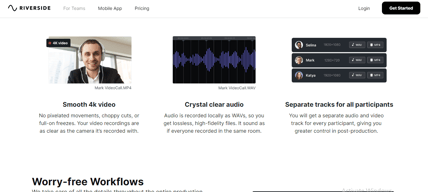
- Helps you save time by automatically recording each participant on individual tracks
- Provides a call-in feature that helps boost audience engagement
- Mobile app available only for iOS
- Uploading complaints have been reported, especially for progressive uploads.
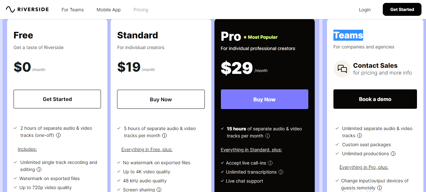
- It can be costly for heavy users as it follows hourly pricing


Compare Riverside with other popular tools in the same category.
This is the easiest, fastest to publish podcast hosted. I love the webinar and livestream features too!
The studio every now and then doesn't record so you have to create a new studio. Besides that it's great!
AI clips, remove silencing, makes it easy to post and export.
It was designed with the needs of podcasters in mind rather than meetings like people who record on Zoom, and the team are lovely and very responsive to feedback so that the product remains relevants to the needs of podcaster as the industry changes so fast. The AI features have been helpful as I mostly edit on my own, but my absolute favourite feature is in-text editing. It makes it very easy to use and I had no trouble learning it even as a luddite with no patience for learning new tech.
I'd like the process of exporting a full size episode to be more streamlined than go in the editor, export the episode, then download the episode.
Remote podcast recordings and editing all in one place, and easy and quick so I don't hate my younger self for starting a podcast and want to quit on account of the production.

Learning isn't hard to grasp. video and audio quality is excellent, and the magic tools make editing hour-long videos a "one click and finish in minutes!" A great short generator tool as well that lures more viewers.
I would like to be able to have more than one person as an Admin, have the ability to add more layers during editing, and the ability to overlay images and photos with timing options to insert images or logos whenever you please throughout the video would be nice.
A platform for remote video recording allows me to have more interviews with guest that arent in the studio and still have high quality recordings.
Riverside allows you to record each person seperately, video and audio so that you can create a great podcast. It has easy to use editing and transcription features as well as tools to help you create sound bites/audiograms from your podcast.
You maybe fooled into thinking that the video quality is low at the time of recording but the final video is of much higher quality.
With recording software and meeting software it's all one audio and all one video so it can be hard to get the right balance for podcasts. Riverside also makes editing and transcription really easy.

The editing software and all the features are amazing. It feels like they are constantly updating their features too.
The editor could be a little more precise with the slide bar. If you could zoom into the track too to make cuts even more precise that would be optimal.
Amazing video editing which is quick and easy to use

I am new to recording platforms for video and podcast. I was turned on to this platform by my mentor, Sean Shahkarami. It's very user friendly and has been a breeze to use!
My wish would be to have video previews that are not low res. I also would like to be able to upload my content directly to all my social platforms.
At this time, I am not sure.
Riverside is close to perfect and provides a very easy and seamless way to produce podcasts. What's even better: they take suggestions serious and are very responsive, they improve very quick.
There is noting to dislike because of their high responsiveness in case of suggestions.
Riverside provides the best video-audio quality for me doing podcasts. It's really very easy to handle – you can hardly make any mistakes, even it its the first time using it. From recording, via post-production to publishing they provide a perfect work-flow for me. And in some points, using AI they are even kind of magic. This because they really provide good working AI and not that nonsense-AI you often find elsewhere. However this is great, the very most impressive part is their responsiveness in the customer-support. I can really keep up my workflow, asking something and receiving an answer always quick enough to keep going.
It does what it says it will do, for a reasonable price. The recordings are of professional quality because audio and video are recorded locally. All of my friends who have podcasts use Riverside too and are very happy with it.
Some minor things - when you navigate to their website and then go to a studio, it opens a new tab. But then it doesn't like to have multiple riverside tabs open when you start recording, so you have to close previous tabs. Strange workflow. I also don't as soon as you join a studio, a red record button appears on the browser tab... it makes it seem like you're recording even if you're not. I made the mistake of doing an entire hour-long podcast (with a guest), and didn't realize until the end that I never hit the record button! Needless to say, I'm just more mindful of that now. Lastly, the recordings don't always upload automatically. I haven't figured out why, but this has happened with several of my guests. They then have to click on a link and follow some prompts... I almost had a heart attack the first time, but we got it to work eventually. It did take about 30min to figure out though.
High quality video and audio.
easy and quick to use great customer service -- was curious about receiving email notifications for billing purposes with receipts and was connected to Anne. i really appreciated that she was supportive and I felt really "heard" as a customer, which I'm always grateful for. Thanks Anne!
nothing at the moment ... love all of the new features!! would love an option to receive email notifications when billed with a copy of the receipt...
easy and quick podcast production at an affordable price makes my life much easier as an award-winning author, artist, and activist for content production and podcasting, which is a huge contribution to increasing my brand value!

It's very simple to use. There is absolutely no learning curve. You hit record, wait a tiny bit, follow that up with a few more clicks here and there, and you have an output. I initially tried to do a bit of editing on Final Cut Pro but then figured a way around that as well, so do not really spend any time editing. If there are some minor edits you need to make, it's super easy to remove words and sentences, and it works. If you are like me (a startup founder at saas.snowpal.com where we provide APIs for businesses to go to market in quick time), and have not a whole lot of time to spend on post-production work, and are primarily focused on the subject matter expertise of your content, I can't see why you wouldn't want to use Riverside.fm.
I don't know if I know of any serious downsides but since this is a required field, I have to write something so I am going to recommend some features! 1. After an edit is done, there doesn't appear to be a way to save the changes so I find myself doing the same thing multiple times. This could use some improvement. 2. The time it takes to convert is not terribly long but if you need HD content and the length of your video is long, it can take a bit of time (that's not to say that FCP is super quick even on the latest Apple machines so this is quite understandable). 3. The layout options are rather limited, and I would like one where you can place your guest picture-in-picture and still add some borders around the frame. 4. Translation of transcripts would be real handy (to appease global audiences). 5. After a video is exported, it places it on the page in a horizontal layout and that page could use a bit of rework to improve UX.
I needed a way to invite guests to my podcast, and record the sessions in high quality with minimal requirement for post production work, and I tried a few other tools before I landed on this one. Riverside.fm delivered to its promises (maybe, it should run for office :)).

The fact that the product being put out by Riverside.fm enables me to put out the product Life around The Fire Ministries Internation that we're working hard on communicating to a growing audience viewers and listeners. They are very kind and considerate at their quick response time to our questions. We're new at using this platform. However, we anticipate establishing a long-term relationship because of the ongoing growth and implementaation of new technolgy.
Working with understanding the language and icons being communicated at a very fast pace (rate of speech).
I'm having trouble getting my headphones to work when I'm recording my own voice or checking for it's sound quality. It's still unresolved. I've viewed dozens of videos but nothing that addresses this problem. I can hear myself once I've recorded an episode. I can hear the other person if there are two of us. However, I can't hear my voice in my headphones. I've worked with this for a few hours with another person who has much more computer experience than I do. I would like to speak with a live person. That's my number 1 concern. A lack of live support phone support.
Riverside.fm is a brilliant system for podcasting. I've only been using it for a month or two but have already recorded 6 podcasts using it. The quality during the recording is absolutely fine, but the fact it records and uploads/backs up in up to 4k is amazing! There are other features for going live and using a team that I haven't used yet, but I know when I need to, they will be a great help. The AI clip generation is perfect for easily creating clips for social media.
I sometimes accidentally share the link to the homepage rather than the studio for guests, which is annoying but just something I need to remember to check.
I previously used Zoom to record sessions but found there was a lot to sort out in the edit if I wanted to use my mirror less camera and podcast mic. The quality was dependent on the internet signal and was often poor. Riverside.fm allows me to link my 4k camera and plug in my podcast mic, then I can either export the whole show automatically or export the separate tracks and edit offline, which I often do.
I like that I get high quality 4K version of the video with high-quality audio that the final product will be broadcast quality.
The only issue I have is that as a paying customer I sometime have trouble removing the watermark but that is a small thing.
We have used other products before but the quality of video is always poor. With Riverside the video quality is clear and professional. A great image and great audio always lead to a great product.
the platform is so easy to navigate and if anything is unclear or you have any questions, there are answers in the resources available. Customer service is amazing and so quick to respond. Within the facebook group, there is so much to be learned and you have insight into all that is coming up! They listen to feedback and work hard to improve their product offerings.
so far I have not run into any roadblocks to have a negative to add.
a platform that is easy to access for all my guests, recording at high quality, ease of use
All the feature the transcript particularly and ability to save in various formats. For the first season of my podcast i used a different platform which was more difficult, now editing podcast is easier which gives me more time with recordin g.
Probably the time to download files. otherwise happy with all the features.
Now i can record and film videos which helps promoting my podcats, also i love that i can search sequences based on words by using the transcript and cut short sequences for social.
What I like best about Riverside.fm is it's ease of use. I didn't start my most recent venture until my sixties. Anything that requires too many other generations to explain to me is a no go. I actually was able to figure out how to use the platform MYSELF. Love.
I haven't figured out some of the cool things the platform offers, but I'm sure that will come.
It's allowing us to create kinterview content with much more flexibility than Zoom.

The most important factor for my daily work is the quality of the recording plus a fast customer service. Riverside offers exactly that. Plus, its really easy to use and the pricing is reasonable.
There are 2 things I would recommend improving: Cutting oder editing in Riverside leaves me only few options plus it is not easy to do fine cutting. Plus I would need to add a graphic layer to the Video with a teaser to the full episode. This is not possible (at least not yet). One more thing: Some people dont want to use Chrome. It would be nice to have alternatives regarding the browser.
Interview guests dont have to install anything, I can invite them easily. I dont have internet quality issues. I have all guests separately recorded. I can even go 4k if the guest has a good camera. Its cool to be able to edit it easily in Premiere Pro!

I have been using riverside fm in the recent months to use as a software for my podcast. The audio has came back great and the support is responsive!
I have not found much I dislike on riverside. They give you storage for free trial and then it is very cost effective to get started.
Riverside is solving the problem of people wanting to find solution to not only record podcasts with people in different areas, but also edit in house.
I love that its easy to use, has quality video, doesn't need a mic and give me transcripts with CC in a jiffy. I can remove silences too ! The teleprompter has been a game-changer for me! I love this product!
Not really. If i had to say something, then maybe get to a recordings directly from the login screen, esp if i have only one studio
All in one tool for speaking video creation

It is easy to use. I like the simplicity of being able to do vidoe podcasts and then be able to edit it for both Horizontal and Verticle content. I would reccomend it to anybody.
With I could dive a litttle deeper with editing.
Being able to do high quality audio/videos for social media and podcasting.
They always innovate with new features! The noise reduction feature is awesome.
The UX/UI flow could be a little bit better.
Help to record and edit podcast easily!
The quality of the output. The ease of use.
It's aggressive signup nature. I forget which email I used to sign up for so now I have like 3 accounts that I don't use. Other than that, pretty decent onboarding once you figure it out.
High-quality video independent of connection speed.
It's quite intuitive and I really need that.
I haven't found anything yet. However, I wish Riverside included the Nvidia app where the eyes focused on the camera while I was reading from the teleprompter.
I'm just starting to produce content so I'm not even aware of the problems that await me, but learning to operate the studio AND editing features are saving me lots of time.
Riverside is easy to navigate, easy to use, and I have yet to experience technical glitches as I did (incessantly) with Zoom.
If I edit a recording, I can't export an audio-only format of that, which is a hindrance at times. I would love to edit in Riverside and export the tracks of my edit, rather than export the video and have to extract the audio another way.
I switched to Riverside from Zoom for recording podcast interviews, and the improvement has been 100-fold. I wish I would have started with Riverside rather than try to scrape by on Zoom.
I like the convenience of the platform, the fact that I can have files that a producer or editor can access directly on Riverside or they can download the files to edit in their own studio.
I haven't found anything that I dislike.
Not aware of any.
I love the easy to use interface and my guests just click one link to join me in the studio. The quality is maintained by recording on local devices throughout the session and then uploading to cloud the final version. I use Riverside 12 times a month and would recommend it to any podcaster.
Sometimes my guests have issues joining the studio from tablets and so I recommend they join from a laptop or PC.
Ease of use for my podcast guests to join me at their convenience from their own location without the need for much technical understanding.
Video quatiltyis great, but I am a huge fan of Riverside.fm's audio quality! As a Voice Actor it's important to have my audio setup reflected during live sessions (without the added, "crap").
So far, I haven't had any negative issues.
No know issues at this time.

There are many things I love about Riverside, including: - High quality video and audio recordings - Separate tracks for each guest, which gives me freedom in editing - Multiple easy to use editing tools to make short clips for any social media platform - Incredible AI generated captions that can be easily edited, and used to edit the clip (have to see this) - Highly responsive and effective support (there are problems from time to time, but they solve them 100%) - They listen to their customers and build in valuable features - It's highly affordable for what you get - Easy for anyone to use, including older, non-tech savvy folks - Plenty of available training that's short, clear, and to the point I am a huge fan of the product, the company, and all that they do. I put so many people on Riverside because it's the best tool around.
There isn't much I don't like. I'd like even more features in the editor.
We need to record high quality video testimonials from customers all over the world. This allows us to generate high quality video and audio of those individuals and capture their opinions on a separate track,
I LOVE Riverside.fm. I've been podcasting and using Riverside for a year or more and could not be any more pleased. I moved from Zoom to Riverside as recommended by my producer, and I couldn't be happier with that decision. I have since recommended it to other podcasters and video content creators. Riverside continues to upgrade its platform, making it easy to edit, download, and export videos for content creators and podcasters who are not experts in that field. I typically focus on making money, and my producer does all the tech related to videos and podcasting; HOWEVER, Riverside has made it so EASY that even I can do it and often do when I want to publish something and not wait on my publisher. I now use Riverside for my Reels for Facebook and Instagram, and I do them myself. Riverside is an absolutely no-brainer. I started on the lower-level tier and quickly upgraded early this year when I decided I was going all in on video creation. They are my tool of choice! Thank you, Riverside......I love you all. I get excited with every email of a new launch. Keep them coming...I'm building many of them in my 2024 business strategy for visibility and influence. I will also be teaching them in my newly launched community!
NOTHING! I love everything about this product. I have a smile on my face every time I open an email or a video from you with a newly launched feature. And....when I hear the guy say in the video, "many more coming,".....I get giddy!
I use three tools that I wrap up into what I call MY MARKETING AGENCY. Riverside.fm is one of those three. You have launched some features lately that I haven't had the chance to use; however, they are on my list for my 2024 business strategy. I just started a new free community and added three paid memberships. I want to give the VIP members access to the audience feature for the podcast. I also want to start doing panel podcasting and be able to allow my community members to be able to ask the podcast guest questions. I have had the chance to research to see if I can do this in Riverside, but I will figure something out. I love the option to stream live to multiple platforms. I canceled Streamyard when I discovered I could do that within Riverside. I haven't done it yet because I need to research it more. But I have many ideas on my 2024 list.
I use Riverside to edit my podcasts. The AI editing is dope.
I wish it was free but that's pretty much the only complaint.
N/A