

Unclaimed: Are you working at Riverside?
Riverside Reviews: 4.8/5 — Highly Rated
Riverside is an online audio and video recording platform that allows users to run and record webinars in 4K video quality, straight from their browser. It’s ideal for users who want to create studio-quality webinars and remote interviews, regardless of where they’re recording them from. Riverside also supports tools that let users separate audio and video trackers, Livestream Twitter, YouTube, and Facebook. Transcription is also available on higher tiers and collaboration is easier on the platform’s shared work environment.

| Capabilities |
AI
|
|---|---|
| Segment |
Small Business
Mid Market
Enterprise
|
| Deployment | Cloud / SaaS / Web-Based |
| Training | Documentation |
| Languages | English |
Riverside Pros and Cons
- Lets you record your webinar in full HD
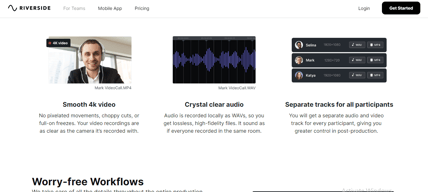
- Helps you save time by automatically recording each participant on individual tracks
- Provides a call-in feature that helps boost audience engagement
- Mobile app available only for iOS
- Uploading complaints have been reported, especially for progressive uploads.
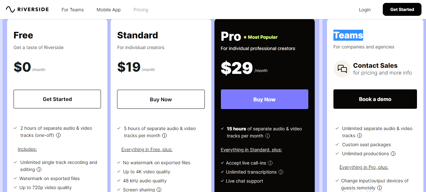
- It can be costly for heavy users as it follows hourly pricing


Compare Riverside with other popular tools in the same category.
Very user friendly even for non tech people, great recording quality even in complicated conditions (worked fine from a rice field in Asia!), the app makes it super easy for guests to connect. Top notch, real time, support team! The new AI features are awesome; particularly the possibility to edit based on text!
There was a glitch with one of my guest closing the app before 100% upload and whereas simply reopening the app should have resumed the upload it didn't and I feared having lost the interview - unpleasant but the support team was able to recover everything nethertheless!
Allows me to record remote interviews with guests anywhere in the world.

I love the quality of the videos, having separate audio tracks for each speaker, and the ability to add media/sound effects while recording my video podcasts! Those features and the ease of making clips for reels using AI saves so much time! I used Zoom for years but the audio was compressed and glitchy. I do not have that problem with Riverside.fm. I am very pleased!
I would like to be able to add a dynamic background and lower thirds with copy for a very professional network-like appearance.
I am a podcaster and clear audio is very important. I did not have that consistently with Zoom and Google Meet doesn't have all the features I need. Riverside.fm solved that problem.
Hands down, it's the multi-track recording and the fact that Riverside records locally. If you do interviews, Riverside is a must-have!
I wish I had more control over cropping and aligning my video within the different size frames for lack of a better word.
The ability to conduct interviews with people worldwide from my home office.
The dashboard is user-friendly, self-explanatory, and easy to use - even for novices.
We enjoy the platform and have no dislikes or complaints at this time.
We are currently using Riverside to record podcast audio. We plan to incorporate video in the near future and are looking forward to utilizing these capabilities.

I have found Riverside to have an excellent featureset and I only found about it based on a colleague recommendation. I wish I had known about it sooner!
It's disappointing while on a paid tier to be badgered to upgrade further: I am already paying. The restriction to Chrome is irritating, screensharing isn't easy
Finally - a way to capture audio and video at the local machine. The improvement in quality is amazing!
Riverside.fm is like Zoom but high quality. It uploads the full quality version of each person's video and audio, meaning it can be used for producing videos remotely. We use it every day for doing interview calls with clients to help them create content for social media. We are able to remotely interview them, record it, and it's completely hands-off for our client, making it a seamless content creation experience. It really is like a virtual studio.
The only downside I can think of is if your internet is slow then it takes a long time for the files to upload after you've ended the call. But, that only happens if I'm in the country on Starlink or something, most internet speeds even in coffee shops are fast enough to handle it. It's not a huge deal though because if you don't finish uploading right then, you can re-open it later to continue the upload.
It solves the issue of low quality Zoom recordings. We record content remotely with our clients, and we want that content to be as high quality as possible for social media. And, a lot of our clients have expensive camera setups, that do not shine on Zoom. But with Riverside.fm, we get the full quality of all the equipment we're using, even though we're not there in person.
I like the simplicity, and efficiency while making your own content.
The google only platform is a bit of a challenge.
Just the ability to record in good video and audio quality with multiple participants.

Riverside FM makes recording our podcast easier. My co-host lives in Ontario, and I live in South Pasadena. And with a busy work schedule, Riverside FM makes recording and creating content much easier for us both. Also, we can download different audio formats for editing our podcast. We also appreciate that they let us download the recording video of our podcast. This helps us with sharing our content with other platforms.
It's hard to pinpoint what we don't like about Riverside FM since we primarily use it to record our podcast. We've never had an issue with the platform. And if we did, the customer service is excellent and always provides a solution.
Our problem with consistently creating content is the distance and time flexibility when recording our podcast. However, Riverside FM makes recording and editing our content a lot easier. They solved the issue by registering with Zoom or any other platform. It is beyond easy to use.

More than just podcasts, this is perfect for course creators too! The editing interface and dashboard is so easy to use and they make exporting the files super easy. I love how you can choose the layout and aspect ratio!
Sometimes the video can be a little laggy when I record, but fortunately, this doesn't reflect in the final video. I'm also not loving that I have to wait for an email confirmation before accessing my exporting edits, but I'm nitpicking.
I was looking to use other platforms to do online editing, such as Detail.co and was really struggling with the interface as my Mac wasn't running the right processes. This hasn't been an issue for Riverside and I've upgraded the interface. I can now do it effectively the same thing by plugging in my iPhone to my laptop and recording content directly into Riverside. What I love is that I can then go through the content and with the help of AI pick out the highlights and then export those in formats that suit my audience

Riverside.fm makes professional-sounding recordings incredibly easy. After processing, I edit in Audacity and produce my final mp3 files. Easy. Quick. Professional.
A very minor improvement would be the option of specifying a folder on my local hard drive where I can download wav files.
Riverside has dramatically improved the quality of sound for my podcast.

Super easy to use and has some edititing upgrades recently that really adds to the whole package
I have yet to find a downside. I am quite new to it all though.
I was using Zoom to record podcasts and just got frustrated.

The most important point is that the sound and the image are recorded separately and uploaded to the system. Editing the image and sound while editing is very easy and high quality. The interface of the application is very easy and gives you the freedom to make some settings while using it. Besides, you can upload your own effects sounds or images and use them during live recording.
If the number of participants is more, it may be possible for me to do online training studies. Like workshops.
It prevents the sound quality from being an issue. solved the biggest problem with our podcast recordings.
I love the simplicity of use. The customer service is super responsive. The sound quality is very good.
I still haven't figured out why some recordings have an intermittent echo that comes on for no apparent reason (no obvious source of audio bleed). But customer service is eager to figure it out.
It's providing a better platform than Zoom, Skype, etc for remote interviews meant to be published as podcasts.

I tried using zoom intially for my podcast interviews and the quality was horrible. I switched to Riverside after I saw their presentation at Podcast Movement conference and was immediately impressed with the higher quality recordings that I was getting. But what impressed me further is that they have continued to develop their platform, most recently adding transcript services that give me so much more value as a consumer. I appreciate that they continue to strive for higher levels of service.
My subscription is based on an alotted number of hours per month and I do wish I could see the number of hours I have already used for that monthly alotment somewhere from the studio page.
I use it to improve the quality of the video and audio recording of my interviews for my podcast. I am also looking into using it more for the video editing capabilities to create clips to use in my social media and posting to a youtube channel.
The biggest reason for my switch to using Riverside to record my video podcast is the video quality I get in the final recording. I get the highest level of quality from my camera and my guest's camera, independent of how strong or weak our internet connection happens to be. The other features I use consistently are the separate audio/video tracks and being able to download in multiple aspect ratios.
I have had sync issues at times with my audio and the combined video recording.
It allows me to record my video podcast with a remote guest and end up with a high-quality (up to 4k) recording that isn't affected by the internet connection being weak or flucuating.
The quality is so much better than Zoom, and we have much more control over the individual files (video, audio) than with Zoom. Also it's great that the video quality isn't tied to stream strength, due to the local recording. Also their new editing features are great. Makes creating podcast and interview content really enjoyable!
I guess if I had to pick something, it's if the interviewee turns off their computer before their upload finishes, then I can't access the video.
It's difficult to record podcasts or interviews in person. Riverside makes it really easy to record HIGH QUALITY video remotely. This wasn't possible in the past. Thanks to better webcams and microphones on computers, we can actually create great quality videos without being in person with a camera setup, etc.
The ease of use and the quality. I've just started a new podcast and this is so much more professional than using Zoom (like I previously used). I wish I'd found it sooner!
Nothing at the moment. As with all tools, I'm sure something will eventually come up but I haven't had any issues yet.
It gives me a professional virtual studio look, allows me to make high quality content without having people in a studio, and allows me to collaborate with others.
Ease of usage - it's super uncomplicated and intuitive for our guests
Everything is great tbh. Sometimes I wish i could directly export content but its not a hassle really
Zoom has low quality recording for podcasts and its harded to work with editors that way. Riverside speeds up the process
I definitely appreciate the ease of use. There is a "set it and forget it" quality to the experience that helps me focus on content.
The only item I am concerned about is the drifting that occurs in the recordings.
I appreciate the ability to quicky edit and share snippets of my interviews for marketing purposes. This solves a time problem, for sure!

I used to use zoom for my podcasts, but have switched to Riverside. It is awesome! My favorite feature is that it can resize the recording to work as reels, square posts, and YouTube. Very cool product and easy to use.
Editing isn't my favorite - I wish I could import the music for my intro and outro.
Easy to add watermarks and size for whatever social platform I want.
Seemless integration - very easy and intuitive tools.
I like everything! So far, everything is working well!
RS is solving the problem of virtual studios.

I like how was easy the platform is to navigate. I like the quality of the video and audio as two separate tracks. It's easier for me to balance the volume on each track and the quality is much better than what I previously used.
I wish it were less expensive. I don't need an annual membership because I don't record all year consistently, but I would love to pay less per month. I also wish the download time on videos was faster. Everything else is great.
The video and audio quality are better because it's being uploaded on each server. I am more productive and love to mute myself in editing while my guest is speaking.

My team and I have enjoyed using Riverside.fm over the last few months to record episodes for our youtube channel. The available features have made it easy to edit the videos and provide ideal control over the recording.
We would like to see more editing options and an improvement to the AI and AI Grid features when compiling and downloading videos. Also, the ability to place our logo anywhere in the video would be beneficial.
Riverside.fm is providing us the ability to have more control over the recordings of our videos without interruptions or having unwanted titles on the screen. It gives us the ability to create a podcast through a legit podcast software program.

Riverside FM allows you to transition through the best avenues, to create high-quality audio without the over-compression on other past platforms I have been using. Overall this platform has allowed me to springboard my platform with high-resolution support and create the best content available.
Sometimes there can be weird, annoying glitches with frame rate regarding internet connection. Just follow all the rules and have an updated version of Google Chrome and a crisp, high-quality camera to create the best workflow.
It gives me the stack version of post editing to create all the unique sites and sounds for my social media clips.

I love the ability to record with both guests and producers, mark audio, play media and share screen all at once.
Sometimes can be quite bandwidth intensive.
Helping make podcasting simple and achievable.
The platform is easy to use and records quality content for both audio and video.
Sometimes there is a voice echo on the hosts end while recording. This can be a pain. If there a better way to prevent this from happening that would be wonderful.
I have a podcast so it's really useful for recording quality audio and video for virtual interviews.

I absolutely love how easy it is to use this site to record my podcast episodes remotely. I use it for every episode and have started exploring the editing tools as well. It has made being a first time podcaster seem like a breeze.
The new transcript feature still has some kinks to work out, but I'm liking the concept of it.
It's making it incredibly easy to record my podcast episodes remotely so that my participants can be included from anywhere in the country.
Easy to use both from my perspective as the producer/host but, more importantly - easy for our guests to use. We have interviewed around 15 guests on the platform since last fall and have yet to have any critical issues.
I would love to be able to have 30FPS without signing up for the enterprise-level package. At one point in time, someone had mentioned this might become available. Other than that it has perfectly suited our needs.
Provides a rock-solid way to capture interviews with guests over the web, and an easy-to-use interface makes the whole process frictionless. Greatly increased our turn around time as well with it's ability to export to premiere, descript, etc...
The virtual studio, the ease of using it, how convenient it is to invite people in as guests or auditors, the fact that it records the audio track with the best quality on the device, be it the computer or the mobile device, and then it uploads it on the server, the overall UI experience is just great, the fact that you can edit right of the bath the podcast you just recorded, and/or download the separate tracks/video. It's just a very useful web app when it comes to launch a podcast! Thanks for creating this!
I sincerely do not have any downsides or dislikes about Riverside.fm. Though... :-) ... we still need to download the tracks individually and upload them into Logic Pro for further fine-tuning, mixing, and editing. But it is definitely not a downside, since that was exactly how we intended to use it anyway at first. Each time we use Riverside, we notice new awesome functionalities on the editing side of it. In the long run, it would be a very handy upgrade to have access to a mini DAW directly into Riverside, and to upload VSTs, media tracks (when editing, since we can already incorporate them as we record the podcast), and further editing.
The ease of access to a virtual out-of-the-box studio to record podcasts with guests. Also, the fact that you get professional audio/video quality even if you are at 2500 miles from your guests.
I love the ease of use. The fact that my podcast guest don't have to download any software is so simple and makes for a smooth and seamless experience from their end and mine.
I haven't run into any major gripes yet with 4, hour-long podcast episodes in the bag at this point.
Capturing HD video and high-fidelity audio feeds from my guests and myself simultaneously without latency, echo, or uploading headaches is a big win. Before, when trying to screen capture or use recordings from video conferencing software, I was never satisfied with the quality and didn't have the individual video tracks to edit easily.