

Unclaimed: Are you working at Riverside?
Riverside Reviews: 4.8/5 — Highly Rated
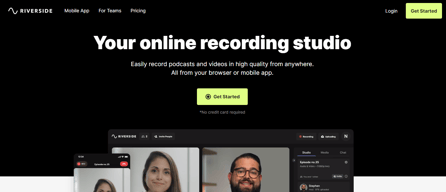
Riverside is an online audio and video recording platform that allows users to run and record webinars in 4K video quality, straight from their browser. It’s ideal for users who want to create studio-quality webinars and remote interviews, regardless of where they’re recording them from. Riverside also supports tools that let users separate audio and video trackers, Livestream Twitter, YouTube, and Facebook. Transcription is also available on higher tiers and collaboration is easier on the platform’s shared work environment.

| Capabilities |
AI
|
|---|---|
| Segment |
Small Business
Mid Market
Enterprise
|
| Deployment | Cloud / SaaS / Web-Based |
| Training | Documentation |
| Languages | English |
Riverside Pros and Cons
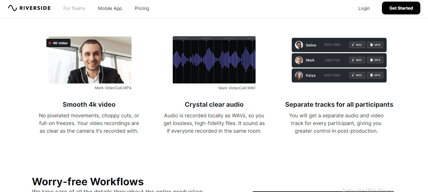
- Lets you record your webinar in full HD
- Helps you save time by automatically recording each participant on individual tracks
- Provides a call-in feature that helps boost audience engagement
- Mobile app available only for iOS
- Uploading complaints have been reported, especially for progressive uploads.
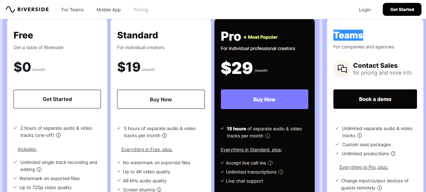
- It can be costly for heavy users as it follows hourly pricing


Compare Riverside with other popular tools in the same category.
Riverside makes possible what I truly didn't know was possible in the Zoom world: HIGH-QUALITY video recordings!! When I started my job in marketing, I asked users to send me video testimonials, but they were often unusable because the person didn't set their phone at a good angle or didn't address all the topics I wanted them to talk about. Now, I interview people in real time and direct them on how to adjust their laptops/phones, and Riverside enables me to have the high quality video and audio I need and couldn't get before!! Fingers crossed that this platform overtakes Zoom, it's so so so much better and a blessing to my professional life. Also, Riverside has AMAZING customer service, I really appreciate that.
There was bit of a learning curve in the beginning to figure out how to get the highest quality videos out of my interviews. I figured it out with some testing and help from customer service. The only other thing I dislike is the price packaging from "pro" to "teams" - the insane price jump ensures that more people in my company won't make the switch from Zoom to Riverside, which is unfortunate, and the idea of "just make your own account for yourself" is off-putting to people who don't absolutely need it like I do. Also, the "add marker" feature is hard to figure out, it would be great if that was simpler/more intuitive.
Riverside makes possible what I truly didn't know was possible in the Zoom world: HIGH-QUALITY video recordings!! When I started my job in marketing, I asked users to send me video testimonials, but they were often unusable because the person didn't set their phone at a good angle or didn't address all the topics I wanted them to talk about. Now, I interview people in real time and direct them on how to adjust their laptops/phones, and Riverside enables me to have the high quality video and audio I need and couldn't get before!! Fingers crossed that this platform overtakes Zoom, it's so so so much better and a blessing to my professional life. Also, Riverside has AMAZING customer service, I really appreciate that.

The suite of options and the staff care whenever there is a question or snafu.
The only downside is mine: I need a "real" studio. A woman can always dream,
Which choices to use for which type of recording .

I've had interviews where the internet connection was not the best, thus providing a very fuzzy recording throughout the interview. As Riverside.fm records locally on everyone's computer, the picture and sound turned out great. I thought I would have to send a camera with a microphone to all the participants, but that hasn't been the case with this software. It's easy to use and particularly exceptional if you want to create a soundbite to send out to your audience with their Editing software in three different frame types for Story, Post or Full Length. They help you decide which size by what social media you plan to use. I also really like how I can have more than one video per studio and keep everything about that episode in one place.
I did have one recording that has choppy consistent background noise that was throughout an entire 1 our episode. I cannot figure out how to clean it out of the recording in Adobe Premiere Pro.
They have been very good at responding to my issues.

We’ve been using Riverside at our podcast production company for more than two years. Catering to corporate clients as we do, it is critical that every podcast episode we produce sounds and looks professional and polished, and Riverside’s suite of tools is the best solution we’ve found to accomplish that.
I can't say there's anything I really dislike about the platform. On the rare occasions when we've had some kind of issue, Riverside's support team has been prompt to jump in with a fix.
When you work with stakeholders across time zones as we do, it can be difficult to curate a podcast interview that sounds like it was recorded in a studio. Riverside's progressive recording process eliminates the "roboticized" glitch effect of low-bandwidth internet by recording locally on users' PCs, caching their files and uploading them as bandwidth allows.

The ability to record and edit my video podcast, and then easily create clips is what's most helpful for me.
I wish it had a feature that would automatically detect segments or something like that powered by AI to help me find and make clips faster.
Faster content production.

Riverside is great for any type of video recording - podcasts, youtube videos, etc. It provides such a high quality video and I love that I can separate out the screen recording vs. video vs. audio into separate tracks.
I haven't used it for any live streaming, but that is something I've heard it isn't the best at - but we don't need much of that at this time.
It provides higher quality video which helps with testimonials, customer stories, youtube recordings, etc.

We run a large podcast network, and Riverside's enterprise offerings are incredible. This is going to make my hosts job easier and fits right in to my production teams workflow. The time savings alone is worth the price.
I have yet to run into a downside. Will edit this review if/when that happens.
Managing a large, geographical disperced podcast network

Great all-in-one solution for recording podcasts. Peace of mind.
Have had some video recording issues but they were fixed.
They are making sure encoding of video is seamess.
Overall the platform does what I need for podcasting with multiple guests for audio and video. Video and sound quality is great compared to Zoom where the audio and video timing are off. The customer service I received from Pat was amazing, was very patient, answered everything I had and stuck around to make sure I had all the answers I needed.
Streaming features with LinkedIn are not as seamless as Streamyard, I would love to only use Riverside vs having to use both. 1 for podcasting and one for streaming to LinkedIn Live.
Sending guests to a studio environment where everything is handy that does not feel like a conference call. Because audio and video quality is so much better it reduces my editing time.

I love it's simplicity and the high quality you get by using the platform. I wouldn't use any other platform. It's is simply the best one out there.
The only thing I don't like is something I am not they can help - which is guests dropping off during interviews also that the streaming platforms don't play ball
The problem of ease when podcasting - the user experience is great, it easy for non techies to use and it creates great audio/video

An economical podcast/meeting platform that affords excellent sound quality for remote interviews, easy to use for both host and guests, and not affected by faltering internet. Also friendly and prompt tech support.
I haven't experienced any negative issues using Riverside.
Reliable hosting for remote podcast interviews, providing tracks that are not affected by any intermittent internet outages, and the superior audio quality makes it sound like host and guest(s) are in the same room. The Riverside team is also very responsive to technical queries through their messenger service. There was a sound issue in a recent podcast between Australia and the UK, some persistent background static resulting from a guest's mic malfunction and not related to Riverside's platform. Riverside's tech support team was able to identify the problem straight away, and the response to my query was courteous and fast.
The interface is really clean and easy but the rock star part is that it is recording at the best quality that can be recorded by everyone's device/phone/web cam. The highest quality video is so necessary and other platforms do not use that. Then you add in that it is very affordable, keeps your library in the cloud and can be accessed quickly. it works!
If you are using a phone to record you do need the app. Also, huge problem, you cannot tell if a person recording on the phone is in vertical or landscape mode. I have got burned by that before.
We use it to record interviews where the producer is off-camera. This is so easy for the guests to use it does not scare them away from shooting with us.
We moved off Zencastr to Riverside because of its stability and its better features. I love the accessibility of tech support at all times within the chat during the recording sessions.
Make sure that if you upload a custom background to your "magic video" that the aspect ratio is exactly what it needs to be in the final render. I learned the hard way that the background image file controls the aspect ratio.
Riverside enables us to podcast with two hosts on opposite coasts and add guests easily into the mix. We're also beginning to use its new "clips" feature to pull highlights for social.

Riverside is the easiest tool to record podcasts and videos in studio quality (I mean video and audio quality) from anywhere with just the browser and local recording up to 4K video resolution.
Nothing much to hate about Riverside. Maybe just a minor fix with the audio quality since there are times when the audio needs to be edited or remixed due to some echoing. Hopefully, Riverside can detect that during recording and warn/advise.
The overall production of the podcast is rooted in the audio and video output from Riverside. This is the foundation of the podcast. Even when the internet connection is poor while recording, the video quality will always be smooth and freeze-free.
Riverside's wav quality files and sleek user interface make my client-facing job easy. I provide them with quality mics and headphones, they provide the content.
I wish that the price point was lower, but I appreciate the tiered options. I also wish they could figure out a way around wonky internet connections, but that's on the ISP end of things.
I am a podcast producer. The separate wav files for each speaker allows for a seamless sound and easy editing. I can manage multiple projects and clients in a single platform.
Riversidefm offers the ability to record full HD tracks for each of the meeting members and separately for the shared screen. The video quality is excellent for pre-recorded webinars. The fact that each video comes synced with its own audio track (yes, you also get individual audio tracks!) is a great benefit as it allows us editors to clean the background audio while a guest isn't speaking. We also love the background noise reduction feature as some guests on our show won't have external microphones.
There isn't much to dislike. The one little thing that bugged us, in the beginning, was the guest URL but once we had that figured out, our studio is super easy to use.
We're saving so much time in post-production since we get individual audio tracks for each speaker which allows us to early master the audio tracks. The quality of our pre-recorded lessons has increased dramatically with the support of 1080p recording.
My favorite thing about Riverside.fm is how easy it is for me to get other guests onboard. The ease of use by sending a single link and eliminating any sort of download or installation makes for the barrier of entry easy for those that are less tech-savvy.
If I had to pick anything, it would be that sometimes you need to leave the browser open to finish the uploads. I'm really digging deep to find a con, here.
We've been able to produce panel-style discussions with individuals in three different time zones at the same time. The audio clarity and video quality is better than anything else we've seen.
Riverside is incredibly easy to use, cost-effective, and produces high-quality recordings. We record routinely with older guests who aren't super tech-savvy, but they've had no issues logging in and getting connected. I'm a huge fan of this platform and all of the features it has to offer!
Honestly, there's not much I dislike here. We've occasionally had some issues with guest audio/video not uploading quickly after the recording finishes, but Riverside makes it easy for guests to go back to a link after they leave the studio to finish uploading at a later time.
Before finding Riverside, our team had struggled to find a consistent way to record high-quality podcasts. We had used Zoom, but the quality was just abysmal. Downloading and uploading recordings was difficult, and our editors had to spend forever cleaning up the audio. We couldn't even release video of the recordings because it was unusable. After we switched to Riverside, we were blown away by the difference in quality and ease of use.

All the programs offered on the platform and the support team helping with technical errors!
Nothing, Nothing, Nothing, Nothing, Nothing!
Recording my podcast remotely!
No matter the quality of your Wifi or your guest's, the recording always looks and sounds great!
They're still growing so coming out with new features always
One place to record and edit podcasts and video interviews! Riverside.fm provides a separate track so you have more control in post-production, it's great!
The native audio AND video recording feature.
Bit on the pricier side, but it is worth it.
Remote podcasting through zoom or skype is super compressed, and the quality is lacking even with the best of internet speeds. Sure zencastr and squadcast have native audio recording, but they lack a working video recording aspect. Just locked behind betas, whereas with riverside.fm they've had it the entire time, and I am able to get high quality video on both ends. #doubleender
One of the standout features of Riverside is the high-quality audio that it delivers. The virtual studio provided an intuitive recording environment that captured every nuance of my voice. Another aspect that deserves recognition is Riverside's reliability. Throughout my usage, I experienced no significant technical glitches or interruptions. This reliability allowed me to focus solely on the conversation, knowing that the recording would be captured flawlessly!
Regarding the editing capabilities of Riverside, there is room for improvement, particularly in refining the option of editing using the transcript. While the service offers the convenience of generating a transcript alongside the audio recording, the editing functionality within the transcript interface could benefit from further development. One of the issues I encountered was the accuracy of the generated transcript. While it did provide a rough representation of the recorded audio, there were instances where it misinterpreted certain words, phrases, or accents.
Riverside gave my business a reliable solution for recording online conversations with my cohost, excellent audio quality, and an easy-to-use and well-designed interface.
We use Riverside.fm for high-res, remote video recording. Guests log on easily, look and sound great, and I can edit quickly and utilize various enhancements, which are constantly being expanded. The video quality is amazing when using an iPhone's back-side camera. Sometimes I export a PremierePro timeline, which allows more complex editing, too. We also have a corporate Zoom account, but there's simply no comparison. Support and tutorials are great, too.
Sometimes guests are apprehensive about loading yet another app on their phone, but I assure them it's a reputable, trustworthy app they can delete after the recording. I wish there was an internal background generator, so I could customize it within the app instead of creating my own in PS and uploading it.
They are quick to respond via chat and e-mail, and even quickly fixed an issue with a multi-person recording that went out of sync. They've also given personalized support and tips for improving my recordings and guests' experiences.

It has many features, including a chat option and a call-in option for making video calls inside the Webinar. I used it 4-5 times in a month. It is a very easy-to-use application. The organization, I am doing work with has integrated it into their APIs, very easily. Customer Support & care is quite impressive. Overall Best application in its category.
Very less features as compared to other applications, with no option for a webcam except the In-call feature. Not good for the Online (face-to-face-webcam) type of video conferencing, as only the In-call feature is there as compared with different apps.
Yes, It is helping the Organization, to host online events. Benefitting the organization in content creation. Different guests had arrived, and Riverside.fm helped in screen and video capture, including screen sharing, In-call feature, etc.
Great to repurpose content for Social Media and edit content in Adobe Premier Pro, however, I like to be able to edit podcast content in Adobe Audition and video in Adobe Rush, as I am not a Pro user. Also easy to monitor the guest microphone and camera. The best part is that the content is uploaded to iCloud. Also, I like to be able to mark the video and capture some special moments for clips. Customer support is excellent and available all the time.
So far only thing that did not regularly work as expected was uploading content that was produced elsewhere. Could not figure yet how to manually create short clips.
Ease of multi-purposing content, at great quality.
The ease of use and seamlessness of live uploading during recording is fantastic. The accuracy of the auto-captioning is helpful as well!
The AI sound editing is pretty good, I look forward to further improvements.
Live uploading and seamless connecting to streaming platforms.
It facilitates my podcasting experince with my guests, as i can reach them anywhere with ease and professionality
The cutting and the back noise smtimes, which unfortunatly can't be editied even in specialized editing prorams
Hosting guests from abroad in my podact
Riverside is easy to use as both the host and a guest. The video and audio upload in realtime, so I don't worry about losing anything. I am a huge fan of Magic Clip when I make promotional content.
One downside is that my content didn't save when I was using a new camera, but it actually may have been an issue with my laptop.
Riverside is on the cutting edge when it comes to transciption and AI generated content, such as Magic Clips.
We have loved using Riverside for our podcast video recordings. The quality and the ease of use are terrific. The quality is great. No complaints so far!
My only complaint is that when two people are side by side, I can't always ensure that we are looking at the camera so that the end result is strong.
We used to use Zoom but the video quality wasn't as good, and the files had to be stored locally which wasn't ideal if Internet access was an issue for any party.
Easy cloud recording features, new AI updates to create short clips for social
In-app editing features can be improved.
Riverside makes podcast recording so much easier, especially when you have guests on your pod.