

Unclaimed: Are you working at Riverside?
Riverside Reviews: 4.8/5 — Highly Rated
Riverside is an online audio and video recording platform that allows users to run and record webinars in 4K video quality, straight from their browser. It’s ideal for users who want to create studio-quality webinars and remote interviews, regardless of where they’re recording them from. Riverside also supports tools that let users separate audio and video trackers, Livestream Twitter, YouTube, and Facebook. Transcription is also available on higher tiers and collaboration is easier on the platform’s shared work environment.

| Capabilities |
AI
|
|---|---|
| Segment |
Small Business
Mid Market
Enterprise
|
| Deployment | Cloud / SaaS / Web-Based |
| Training | Documentation |
| Languages | English |
Riverside Pros and Cons
- Lets you record your webinar in full HD
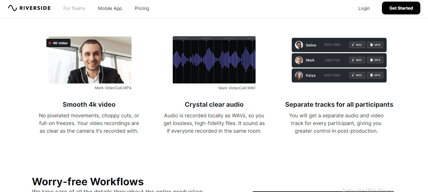
- Helps you save time by automatically recording each participant on individual tracks
- Provides a call-in feature that helps boost audience engagement
- Mobile app available only for iOS
- Uploading complaints have been reported, especially for progressive uploads.
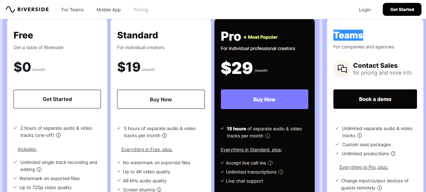
- It can be costly for heavy users as it follows hourly pricing


Compare Riverside with other popular tools in the same category.
Ease of us. It's very easy to figure out how to use the platform and get the first episode going live very quickly!
if you aren't using Chrome or Edge there could be an issue when recording. Other than that it's great!
Being able, at an affordable cost, to run a podcast from start to finish. It saves a lot of time.
So easy and fast to use and setup, overall has just the right amount of features to streamline the entire process of getting a podcast setup and running. The Ai transcripts and edit feature is outstanding.
Having to buy up to other features via subscription, maybe some of the more basic features logo logo upload, download all files after a recording should be part of even the paid basic subscription.
Brings everything together, online podcasting via video links. The fact that Audio if lost can resync back to the podcast original recording and isnt lost. Also the audio quality is excellent which is super important.
I've used several competing platforms. Riverside is hands-down my favorite for a combination of features and ease of use for my guests
I have nothing negative to say at all. Great platform
Recording of short and long form video content. It's a combination of educational videos and podcast type content
Easy to use for non-technical people. Very short learning curve. Everything we do for podcasting and Youtube interviews lives here!
Still a developing and growing tool. Some pains with trimming footage but nothing Adobe Premier can't fix.
Much better than Zoom and far more intuitive. Worth the price.
The editing is very easy to use, and the ability to have multiple tracks to use individually in external editing is very useful. Video and audio quality is top notch.
Having the users wait to finish uploading can be difficult sometimes, but with proper education to the user prior to recording, it makes things easier. Giving a note to the user as they sign on to record reminding them to stay online would be helpful.
I used to have to wait for the host to record on zoom, then tell me that it is done, and he would have to upload to google drive and then I download then edit. Now it is all seamless in one space.
I love Riverside because of it's versatility. I can use it to record interviews for podcasts, casting sizzles to be used in the TV space, and record high quality audio in real time with voice actors while also providing them live feedback. It's easy to use and makes the best tool for anyone who works in both nonfiction and scripted entertainment production!
There aren't things I dislike about Riverside.fm. It's a really wonderful application - the only thing I can think of is how there's a bit of a learning curve with inviting people to your recording session, but once you do it the first time, it's easy!
Riverside.fm is helping me stay organized and provides a central location for me to record video and audio across various mediums. Before, I used to have to open a million apps in order to work across several projects, and now I only need one: Riverside.fm!

I love that I can create clips of my show in real time instead of having to do it afterwards. It cut down editing time tremendously.
It sometimes has audio distortion causing me to have to rerecord.
It cuts down on editing and production time.
I love the new silence-removing feature. The video quality is excellent and I've had no problems with out-of-sync audio (as I did on other platforms).
Their new AI features aren't quite working yet. The Magic Clips (for reels etc.) don't really pick out useful parts and they're too short.
I used to record on my digital camera, then import, edit and upload. The whole thing took about 4 hours. Now it's under 1 hour to publish an episode.
I wasn't a podcaster before but Riverside.fm has made it simple for me to do this and manage my business. Because of the content we create, our engagement on social media has gone up 1300% in the first 3 weeks.
I hope they can add more editing functionality. The ability to add thumbnails, audio and other images.
We're using Riverside to record podcasts and create content for our media assets.
Ease of use, great team. Lives up to its promises.
Haven't found anything yet. We've been very pleased.
Using riverside helps avoid redundant HR costs and outsourcing work.
