

Unclaimed: Are you working at Unbounce?
Unbounce Reviews: 4.4/5 — Solid Choice
Unbounce is a flexible and powerful landing page builder for all screen sizes. It offers two solution categories. While it offers code-free drag-and-drop functionality for solopreneurs and lean teams with limited development resources, it also allows for custom JavaScript and CSS programming for more experienced users. Unbounce offers two major product categories – Classic Unbounce and Conversion Intelligence Platform. Classic Unbounce allows marketers to design pages in minutes with its 300+ built-in templates and integration with theme stores, plus an array of marketing-focused capabilities such as offer targeting, A/B testing, and content gating just to name a few. The newer Conversion Intelligence Platform leverages AI and machine learning that empowers businesses to create high-converting marketing campaigns. It offers industry-specific, goal-based, and data-driven page templates, content delivery based on traffic sources and visitor attributes, and AI-assisted copywriting capability.

| Capabilities |
AI
API
|
|---|---|
| Segment |
Small Business
Mid Market
Enterprise
|
| Deployment | Cloud / SaaS / Web-Based |
| Support | 24/7 (Live rep), Chat, Email/Help Desk, FAQs/Forum, Knowledge Base, Phone Support |
| Training | Documentation |
| Languages | English |
Unbounce Pros and Cons
- Extensive guides and resources
- Excellent natural copy generation, with minimal editing required.
- Multiple template options for product descriptions, ad copy, landing pages, Facebook ads, and more
- Chrome extension to automatically create content on social channels.
- Excellent A/B testing functionality
- Not ideal for creating long-form copy, due to limited output options.
- No options to help you organize your content.
- It needs better analytics tracking
- Price is uninviting unless you’re making money
- Responsiveness and mobile optimization could be improved

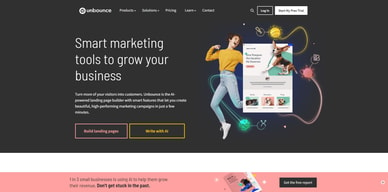
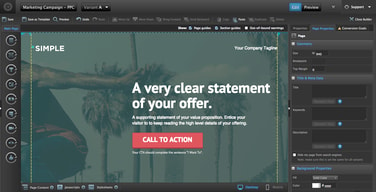
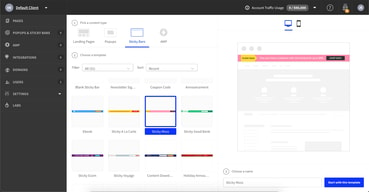
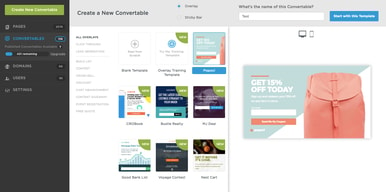
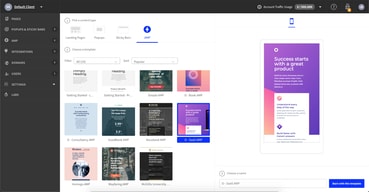




Unbounce is by far one of the most prolific and popular landing page builders on the market. Part of what makes it so appealing is its versatility. The solution gives companies multiple ways to capture leads, with pop-ups and sticky bars, lead forms, and various other fantastic tools.
Of course, Unbounce is far from the only landing page and lead capture tool on the market. There are countless other contenders out there, all promising their own amazing functionality.
To help you determine whether Unbounce is really the tool for you, we’re going to take a deep dive into its features, exploring its various pros, and a couple of cons.
What is Unbounce? : An Introduction
Unbounce is a landing page builder, but it’s also a lot more than that. First launched in 2009, it was one of the first tools to introduce business owners to a more effective way of capturing leads. Before Unbounce, creating landing pages meant you needed extensive developer knowledge and skill.
CEO Rick Perreault believed there needed to be a better way to create powerful landing pages. With Unbounce, he created a drag-and-drop solution for teams to design powerful conversion tools, without the fuss. Over the years, Unbounce has increased its functionality, introducing popups, sticky bars, artificial intelligence, and A/B testing.
In fact, the AI functionality means you can essentially get a bot to build your entire page for you, suggesting templates, producing copy, and even offering advice for optimization.
Unbounce Review: The Features
At its core, Unbounce is still primarily a landing page builder, but it also offers a huge selection of features, crucial to creating and optimizing your online assets. As the digital world has continued to evolve, Unbounce has updated its features accordingly. Today, the service includes:
- Landing pages: Drag-and-drop landing page creation with AI support, templates, and tools to help you every step of the way.
- AMP landing pages: Rapidly-loading landing pages performing up to 85% faster than your average page on mobile.
- AI copy creation: AI copywriting tools to generate, remix and expand page content.
- Popups and sticky bars: Multiple ways to collect leads within your existing website pages (without sending users to a landing page)
- A/B testing: Test the impact of your landing page to optimize conversion rates
- Reports and analytics: Track landing page performance and make meaningful changes.
- Smart traffic: AI-powered tools to automatically send traffic to the most relevant landing page, based on a series of factors.
- Dynamic text replacement: Instantly match your landing page content to what customers are searching for, to increase conversions.
- Lead form building: Design and implement forms in your landing pages.
Let’s take a closer look at each of the features.
Landing pages & AMP Landing Pages
The drag-and-drop landing page creation tools are at the heart of Unbounce’s toolkit. The purpose of creating this service initially was to allow anyone to pick up the tool and start designing pages without any specialist design software.
Now, you can create both desktop and mobile (AMP) pages with the same tools. For the standard landing pages, there are more than 100 templates to choose from, and the AI system helps you select a template based on the purpose of your page, like if you’re promoting a discount.
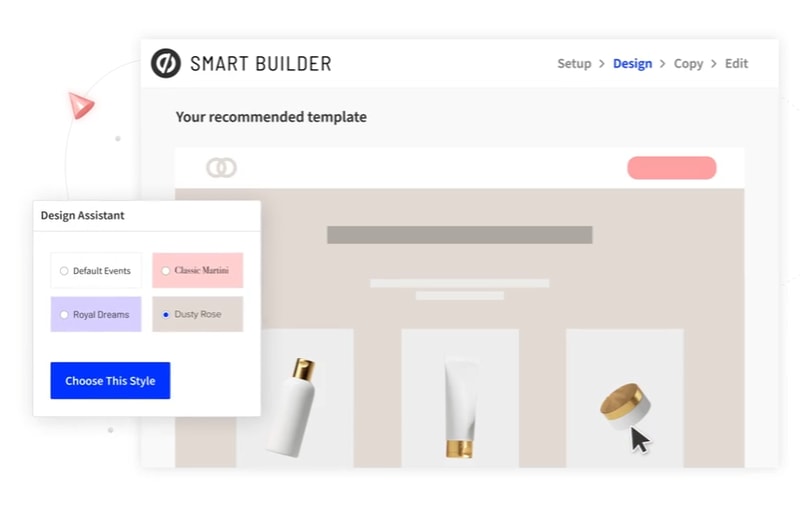
Notably, there’s a classic builder and a “Smart Builder”. The smart builder offers all the same features as the standard builder, but with extra AI support.
The service comes with:
- Drag-and-drop functionality for customization in seconds
- Clone & edit support for duplicating successful pages
- Copy/paste to move elements from one landing page to the next
- Complete pixel-level customization to match your brand
- Quick publishing straight to a WordPress site with a WP plugin
- Integrations to connect your favorite tools to your builder
- AI-enhanced copy insights and suggestions
- Conversion goals and tracking
- Design and Copy assistants to speed through the building process
- Optimized page sections and builder grids
- Google fonts
The experience is one of the smoothest around, whether you’re designing for web or mobile. In fact, Unbounce was one of the first landing page builders to offer AMP page creation. These “Accelerated Mobile Pages” reduce loading times for your customers, with dedicated templates.
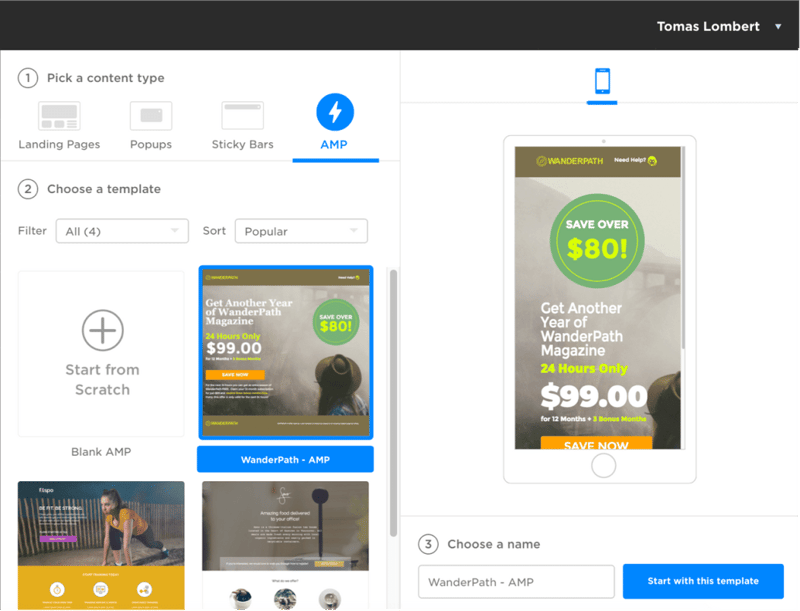
Unbounce even keeps your code and pages up-to-date, according to the latest AMP standards. By removing the complexity associated with AMP solutions, Unbounce ensures every company can build landing pages just as effective on mobile as they are on desktop.
AI Copywriting
One of the more recent additions to the Unbounce ecosystem, “Smart Copy” allows you to write and edit high-quality copy for your website, blog, and landing pages. The service can literally produce hundreds of words in seconds, at the click of a button.
All you need to do is implement some initial information, so the AI algorithm knows the context you’re writing about, then you can generate copy to match. The system makes it easy to edit anything produced, and you can even translate content into more than 30 languages.
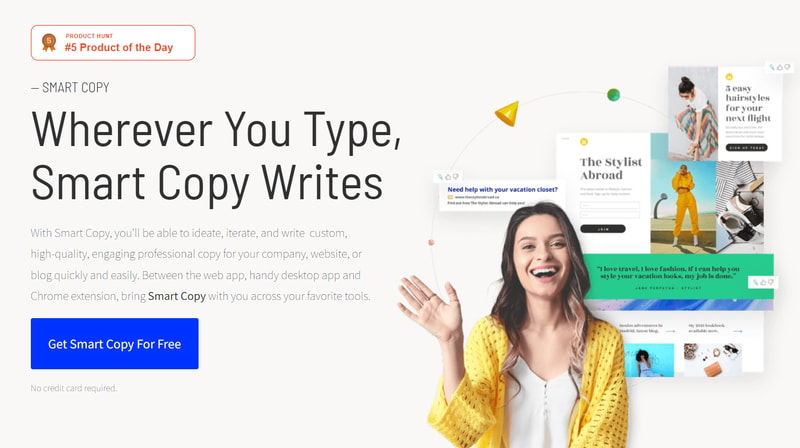
If you’re simply struggling with ideas, the Smart Copy service can suggest options on what to write about, so you can jump into action immediately. There’s even a Chrome extension for creating copy when you’re writing documents online, or creating emails.
Popups and Sticky Bars
While landing pages might be at the heart of the Unbounce ecosystem, they’re not the only way to convert customers. There’s also a pop-up and sticky bar builder for boosting conversions too.
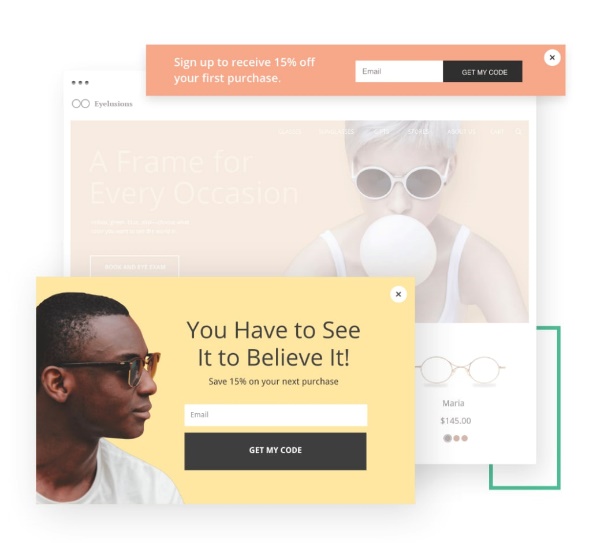
The popups and sticky bars benefit from most of the same functionality you’d get from the landing page builder. There’s still a drag-and-drop builder for easy design, and a host of templates so you don’t have to start from scratch. Targeting and triggers are included, so you can choose who sees your pop-ups, and when they appear.
Dynamic text replacement is included, so every popup can include the keywords your customers are searching for. Plus, you can determine how frequently a popup appears, and even whether certain assets should only appear for people in certain areas.
The Popups and sticky bars also come with two-step forms, offer scheduling to automate your campaigns, and cookie targeting, to show offers based on a user’s browser history. All that, and you still get A/B testing too.
A/B Testing, Reporting, and Analytics
Unbounce ensures you can get the most out of every campaign with extensive A/B testing functionality. Everything you produce with Unbounce has the same testing options, so you can maximize the performance of regular and AMP landing pages, as well as popups and sticky bars.
Setting the tests up only takes a couple of clicks, and you can choose between testing entirely different pages, smaller variations (such as differences between CTA buttons) and more.
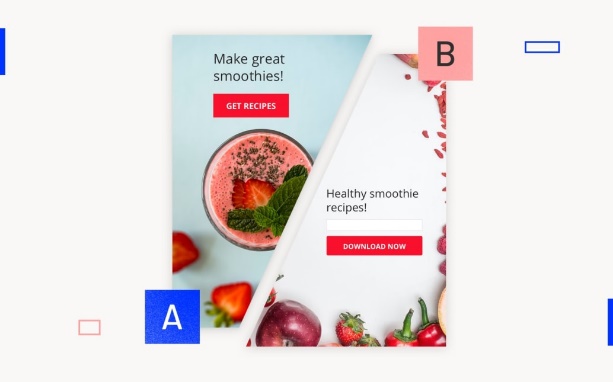
The A/B testing is a crucial part of what makes Unbounce so compelling for customers in the business world. However, it’s not the only way to optimize your campaigns. There’s also a full reporting and analytics section, so you can get deeper insights into how your pages are performing.
The reporting and analytics section also provides insights into any A/B testing results for the tests you’re running. It even integrates with Google Analytics.
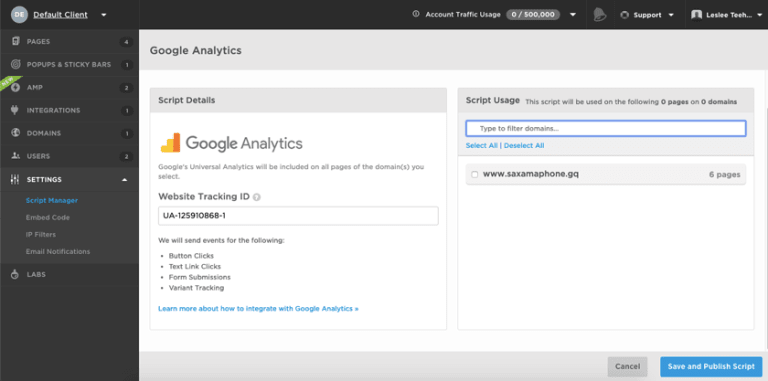
All you need to do is get your website tracking details from Google and add them to the Script Manager in the Unbounce interface. You can then use event measurements to track actions like clicks, and CTA performance. This can help guide your future A/B tests.
Smart Traffic
Smart Traffic is one of the cleverest features of Unbounce. It’s essentially an AI-powered tool for increasing conversions, which looks at the “attributes” of all your visitors, and immediately directs them to the most relevant landing page. This could mean sending your customers to different pages based on their location, device type, OS, and browser.
The Smart Traffic system starts learning about your website and visitor attributes instantly, and can automatically identify conversion patterns based on who clicks on which page variants.
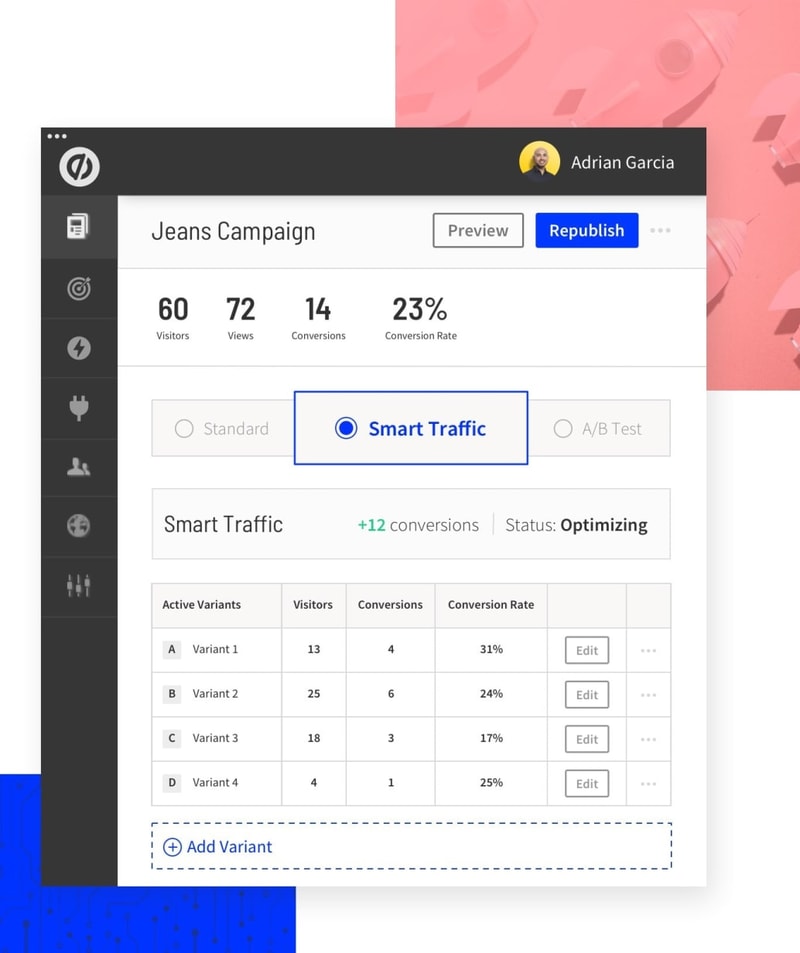
Unbounce is currently in the process of updating the functionality of this feature with Smart Traffic Insights, so you can get more actionable advice on how to improve your pages. There are also Smart Traffic reports for easily digestible performance insights.
Dynamic text replacement
Dynamic text replacement is how Unbounce ensures every landing page and pop-up is as relevant as possible to the people who see it. The solution matches the copy on your landing page to the keywords people search for before they click on your ads.
You can even combine this functionality with the dynamic keyword insertion features from Google Ads, to create PPC campaigns custom-made to adhere to user intent. By focusing on more relevant content, you can boost your chances of having a direct impact on your customers.
All you need to do to use this feature is select the text you want to apply and click the “Dynamic text” option. The dynamic text will automatically replace the words whenever a customer visits your page.
Lead form builder
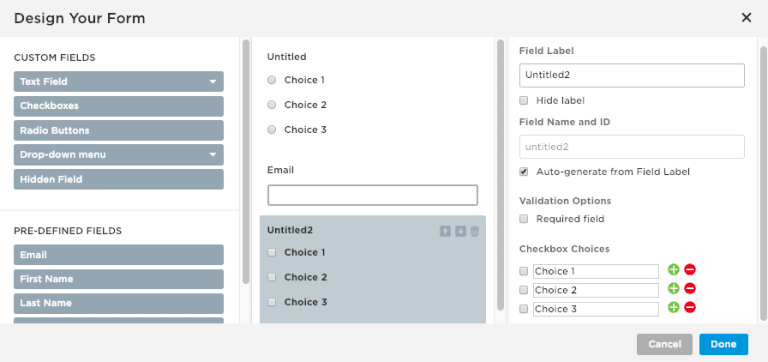
Unbounce also features a handy form builder so you can add lead-gen forms to any page, anywhere. This isn’t the most advanced form builder on the market, but it’s a great way to ensure you can instantly collect valuable information straight from your target audience.
You can also create two-step forms. This allows the customer to confirm they’re ready to convert with an opt-in message.
How to Use Unbounce?
Unbounce is a very straightforward tool, excellent for anyone who doesn’t have a lot of experience using a landing page builder. Here’s a quick step-by-step guide to what creating, publishing, and testing a landing page in Unbounce might look like.
Step 1: Creating your landing page
When you’re ready to start building a landing page with Unbounce, you’ll have the option to choose between the classic builder, and the new “Smart Builder”.
The classic builder gives you a basic step-by-step experience where you can choose a template or start building with a blank page from scratch. The full experience is drag-and-drop, so you can easily pull your CTA buttons, pictures, and other elements into any section of the page. There are also grid guidelines to help keep everything aligned.
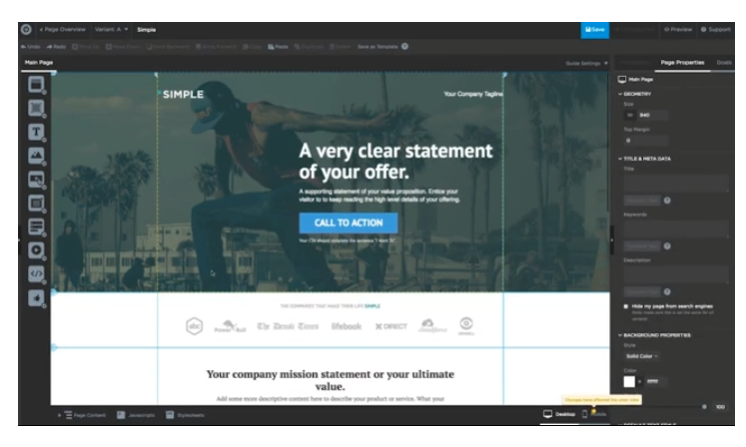
The drag-and-drop builder comes with a widget panel for adding and removing anything, whenever you choose. You can rearrange content however you like, and even add custom HTML with the code widget.
The smart builder is a little more advanced. You start by providing the AI system with some information about your campaign.
You can enter information about what kind of business you’re running, what your goals are and so on, and the Smart Builder will automatically suggest a design for you. The service also comes with access to Unbounce apps, so you can add things like PayPal and Stripe integrations to your page in a click.
The Smart Builder comes with the “Smart Copy” function mentioned above built-in, so you can generate content with AI help if you’re not a confident writer. There’s also the “Smart Traffic” option so you can automatically send customers where they’re most likely to convert.
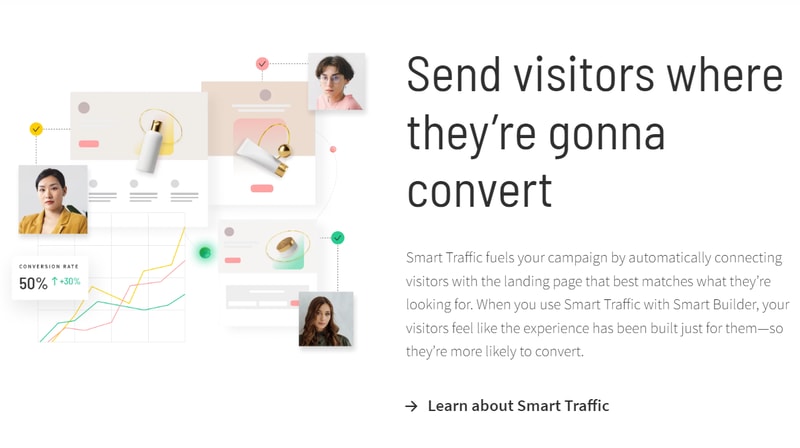
Unbounce’s landing page builder, whether you choose the classic model or the smart solution, is extremely straightforward. It also gives you a lot more freedom than you’d get from the majority of alternative platforms. You should be done building in a matter of minutes.
Step 2: Publishing Your Landing Page
After you’ve created your landing page, the next step is publishing it. For WordPress users, this couldn’t be more straightforward with Unbounce.
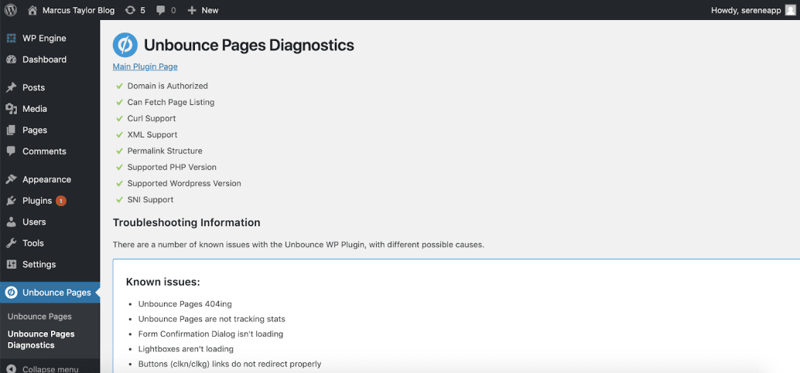
You can simply download the Unbounce plugin on WordPress, verify your account, and you’ll be able to add any landing page you choose to your CMS. Head to the Unbounce dashboard and define your URL, and you’ll be ready to go.
Once again, this is another way Unbounce helps to cut down on the amount of extra coding and work you need to do to make your landing pages as effective as possible.
If you don’t have WordPress, you will have to jump around to a few different areas within the UI and connect with your hosting provider to configure the connection between Unbounce and your domain. The process takes a little longer, but you can find some videos and guidance to help here.
The “Unbounce Apps” APIs, and Zapier access can also make it easier to add other connections you need straight to the system. If you’re using the Smart Builder, you can automatically send leads to CRM and marketing automation tools like MailChimp, HubSpot, Zoho, and Salesforce.
You can also create your own Webhook integrations or use Zapier to connect virtually anything. The Unbounce Apps are particularly useful for implementing payment solutions for ecommerce pages.
Step 3: Testing Your Landing Pages
Unbounce is one of the few landing page builders out there to deliver unlimited A/B testing on all platforms. This is one of the key features most people appreciate on this platform, as it ensures you can optimize the performance of every page.
Otherwise known as split testing, this feature allows users to create multiple versions of the same landing page to see which works better.
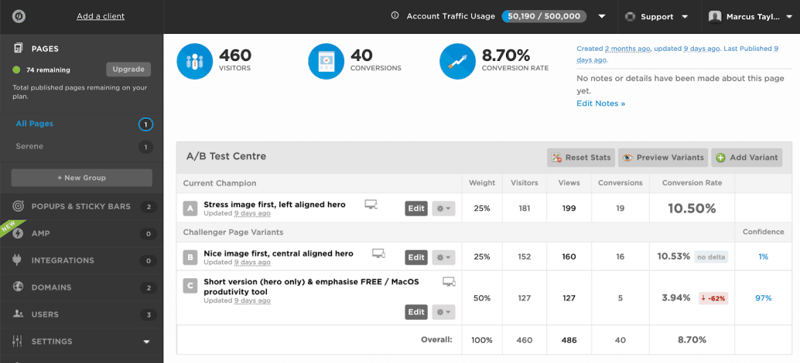
Unbounce automatically splits traffic between both landing pages, simplifying the process so you can focus on the other aspects of running your business. You won’t need any technical expertise, and you can create and run tests with virtually no developer input.
Of course, there’s also the full analytics section too, which includes a real-time dashboard to show you how your pages and tests are performing. You can link this with Google Analytics to take your insights to the next level and use other marketing and optimization apps available through the integrations and “apps” part of the site.
Step 4: Using Popups and Sticky Bars
If you want to take your conversion options to the next level, you can experiment with the pop-ups and sticky bars too. These are just as straightforward to use as the landing page creator, because the technology is the same. You still get the drag-and-drop builder, and you’ll have a host of options available to control how your pop-ups and sticky bars work.
Once you’ve designed your asset, you can implement dynamic text replacement, two-step forms, and URL targeting, to ensure your popups run on the right pages. You can also adjust:
- Action triggers: Launch your popups and sticky bars when a customer is about to abandon a page, as soon as they arrive, or when they click on an element.
- Offer frequency: Decide how many times a customer will see a sticky bar or popup
- Offer scheduling: Schedule bars and popups to appear when a seasonal campaign begins
- Location targeting: Get local offers in front of visitors nearby by targeting regions
- Cookie and referral targeting: Create segmented offers based on traffic source, or based on the pages your customers have visited in the past
Because it’s not a dedicated popup platform, Unbounce doesn’t give you quite the same level of options as you’d get from other platforms like OptinMonster, but it’s still a great option for beginners. The dynamic text replacement also ensures the assets are as relevant as possible.
Unbounce Review: Ease of Use
Clearly, Unbounce is excellent when it comes to ease of use. If you’re looking to create professional landing pages and pop-ups without the headaches, this could definitely be the tool for you. There are hundreds of templates to choose from in the classic landing page builder, and you get complete control over how you customize your pages.
If you’re willing to upgrade to something more intelligent, you can also use the Smart Builder to make the whole experience even more straightforward. The smart builder can literally create most of your landing page for you, including the copy, so you can spend more time focusing on converting customers. You’ll even be able to optimize your traffic automatically.
When you’re building with Unbounce, there are plenty of pop-up sections and guides to help you too. As soon as you log into your account, you’ll go through an onboarding process which explains the features and options in easy-to-follow English.
Working with different elements couldn’t be simpler, and there’s a “properties” tab on the right hand of the page to help you tweak all of the elements of your design as much as you like.
Even running an A/B test is straight forward.
Unbounce Review: Support
Unbounce has a few different options when it comes to support. There’s a lot of focus on DIY guidance, with help articles, videos, and other valuable content to guide you through how to manage most things on your own.
An active online forum helps you collect insights from community members too. However, if you need extra guidance, you can submit a support ticket to support@unbounce.com, to get in touch with a real human being to help you. Existing customers also have access to live chat within the “Support” section of the builder app.
There’s also phone support, an active blog, and some social media pages where you can seek out guidance through channels like X.
The team is generally active from 1am to 8pm PST, Monday to Friday, and 9am to 9pm PST on weekends. However, weekends can have longer delays.
Unbounce Review: Pricing
You can choose from a few different packages for your service from Unbounce. All packages come with a 14-day free trial, but you do need to enter your credit card details to get started. Notably, you’ll also save 10% on all packages if you opt for “yearly” payments, instead of “monthly”.
Options include:
- Build: For smaller-scale campaigns with essential landing page features.
- Experiment: Adds A/B testing and Smart Traffic capabilities.
- Optimize: Expanded limits for growing businesses.
- Concierge: Premium support and custom limits for high-volume teams.
See Unbounce pricing for current rates and plan details.
All plans included unlimited landing pages and A/B testing, unlimited sticky bars, access to Unbounce apps, and unlimited pop-ups.
Unbounce Review: Pros and Cons
Overall, Unbounce is an extremely valuable tool for anyone looking to create landing pages and convert more customers, with minimal coding knowledge. However, it’s not the right tool for everyone. Let’s look at the pros and cons:
Pros:
- Ease of use: Quickly build and publish landing pages, sticky bars, and popups using either the classic builder, or the AI smart builder for extra support.
- Customization: Adjust anything you like, from pop-up triggers, to landing page branding with a couple of clicks.
- AI enhancements: Access a range of AI tools like dynamic text replacement, AI copy creation, and smart traffic to boost conversions.
- A/B testing: Unlimited A/B testing makes it easy to create variants and track their results.
- Good customer support: There are lots of customer support options to choose from to help you if you have any issues.
- Apps and addons: Connect a range of the tools you already use straight to your landing pages and publish directly to WordPress.
Cons:
- Basic form builder: The form builder does have some limitations on how much you can customize.
- Button issues: You can’t add custom classes to buttons, which means you may need to re-build them in HTML to get the right results.
- Affordability: Unbounce can be quite expensive for beginners, even on the lowest pricing package.
Unbounce FAQ
Q: What is Unbounce used for?
Unbounce is an intelligent conversion platform and landing page builder designed to help you capture more leads and boost your profits. It comes with a host of AI tools to help you get started, and a lot of fantastic testing options.
Q: Is Unbounce easy to use?
Unbounce is one of the most straightforward tools on the market, particularly now the company is investing more in its AI features. You don’t really need any developer knowledge or background insights into landing pages to get started.
Q: Does Unbounce work with Shopify?
Unbounce works alongside a range of other tools, including WordPress and Shopify. You can also add-in various other apps, like PayPal and Stripe for managing payments. There are also Zapier connections available if you’re using another CMS.
Unbounce Review – Finishing Thoughts
Hopefully, this Unbounce review has given you a good idea of what you can expect from the Unbounce landing page builder. Ultimately, it’s a straightforward and convenient app, with a list of features that continue to get better all the time.
Although there are some issues, like an absence of many advanced form-building features, it’s hard to find much in Unbounce to complain about.
Do you have any experience with the Unbounce landing page builder? Share your experiences with us in the comments below.

Compare Unbounce with other popular tools in the same category.
Unbounce solves the problem of needing a landing page for information collection, without needing to build a full site.
Sometimes the customization options are limited, but it's getting better every year.
Allowing us to have a landing page without building a full site.
Really easy WYSIWYG, drag and drop editor for landing pages, forms, etc. Also has integrations into things like Hubspot so our Marketing and CS teams can use them without the help of a web developer to quickly turn around content for webinars, etc.
Responsiveness is kind of meh, have to really edit the mobile view to get it right. A lot of items are positioned absolute instead of relative so need to play to support resolutions.
Need to quickly turn around landing pages and run A/B testing without having to pull a developer onto a project. This way the team can create and tweak these pages and forms as much and as quickly as they want.
- Super easy to build landing pages from scratch or from a variety of available templates - Very easy to integrate your forms or to your CRM
Sometimes glitchy, specifically with adding a social card (image that shows up when you share a page on social) -- this requires some custom javascript. Also sometimes glitchy when editing specific parts of text, the link colour won't always pick up for example.
- gives us a home for our landing pages that are easy to edit, customize, A/B test and quickly replicate - super easy to build and train new team members in Unbounce
It is easy for all levels to create website forms and integrates well with other tools (ie Salesforce).
I don't have any dislikes about Unbounce.
We are able to make multiple landing pages for our email campaigns, see the analytics easily, and it integrates with other tools we use (Salesforce, Make, ect.)
Easy setup and best flow of the platform
There should be option to add customform
Unbounce helps me to launch multiple landing pages with minimum technical knowledge required. Drag and Drop feature is very good.

Ease of use, practical launches, you can build a landing page within a day and have your campaigns up and running in no time. Mobile editing is easy and their support team is great.
Nothing really, i wish it were a little cheaper than it is currently, i have never had any problems with the tool. We have been users for more than 3 years and i dont see us canceling the service.
We are able to launch landing pages that are integrated with our campaigns very quickly. Whereas, before landing page tools were difficult to use, and the launch time was very similar to that of a website.
What I liked best about Unbounce compared to other landing page platforms is its user experience. It is just flawless, everything feels robust and you never feel lost.
I had to think about this haha since I like Unbounce so much. I think the only thing I dislike is that the free plan wont allow me to connect a custom domain!!!
I've built landing pages for enterprise software solutions with over $100k monthly ad spent. We were building landing page for different campaigns and a/b tested them to increase conversion rates.
I can work through the design and development stages at the same time. When a design is complete it is quick to set up testing and start recieving traffic. Love it!
The platform has many recurring bugs, which seem to never be worked out. I have reported repeatable bugs to the team before, but the product does not seem to receive updates. Multiple issues have been in software for 5+ years.
Unbounce allows me to work with many clients with a variety of goals and quickly produce great looking landing pages that produce actions by the visitors. I will continue to use Unbounce for my all in one landing page solution.
Easy to Use, Flexible and Reliable software
Not a CMS itself but love to see it as a CMS replacement/integration.
Landing pages as we didn't have this with our CMS. Also Pop Ups such as Newsletter.
I really like the transparency and analysis side of Unbounce. You can easily see which variants are performing well and see which ones are underperforming, allowing you to maximize the champion variant and build off of what your consumers are feeding off of the most. The collection and presentation of data is effective and makes my job a lot easier.
There's not a lot of downsides to Unbounce, however I do think there could be improvements within the web design aspect of it. I've seen other platforms with a little more options on that front, but overall, there's not much to complain about.
It solves the pain of data collection and organization. Having all the data for our landing pages in one spot makes it easy on us. We didn't have to design a system, the system was already in place.
The best features are the ability to easily build landing pages by selecting elements and dragging and dropping them without disrupting other elements of the page. You can change the appearance of different elements across devices and even hide ones that are not suitable for smaller screens. Having used competitors in this space, this is the only one that allows you the freedom to fully customise a page quickly, without needing coding/dev experience, or having to comprise on your design ideals. The A/B testing functionality is superb, with clear metrics on traffic weighting. The Unbounce community pages are superb at giving help/advice and HTML code that can be copied and pasted onto your page, with minor changes to customise it to your project, which even someone without coding experience like myself can navigate around. Overall, I'd recommend Unbounce to anyone who wants or needs to make landing pages for their website. The best in the business.
The lightboxes which appear after form submissions are a little basic, and it would be good to have a feature that allows you to automatically filter out test lead submissions. Sometimes the design area does not mirror exactly how the page appears once published.
Unbounce helps me create landing pages that offer new products or create pages with lead forms from ad campaigns. This helps us see which of our campaigns and designs convert traffic quicker than coding designs.

Teams without developers can quickly throw together and split test landing pages for things like webinars, downloads, contact forms, event pages, and more. Both our CS and Marketing teams use it.
Positioning is a bit clunky if you're not using templates. Having things relatively placed is difficult and some resolutions are a bit off on placement. Have to basically make 2 versions, one mobile, one desktop.
Creating web content without a developer resource. Anyone can now quickly make a lander without wasting time or having to wait for a resource. This has increased turnaround for things like webinars and decreased cost to produce material like this.

Unbounce has been a staple for our B2B Saas company for many years. It is the most user-friendly landing page builder in the market. Anyone with little to know experience in web building can very easily create pages. Unbounce allows you to easily A/B test different variations of landing pages and has strong analytics features.
Unbounce can be tricky to use when you're syncing between the desktop and mobile version. However, we worked around this by duplicating and hiding different modules on the mobile and desktop versions so they don't influence each other.
We never had an easy way to build out multiple landing pages for different campaigns before, and Unbounce solved that issue. Also, Unbounce allowed us to build an A/B testing framework at our company for the first time.
Unbounce makes it possible for a non-developer like myself to create professional looking landing pages.
It can be tricky to connect form submissions to my CRM. I've needed developer help on occasion.
I need landing pages and need them fast. Unbounce permits me to create them on my own!
I like how easy it is to pick up using Unbounce from using other tools prior. We primarily use Unbounce for Google paid landing pages, and the performance has been stellar so far in terms of page load times as well.
I wish the HubSpot forms integration could filter work only emails natively, other than that everything is great with Unbounce, looking forward to upcoming updates in the platform.
Unbounce is helping us deploy landing pages and subsequent variations at lighting speed. It also helps us intelligently direct the right people to the right variant through the use of AI technology.
Designing coherent landing pages is a breeze. Easy to create variations and conduct A/B testing. High conversion rates. Easy to integrate to website and domain.
Limitations on the number of pages in the freemium model - although the success we had with Unbounce made it easy to upgrade. Mastering the design elements took longer than expected, but that is not an Unbounce problem.
We wanted to craft a series of targeted email marketing landing pages for the launch of a new service - it literally took less than 48 hours and we were watching our strategy being executed and already making improvements to it.
Really easy to duplicate pages to set up easy split tests. Easy to set up integrations and hooks. Reporting is simple but effective. Good templates.
Mobile page creation could be easier to set up and more mobile templates would be better. But good enough for our needs.
Unbounce makes it easy to quickly replicate and split test landing pages.
I like the ease of building a landing page.
Sometimes the interface seems a little clunky,
Perfect solution to send our Adwords traffic from. Helps us keep a tightly focused sales funnel.
The a/b testing and how easy it is to build and make changes
Nothing really overall it's a fantastic software.
Helps us get better results for our clients.

Very easy to get started. Analytics integrations are super simple. You can add any tags you need without coding skills. Not heavy on design requirements
Doesn't have all the customisations you might need (eg not all fonts are there).
Improving landing pages faster without loy quality score
The best features Unbounce has to offer are easy to list. Site speed/page load time is an often-overlooked advantage of using Unbounce vs a client's website, but it can often be a huge quality score driver. Additionally, the ability to integrate the form with many platforms like Marketo and HubSpot helps reduce the need to place third-party forms within the LP.
Some elements of the page can be tricky to edit mainly due to responsiveness features. It isn't too hard to come up with workarounds if you are familiar with source code.
In search campaigns, specifically google and bing, you'll find quality score to be a huge factor in how your ads rank. By improving the overall page quality as well as load times, landing page experience scores jump considerably. Having the ability to edit LPs without needing to go through the client is also a huge time saver for us.
Unbounce solves multiple problems in performance marketing: a) A/B testing b) gaining independence from IT support, therefore massively increasing speed of execution c) dynamic text and image replacement increases conversion rates without having to take care of dozens of landing pages d) easy integration with CRMs or any other tools using Integromat/make or Zapier
There are just a couple of features that would make the product even better. In particular, global sections that can be re-used on multiple landing pages but can be updated centrally. Useful especially for footers or legal sections.
We are a digital marketing agency and run PPC campaigns for our clients. Conversion rate optimisation therefore lies at the heart of our business. We achieved tangible improvements in CPLs and could scale campaigns larger than ever before.

The design tools are intuitive enough fo
r someone, like me, who appreciates good design, but isn't trained in graphic design. The templates work well. The support is helpful. And if you want to go deep and do something fancy, you can do that too!
The problem I had was that I needed to go through IS to get web pages updated. And even then I had to trust that they understood my needs. Unbounce lets me get my hands on the page to make changes on the fly and I don't need anyone else's help. But, since the features that let me go deep on a couple of fancy things are so similar to the Adobe suite, then I can easily ask a designer for assistance and they don't need any experience on the platform to be helpful.

The landing pages are easy to use and amend and keep up to date.
Nothing is missing and there is nothing I dislike
I love the conversion statistics to help identify which adverts are working best
Easy to use and you can get started in minutes, not hrs I can integrate it with all my tools and apps And the BEST support team bar none! Love the Unbounce team!
Nothing. It does the job and it does it very well! Perhaps in future versions, look for ways to minimize Javascript to catch incoming traffic with ad blockers or special browsers
Tracking leads, increase conversions, launching campaigns easily, get clients' marketing up and running with no sweat!
I like that it's easy to create landing pages and I have control over things like font, colours, images and text. I also like being able to view the mobile version at the same time as desktop and to optimize my pages for conversions.
I dislike that I cannot make changes in mobile exclusively from the desktop version, only some changes are allowed.
Unbounce has allowed my team to solve outdated landing pages that were not mobile optimized and functional.

Not only is it easy to create a landing page, but it's very easy to A/B test different versions.
Not a lot to dislike about unbounce. It works great for us.
It's really beneficial to set up different landing pages by ad campaign and comparing the visitor/click metrics
The first time I used it, I was able to figure out how to create a landing page and get it all set up quickly and neatly. I loved the drag and drop feature, too.
I can't think of anything. Once I messed around with it, I picked it up quickly.
This allowed me to build a landing page quickly and integrate it with my site in no time.
The user interface is the best feature of Unbounce
There is nothing that I would say is a negative experience
Unbounce allows us to quickly realise opportunities
How simple & easy to use everything is to use
If you are not familiar with these services the tutorials could be better
Lead generation