Appy Pie vs CorelDRAW Graphics Suite
Take a look at how
Appy Pie
and
CorelDRAW Graphics Suite
stack up against each other across pricing, features, and support
using feedback from real users like yourself.
Appy Pie
scores
4.7
out of 5 from
1326
reviews, while
CorelDRAW Graphics Suite
has been rated
4.3
out of 5 from
506
reviews.
Advertising disclosure: Findstack offers objective, editorially independent comparisons to
help you find the best software. Some links on this page are affiliate links — we may earn a commission when you
visit a vendor through our links, at no additional cost to you. Affiliate relationships never influence our ratings,
rankings, or reviews. Disclosure policy |
Methodology

CorelDRAW Graphics Suite
4.3
( 506 )
Start selling digital products with Crevio

5.0
(1)
Free plan available
Crevio is an AI-powered platform that runs your business while you sleep. Describe what you want to se...
Learn more about Crevio
At a Glance
Overview

Appy Pie is a drag-and-drop builder software that allows users with no programming skills or coding know-how to create an app. The platform can be used for Windows 8 Phone, Android & iPhone applications, both for mobiles and smartphones; and allows users to quickly publish to Google Play & iTunes. Learn more
Capabilities
- AI Enabled
- API Available
- Open Source
- CLI Available
Images
View 5 images
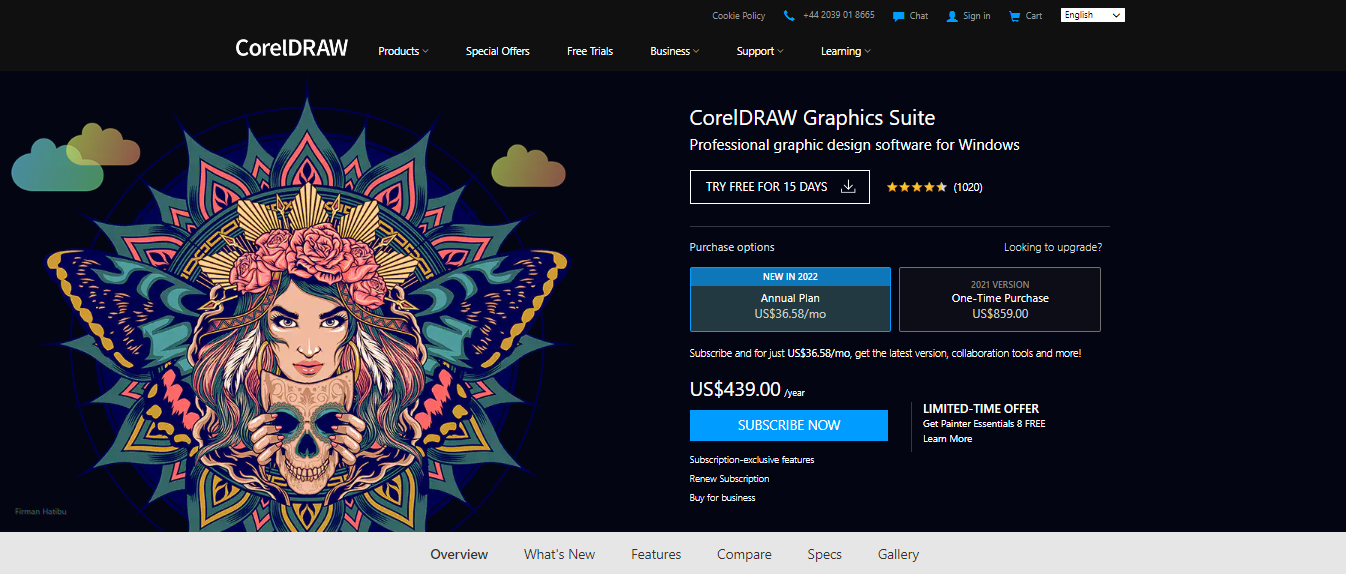
CorelDRAW Graphics Suite is a full-featured design toolkit that lets users create vector illustrations and layouts as well as tools that support photo editing, and typography projects. The platform is offered via a budget-friendly subscription platform that provides incredible ongoing value with ... Learn more
Capabilities
- AI Enabled
- API Available
- Open Source
- CLI Available
Images
View 5 images
Exclusive Deals
Discover Amazing Software Deals on Findstack
Get access to up to $900,000+ in savings on the best software to scale your business.
Pricing
Free trial available
Free plan available
Billing type
Recurring Subscription
Basic
$16.00
/ month
Gold
$36.00
/ month
Platinum
$60.00
/ month
Enterprise
Contact Us
Free trial available
Free plan available
Billing type
Perpetual License
Subscription
$439.00
one-time
Pros and Cons
Not enough data available.
Not enough data available.
- Great for productivity: The collaborative and productivity features on Corel Draw aren’t just there for show. This software really does make it easier to get connected and make progress on a shared project.
- Versatility: You can use Corel Draw on virtually device, including smooth drawing surfaces, laptops, and desktops.
- Tons of exporting options: You can export up to 48 different file types with Corel Draw, including PNG, JPG, and even CAD for 3D content.
- Huge community collection of assets: The collection of assets available is incredible. You can access fonts, templates, frames, photos, vectors, and brushes. Plus, there’s a full organized library system for keeping everything in the right place.
- No app for your smartphone if you’re working on the move
- Does require a lot of initial learning due to the wide range of features
Reviewer's Segments
Small Business
86.95%
Mid Market
9.95%
Enterprise
3.09%
Small Business
66.8%
Mid Market
22.53%
Enterprise
10.67%
Deployment
- Cloud based
- Desktop based
- Mobile based
- On-premise
- Cloud based
- Desktop based
- Mobile based
- On-premise
Support
- 24/7 (Live rep)
- Chat
- Email/Help Desk
- FAQs/Forum
- Knowledge Base
- Phone Support
- 24/7 (Live rep)
- Chat
- Email/Help Desk
- FAQs/Forum
- Knowledge Base
- Phone Support
Training
- Documentation
- Documentation
Integrations
Total integrations:
56
- Adobe Acrobat
- Adobe Illustrator
- Adobe Photoshop
- Affinity Designer
- Airtable
- Asana
- Asset Panda
- Basecamp
- Bitbucket
- Blender
- Box
- Calendly
- ClickUp
- Clip Studio Paint
- Corel PaintShop Pro
- CorelCAD
- Discord
- Dropbox
- Eventbrite
- Evernote
- Expensify
- Freshdesk
- GIMP
- GitHub
- GitLab
- Gmail
- Google Ads Formerly AdWords
- Google Calendar
- Google Meet
- Google Sheets
- HubSpot
- Inkscape
- Intercom
- Intuit Mailchimp
- Jira
- Loyverse POS
- Microsoft Outlook
- Microsoft Teams
- Notion
- Odoo
- Omnisend
- OneDrive
- Paymo
- Pipedrive
- RingCentral Contact Center
- Shippo
- Shopify
- Slack
- Squarespace
- Stripe
- SurveyMonkey
- SysTools IMAP Migration Tool
- Todoist
- Toggl
- Trello
- Twilio
- Typeform
- Vend
- Wix
- Xero
- ZBrush
- Zendesk
- Zoho CRM
- Zoom
Total integrations:
11
- Adobe Acrobat
- Adobe Illustrator
- Adobe Photoshop
- Affinity Designer
- Airtable
- Asana
- Asset Panda
- Basecamp
- Bitbucket
- Blender
- Box
- Calendly
- ClickUp
- Clip Studio Paint
- Corel PaintShop Pro
- CorelCAD
- Discord
- Dropbox
- Eventbrite
- Evernote
- Expensify
- Freshdesk
- GIMP
- GitHub
- GitLab
- Gmail
- Google Ads Formerly AdWords
- Google Calendar
- Google Meet
- Google Sheets
- HubSpot
- Inkscape
- Intercom
- Intuit Mailchimp
- Jira
- Loyverse POS
- Microsoft Outlook
- Microsoft Teams
- Notion
- Odoo
- Omnisend
- OneDrive
- Paymo
- Pipedrive
- RingCentral Contact Center
- Shippo
- Shopify
- Slack
- Squarespace
- Stripe
- SurveyMonkey
- SysTools IMAP Migration Tool
- Todoist
- Toggl
- Trello
- Twilio
- Typeform
- Vend
- Wix
- Xero
- ZBrush
- Zendesk
- Zoho CRM
- Zoom
Top Alternatives
Categories
Common categories include: Photo Editing Software.
Company Details
- By Appy Pie LLC
- Located in Warrenton, Virginia, United States
- Founded in 2014
- By Corel Corporation
- Located in Ottawa, Ontario, Canada
- Founded in 1985



Popular Comparisons