

Unclaimed: Are are working at Adobe Learning Manager ?
Adobe Learning Manager Reviews: 4.0/5 — Solid Choice
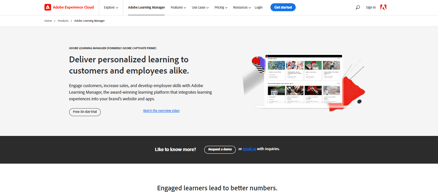
Adobe Learning Manager is a cloud-based learning management system (LMS) that creates personalized learning experiences at scale for customers, partners, and employees alike. It uses a headless learning platform that allows for integrations with Experience Manager Sites or any other CMS through open APIs.

| Capabilities |
API
|
|---|---|
| Segment |
Small Business
Mid Market
Enterprise
|
| Deployment | Cloud / SaaS / Web-Based, Mobile Android, Mobile iPad, Mobile iPhone |
| Support | 24/7 (Live rep), Chat, Email/Help Desk, FAQs/Forum, Knowledge Base, Phone Support |
| Training | Documentation |
| Languages | English |


Compare Adobe Learning Manager with other popular tools in the same category.
I love the fact that I no longer have to have our users to download software or apps for use. This is really important since the majority of what regular users would like is to simply go online and take care of all of their work and their business there, in the cloud.
At this point I don't think I have anything that stands out that I would not like. Perhaps the more I use it I can find item that I dont like in the program. I can say that the wide variety of options they provide are amazing and I can see why this is the future for online schools, seminaries, private and public education.
This particular program will be very helpful because he type of clients I use rely on this type of usage that allows the client to have a live and interactive experience. From profit to non-profit I work with several organizations who need this type of service.
I like the ease of use across many platforms. Our volunteers are all over the US (and world) and have many, many personal technology platforms, including some that are older. Most everyone can access the system without issues and when there is a difficulty, Adobe Captivate Prime help staff contact our volunteers individually to get them connected.
The least helpful aspect for me is that the reports tend to be fixed. I would like to be able to generate reports that I need by pulling only the fields I need.
Our volunteers were receiving different levels of training and support depending on where they lived. By creating an online system that is accessible by everyone, we are ensuring that our training is standard across the board. This ensures that the children who participate in our educational experience have equitable expericences no matter where they live. We have more than 14,000 volunteers who have access to our system; 4,000 participated in the 2018/2019 competition season. In 2019/2020, all US-based volunteers will be required to take a child protection course, so we are planning to reach nearly all of our 14,000 volunteers.
Training employees a lot faster but also having them understand the information a lot more.
I wish it was more interactive at times but it’s not a deal breaker. Still love it!
Improving the efficiency of training employees at any of our facilities.
adobe captivate provide an smart authoring tool.
No thing to mentioned in this area to add
Teaching courses for design and creativity requires repeating the lecture more than once, and this helped me to make the lectures on-Demand
I love Adobe's ability to be used cross platform and cross network. It helps facilitate meetings and keep everyone on track.
The inability for everyone to share via screen share does make things difficult ar time
Adobe captivate helps me prioritize and organize with my project solution oriented role at a big bank
Because of its integration and automation capabilities, the learning managers and admins work gets easier. There are additional content catalogs available for Captivate Prime which include work, business and softskills. Additionally, users have control over their data and privacy.
It has a monthly subscription pricing option with annual commitment and option for perpetual license only for exclusive courses. Options for perpetual license will be good.
A good choice for learning managers and administrators. Course content availability is an added advantage. More pricing options required.

Very User Friendly we love the ease of use because who has time to learn a completely new program and still stay on top of our daily requirements. with Captivate being so easy to use we were able to keep things moving and not hinder the company at all
Color layout is little rough on the eyes after a long period of time. Other than that is is all good experiences from us so far and cannot wait to see if we can really use it here
we are benefiting out clients more efficiently through Captivate, Able to cut our turn around time by almost 33%
The following are the strengths of the Adobe Captivate Prime system: Capabilities for course, training plan and certification management Skills focus Global content management Reporting Support and training videos Smaller learning curve Simple pricing Free trial
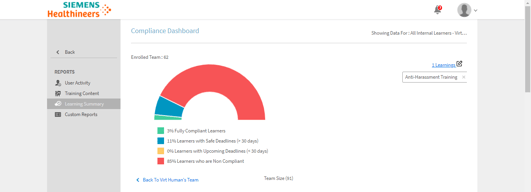
Here are the areas that could need a boost from the Adobe folks: Shopping cart integration is needed to sell courses. Learner analytics are mostly unformatted, downloadable excel sheets. Leaderboards and social homepage widgets need a boost.
Having used the Adobe Captivate course authoring software for the past four years, I had seen through enough trials and triumphs. The headache of uploading the SCORM package to my personal server to share with the client. And the heartache of waiting for their feedback, making changes, deleting the previous version from my server and then uploading the current file. The very memory gives me an aversion! Enter, a cloud sharing solution, exclusively for Adobe Captivate, aptly named the Adobe Captivate Prime. This learning management system offers a robust option for sharing and version controlling the files uploaded and tested for the client. The “getting started” videos are great for a newbie to learn the ropes and get themselves familiar with the environment. The application is divided into four primary roles: Administrator, Integration Administrator, Author and Learner. Users can toggle back and forth between roles they have been assigned to, with appropriate permissions. All four areas are guided by the much-needed tutorials. We also have the option of a 30-day trial to explore the system.
Captivate allows me to create dynamic eLearning material for my organization.
Some of the functions to create content can be confusing to get the grasp of.
This tool gives flexibility that allows me to customize my organizations training and development needs.
Use this program with power points and voice overs to create great videos for training
nothing this program has worked great!!!
instead of hosting in person training sessions we are able to post training online


