
( 166 )
Better Stack Reviews: 4.8/5 — Highly Rated
Better Stack lets you see inside any stack, debug any issue, and resolve any incident. Visualize your entire stack, aggregate all your logs into structured data, and query everything like a single database with SQL. Monitor everything from websites to servers. Schedule on-call rotations, get actionable alerts, and resolve incidents faster than ever. Made to fit into your workflow with over 100+ integrations.


| Capabilities |
API
CLI
|
|---|---|
| Segment |
Small Business
Mid Market
Freelancer
Enterprise
|
| Ease of use |
Beginner
Intermediate
Advanced
|
| Deployment | Cloud / SaaS / Web-Based, Mobile Android, Mobile iPad, Mobile iPhone |
| Support | 24/7 (Live rep), Chat, Email/Help Desk, FAQs/Forum, Knowledge Base, Phone Support |
| Training | Documentation, In Person, Live Online, Videos |
| Languages | English |

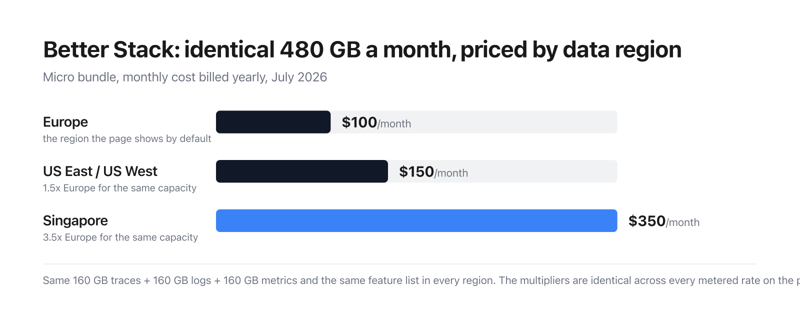
Better Stack’s Micro bundle costs $100 a month in Europe, $150 in the United States and $350 in Singapore — for exactly the same 480 GB and exactly the same feature list. Every metered rate on the page carries the same multipliers: US is 1.5× Europe, Singapore is 3.5×. The page opens on Europe, the cheapest of the four. Choosing where your data lives is the single largest decision on Better Stack’s price list, and it is made by a dropdown most buyers will scroll straight past.
- What it is: A combined observability and incident-management platform — logs, metrics, traces, errors, uptime monitoring, on-call and status pages.
- Best for: Teams that can host in Europe and want one vendor instead of five.
- Pricing: Free tier, then $29 per responder per month billed yearly. Telemetry billed separately. Verified July 2026.
- The honest catch: The platform costs $29; a fully-equipped status page costs $886.
What Is Better Stack?
Better Stack bundles a set of products usually bought separately: log and trace aggregation queryable with SQL, PromQL or a drag-and-drop builder, metrics, error tracking, session replay, web events, uptime and Playwright transaction monitoring, cron heartbeats, on-call scheduling, incident management inside Slack or Teams, branded status pages, and a Slack-native AI SRE agent that investigates incidents against your telemetry.
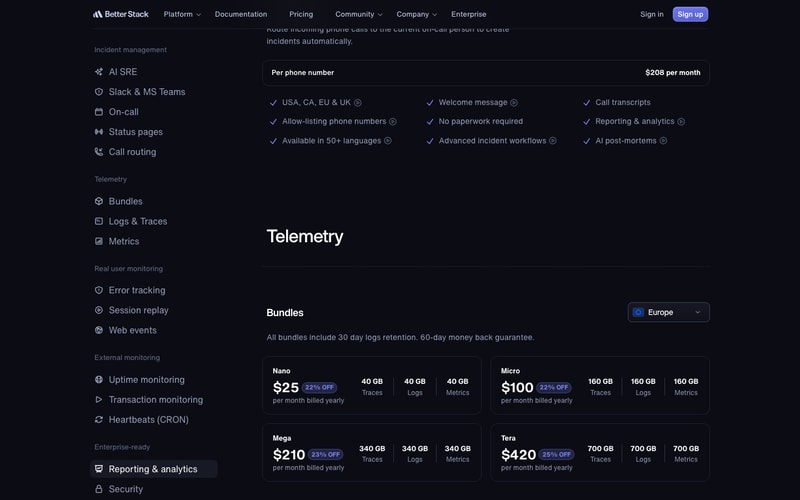
Pricing is à la carte rather than tiered. There is one licence price and a long list of separately metered components.
How Better Stack Works
- One responder licence, then metered add-ons.
- Team members are free; responders are not.
- Telemetry is billed by volume, in bundles or pay-as-you-go.
- Data region multiplies every rate.
- Status-page features are the costliest add-ons.
- 60-day money-back guarantee.
Better Stack Pricing
Captured from Better Stack’s pricing page in July 2026 in US dollars, reading both billing toggles and all four data regions.
| Component | Monthly | Billed yearly | Unit |
|---|---|---|---|
| Free tier | $0 | $0 | 10 monitors, 1 status page, 100k exceptions, 5,000 replays |
| Responder licence | $34 | $29 | per licence per month |
| Team members | $0 | $0 | unlimited |
| Slack channel/thread workflows | $9 | $9 | per responder licence per month |
| Reporting & analytics | $5 | $4 | per member per month |
| Additional 50 monitors | $25 | $21 | per month |
| Additional 10 heartbeats | $20 | $17 | per month |
| SSO with Azure or Okta | $5 | $5 | per user per month |
| Audit logs | $250 | $208 | per month |
| Call routing | $250 | $208 | per phone number per month |
| Telemetry bundle | Europe | US East/West | Singapore | Capacity |
|---|---|---|---|---|
| Nano | $25 | $38 | $88 | 40 GB each of traces, logs, metrics |
| Micro | $100 | $150 | $350 | 160 GB each |
| Mega | $210 | $315 | $735 | 340 GB each |
| Tera | $420 | $630 | $1,470 | 700 GB each |
| Multiplier | 1.0× | 1.5× | 3.5× | identical features |
What actually decides your cost:
- Data residency is the biggest multiplier on the page, and it is exact. Europe is the baseline. US East and US West both cost 1.5×. Singapore costs 3.5×. This is not approximate: logs ingestion runs $0.10, $0.15 and $0.35 per GB; metrics retention $0.50, $0.75 and $1.75 per GB per month; error tracking $0.000050, $0.000075 and $0.000175 per exception; session replay $0.00150, $0.00225 and $0.00525 each. Every one is precisely 1.5× and 3.5× the European rate, with only the logs retention figure rounded for display. The capacity and the feature list are identical in all four regions. If your compliance position lets you host in Europe, that choice is worth more than every discount on the page combined.
- The comparison claims do not move with the region, though the prices do. Beside the error-tracking rate the page reads “approx. 6x cheaper than Sentry”, and the section is headed “Sentry-compatible at 1/6th the price.” That text is byte-for-byte identical whether the rate showing is $0.000050 (Europe) or $0.000175 (Singapore) — a spread of 3.5×. The same is true of “up to 2x cheaper than PostHog” on session replay and “At 1/10 of the cost of PostHog or Amplitude” on web events. Whatever the comparison is worth in Europe, it cannot hold equally in Singapore at three and a half times the price.
- The discount badges are honest, and they are off the pay-as-you-go rate — not off each other. Each bundle shows two percentages, and both reconcile exactly against the metered rates published further down the same page. Nano’s 40 GB of logs, traces and metrics costs $32 a month at European pay-as-you-go rates ($6 logs, $6 traces, $20 metrics); the bundle is $30 monthly, 6.25% off — badged “6% OFF” — and $25 yearly, 21.9% off, badged “22% OFF”. The same arithmetic lands on 8%/23% for Mega and 11%/25% for Tera. Verifiable discount claims are rare enough to be worth saying out loud.
- Metrics are 62.5% of every telemetry bill while being a third of the data. Metrics retention costs $0.50 per GB per month against $0.15 all-in for logs — 3.3×. Because the bundles allocate equal gigabytes to traces, logs and metrics, metrics account for exactly 62.5% of the pay-as-you-go equivalent of all four bundles. If you are choosing a bundle size, model your metrics volume first; the logs figure that gives the bundle its name is the cheap third.
- The platform costs $29; the status page costs up to $886. One status page is included, but its options are priced per page per month at yearly rates: white-labelling $208, IP allowlisting $208, single sign-on $208, sending e-mail from your own domain $208, password authentication $42 and custom CSS/JavaScript $12. A single fully-equipped status page therefore runs $886 a month — over 30 times a responder licence, and $1,065 if billed monthly. For a company that wants a branded status page without Better Stack’s footer on it, that one line will dominate the invoice.
- “Unlimited team members” is true until you want reporting. Members are explicitly $0 per member per month, which is genuinely generous next to the per-seat norm in this category. But Reporting & analytics is charged per member, not per responder — $4 each billed yearly. A forty-person engineering organisation with three responders pays $87 for licences and $160 for reporting: the reporting add-on costs nearly twice the platform. Azure and Okta SSO are also per user at $5, while Google SSO is free.
- Heartbeats cost four times what monitors cost. Extra monitors are $21 per 50 (42¢ each); extra heartbeats are $17 per 10 ($1.70 each) — a 4× difference per unit for what is, from outside, a simpler check. Ten of each are included free.
Who Should Use Better Stack
- Teams consolidating five tools into one. The clearest case — logs, metrics, errors, uptime, on-call and status pages under one bill.
- Anyone who can host data in Europe. The same platform at a third of the Singapore price.
- Small teams and side projects. The free tier is unusually complete: 10 monitors, a status page, 100,000 exceptions and 5,000 session replays a month.
- Organisations with many observers and few responders. Free unlimited members is worth real money at scale.
It fits poorly for teams needing Singapore or US data residency on a tight budget; for anyone whose status page must be white-labelled and access-controlled; for metrics-heavy workloads; and for HIPAA-regulated organisations, which Better Stack says outright it cannot serve.
Honest Pros and Cons
Strengths
- A genuinely usable free tier, not a trial.
- Unlimited team members at $0.
- Discount badges that reconcile exactly with the published rates.
- 60-day money-back guarantee — twice the usual 30.
- SOC 2 Type 2, ISO 27001, GDPR, EU storage by default.
- Says plainly it is not HIPAA compliant rather than staying quiet.
Limitations
- Singapore costs 3.5× Europe for identical capacity.
- Comparison claims stay fixed while prices vary 3.5×.
- $208 per page per month for white-labelling, SSO and IP allowlisting.
- Reporting is billed per member, undercutting free seats.
- Metrics are 62.5% of every bundle’s underlying cost.
- Extra heartbeats cost 4× extra monitors, per unit.
Better Stack Alternatives and How It Compares
- Datadog is the full-coverage incumbent Better Stack’s own footer benchmarks against.
- Sentry is the error-tracking standard, and the target of the “1/6th the price” claim.
- PostHog covers session replay and product analytics, named in two claims on the page.
- Grafana Cloud is the closest open-source-rooted alternative for logs and metrics.
- PagerDuty competes specifically on on-call and incident response.
The Verdict
Better Stack is doing something unusual, and mostly doing it well. Rather than a three-tier ladder, it publishes one $29 responder licence and then meters everything else openly — a free tier that is genuinely usable, unlimited team members at no cost, and telemetry priced by the gigabyte with bundles on top. The discount badges even survive checking: Nano’s “6% OFF” and “22% OFF” reconcile to 6.25% and 21.9% against the pay-as-you-go rates published further down the same page, and the same arithmetic holds for all four bundles. Vendors whose percentages can be audited from their own price list are a minority.
The thing to understand before comparing Better Stack with anything else is that the data-region dropdown is the most expensive control on the page. Europe is the baseline; US East and US West cost exactly 1.5×; Singapore costs exactly 3.5× — and that multiplier applies to every metered rate, not just the bundles. The Micro bundle is $100, $150 or $350 a month for the identical 480 GB and the identical feature list. The page opens on Europe, the cheapest of the four, so the figure a casual reader takes away is the best case. Anyone with a compliance requirement pinning data to Singapore should re-price the whole platform before drawing conclusions.
That regional spread also strains the comparative marketing. “Approx. 6x cheaper than Sentry” sits beside the error-tracking rate in every region, unchanged, while that rate ranges from $0.000050 to $0.000175 per exception. The same static claims accompany session replay (“up to 2x cheaper than PostHog”) and web events (“1/10 of the cost of PostHog or Amplitude”). These are not false so much as unqualified: they can only describe one region at a time, and the page never says which.
Two more numbers deserve a place in any budget. Metrics retention costs 3.3× what logs cost per gigabyte, which means metrics are 62.5% of the underlying cost of every bundle despite being a third of the data — so size your bundle on metrics, not logs. And the status-page add-ons are the steepest line on the page: white-labelling, SSO, IP allowlisting and custom-domain e-mail are $208 per page per month each, so a fully-equipped status page reaches $886 a month, more than thirty times a responder licence. Host in Europe, watch your metrics volume, and decide early whether that status page really needs to be unbranded.
FAQ
How much does Better Stack cost?
There is a free tier, then $34 per responder per month monthly or $29 billed yearly. Team members are unlimited and free. Telemetry is billed separately, either pay-as-you-go or in bundles from $25 to $420 a month on European rates. Add-ons — extra monitors, heartbeats, status-page features, reporting, audit logs — are metered individually. A 60-day money-back guarantee applies.
Why does Better Stack’s price change when I pick a different data region?
Because the region multiplies every metered rate. Europe is the baseline, US East and US West cost 1.5×, and Singapore costs 3.5× — for identical capacity and an identical feature list. Logs run $0.10, $0.15 and $0.35 per GB; metrics retention $0.50, $0.75 and $1.75 per GB per month. The page opens on Europe, so the prices shown by default are the lowest available.
Is Better Stack really six times cheaper than Sentry?
That is Better Stack’s claim, printed beside its error-tracking rate — but the claim never changes while the rate does. It appears identically at $0.000050 per exception in Europe and $0.000175 in Singapore, a 3.5× spread. Whatever ratio holds in one region cannot hold in all of them, and the page does not say which region the comparison refers to.
Is Better Stack’s free plan actually usable?
More than most. It covers 10 monitors and heartbeats, one status page, 100,000 exceptions a month, 5,000 session replays, 3 GB each of logs, traces and web events retained for three days, and 30 GB of metrics — with Slack and e-mail alerts. It is labelled “free for personal projects”, and the three-day retention is the main constraint for anything production-facing.
What does a branded status page cost on Better Stack?
One status page is included with a licence, but the options are charged per page per month at yearly rates: white-labelling to remove the “Powered by Better Stack” footer is $208, as are single sign-on, IP allowlisting and sending e-mail from your own domain. Password authentication is $42 and custom CSS/JavaScript $12. A page with all of them costs $886 a month, against $29 for the responder licence itself.


Perfect for small devs and their services, BetterStack is easy to set up and maintain, but there is no compromise on the amount of features you get.
I haven't found any reason not to use BetterStack
I can keep track of my server services without having to connect to my server, also is sending me reports on any incidents that may happen along the way. It keeps my website monitored so I can tempestively resolve incidents minimizing the downtime

I use Better Stack to monitor my web applications constantly. Better Stack keeps me updated with monitoring them and alerts me when there is a problem. It's super easy to use, and while I dread the "your site is down" emails, they are very helpful. I'm able to respond to outages quickly. Better Stack always has my back. I interact with the communication that they provide. For some of my apps, it sends me text messages and emails, which is extremely helpful. Better Stack allows me to acknowledge the incidents, which would be more helpful if I had a team around me. My company is just me, and seeing a Resolved email come through is fantastic. I haven't used customer support because the products stand so well on their own. It was super easy to implement monitoring, and now I don't even think about it. I'm very happy with their service. I haven't had to integrate it with systems other than my cell and email, but there are many options for integration beyond my needs. For usage of the site, I don't have to think about it since everything is working like a well-oiled machine. I interact with it when there is a problem, but most of the time, I don't actually need to go to their site as a solopreneur. The communication from them is superior to other options out there. I also use the site to set up new applications when I create them, but that isn't a daily occurrence.
Nothing that I can think of at this time.
Without Better Stack, I wouldn't have good coverage of my applications. It helps me monitor and alerts me of incidents with my web applications.
I love how simple it is to create a reliable web monitor. They offer the most robust and generous free tier I've ever seen, including free SMS notification!
For my needs, I've not yet come across anything I'd complain about.
I love their web monitoring and alerting capabilities. Easily as feature-rich as substantially more expensive solutions.
Loved the custom incident setup we could make, on top of the modern UI the tool is exactly what we were looking for.
nothing much to dislike, a while ago we would appreciate bulk action features, but saw they implemented that this week
it solved all our problems in terms of monitoring the website and alternating the right people at the time of an incident

Ease of use, features, and incident monitoring
I like the features and I don't have any dislike at the moment.
We use Betterstack to monitor our apps, and website, and also the incident reporting is helping us quickly jump and resolve any issues.
The elegant and very beautiful status pages, in addition to being able to use your own domain without paying, no service allows this, only Better Stack. The interface design is also very beautiful, in addition to the support being very efficient and always helping.
I have no criticisms, but it would be interesting to release new status page models, to vary some templates.
Better Stack helped me notify users when my service becomes unstable, down, and can display maintenance, as well as receive notifications when it goes down.
Cheaper and better than other tools on the market, quick with new features, ease of deployment and superb customer support.
After using Better Stack, my standards for user experience with devtools have raised exponentially.
We started using Better Stack for upsite monitoring but after some time we deployed for our whole log management.

Quality of everything - from UI/UX (User Interface and User Experience) to stable work and right set of tools to keep your servers and services up and running. It was very easy for me (amateur user of monitoring software) to set everything up and get it running. Unobtrusive and responsive customer support is always there if you need it. Good amount of educational materials, shall you want to dive deeper into the tool and technology. Also, from what I see in my admin panel, this is great tool for teams and bigger projects.
So far I had no single problem using Better Stack.
I use Better Stack primarily to monitor my website status and availability. The tool does its' work just right.
Better Stack keeps me informed and better prepared to take action.
I am unable to think of a single negative. The company updates their product often. They communicate often and they are enthusiastic about their oroduct.
Because my website is my business, any interruption is critical. Better Stack allows me to resolve issues the instant it occurs.

Ease of integration and easy to use. The integration was quick and features are good making daily life of a developer easy.
Dashboard can be a bit more catchy, otherwise it is nice.
Realtime alerts help me to be stress free as it alerts me whenever there is outage so that I can take action quickly.
Logs the way they should be. Makes debugging refreshing.
Not the cheapest option, but worth it in my opinion.
Observability!
The better stack platform to see and query logs is really easy to use and it has everything I need
Excelent for filtering logs and logging.
Logging and detecting problems

They provide a free status page that you can use with your own subdomain, which was really easy to set up and integrate with my website. They'll also call you when your website goes down, unlike some other services I tried. They have plenty of features for customizing your status page, such as custom css and javascript. The customer service was top notch, I even got a free T-Shirt just for being a customer!
I don't really have anything bad to say about them, and I haven't run into any friction using the service as of yet.
Better Stack lets me know when my website is down or not performing as expected. I will recieve an email and a phone call letting me know what's up, and it helps me respond quickly and find the source of the issue.
Its so fast. Super easy to integrate with your existing tools and stack. The UI is clean and intuitive. The customer service is excellent, even for small business clients.
Not cheap, but you get what you pay for.
Excellent log consolidation. Support for vector is a plus, makes it easy to get everything formatted similarly.
It looks fancy, it intergrates well and groups works great.
Nothing? Can't think of anyting that i dislike.
Colletings logs, and make them readable. Uptime monitoring.
I mostly use Uptime service(formerly Better Uptime) for monitoring, while also using Logs occasionally to grab logs from Cloudflare and couple of linux VMs. I will mostly talk about Uptime because that's what I mostly use. But Better Stack Logs also has powerful features, I don't use most of them but you should check it out. It is really easy to get started with uptime monitoring. Monitoring a server? A simple ping check will do. If not, you can monitor any URL, any port of any IP, check IMAP/SMTP, or even check HTTP responses for keywords for checking. Do you want to monitor something that has no exposed service to the Internet, like your home router behind CGNAT? No problem. just put a "curl https://uptime.betterstack.com/api/v1/heartbeat/xxxxxx" on crontab, or find a way to ping the URL at any interval you choose, and you're done. If no heartbeat is received within selected interval, after a confirmation period, alarm goes off. If you want to go even further, their simple yet powerful API and integrations look like they can take you even further, but for smaller operations it is not needed. I, for example, used Zapier integration to post an alert to my Discord server when stuff goes down. There are integrations with popular services such as heroku, Google Cloud, or Webhook in/out (so you can create incidents via webhooks if you don't want to go with API yet get similar function) that you can use to both "import data" and "export data", Importing being monitoring or creating alerts/incidents from other services, and exporting being alerting via other services, like Trello or Slack(similar to my discord example). When an alarm goes off, yes you get an email, yes you can see it on the page, standard stuff. If that's not enough, you can get notifications in literally anywhere else you choose thanks to integrations I mentioned. No Internet at all? Well, if you don't have internet you can't really do anything about the issue that may arise, but at least you'll know something is wrong because you can choose to get called on your phone by Better Stack. It will not be a real person, obviously it's a robocall, but you'll still get notified and you can even acknowledge the incident on the phone call if you're on it so it doesn't call others. The design of the status page is slick and easy to understand, you can edit the basic layout of the services you want to show on the page(you don't have to show all of them) and you can manually create and edit incidents, maintenance notices and more. You have quite a few customization options if you want to dig in, but honestly you'll feel just fine with the default settings. Customer support is just amazing. They will answer your questions directly, without sending you random help articles like any other service does. I am using this service for more than a year, and I did not have any major issues, and couple of minor issues were quickly addressed thanks to the customer service being super fast and straight to point. They know their customers are usually IT people, so they don't spend time explaining stuff that everyone already knows. Only major-ish issue I had was their status page itself going down every now and then before(I added the status page itself to their status monitor just for the sake of it, how ironic lol), but they were already aware of the problems even before I asked what's going on. As I said, I am using this service for over a year at this point, and I do not plan on giving up at all. If they keep operating for 10 years, I will keep using this service for 10 years, for my personal projects as well as any professional work I might do, and I will happily pay for it because it is 1000% worth the money imo.
Status pages can definitely get some more user-friendly customization options. You can choose between multiple layouts and even put your own CSS/JS code, which should allow you to do literally everything, but I don't think that's the most user friendly way to do it. Design of the status page itself is pretty decent and you will not have an issue to use it as is, but being able to more easily customize it would be nice to have. Also I saw on the pricing page that some features I am currently enjoying as a free user is no longer being offered to new free users, and even some of them, such as ability to use your own domain, are only offered on Enterprise plan, which greatly reduces the usability of the service on lower/free tiers. While it is nice that they don't take features away from existing users(that's the easiest way to get your users angry, for example, look at twitter), but I would expect a bit more transparency while this change took place, I only realized this is the case after I recommended the product to another geek friend of mine only for him to realise that he cannot have some features I have without paying quite a considerable amount of money. And on the Logs, they primarily use Vector to collect logs from all kinds of services across platforms. While vector itself is not a bad system, sometimes it randomly stops working and errors out, resulting in logs from servers not appearing on the service. That's probably something customer service can asisst me for a solution, but I had other issues with the vector itself in other use cases I don't really want to deal with it and I'd prefer alternative methods being offered for Debian systems.
I didn't even know I needed to monitor for uptime, because you know, couple of VMs, and one page via Cloudflare Pages. They won't go down, right? Well, it turns out they do. And when they go down, they took your mail server down with it, or your VPN, or your Wordpress instance, or your Minecraft server, then your girlfriend calls you and complains, etc etc. It is a one-man show around here, so I don't really have *that* much going on, but knowing a problem exists is pretty helpful so you can solve it. For example, I recently found out that the server I rented recently from a local company is having random internet dropouts. I got in contact with the hosting company and they tracked it down to a larger intermittent issue with the actual datacenter, so I'm currently planning on moving my services from Bursa back to Istanbul. Although as I said, I don't really have much going on, I try to provide useful stuff to my friends around me, like an adblocking DNS or a small VPN via wireguard, and I'd like to sleep knowing they are still working and I won't learn that my minecraft server crashed out and is down for multiple days from my friends, for example.
We started using Better stack in the early days and it quickly became our favorite monitoring tool. It has an easy and clean UI, good integrations and it was simple to start using it. With the Better stack logs being available we are migrating from Graylog to Betterstack logs and the experience has been very good as well. The tooling is so much easier to work with compared to Graylog. Although it might not be as feature-rich yet the support team is awesome, responds fast and features are implemented in mere days in some cases.
Nothing really stands out at this point for us but since it's quite new, if you are coming from a very feature-rich solution it might be missing some features. But as mentioned the development and improvements are quick.
Better stack uptime helps us detect if websites, apps, or services are up and running. We use the default monitoring and heartbeats for this. Better stack logs helps us centralize logs for multiple servers running the same sites behind a load balancer, logs are quickly queriable, and visualized in dashboards accompanied with alerting to quickly respond to incidents.
Very well designed and straightforward interface with plenty of options to monitor almost anything you need monitored. The integrations with other services really makes this a service that can be your central focal point for a monitoring system of all things. This all along with a very attractive price makes it difficult to consider any other option.
It would be nice to be able to "pause" team members, so they don't get alerts while on vacation or out of the office. Or even to have active hours for a certain person. This goes for monitor checks, would be nice to place a specific monitor into Maintenance mode on demand for xx minutes. Also would be nice to have more complex scheduling for maintenance periods (i.e. every 3rd friday of a month, etc).
Monitoring when websites go down so we can respond to outages quickly.
I would definitely say that the calling feature is the best part of BetterStack - my developers can be alerted almost instantly after an incident is started. I also love the simplicity and how easy it is to deploy the status page. I think that status pages now look really bad, Atlassian status pages just don't look that good; they're bland, no dark mode, and look like an old webpage. However, BetterStacks' Status Page looks absolutely amazing. I had an amazing support conversation with a BetterStack employee, I asked if I could recieve one more team member on my dashboard, which normally comes at a cost - they said yes! I was very surprised that they said yes, and very happy too. The support response time was a few hours, and I was kept updated.
I only have one thing, which is the lack of a Discord integration. I would like for me to be able to create incidents through a Discord bot. It would also be really really cool if there was a Discord bot in a channel that would edit its message based on the status. For example, there's a message that says "All Systems Operational," however, when there is an incident, the embed color changes to yellow and provides a timeline of all status updates, and the effected monitors.
BetterStack is making the process of calling IT members automatic. It will call IT right when an issue starts, including me! This makes downtime very minimal. Not only that, but I can track the ping of my website in multiple regions - allowing me to determine where I need to deploy edge servers at.
Easy to set up across almost all platforms we use (Heroku, DigitalOcean, k8s). Offers a free tier to start with and grows with us. Fully-featured, it provides more functions than we've ever needed.
The log alert doesn't send the actual content of the triggering log entry.
We use Betterstack Logs for centralised logging and Uptime for monitoring. Both integrate seamlessly with our applications running on Heroku and k8s, and are simultaneously connected to Slack. Collectively, Betterstack has become the one-stop solution for collecting firsthand log/monitoring data, correlating this data with monitoring results, and sharing this information with our team.
We have been using other services to monitor ours, and our client's websites for a long time, but when we have found Better Stack (Better Uptime), we wanted to try it because of the great UI, it also has multiple server locations for monitors, SMS nofications, team options, call option, etc. Since then we have moved all our website monitoring's to Better Stack without hesitation, their support is also good and responsive.
There is nothing to dislike about the product, but we don't receive SMS or calls when the new incidents are created, we receive email notifications everytime, but not calls and SMS.
We primarily use Better Stack to monitor all our websites, and whenever the website goes down, we receive email, SMS and call notifications, so our team can dive into the issues and fix them asap. It also has SSL expiry notifications which helps us to renew the SSL certificates before expiration.
Easy setup and notifications to monitor my sites. I add the service to each customer site to identify issues 1st.
It's really a good service. I purchased a LTD license via Appsumo, so maybe if I paid a subscription I'd be more critical but it's a solid service for me.
Better Uptime notifies me when one of my WordPress sites goes offline. Before Better Uptime, I would find out about broken sites from the customer, which is the worst case scenario.
Better Uptime is the best monitoring platform I have used. The ability to monitor keywords, certificates, HTTP requests makes it flexible and powerful. The app downtime notifications are top-notch.
I haven't had any issues to date so no dislikes at all.
Website monitoring with effective alerts.
One of the much better uptime monitor softwares, doesn't give gals positives like others and has more automation and api options even in the free tier.
You do need to upgrade to paid for more advanced options but it isn't expensive either.
More consistent monitoring off my websites and AWS instances.
- The reliability - The checks are made from several regions - Very customizable - The statuses pages are beneficial to share with stakeholders - The integrations including their API
So far, I haven't had any complaints about the tool, but they could potentially add more native integrations, like Telegram. Another good integration could be ClickUp.
- Monitor uptime of all the websites I'm managing - Share the statuses pages with stakeholders - Monitor scripts thanks to the heartbeats - Align team to address incidents timely

Better Uptime comes with a lot of flexible options for monitoring my websites. One feature I find useful is downtime will trigger the creation of a new incident. When viewing the the incident I can see the page response and better identify the root cause. Another awesome feature is status pages that come with a clean UI.
Nothing I can think of. Does exactly what you expect and works great.
We track the uptime of multiple services for our cloud platform. The status pages are great at showing our customers we care about uptime.
I searched a lot of monitoring tools and signed up for a few of them, then came across Better Uptime, loved the services. Deleted all other accounts and decided to stick with Better Uptime for all my monitoring activities.
None at the moment. Everything is amazing and I am happy about this product.
Solved my issue for monitoring my web services for multiple projects which is in production
Better Uptime helps me monitor my server uptime, and was very easy to set up. What i love most is it's ability to connect with many other apps, through direct integrations or through Zapier, so that it fits in my workflow and didn't require any custom integration for notification handling etc. Good job guys!
Nothing honestly, even the design is pleasing which is to be underlined - not all tech products are…
Server monitoring, service status notifications and handling of the issues.
Combining the status page with monitoring under one solution
i dislike nothing about better uptime so far
I used to pay for the status page and Pingdom separately, better uptime helps me save and add new features to our monitoring like cronjob monitoring.
Fair Free Tier. Extensive functionality and flexibility. Beautiful UI. Smooth and reliable experience so far. Excellent status tool - probably the best one overall.
UX could be more intuitive in a few areas (active components drop was surprising, could be automatic or pre-activated). A very minor inconvenience, though, and easily fixable.
Customizable status page. Several monitors with options on what to display easily. Incident management and maintenance display. API to fetch data or integrable status component and page. Hooks for Edge Functions monitoring, etc. Also alerts and escalation for team response.