

Unclaimed: Are you working at Calendly?
Calendly Reviews: 4.7/5 — Highly Rated
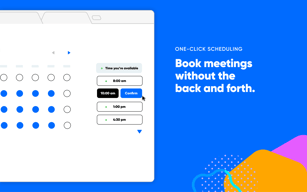
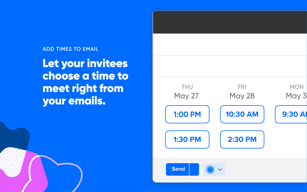
Calendly is a scheduling software that is used to automate the scheduling of appointments. Typically used for businesses to help reduce no-shows, Calendly’s customizable appointment types, automated email notification features, as well as convenient integrations with useful business applications.
Calendly is also often used as Business Scheduling of choice in Venture Capital and Personal Productivity tech stacks.


| Capabilities |
API
|
|---|---|
| Segment |
Small Business
Mid Market
Enterprise
|
| Deployment | Cloud / SaaS / Web-Based, Mobile Android, Mobile iPad, Mobile iPhone |
| Training | Documentation |
| Languages | English |

Compare Calendly with other popular tools in the same category.
Calendly is great for eliminating the back-and-forth emails when trying to schedule conference calls or other virtual meetings. In theory, it should work all of the time. However, it's been my experience even after multiple attempts to synch my Outlook calendar with my Calendly account, causing people to schedule meetings in Calendly when I already have that time blocked off in my Outlook calendar. I've tried to do troubleshooting and not had much luck. It doesn't seem like Calendly's customer support team is that easy to contact.
The downsides of using Calendly are the synching errors I've experienced in trying to successfully sync my Outlook calendar to my Calendly account. It's been a little frustrating.
When everything is properly synched between my Outlook calendar and Calendly account, it is a wonderful, time-saving scheduling tool. I like that for people who know about Calendly, they are easily able to schedule meetings with me, eliminating the annoying & time consuming "What time are you availble" emails when trying to schedule meetings.
Easy to configure, has a straighforward API which allows to integrate easily
The inability to use multiple brand logos and the sizing of the logos that you use
It's making it easy to schedule appointment without manual work
Calendly just works! Integrations are good!
None. Could do better with multiple tume slots per day
Public access to calendar
So easy to set up. Just a few minutes and I had a link to include in my email signature. Saves me so much time when sales meetings, interviews, everything!
Not much to dislike. I use the free tier and it has enough functionality for simple scheduling
Makes it so easy to schedule without having to go back and forth. Automated reminders so I don't end up with no-shows
We like using Calendly for our onsite events so our SDR team can preset meetings and utilize a set schedule for our Sales teams availability
That we don't have the option to have people choose a person they want to speciffically meet with from an overview of available staff onsite. The round robin setting does not work for our needs.
Not double bookkng onsite meeting space
Easy to schedule and push out the meeting invites
Still requires quite a few steps to book the actual meeting
Saves time for scheduling the meeting
That there are advanced settings to add cushion time between meeting slots and that it shows potential conflicts when selecting times. I like how calendly offers more than one calendar setting and allows collaborative scheduling.
Sometimes the person scheduling the meetings do not realize there might be a Timezone difference or Timezone selection. So there are some meetings that I have to reschedule because they would think they booked time for 3pm CET but it would be 3pm PST
Asynchronous calendaring and scheduling. The ability to sync with Google calendar is also nice because it automatically blocks off the time and reflects it on the calendly link.

The experience for the person setting an appointment is great.
The setup for different appointment types is a little tedious, although once you are setup you likely won't have to make changes often.
Scheduling meetings with clients can be a hassle, and Calendly makes it much easier for everyone involved.
Takes the human piece out of scheduling which eliminate the headaches
Have had meetings disappear or not show on my calendar.
No more back and forth with people of availability
That I can customize the hours I'm available for given slot periods instead of having to go back and forth with folks in trying to make a schedule.
Lacking the ability to schedule with multiple people in one day. Example: If I and my co-hort make ourselves available to be scheduled for 1 hour slots from 10am to 5pm and one person schedules me for 12pm, but my cohort still has an open 12pm slot, it automatically makes it look like he's not available once they schedule me for 12pm. Need the ability to divide our group scheduling up better.
Not having to go back and forth with folks to find an available time to chat. They can just look at my availability and book. And vice versa if I need to schedule with someone else with a complex calendar.
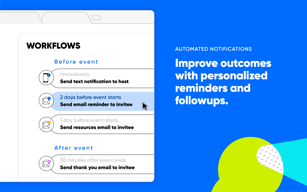
I love that you can send customized automatic emails after a client books or schedules a meeting. In addition, I like that it can trigger a set of emails and actions to help ensure a great customer expeirence.
I think Calendly is a bit more on the expensive side, but has great potential. It is tough to compete with the internal scheduling of meetings through other CRM's like HoneyBook.
Calendly helps me gain my time back by automatic the scheduling of meeting to where it works for both myself and for the clients. No more emailing back and forth to try and find a time.
I love that it's sync with my Google Calendar. I can meet up with my subordinates and making sure that I don't have double bookings
Upgrades and added features can be a little costly
The software allows me to book meetings without back and forth emails to clients & my subordinates. Also avoids double bookings
Calendly is a helpful solution for managing your schedule. I find it great to use when I have multiple remote sessions lined up and want to make sure no one is double-booked.
The user management and administration could use some work, but otherwise, I find Calendly to be perfectly acceptable as a scheduling tool. We've been using it for some time with no issues now.
We are solving the issue of schedule management. We have clients both internal and external that need to set up appointments with our staff, and Calendly allow us to easily manage that scheduling without double-booking or running into problems with time management.
Easily integrates with our calendars so we can quickly schedule meetings and not double book. Syncs up with our other systems so we can track and implement additional strategies to best serve our clients.
Nothing in particular, we have not had any issues utilizing it.
Calendly allows us to sync up multiple systems so that all appointments made and notes attached to those are easily found across the board which allows us to stay organized.
The interaction between our Customer base leading up to a Trade Show.
I am used to Outlook and rely on this tool
The interaction between leadership and customer
I can schedule appointments with other people and schedule automated reminders. I also like the way it seamlessly integrates with my Zoom account.
There is no way to schedule recurring meetings with Calendly
Less no shows on scheduled calls.

it provides an easy interface for users to select their time availability to book any meeting. In the backend, the business owner can add multiple team members and automate notification.
It does not have a payment facility in Indian rupees for India.OTP varifaction will be a good feature to have it in calendly.
it solving my business problems to scheduling meetings as per my availability and showing the meeting available time too. I can share the link or can add it to my web page.
I like the ease of use and the integrations available.
The price plans have recently changed and I have lost features that I originally had and have been using.
It's so easy to have customers schedule from our platform using Calendly's available integrations.
Automatically creating notes for upcoming meetings. Shared meetings between department. Being able to edit along with another person - live editing done RIGHT! Love it!
Not much! Perhaps the search could be refined but workflow works really well for me.
Keeping meeting notes and being able to share them easily across the company. We aren't the best at minute taking because of the surrounding admin but this works great!
It helps manage all the scheduling of meetings and calls at the same time removing the hassle of matching the schedules of everyone involved without having to juggle between individual calendars and schedules
The sync-up with google calendars needs to be improved as there seems to be a major functionality missing i.e. real time sync with google calendars which causes problems at ocassions
Scheduling conflicts with in company meetings and internal deliberations are done away with, also helps our consultants and customers to interact with us without multiple follow up calls
Easiness of setting itu up is a great selling point for this product. You font have to take too long time to understand how things work and what leads to where.
Would be great ifyou could set up two different time slots in the free version of the product. :) Otherwise not much bad to say as it works like you expect it to.
Booking meetings it my calender for partnering businesses, who want to to either discuss something with me or learn something new. Great tool for booking longer phonecalls as well.

Calendly is my favorite and one of the most convenient tools for scheduling meetings with clients and new employees for interviews with the least amount of hassle. It is easy to use, and a person wishing to get in touch through Calendly, whether it be for meetings or any other matter, can choose a time that works for him based on my availability. I also can customize my meeting schedule as well.
There is not so much to dislike about Calendly. It works fine, but the pricing plans are a bit costly compared to other tools in the market. Moreover, when it comes to integrating with other apps, the choice is limited to a few apps only.
Calendly helps me to organize my working time schedules. I don't have to send reminders or mails to my clients anymore for meetings and all. They can easily book an online appointment for a meeting whenever they need it. Moreover, it lets me quickly add my team members to the meetings by simply sharing links.
I like the fact that I can easily find an organized template to take notes before each meeting.
I don't particularly like the organization after the meetings to then have to go back and search to find relevant notes and information.
Hugo helps us to have one source to take and share meeting notes for both internal and external meetings.
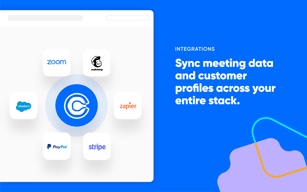
What I like most about Calendly is that it can be integrated with a variety of other softwares such as Zoom, Google Calendar, GoToMeeting, MailChimp, etc! I love that it gets rid of the hassle of scheduling!
Sometimes I find that it is initially a bit hard to set up, but once it is set up, Calendly makes it very easy to send available meeting times and link different software such as Zoom!
Calendly helps us set up meeting times for tutoring! We were able to link Calendly to our Google Calendar and efficiently manage and move around schedules for our tutors.

Calendly makes calendar and appointment scheduling with multiple clients much more manageable. No more back and forth trying to find availability for multiple players.
Very limited features if using the free version. Without pro you cannot use multiple email addresses, nor can you choose different types of time slots/meeting lengths.
I no longer have to email back and forth to find out availability for meetings. Instead, I simply send a personalized link and people can book as they desire. Also it then avoids having to explain why you aren't available or get into personal details with clients and co-workers.. The calendly availability tool lets you set the times you'd like to accept meetings.
Easy to integrate into other processes and systems.
There isn't much to dislike! The login is a bit different with direct 365 login direction.
Ability to share calendar availability and ease of use with outside scheduling vendors.
Have people book at their needs, and do not have to provide options from your end, as long as you have every schedule on your calender.
As physical meetings are coming back, need to take into account of time to move from one place to another. (not the apps fault).
Time saving for scheduling meetings.
finding workable meeting times when dealing with multiple schedules
I really like this product so far and can't think of downsides
managing multiple schedules to schedule meetings and interviews
Notes tracking, you can refer to all the relevant note at once
not really anything, everything is well, maybe some logic behind design functions
project management, it helps me track all the notes for project specified meetings
Very simplistic and effective in scheduling events on multiple individuals' calendars.
There is no scheduling bot that could be sent out to somebody to assist them to schedule a day/time that aligns with your schedule.
Scheduling meeting with minimal back and forth.