

Unclaimed: Are you working at Cloudways?
Cloudways Reviews: 4.7/5 — Highly Rated
Cloudways is a managed hosting provider that focuses on performance and simplicity. Whether you need simple server and application launches, or ongoing server maintenance, Couldways is built to simplify the whole process of server management to support business growth thanks to its powerful suite of tools and services that can help manage your eCommerce stores and business sites. It also underscores user options–from cloud providers and hosting.

| Capabilities |
API
CLI
|
|---|---|
| Segment |
Small Business
Mid Market
Enterprise
|
| Deployment | Cloud / SaaS / Web-Based |
| Support | 24/7 (Live rep), Chat, Email/Help Desk, FAQs/Forum, Knowledge Base, Phone Support |
| Training | Documentation |
| Languages | English |
Cloudways Pros and Cons
- Option to add as many website installations as you want
- Server speed is faster than competition
- Pay as you go pricing plan
- Managed app option with database backups
- No root access or server modifications
- Add ons require additional cost
- Inability to use Plesk or cPanel

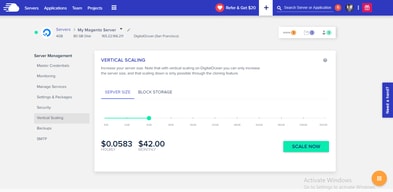
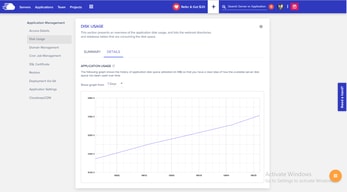
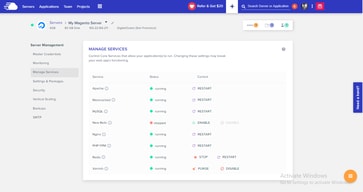
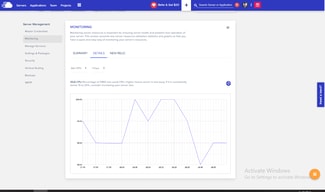




Cloudways includes unlimited websites and unlimited visits on every plan, starting at $14 a month. That is the whole proposition, and it is a genuine outlier. Kinsta’s entry plan is $35 a month for one WordPress install with 20 GB of bandwidth; Cloudways’ $14 Micro server carries no install cap at all and 1 TB of transfer. You are renting a server rather than buying licensed slots, and the difference in what that gets you is substantial.
- What it is: Managed cloud hosting for WordPress, Magento, Laravel and PHP, on your choice of cloud provider.
- Best for: Agencies and developers hosting many sites who want managed infrastructure without per-site licensing.
- Pricing: From $14 a month for 1 GB RAM, rising to $99 for 8 GB. Verified July 2026.
- The honest catch: Server resources are the real limit — unlimited sites still share one server’s RAM.
What Is Cloudways?
Cloudways is a managed hosting layer that sits on top of cloud providers rather than running its own metal. You choose the provider and the server type — Basic, General Purpose or CPU Optimized; Standard or Premium — and Cloudways manages the stack, now branded Lightning Stack.
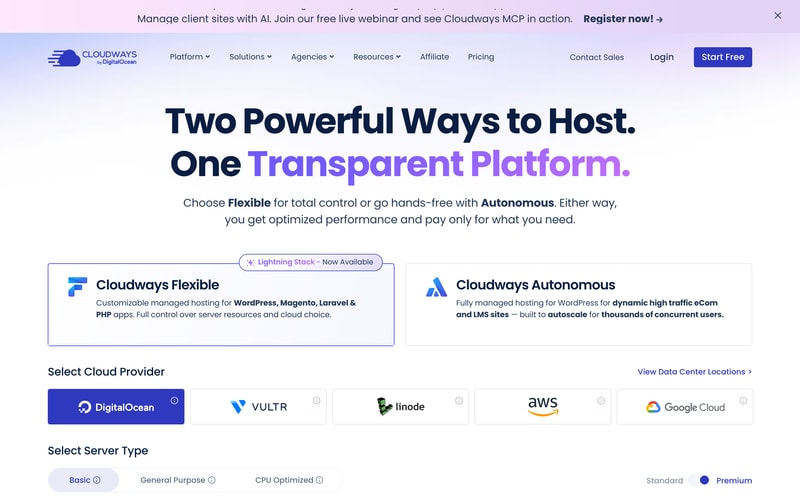
Two product lines sit side by side: Cloudways Flexible, the customisable managed hosting reviewed here, and Cloudways Autonomous, a fully managed autoscaling WordPress product for high-traffic ecommerce and LMS sites.
There is a free trial with no credit card required.
How Cloudways Works
- Server size is the meter — RAM, vCPU, storage and bandwidth.
- Websites and visits are unlimited on every plan.
- Billing is hourly, with a monthly figure shown alongside.
- Offsite backup storage costs $0.033 per GB per server.
- You choose the cloud provider and server class.
- All listed prices exclude tax.
Cloudways Pricing
Captured from Cloudways’ pricing page in July 2026 in US dollars, on DigitalOcean Standard servers.
| Plan | Monthly | Hourly | RAM | vCPU | Storage | Bandwidth | Per GB RAM |
|---|---|---|---|---|---|---|---|
| Micro | $14 | $0.0208 | 1 GB | 1 | 25 GB NVMe | 1 TB | $14.00 |
| Small | $28 | $0.0417 | 2 GB | 1 | 50 GB NVMe | 2 TB | $14.00 |
| Medium | $54 | $0.0804 | 4 GB | 2 | 80 GB NVMe | 4 TB | $13.50 |
| Large | $99 | $0.1473 | 8 GB | 4 | 160 GB NVMe | 5 TB | $12.38 |
Every plan: Lightning Stack, unlimited visits, unlimited websites.
What actually decides your cost:
- Unlimited websites is the reason to be here. Managed WordPress hosts almost universally meter installs — Kinsta allows one at $35 a month and forty at $450. Cloudways allows as many as your server can run, at $14. For an agency with twenty small client sites, that difference is the entire business case.
- The real constraint moves from licences to resources. Unlimited sites on 1 GB of RAM is unlimited in the licensing sense only. What you are actually buying is a server, and twenty WordPress sites on a Micro will perform accordingly. Size by expected load, not by site count.
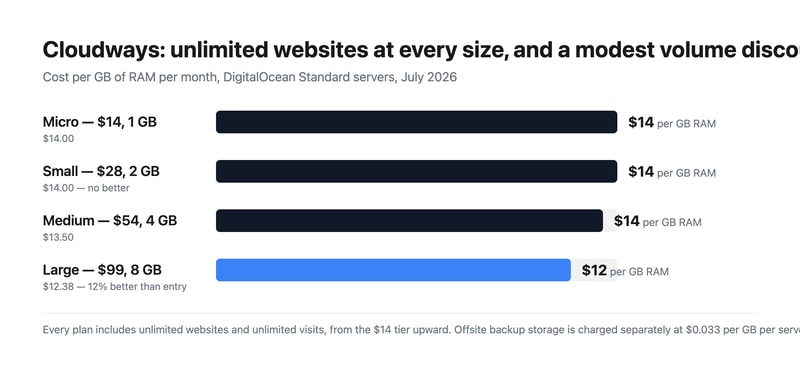
- The volume discount is real but modest. Cost per GB of RAM runs $14.00, $14.00, $13.50 and $12.38 across the four sizes — about 12% better at the top than the bottom, and no improvement at all from Micro to Small. Compare that with the flat-rate hosts reviewed here, where the per-unit price never moves at any size.
- Check how the hourly rate resolves against a full month. The published hourly figures correspond to the monthly price divided by 672 hours, a 28-day month — $0.0208 × 672 is $13.98, and the same holds for all four sizes. A 30-day month is 720 hours and a 31-day month 744, so confirm with Cloudways whether the monthly figure is a cap or whether a full month bills above it.
- Backups are an add-on. Offsite backup storage is charged at $0.033 per GB per server. On a 160 GB Large server that is a small but non-zero line, and it is separate from the storage included in the plan.
- Prices exclude tax, which the page states plainly. For EU buyers that is a meaningful addition to compare against gross-quoting competitors.
Who Should Use Cloudways
- Agencies hosting client sites. The clearest case — one server, many sites, no per-install licence.
- Developers running multiple projects. Laravel, Magento and PHP alongside WordPress on the same platform.
- Businesses wanting cloud choice. Pick the provider and server class rather than accepting one stack.
- Anyone testing before committing. A free trial with no credit card.
It fits poorly for people who want one high-performance site with dedicated support, where Kinsta or WP Engine invest more per site; for teams wanting a fully hands-off product, which is what Cloudways Autonomous exists for; and for buyers who need certainty on monthly cost before understanding hourly billing.
Honest Pros and Cons
Strengths
- Unlimited websites and unlimited visits on every plan, from $14.
- 1 TB of transfer bandwidth even on the entry server.
- Choice of cloud provider and server class.
- NVMe storage across the range.
- A free trial with no credit card.
- A real, if modest, volume discount — 12% better per GB at the top.
Limitations
- Unlimited sites still share one server’s RAM.
- No per-GB improvement from Micro to Small.
- Offsite backups cost $0.033 per GB on top.
- Hourly rates imply a 28-day month — confirm whether monthly is a cap.
- Prices exclude tax.
- Support and tuning are lighter than dedicated managed-WordPress hosts.
Cloudways Alternatives and How It Compares
- Kinsta and WP Engine are the premium managed-WordPress hosts, metering installs but investing more per site.
- Flywheel targets designers and agencies with a similar philosophy to Kinsta.
- SiteGround and A2 Hosting sit in the mid-market with simpler shared plans.
- Hostinger and DreamHost compete at the budget end.
- Liquid Web offers managed VPS and dedicated infrastructure.
- DigitalOcean directly, if you are willing to manage the stack yourself.
For a broader survey, browse our cloud hosting directory.
The Verdict
Cloudways answers a question the managed-WordPress market mostly refuses to: what if you just rented a server and put as many sites on it as it could handle? Unlimited websites and unlimited visits on every plan, starting at $14 a month with 1 TB of transfer, is a fundamentally different proposition from hosts that license installs. Against Kinsta’s $35 entry plan for a single WordPress site with 20 GB of bandwidth, the contrast is stark — and for an agency carrying twenty small client sites, it is the whole argument.
The honest counterweight is that “unlimited” describes licensing, not physics. Twenty sites on a 1 GB Micro server will perform like twenty sites on a 1 GB server, and the skill Cloudways asks of you is sizing by real load rather than by site count. That is a fair trade for the price, but it does move a responsibility onto you that premium managed hosts absorb — which is also why their per-site investment, support depth and tuning tend to be greater.
Two commercial details to settle before you commit. The published hourly rates work out to the monthly price divided by 672 hours — a 28-day month — so $0.0208 × 672 gives $13.98 against the $14 headline, and the same relationship holds at every size. Real months run 720 to 744 hours, so ask Cloudways directly whether the monthly figure is a cap or whether a full month bills above it. And offsite backup storage is $0.033 per GB per server, separate from the NVMe storage in the plan, with all prices excluding tax. The volume discount, meanwhile, is modest but genuine: $14.00 per GB of RAM at Micro and Small, falling to $12.38 at Large — roughly 12%, which is more than several flat-rate competitors offer at any size.
FAQ
How much does Cloudways cost?
Captured in July 2026 in US dollars on DigitalOcean Standard servers, excluding tax: Micro $14 a month for 1 GB RAM, 1 vCPU, 25 GB NVMe storage and 1 TB bandwidth; Small $28 for 2 GB; Medium $54 for 4 GB; and Large $99 for 8 GB. Every plan includes unlimited websites and unlimited visits. Offsite backup storage costs an additional $0.033 per GB per server.
Does Cloudways limit how many websites I can host?
No. Unlimited websites and unlimited visits appear on every plan, including the $14 Micro server. The practical limit is server resources rather than licensing — the sites you host share the RAM, CPU and storage of the plan you buy — so size the server by expected traffic and application load rather than by how many sites you intend to run.
Is Cloudways billed hourly or monthly?
Both figures appear. Each plan shows a monthly price and an hourly rate, and the hourly rate corresponds to the monthly price divided by 672 hours — a 28-day month. Since real months run 720 to 744 hours, it is worth confirming with Cloudways whether the monthly figure acts as a cap or whether a full month of hourly billing can exceed it.
Cloudways or Kinsta?
They solve different problems. Cloudways rents you a managed server with unlimited sites from $14 a month, putting resource-sizing in your hands. Kinsta licenses WordPress installs — one at $35, forty at $450 — with more per-site tuning, support and infrastructure investment. Choose Cloudways for many small sites at low cost, and Kinsta for fewer sites where performance and support matter more than price per site.
Does Cloudways include backups?
Not offsite ones at no charge. The pricing page notes that “$0.033/GB per server will be applied for offsite backup storage”, so backup retention is a separate usage-based line on top of the plan. The NVMe storage listed against each plan — 25 GB to 160 GB — is the server’s own disk rather than backup capacity.

Compare Cloudways with other popular tools in the same category.

The best thing that I like about Cloudways is their feature rich custom dashboard which makes it easy to manage my WordPress powered blog. Following are some of my favorite features: 1) See Realtime server usage graphs. 2) Easily restart different services. 3) Easily modify server level settings. 4) Upgrade packages. 5) Auto disk cleanup to free space. 6) Tell Cloudways when it can perform schedule server maintenance for my site. 7) Secure SSH/SFTP/MYSQL by blocking access to all IPs except mine. 8) Ability to scale server whenever traffic spikes. 9) Choose when and how often to take offsite auto backups and how long to retain them. Plus take on demand backups as and when need arises. 10) Enable SMTP email service of my choice or Elastic mail with just few clicks. 11) Enable Cloudflare WAF module to see real visitor IP in logs. 12) Block direct IP access to my site. 13) Set custom cache expiry for Static Assets and Varnish cache. 14) Add delete multiple user for SSH/SFTP. 15) Access MYSQL Database Manager with 1-Click. 16) Setup and manage server cron jobs. 17) Disable XMLRPC requests to prevent Brute Force attacks.
Have no issues with the way Cloudways is apart from below issues: 1) Little pricy. 2) Inbuilt CDN.
Helps me solve speed, security, and management issues effortlessly. 1) Can easily manage my WordPress powered blog with their feature rich dashboard. 2) Fast loading sites. 3) See access and error logs. 4) Analyze traffic. 5) Easily upgrade packages. 6) Take on demand backups when required.
Loved the prompt customer support service.
Many things which should be by default part of the hosting package are not there and we are fully busy buying and setting up those one by one, Like email, SMTP, sub domain, add on domain configuration, etc... its eating lot of time and impacting time to market.
Faster speed, until now we are still busy setting up the application, so cant comment early.

Setting up a new server and launching a new application is straightforward on Cloudways. Once logged in, creating a new application is almost intuitive. I could add several applications without referring to the Cloudways documentation or contacting the Support team. Before Cloudways, I had used other cloud control panels, including GridPane, RunCloud, and SprinupWP - this experience could have made it easier for me to use Cloudways. The comprehensive and well-written Cloudways docs make it a breeze to perform tasks like provisioning a new server, creating a new application, verifying SSL certificates, and connecting to applications via SSH or SFTP. The Cloudflare enterprise add-on is a feature that Cloudways introduced in March 2022. Few webs hosting providers offer Cloudflare enterprise, so when Cloudways announced their partnership with Cloudflare on this CDN add-on, I jumped on the opportunity to move several of our sites back to Cloudways. At least on paper, Cloudflare enterprise offered improved security and performance. The cost of this add-on is very affordable, from only $4.99 per domain per month (and substantially less with volume discounts). Unfortunately, our experience with this add-on has been less than anticipated. Page loading times using Cloudways and the Cloudflare enterprise add-on were comparable (similar) to RunCloud and GridPane, both subjectively and on testing using GTmetrix, Pingdom Website Speed Test, and WebPageTest site performance test. Likewise, our sites on Cloudways did not perform any better in the Core Web Vitals than other cloud control panels, namely RunCloud and GridPane.
There are quite a few things we dislike about Cloudways. We'll mention only a few below. As mentioned above, performance, though better than average (e.g., from shared web hosting), is not stellar and does not live up to the hype, even with the Cloudways Breeze cache plugin installed. We suspect much of the hype is because of the attractive commissions Cloudways offers its affiliates. We believe Cloudways' claim of having "the fastest hosting stack ever" is unsupported by our real-world experience and testing. While its competitors (GridPane and RunCloud) are now offering an OpenLiteSpeed option besides NGINX in their application stacks, Cloudways only offers its "ThunderStack," which includes an NGINX and Apache hybrid. OpenLiteSpeed has several advantages, including performance and the use of the excellent LiteSpeed Cache plugin. In this way, I get the impression that Cloudways is falling behind its competitors in terms of technology. Unless you select the most basic plans (1 GB RAM and 1-core processor), the cost of the service is expensive for what you get. Cloudways charges for its service more than you pay for the server, i.e., the total price you pay is more than double what it would cost you if you purchased the VPS from the provider directly. For example, the VPS we use is a Vultr High-Frequency server (2 GB RAM, one core) that costs $12 per month if purchased directly from Vultr. However, Cloudways charges $26 per month for the same VPS and its service. Likewise, for a Vultr HF VPS with 4 GB of RAM and two cores, Cloudways' price is $50 per month, while it will cost only $24 per month if bought directly from Vultr. One issue we encountered on the Cloudways platform was the inability to select the PHP version on an application basis. On Cloudways, you choose the PHP version at the server level, so all applications on any one server will have the same PHP version. Having only one PHP version for all applications was a problem. We have some WordPress sites with plugins that require PHP version 7.4. In contrast, other websites can run on the latest PHP version and therefore take advantage of the latter's performance gains. Further, the highest PHP version on the Cloudways platform is 8.0, whereas RunCloud already provides an option for PHP version 8.1. Since moving our WordPress sites to Cloudways, we have received significantly more comment spam messages while not experiencing any change in real visitor traffic (as opposed to bot traffic).
By moving some websites to Cloudways, we hoped to improve real visitor traffic, enhance user experience, and increase sales. Unfortunately, we have seen no difference in these metrics compared to other providers, such as GridPane and RunCloud.

They make web hosting pretty easy. I would recommend it to anyone getting started with managed hosting.
I have had issues with being unable to login. support team has been helpful but we are still having issues.
Making it easy to organize and managed websites.
User Interface are at optimal performance all time
Support system likely Bot. Most results are produced by bot.
Website Speed and Security
Server feels secure, one less thing to worry about.
Not sure how it really works. Pricing seems to continue to increase, not sure why.
Server security for entire organization.
performance, ease of use and simple dashboard
They simply deleted our client's website without proper alerts and our clients are suffering from a lot of payment issues accessed from India. They are insisting on PayPal once again a worst payment gateway which has got zero support
Performance & Simple UI

It was a good managment system almost 3 years ago, but it get worse and worse
Speed of the actions, Even just to perform a single action you have to wait hours. like adding new application to server pulling git cloning server (it takes almost forever) support person a non-technical
Frenkly they are just proving a managed hosting service in a cost of doubled as compare to the origanal servers. But its the slowest web hosting service we have ever used.
Referral Program Full Scam. Cloudways Promise Refer 1 customer and Earn $100 Honus Bostong but They don't Added after Referal successful and spend $20. I have an bad experience with Cloudways.
On the Cloudways everything is Scammed and Foll Customer to earn free Hosting Credit.
100% Scam. I am refer 9 Customer to cloudways But Cloudways refer team add only $150. My all Referal User full fill all Requirements.
Cloudways Affiliate program is a scam, and he Scammed Me. Nothing to like about cloudways affiliate program, Cloudways Claim Refer and earn $150/sales. Automatic System Approved Your affiliate payment, But Most of time Affiliate Team Reject Your commission with Diffrent Unwanted reason.
Please don't make fool to people. cloudways don't pay My $900 approved affiliate commission.
Its just a 100% Scam. System Approved Sales But Affiliate Team denied Payment. Unknown Reason to declined Your Sales
Recently, I tried to access my Cloudways account, but I encountered difficulties and am currently unable to log in. PHP performance monitoring is efficiently carried out using Cloudways in my professional Expirance.
Cloudways is a hosting provider, and I am puzzled why they are asking me to share my government-issued ID. It concerns me as it affects my privacy.
When I checked my email, I was shocked to discover that my account was disabled. The message requested that I share my card details and a photo ID.
Nothing really, just bad service and difficult to get answer.
These guys are a SCAM, they take your Bank information and then they charge you without any service or explanation, I emailed their billing to get an explanation on the charges, the response is a link to FAQ. I have not used them for more than a year and I have no active servers or application , yet they still charges my credit. In addition they purposely don't allow you to remove your credit card information from their system so they can continue charging you. Appaling service.
Didn't not solve a problem, I left them because it was bad service.
You can host multiple websites on one server. The prices for the server depend on how much CPU, storage and RAM you need.
Their support is horrible. I am trying to get my password reset and despite requesting a new password for the past few days and not getting the emails. They do send me emails trying to sell me something. You can't talk or chat with anyone unless you are logged in. That doesn't work if you can't login. Based on this I would not recommend Cloudways.
I needed a managed VPS in which I can host multiple Wordpress sites. Cloudways benefits me by being a good value for the money paid.
Pricing and ease of usage and migration of websites.
Dear Cloudways Support Team, I hope this message finds you well. I am writing to express my deep dissatisfaction and concern regarding the charges incurred on my account for the AutoScale plan, despite not utilizing any resources during the specified billing period. My account is associated with the invoice number #4112485, and upon reviewing my billing statement, I was dismayed to discover that I have been consistently billed for the AutoScale plan, even though my website has not been utilizing any resources that warrant such charges. It is disconcerting that the process for unsubscribing or modifying the subscription plan is not clear, and this lack of transparency has resulted in unwarranted financial implications for me. As a customer, I expect to have a clear and straightforward method for managing my subscription and ensuring that I am only charged for the services I actively use. I kindly request that you investigate this matter promptly and provide a thorough explanation as to why I have been charged for the AutoScale plan despite the absence of resource utilization on my end. Additionally, I am seeking an immediate refund for the charges incurred erroneously. I value the services provided by Cloudways and have appreciated the convenience it has brought to my hosting needs. However, this billing discrepancy has eroded my confidence in the service, and I trust that you will address this matter promptly and with the utmost urgency. Please acknowledge the receipt of this complaint at your earliest convenience and provide a timeline for resolution. I believe in a swift and amicable resolution to this matter and look forward to your prompt response. Thank you for your attention to this pressing issue. Sincerely, Felipe Oliveira
It is not solving anything.
Cloudways support is TOTAL UTTER CRAP. Don't get me wrong, every agent you'll talk to is nice and professional, but if throw even a slightly difficult issue at them, prepare to get a run around for more than month. You will be totally ignored over and over and over. It feels like I've entered the twilight zone, where nobody at cloudways I talk to are real human beings, just a bunch of people doing their jobs. Don't be fooled by a few pagespeed and gtmetrix tests or a few dozen visits to your sites hosted with cloudways.... The consistency of website performance is ATROCIOUS!!!!!! it is all over the map. And to keep be websites running and running normally is so increddibly time consuming with cloudways. I've been trapped by the "prices are good" for too long, and am now literally going insane. Below is my review given afer one month It has been one month since I started moving sites over from my cpanel based provider to Cloudways. It isn't all positives. But the most important positive so far outweigh the negatives. The biggest positive is when I move client sites to Cloudways / Vultr they run A LOT faster in real-life experience (average improvement of 5 seconds... from 8 seconds with HUGE variation to 2.5 seconds and tight variation). These results are true across the country, where I ask my client to open both versions of their site in incognito and simply count to see how long it takes the site to open. Real life desktop and mobile experimentation. Can't beat it. The problem is... on Google's page speed test on pagespeed.web.dev, Cloudways performs A LOT worse. For the same desktop site cloudways scored a 69 on the Google speed test while my old provider got a 96, and for the same mobile site cloudways scored a 29, and my old provider a 69 (69 for mobile is actually very good compared to any and every website you can find). To give you proper perspective Amazon.com just scored a 56 on mobile performance on Google's page speed test, and a 69 on their desktop speed test. Amazon doesn't seem to care about optimizing their sites for Google's speed test, yet Amazon's pages open wicked fast. It has taken me two years to realize that the speed tests don't match reality at all. Not even close. I believed them like an idiot. With my old provider I would see 1.1 second desktop load times on GT Metrix and get a useless dopamine hit. I never checked the reality, where the site would sometimes take 1.1 seconds and sometimes 8 to 12 seconds to load on both desktop and mobile! the variation was unreal, and the average load time which I think once upon time was in the 3 to 4 second range has stretch to the 8 second range. DO NOT TRUST SPEED TESTS ALONE! However they are interesting for comparing the exact same website from the same location, but different locations, and for benchmarking. So I have to choose between the real customer experience or BS speed tests. I am going to go with the experience. That said I am still nervous that Google's official speed test meanst that by moving to Cloudways I will impact SEO negatively. I haven't devised a way to test whether this is the case, but plan to do so before I move all sites over. The real customer experience though is so compelling, that I am going to spend the time necessary to see if Cloudways can trick Google like it appears my other provider has. The biggest forseeable negative with Cloudways is... You lose a lot of control that you get through CPanel. For example, no more email forwarders, something I love! I also love that I can troubleshoot easily through php myadmin, and file manager when there are conflicting plugins. Soemthing I deal with a lot for WordPress. So I may just keep DNS records with a CPanel provider, and see if there is a way to get some of the functionality I like in CPanel for a minimal cost. while running the sites on Cloudways. Obviously I will lose some functionality. Last thing... Cloudways like most other providers does automatically back up sites and keep the backups for a week. If you check on your sites at least once a week, then you should be good.
See the what I like section, which has what I dislike. The jury is still out, and i could come back in and change my rating. Their support is something like I imagine hell would be like. It's hard to explain... but the only thing worse than somebody intentionally screwing you, is somebody who feels like they are being nice and say they'll help you, and then provide response after response after response after response after response after response that isn't helpful. Spending hours and literally getting nowhere.
they appeared to be solving a pain point for me, but it has been hell. They have literally kicked tha shit out of me. I'm so worn out trying to make it work because I think I can ge the best while paying less than a tenth what top tier host companies offer. So I'm partly to blame. I guess expected too much for what clouways charges.
I can't say anything good about them, they just cheat and they stole my money and they don't care about me at all.
Cloudways is not pay as you go, it is a deceptive way to attract your customers. My credit card has been charged twice for a server I HAVE NOT USED at all. They charged 150 usd, that is, they stole 150 usd from me and I did not use their servers. I requested a refund and they said they wouldn't do it because they don't really charge for use, they charge you for days, whether you use it or not. That doesn't make any sense in a pay-as-you-go system. Customer service is simply interested in capturing "money" not customers. They don't care at all about my explanation and my return request. It is very sad to have to pay for a service that you did not use.
Cloudways does not solve any problem. He gave me a big problem. They stole my money.
The live chat support is helpful for the most part.
Utterly misleading pricing. You'll be charged even with cloned inactive servers (which their support doesn't disclose while cloning). You end up paying for resources you didn't ever use. The support should disclose that even inactive servers with an under-construction site hidden from the general public / search engines & no traffic being sent to it will cost $97/mo.
Tried Cloudways Cloud hosting. Back to dedicated.
Fast servers, only slow when your hit with bots. They have some features to overcome this, but I had to use Cloudflare and purchase more CPU/memory to overcome slow issues caused by bots
Cloudways had the most inexperienced Support I've seen out of 4-5 different hosting companies i used, most staff are like interns...they have no idea and just push you to help docs or blame your software for issues...and I think they want you to purchase one of the support plans... also, you don't have direct access to the server either so you can't make changes yourself Also Even though I've cancelled my hosting they're still billing my credit card and because I've cancelled my account i cant log in to lodge a support ticket to billing...seriously what's wrong with these companies
It benefited me with some speed compared to Cpanel on knownhost, however I've cancelled and gone directly to Vultr.com for much better control, and cheaper servers. use free Gridpane or free Plesk to manage your own server, easy to do
I am so sorry, but I liked Nothing about cloudways.
- Spam mails from them ( and different email addresses ) - Price is too high - No need to use cloudways to use GCP, VULTR, etc
Hosting