

Unclaimed: Are you working at Cloudways?
Cloudways Reviews: 4.7/5 — Highly Rated
Cloudways is a managed hosting provider that focuses on performance and simplicity. Whether you need simple server and application launches, or ongoing server maintenance, Couldways is built to simplify the whole process of server management to support business growth thanks to its powerful suite of tools and services that can help manage your eCommerce stores and business sites. It also underscores user options–from cloud providers and hosting.

| Capabilities |
API
CLI
|
|---|---|
| Segment |
Small Business
Mid Market
Enterprise
|
| Deployment | Cloud / SaaS / Web-Based |
| Support | 24/7 (Live rep), Chat, Email/Help Desk, FAQs/Forum, Knowledge Base, Phone Support |
| Training | Documentation |
| Languages | English |
Cloudways Pros and Cons
- Option to add as many website installations as you want
- Server speed is faster than competition
- Pay as you go pricing plan
- Managed app option with database backups
- No root access or server modifications
- Add ons require additional cost
- Inability to use Plesk or cPanel

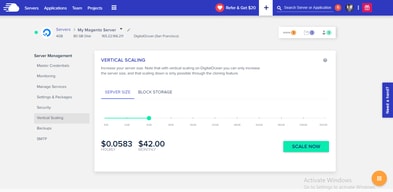
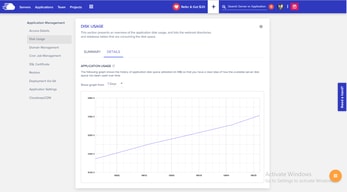
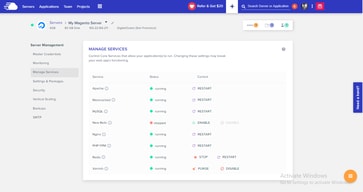
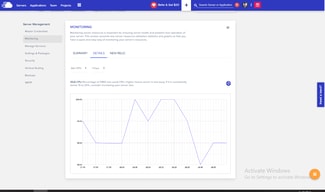




Cloudways includes unlimited websites and unlimited visits on every plan, starting at $14 a month. That is the whole proposition, and it is a genuine outlier. Kinsta’s entry plan is $35 a month for one WordPress install with 20 GB of bandwidth; Cloudways’ $14 Micro server carries no install cap at all and 1 TB of transfer. You are renting a server rather than buying licensed slots, and the difference in what that gets you is substantial.
- What it is: Managed cloud hosting for WordPress, Magento, Laravel and PHP, on your choice of cloud provider.
- Best for: Agencies and developers hosting many sites who want managed infrastructure without per-site licensing.
- Pricing: From $14 a month for 1 GB RAM, rising to $99 for 8 GB. Verified July 2026.
- The honest catch: Server resources are the real limit — unlimited sites still share one server’s RAM.
What Is Cloudways?
Cloudways is a managed hosting layer that sits on top of cloud providers rather than running its own metal. You choose the provider and the server type — Basic, General Purpose or CPU Optimized; Standard or Premium — and Cloudways manages the stack, now branded Lightning Stack.
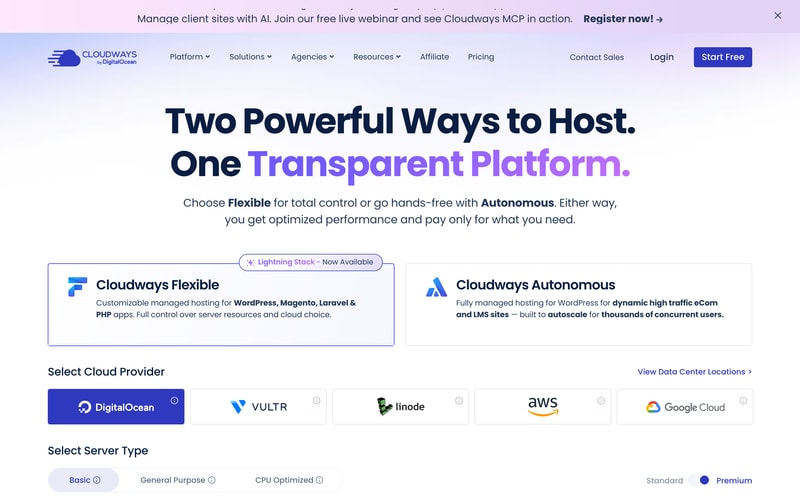
Two product lines sit side by side: Cloudways Flexible, the customisable managed hosting reviewed here, and Cloudways Autonomous, a fully managed autoscaling WordPress product for high-traffic ecommerce and LMS sites.
There is a free trial with no credit card required.
How Cloudways Works
- Server size is the meter — RAM, vCPU, storage and bandwidth.
- Websites and visits are unlimited on every plan.
- Billing is hourly, with a monthly figure shown alongside.
- Offsite backup storage costs $0.033 per GB per server.
- You choose the cloud provider and server class.
- All listed prices exclude tax.
Cloudways Pricing
Captured from Cloudways’ pricing page in July 2026 in US dollars, on DigitalOcean Standard servers.
| Plan | Monthly | Hourly | RAM | vCPU | Storage | Bandwidth | Per GB RAM |
|---|---|---|---|---|---|---|---|
| Micro | $14 | $0.0208 | 1 GB | 1 | 25 GB NVMe | 1 TB | $14.00 |
| Small | $28 | $0.0417 | 2 GB | 1 | 50 GB NVMe | 2 TB | $14.00 |
| Medium | $54 | $0.0804 | 4 GB | 2 | 80 GB NVMe | 4 TB | $13.50 |
| Large | $99 | $0.1473 | 8 GB | 4 | 160 GB NVMe | 5 TB | $12.38 |
Every plan: Lightning Stack, unlimited visits, unlimited websites.
What actually decides your cost:
- Unlimited websites is the reason to be here. Managed WordPress hosts almost universally meter installs — Kinsta allows one at $35 a month and forty at $450. Cloudways allows as many as your server can run, at $14. For an agency with twenty small client sites, that difference is the entire business case.
- The real constraint moves from licences to resources. Unlimited sites on 1 GB of RAM is unlimited in the licensing sense only. What you are actually buying is a server, and twenty WordPress sites on a Micro will perform accordingly. Size by expected load, not by site count.
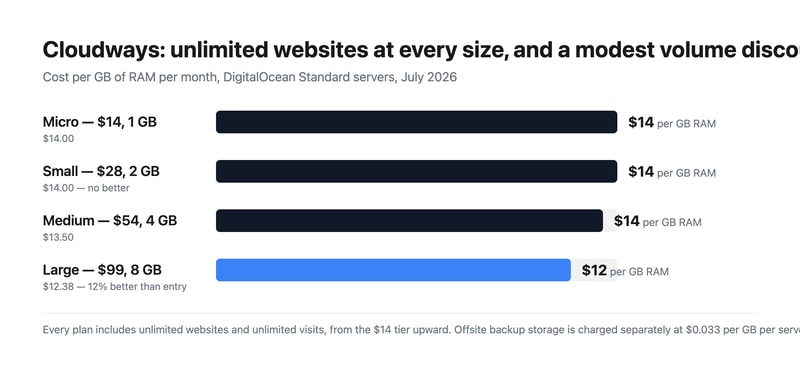
- The volume discount is real but modest. Cost per GB of RAM runs $14.00, $14.00, $13.50 and $12.38 across the four sizes — about 12% better at the top than the bottom, and no improvement at all from Micro to Small. Compare that with the flat-rate hosts reviewed here, where the per-unit price never moves at any size.
- Check how the hourly rate resolves against a full month. The published hourly figures correspond to the monthly price divided by 672 hours, a 28-day month — $0.0208 × 672 is $13.98, and the same holds for all four sizes. A 30-day month is 720 hours and a 31-day month 744, so confirm with Cloudways whether the monthly figure is a cap or whether a full month bills above it.
- Backups are an add-on. Offsite backup storage is charged at $0.033 per GB per server. On a 160 GB Large server that is a small but non-zero line, and it is separate from the storage included in the plan.
- Prices exclude tax, which the page states plainly. For EU buyers that is a meaningful addition to compare against gross-quoting competitors.
Who Should Use Cloudways
- Agencies hosting client sites. The clearest case — one server, many sites, no per-install licence.
- Developers running multiple projects. Laravel, Magento and PHP alongside WordPress on the same platform.
- Businesses wanting cloud choice. Pick the provider and server class rather than accepting one stack.
- Anyone testing before committing. A free trial with no credit card.
It fits poorly for people who want one high-performance site with dedicated support, where Kinsta or WP Engine invest more per site; for teams wanting a fully hands-off product, which is what Cloudways Autonomous exists for; and for buyers who need certainty on monthly cost before understanding hourly billing.
Honest Pros and Cons
Strengths
- Unlimited websites and unlimited visits on every plan, from $14.
- 1 TB of transfer bandwidth even on the entry server.
- Choice of cloud provider and server class.
- NVMe storage across the range.
- A free trial with no credit card.
- A real, if modest, volume discount — 12% better per GB at the top.
Limitations
- Unlimited sites still share one server’s RAM.
- No per-GB improvement from Micro to Small.
- Offsite backups cost $0.033 per GB on top.
- Hourly rates imply a 28-day month — confirm whether monthly is a cap.
- Prices exclude tax.
- Support and tuning are lighter than dedicated managed-WordPress hosts.
Cloudways Alternatives and How It Compares
- Kinsta and WP Engine are the premium managed-WordPress hosts, metering installs but investing more per site.
- Flywheel targets designers and agencies with a similar philosophy to Kinsta.
- SiteGround and A2 Hosting sit in the mid-market with simpler shared plans.
- Hostinger and DreamHost compete at the budget end.
- Liquid Web offers managed VPS and dedicated infrastructure.
- DigitalOcean directly, if you are willing to manage the stack yourself.
For a broader survey, browse our cloud hosting directory.
The Verdict
Cloudways answers a question the managed-WordPress market mostly refuses to: what if you just rented a server and put as many sites on it as it could handle? Unlimited websites and unlimited visits on every plan, starting at $14 a month with 1 TB of transfer, is a fundamentally different proposition from hosts that license installs. Against Kinsta’s $35 entry plan for a single WordPress site with 20 GB of bandwidth, the contrast is stark — and for an agency carrying twenty small client sites, it is the whole argument.
The honest counterweight is that “unlimited” describes licensing, not physics. Twenty sites on a 1 GB Micro server will perform like twenty sites on a 1 GB server, and the skill Cloudways asks of you is sizing by real load rather than by site count. That is a fair trade for the price, but it does move a responsibility onto you that premium managed hosts absorb — which is also why their per-site investment, support depth and tuning tend to be greater.
Two commercial details to settle before you commit. The published hourly rates work out to the monthly price divided by 672 hours — a 28-day month — so $0.0208 × 672 gives $13.98 against the $14 headline, and the same relationship holds at every size. Real months run 720 to 744 hours, so ask Cloudways directly whether the monthly figure is a cap or whether a full month bills above it. And offsite backup storage is $0.033 per GB per server, separate from the NVMe storage in the plan, with all prices excluding tax. The volume discount, meanwhile, is modest but genuine: $14.00 per GB of RAM at Micro and Small, falling to $12.38 at Large — roughly 12%, which is more than several flat-rate competitors offer at any size.
FAQ
How much does Cloudways cost?
Captured in July 2026 in US dollars on DigitalOcean Standard servers, excluding tax: Micro $14 a month for 1 GB RAM, 1 vCPU, 25 GB NVMe storage and 1 TB bandwidth; Small $28 for 2 GB; Medium $54 for 4 GB; and Large $99 for 8 GB. Every plan includes unlimited websites and unlimited visits. Offsite backup storage costs an additional $0.033 per GB per server.
Does Cloudways limit how many websites I can host?
No. Unlimited websites and unlimited visits appear on every plan, including the $14 Micro server. The practical limit is server resources rather than licensing — the sites you host share the RAM, CPU and storage of the plan you buy — so size the server by expected traffic and application load rather than by how many sites you intend to run.
Is Cloudways billed hourly or monthly?
Both figures appear. Each plan shows a monthly price and an hourly rate, and the hourly rate corresponds to the monthly price divided by 672 hours — a 28-day month. Since real months run 720 to 744 hours, it is worth confirming with Cloudways whether the monthly figure acts as a cap or whether a full month of hourly billing can exceed it.
Cloudways or Kinsta?
They solve different problems. Cloudways rents you a managed server with unlimited sites from $14 a month, putting resource-sizing in your hands. Kinsta licenses WordPress installs — one at $35, forty at $450 — with more per-site tuning, support and infrastructure investment. Choose Cloudways for many small sites at low cost, and Kinsta for fewer sites where performance and support matter more than price per site.
Does Cloudways include backups?
Not offsite ones at no charge. The pricing page notes that “$0.033/GB per server will be applied for offsite backup storage”, so backup retention is a separate usage-based line on top of the plan. The NVMe storage listed against each plan — 25 GB to 160 GB — is the server’s own disk rather than backup capacity.

Compare Cloudways with other popular tools in the same category.

All my Cloudways sites run at least twice as fast as any other hosting I've used. I always get support within a couple of minutes. My virtual servers are amazingly scalable. Also, Cloudways has great add-on services such as Safe Updates and Elastic Email.
A downside (and one that is easily remedied) is the Rackspace email add-on service. Unfortunitely this 3rd party company doesn't offer very good support, and the support can't be accessed directly in the Cloudways interface, so I am hosting email accounts elsewhere now. The only other issue is that there's no inbuilt free DNS service, so I have to keep going back and forth between Cloudflare and Cloudways.
I can say goodbye to slow, poorly supported hosting platforms.

Live chat has made my life so easy. Whenever I get any issues with my website, all it takes is to get in touch with Live support and all my issues get resolved without any hindrances. Compared to shared hosting Cloudways looks a little expensive, but while using it with all its advantages I find it very reasonable. Website security and speed of the website were always my prime concern and with Cloudways I don't need to worry about it, what else do I want?
For beginners, it can be a little expensive. Sometimes their options for servers and application management feels confusing, they could have made it a little user-friendly.
The major problem for me was my website speed and security. With Cloudways I do not need to worry about these things as Cloudways perfectly take care of them. The second major problem Cloudways is solving for me is managing my website. I am not very good at managing website technical things such as errors, etc. But with Live chat support from Cloudways, I just need to contact them whenever I face any issues with my website, and they take care of the problem.
Cloudways is an excellent hosting facilitator, that delivers servers that are secure and precise. More so, the tool is powerful in installing paid and free SSL, which brings safety in the business websites. Again, the platform brings quality server maintenance and no challenges of digital coordination.
The platform is well integrated, with suitable server controls, hence, very useful and advisable to all subscribers.
This avenue is progressive in creating suitable server control, for purposes of cloud hosting and assertive management. More so, the inclusion of WordPress control is another supporting part of Cloudways.
Easy to use, easy to scale, it has all the tools you need to manage your servers and apps, without having to use a terminal. Apps are already optimised for wordpress, staging, etc...
Some weird bugs that have been ongoing for a while (added domains don't work half the time, you need to refresh the page every time you add a domain for it to work). Also you need to lone your server to scale down when on Digital Ocean.
It simplifies the process of hosting and managing wordpress and woocommerce sites and keeping them backed up. All the tools are in one place instead of relying on multiple services.
Cloudways CDN, fast speed, higher uptime
Its good, nothing negative at the moment.,
CDN so my users has high speed anywhere on the earth.
The most helpful about Cloudways is that it gives cloud servers at very affordable prices along with servers located in different regions, we can choose the server and its pricing as per our requirements and budget. The best thing I like about Cloudways is its excellent customer support, which can give you a resolution of any technical issues instantly.
There is nothing to dislike about Cloudways, as we found it a very good hosting platform that gives a constant boost in the site speed and better performance of wordpress site.
With the use of Cloudways, we moved our site to this platform and notices an immediate increase in the speed of the site which helps in lower bounce rate and high performance of the site.
-Have good variety hosting providers options (Google, AWS, Vultr. Linode, and DIgital ocean). -Fast replying and well-educated CS and technical team. -Good user graphical interface.
-Pricing is the most thing that I disliked about cloudways.
Giving you a good user graphical interface management tool to manage your hosting from (Google, AWS, Vultr. Linode, and DIgital ocean) with no coding knowledge or experience.
The platform is easy to use, feature-rich and has excellent customer support. I use it to host my WordPress site, which works well.
The thing I don't like about Cloudways is that the platform does not offer email hosting, which means I need to pay for another email hosting service
Cloudways help deploy a server and host websites quickly in less time, which lets me focus more on my business and produce more content.
I like being able to create a magento at once, so I can create multiple and test them against each other. The support team was also very helpful. I saved a lot of time by being able to set up things (related to Magento) with one click, which I had to do manually on my old server.
I had some trouble getting the site to come over here, but it mostly worked out in the end. I still don't have a good understanding of the cost of backups because it's not clear to me.
I had some trouble getting the site to come over here, but it mostly worked out in the end. I still don't have a good understanding of the cost of backups because it's not clear to me.
The servers are fast! Support is also great, I've had to contact them a couple of times and they are friendly and helpful in getting my issues resolved.
The platform is different than other hosting providers and there is a little bit of a learning curve when getting started.
Cloudways allows apps to be quickly and easily deployed which is a time save. Scaling is also easy when more resources are needed.

User-friendly platform: Cloudways has a clean and intuitive interface that makes it easy to manage my cloud servers. Flexible pricing: The platform offers flexible pricing options that allow me to scale up or down as needed, which is great for businesses with changing needs. Exceptional support: The support team at Cloudways is always available to help and their response times are impressive.
Limited customization options: While the platform is easy to use, there are limited customization options available. In summary, Cloudways is a reliable and user-friendly cloud hosting platform with flexible pricing options and excellent support. The only drawback is the limited customization options, but overall it's a great choice for businesses looking for a cloud hosting solution.
Complexity of cloud hosting: Cloud hosting can be complex, especially for users who are not familiar with server management. Cloudways simplifies the process by providing a user-friendly interface and tools to manage servers, deploy applications, and monitor performance.
*Intuitive control panel interface with many settings. *Automatic daily one click restore backups. *Options to choose a server that is located close to my target audience. *24/7 reliable customer service.
I have no dislike for our cloud storage.
It is our reliable easy-to-use hosting solution with all security compliance.
I like the user interface and features that Cloudways has to offer for WordPress hosting. The backup feature has been a lifesaver, and the Let's Encrypt SSL is super easy to implement.
I think Cloudways should offer the ability to host static sites. I would like to create static sites quickly but I can't do that with the available types of applications that can be hosted on Cloudways
Cloudways is making installing and managing WordPress sites a lot easier for me as I can create new applications in minutes and when I make changes, I know Cloudways has back ups of my website.

The best thing about Cloudways, in my opinion, is how simple it is to use. The user-friendly platform that Cloudways offers makes it very simple to maintain my website and application.
Cloudways does not offer email hosting, so i had to use a separate provider for email services.Cloudways should add email hosting services also as it is used almost everywhere.
Cloudways has solved a number of problems for users when it comes to hosting their websites and applications. The process of hosting can be difficult and time-consuming, especially for beginners. A user-friendly platform is offered by Cloudways to make managing hosting resources easier.

Cloudways is quite cost effective compared to alternatives like Hostinger. Enhances file management, website and email hosting.
Shared hosting host few websites although it is less expensive.
Website design and management. Control panel integration. Content management system support. SEO. Email and website hosting.

Cloudways make it simple to securely and reliably manage Wordpress websites in bulk. Using Cloudways innovative control panel, you can easily manage, update and launch new websites in minutes.
Whilst I used to feel Cloudways was cheap, there are now many competitors starting up that seem to offer similar for much cheaper. Right now, I have not moved because I trust Cloudways and have been a happy customer for a few years, but the lower price of alternatives does make it tempting to try them.
Cloudways saves time managing website with automated safe updates, the ability to securely launch Wordpress applications and the ease of user of their control panel.
The best thing is you're getting managed cloud hosting service at a competitive market rate. Along with the hosting service, you're getting extra services already integrated into their system to increase the efficiency of your application. You're getting multiple hosting providers (almost all major cloud services).
I haven't faced any major problems till now with Cloudways, except for some features. For example, you can't downgrade a few things in server settings while vertically scaling. Also, I feel that they should launch a mobile app to make it easy for the users to manage the server.
The main problem they are solving is giving you a managed cloud server. "Managed server " means you don't need to know a lot of commands while working on the server. These managed servers are a much better choice for developers using basic shared hosting. Honestly, I used to regret it while I was using shared hosting. Lots of problems I faced almost every week. I didn't have any liberty to change most of the server settings. But with cloudways I'm getting much better worry-free services with pricing that is not much higher than shared hosting. I appreciate that they are giving you services for as low as $10. It is helping me as a small business owner.
I love the live chat to contact Cloudways if I have a problem. It is easy and I can usually continue working while they solve my issue.
Sometimes the tech support try to fob you off but the majority are very good and willing to help.
I love being able to control my own servers without having to use Cpanel.
Being able to choose cloud servers from various providers is a great feature which helps us really get the best results for our clients while maintaining profitability for our agency. We have found particular success using Digital ocean servers, which have proven to be reliable and affordable.
For some basic requirements, it is a little too much, and it can be confusing for our less technically-minded staff. That being said, it is mainly used a part of larger projects, so this rarely becomes an issue.
Cloudways allows us to manage our various cloud hosting requirements more easily, all in one place
Cloudway's Support team are always very helpful. Whenever we have an issue, live chat is available to help. Our premium partner level support always results in quick turnaround.
Cloudways unfortunately don't allow downscaling of servers, instead opting to only upscale. However the range of providers and server specs available is very suitable.
Cloudways primarily solves our issue of managing several VPS servers at once while having to manage backups. This process is managed for us, saving us time.
The backend interface is really easy to use, and there are lots of great inclusive features (daily backups, SSL certificate). It's also easy to scale up as needed, and I love the monthly billing for this. Website speeds are great too.
Occassionally there are issues with servers that are hard to determine the cause of. The support team are helpful most of the time, but sometimes it does take a while to get a solution/answer to the issue.
Quick loading websites, and easy to manage multiple websites in one spot
The most helpful thing I like about Cloudways is its customer care services; they are always available online and appear over the chat in just a few moments to resolve any issue. The best thing I like about this is that they offer a post-paid monthly bill payment plan to their users, which helps users to save a lot of money, as with other hosting providers, we mainly need to pay upfront for the whole year.
There is nothing to dislike with Cloudways for me, as it provides excellent solutions for web hosting to their users and increases the speed of their site to a great extent.
With the use of the Cloudways platform, we were successfully able to migrate our shared hosting site to this platform via the Cloudways migrator plugin, and we can easily manage our site and the panel provided by Cloudways easily without the help of any professional.

I used this to host my WordPress site, I am amazed by the speed of my site, I found Cloudways is very easy to set up even for beginners and the bonus is the migration tool and services
There should be a straightforward option to host other frameworks like React, Node, and some other js as same as PHP and WordPress
The problems include the high cost of VPS servers, the complicated deployment process, and downtime. Cloudways solved these problems in a very efficient manner
Helpful support when setting up site. Good plugin.
As someone used to cPanel, it's all rather unfamiliar. And there's no email.
Website was very slow on old host. Now seems very quick from international locations.
Easy few clicks set up allows you to be onboarded very quickly. Overall, servers performance is very good compared to other cloud services providers. Support is very helpful and ready to assist you even with technical scenarios if something is not working as expected.
Nothing to dislike about Cloudways. Some aspects could still be improved, but this is not so critical, such as DNS hosting, which will allow using cloudways to host your email.
Cloudways solves the problem of simple and fast hosting, especially for WordPress. You don't need technical knowledge to host your websites with Cloudways, it can be done with just a few clicks.

The biggest gain since I joined Cloudways is the cost of hosting. This dropped significantly compared to my previous host. The next best thing is the ease of use of the platform .... there seems to be a material to help with most issues that can arise.
My main challenge has been with emails. First, it took a while to understand that I need to configure emails on the server to be able to get transactional emails. Also, for the mailbox, I need to subscribe to an add-on.
The main issue that Cloudways has solved for me is high cost of good cloud hosting. With Cloudways, you get great cloud hosting at low cost.
One of the most very helpful benefits of Cloudways is the overall performance that you will get, it's definitely better than possibly even your very best shared web hosting providers, you'll observe the speed impact straight away. It provides you with multiple server options to choose from as per your requirement and budget and these servers are located at various locations. Also, the customer support services of Cloudways are excellent and very quick to resolve your issues.
While using the services of Cloudways we didn't find any downside for us over all its working fine for us and all the sites hosted with this platform is working fine with high open rate.
With the Cloudways platform, we opted for their Digital Ocean server, which is one of the most popular and renowned servers, after shifting our WordPress site from shared hosting to this platform we noticed a great increase in the speed of our site, which helps us increase the conversion rate on our site.
The complete control with an awesome interface and ease of use. All the features are handy and well explained. Customer support has always fixed my issues on time.
Its a little pricey, hope something can be done to bring the prices down a bit.
Bringing the power to use cloud servers to not-so-technical people.

The most helpful about Cloudways is, that it provides its products at very low prices and also we need not pay for hosting upfront, we can switch to any othehosting at any time if not satisfied with their services. Also, the customer support team is very skilled and knowledgeable in executing their duties.
The only dislike with Cloudways is that they don't provide a control panel and it is not friendly for new beginners, but the Cloudways team is always there to help you in case you are stuck anywhere.
With Cloudways we resolve the issue of slow speed which we are facing with shared hosting servers, after making use of Cloudways services the speed of our site increased to a good extent and the bounce rate decreased to a significant level.
How easy it is to deploy WordPress. That you aren't limited to only hosting 1 instance per server, you can host many instances on one. It's cost-efficient even if you only have a few small sites because you only need 1 server. If you're late on paying your bill they don't rush you to catch up. Knowledgeable support through live chat.
Getting an HTTPS certificate is simple enough, but if you request too many you have to contact support.
They've made their user interface much faster where before it was rather sluggish.