

Unclaimed: Are you working at Cloudways?
Cloudways Reviews: 4.7/5 — Highly Rated
Cloudways is a managed hosting provider that focuses on performance and simplicity. Whether you need simple server and application launches, or ongoing server maintenance, Couldways is built to simplify the whole process of server management to support business growth thanks to its powerful suite of tools and services that can help manage your eCommerce stores and business sites. It also underscores user options–from cloud providers and hosting.

| Capabilities |
API
CLI
|
|---|---|
| Segment |
Small Business
Mid Market
Enterprise
|
| Deployment | Cloud / SaaS / Web-Based |
| Support | 24/7 (Live rep), Chat, Email/Help Desk, FAQs/Forum, Knowledge Base, Phone Support |
| Training | Documentation |
| Languages | English |
Cloudways Pros and Cons
- Option to add as many website installations as you want
- Server speed is faster than competition
- Pay as you go pricing plan
- Managed app option with database backups
- No root access or server modifications
- Add ons require additional cost
- Inability to use Plesk or cPanel

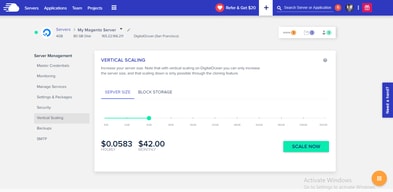
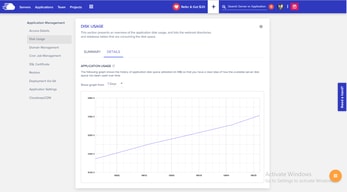
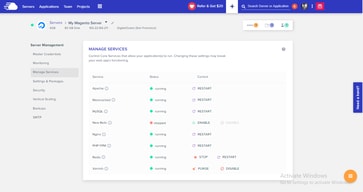
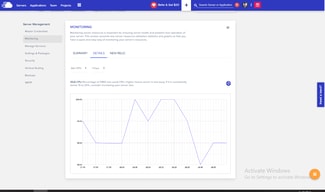




Cloudways includes unlimited websites and unlimited visits on every plan, starting at $14 a month. That is the whole proposition, and it is a genuine outlier. Kinsta’s entry plan is $35 a month for one WordPress install with 20 GB of bandwidth; Cloudways’ $14 Micro server carries no install cap at all and 1 TB of transfer. You are renting a server rather than buying licensed slots, and the difference in what that gets you is substantial.
- What it is: Managed cloud hosting for WordPress, Magento, Laravel and PHP, on your choice of cloud provider.
- Best for: Agencies and developers hosting many sites who want managed infrastructure without per-site licensing.
- Pricing: From $14 a month for 1 GB RAM, rising to $99 for 8 GB. Verified July 2026.
- The honest catch: Server resources are the real limit — unlimited sites still share one server’s RAM.
What Is Cloudways?
Cloudways is a managed hosting layer that sits on top of cloud providers rather than running its own metal. You choose the provider and the server type — Basic, General Purpose or CPU Optimized; Standard or Premium — and Cloudways manages the stack, now branded Lightning Stack.
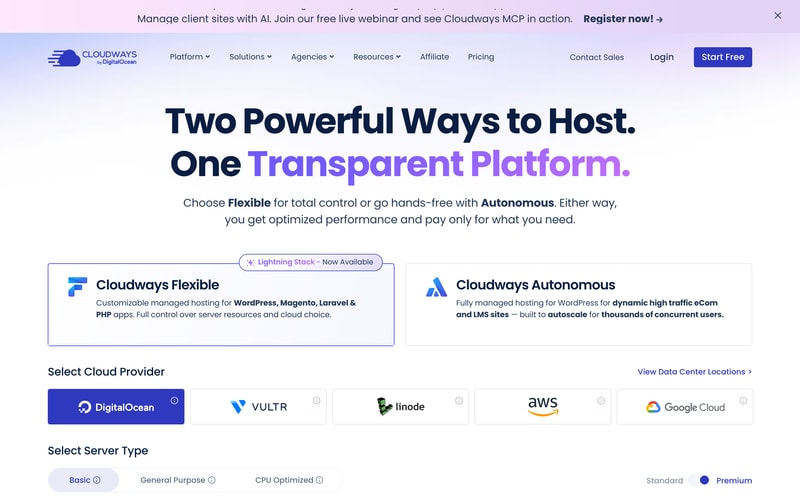
Two product lines sit side by side: Cloudways Flexible, the customisable managed hosting reviewed here, and Cloudways Autonomous, a fully managed autoscaling WordPress product for high-traffic ecommerce and LMS sites.
There is a free trial with no credit card required.
How Cloudways Works
- Server size is the meter — RAM, vCPU, storage and bandwidth.
- Websites and visits are unlimited on every plan.
- Billing is hourly, with a monthly figure shown alongside.
- Offsite backup storage costs $0.033 per GB per server.
- You choose the cloud provider and server class.
- All listed prices exclude tax.
Cloudways Pricing
Captured from Cloudways’ pricing page in July 2026 in US dollars, on DigitalOcean Standard servers.
| Plan | Monthly | Hourly | RAM | vCPU | Storage | Bandwidth | Per GB RAM |
|---|---|---|---|---|---|---|---|
| Micro | $14 | $0.0208 | 1 GB | 1 | 25 GB NVMe | 1 TB | $14.00 |
| Small | $28 | $0.0417 | 2 GB | 1 | 50 GB NVMe | 2 TB | $14.00 |
| Medium | $54 | $0.0804 | 4 GB | 2 | 80 GB NVMe | 4 TB | $13.50 |
| Large | $99 | $0.1473 | 8 GB | 4 | 160 GB NVMe | 5 TB | $12.38 |
Every plan: Lightning Stack, unlimited visits, unlimited websites.
What actually decides your cost:
- Unlimited websites is the reason to be here. Managed WordPress hosts almost universally meter installs — Kinsta allows one at $35 a month and forty at $450. Cloudways allows as many as your server can run, at $14. For an agency with twenty small client sites, that difference is the entire business case.
- The real constraint moves from licences to resources. Unlimited sites on 1 GB of RAM is unlimited in the licensing sense only. What you are actually buying is a server, and twenty WordPress sites on a Micro will perform accordingly. Size by expected load, not by site count.
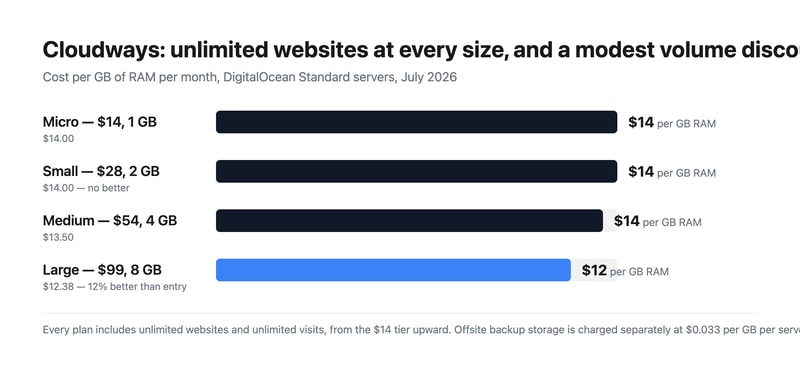
- The volume discount is real but modest. Cost per GB of RAM runs $14.00, $14.00, $13.50 and $12.38 across the four sizes — about 12% better at the top than the bottom, and no improvement at all from Micro to Small. Compare that with the flat-rate hosts reviewed here, where the per-unit price never moves at any size.
- Check how the hourly rate resolves against a full month. The published hourly figures correspond to the monthly price divided by 672 hours, a 28-day month — $0.0208 × 672 is $13.98, and the same holds for all four sizes. A 30-day month is 720 hours and a 31-day month 744, so confirm with Cloudways whether the monthly figure is a cap or whether a full month bills above it.
- Backups are an add-on. Offsite backup storage is charged at $0.033 per GB per server. On a 160 GB Large server that is a small but non-zero line, and it is separate from the storage included in the plan.
- Prices exclude tax, which the page states plainly. For EU buyers that is a meaningful addition to compare against gross-quoting competitors.
Who Should Use Cloudways
- Agencies hosting client sites. The clearest case — one server, many sites, no per-install licence.
- Developers running multiple projects. Laravel, Magento and PHP alongside WordPress on the same platform.
- Businesses wanting cloud choice. Pick the provider and server class rather than accepting one stack.
- Anyone testing before committing. A free trial with no credit card.
It fits poorly for people who want one high-performance site with dedicated support, where Kinsta or WP Engine invest more per site; for teams wanting a fully hands-off product, which is what Cloudways Autonomous exists for; and for buyers who need certainty on monthly cost before understanding hourly billing.
Honest Pros and Cons
Strengths
- Unlimited websites and unlimited visits on every plan, from $14.
- 1 TB of transfer bandwidth even on the entry server.
- Choice of cloud provider and server class.
- NVMe storage across the range.
- A free trial with no credit card.
- A real, if modest, volume discount — 12% better per GB at the top.
Limitations
- Unlimited sites still share one server’s RAM.
- No per-GB improvement from Micro to Small.
- Offsite backups cost $0.033 per GB on top.
- Hourly rates imply a 28-day month — confirm whether monthly is a cap.
- Prices exclude tax.
- Support and tuning are lighter than dedicated managed-WordPress hosts.
Cloudways Alternatives and How It Compares
- Kinsta and WP Engine are the premium managed-WordPress hosts, metering installs but investing more per site.
- Flywheel targets designers and agencies with a similar philosophy to Kinsta.
- SiteGround and A2 Hosting sit in the mid-market with simpler shared plans.
- Hostinger and DreamHost compete at the budget end.
- Liquid Web offers managed VPS and dedicated infrastructure.
- DigitalOcean directly, if you are willing to manage the stack yourself.
For a broader survey, browse our cloud hosting directory.
The Verdict
Cloudways answers a question the managed-WordPress market mostly refuses to: what if you just rented a server and put as many sites on it as it could handle? Unlimited websites and unlimited visits on every plan, starting at $14 a month with 1 TB of transfer, is a fundamentally different proposition from hosts that license installs. Against Kinsta’s $35 entry plan for a single WordPress site with 20 GB of bandwidth, the contrast is stark — and for an agency carrying twenty small client sites, it is the whole argument.
The honest counterweight is that “unlimited” describes licensing, not physics. Twenty sites on a 1 GB Micro server will perform like twenty sites on a 1 GB server, and the skill Cloudways asks of you is sizing by real load rather than by site count. That is a fair trade for the price, but it does move a responsibility onto you that premium managed hosts absorb — which is also why their per-site investment, support depth and tuning tend to be greater.
Two commercial details to settle before you commit. The published hourly rates work out to the monthly price divided by 672 hours — a 28-day month — so $0.0208 × 672 gives $13.98 against the $14 headline, and the same relationship holds at every size. Real months run 720 to 744 hours, so ask Cloudways directly whether the monthly figure is a cap or whether a full month bills above it. And offsite backup storage is $0.033 per GB per server, separate from the NVMe storage in the plan, with all prices excluding tax. The volume discount, meanwhile, is modest but genuine: $14.00 per GB of RAM at Micro and Small, falling to $12.38 at Large — roughly 12%, which is more than several flat-rate competitors offer at any size.
FAQ
How much does Cloudways cost?
Captured in July 2026 in US dollars on DigitalOcean Standard servers, excluding tax: Micro $14 a month for 1 GB RAM, 1 vCPU, 25 GB NVMe storage and 1 TB bandwidth; Small $28 for 2 GB; Medium $54 for 4 GB; and Large $99 for 8 GB. Every plan includes unlimited websites and unlimited visits. Offsite backup storage costs an additional $0.033 per GB per server.
Does Cloudways limit how many websites I can host?
No. Unlimited websites and unlimited visits appear on every plan, including the $14 Micro server. The practical limit is server resources rather than licensing — the sites you host share the RAM, CPU and storage of the plan you buy — so size the server by expected traffic and application load rather than by how many sites you intend to run.
Is Cloudways billed hourly or monthly?
Both figures appear. Each plan shows a monthly price and an hourly rate, and the hourly rate corresponds to the monthly price divided by 672 hours — a 28-day month. Since real months run 720 to 744 hours, it is worth confirming with Cloudways whether the monthly figure acts as a cap or whether a full month of hourly billing can exceed it.
Cloudways or Kinsta?
They solve different problems. Cloudways rents you a managed server with unlimited sites from $14 a month, putting resource-sizing in your hands. Kinsta licenses WordPress installs — one at $35, forty at $450 — with more per-site tuning, support and infrastructure investment. Choose Cloudways for many small sites at low cost, and Kinsta for fewer sites where performance and support matter more than price per site.
Does Cloudways include backups?
Not offsite ones at no charge. The pricing page notes that “$0.033/GB per server will be applied for offsite backup storage”, so backup retention is a separate usage-based line on top of the plan. The NVMe storage listed against each plan — 25 GB to 160 GB — is the server’s own disk rather than backup capacity.

Compare Cloudways with other popular tools in the same category.

Virtual hosting with a bit more help than Digital Ocean witch I still use with Cloudways.com. I use wordpress, a PHP wiki, and PHP blog app called Publii. Affordable professional, with competent help. I recommend this to anybody with Linux or some web experience.
Sorry. I can't find anything to dislike. Sign-up was easy. Migrated the PHP wiki first (PM Wiki) Been more than a year, and a couple years before at Digitalocean.com
I'm hosting a business, two blogs and a Wiki. I like that you can do PHP, or use popular prepackaged apps like WordPress.
Using Cloudgways gave me a lot of freedom. It is so simple to use it and the support is just great. You get quick answers to your questions right in the moment.
I didn't get downsides of using Cloudways until the moment. However, it seems that database must be extended as sometimes we use various databases for the same app!
It is simple to use and it gaves me a lot of free time as I didn't need to be worried about configuration definitions.
Cloudways has an intuitive platform and made it much easier for me to manage multiple sites.
Breeze cache hasn't worked very well for me but it's manageable.
I had issues with application speed and manageability with other venders. Cloudways has bridged that gap for me.
The support. There's full 24/7 support which goes well beyond "My site isn't working". Any time day or night you have an issue and they have a solution.
I always things were cheaper but you get what you pay for.
I never have to worry about finding devops people to solve my server issues, I never have to worry about deployments or backups. It's a devops free world.
Other than the platform being easy to use, if you're having trouble, Cloudways has an excellent support team that would hop on a call to help you set up, migrate, or answer your questions.
Not all open-source platforms are available in Cloudways, which would opt people to use a different cloud service provider. If Cloudways had it all, people would switch.
The difficulty of setting up services online. Since cloud services are a budding business model, Cloudways made it easy for us to setup website fast and with little difficulty.
Fair prices compared to what they offer. Excellent support team and fast response to your queries and problems. Very user friendly interface. Daily backups, both local and offsite. Easy configuration for your server, basically with a few clicks and numbers. Highly recommending CloudWays. They provide an option called "website cloning" which is incredible for my team because we can easily test our products in the same environment without worrying about anything or managing it manually.
Honestly, I can not think of anything. For the past few months that I've been using CloudWays, never ran into a problem that would change my mind or seem as an important issue. I only needed to change a version for a PHP addon, contacted support team and they fixed it in less than 10 minutes, so there's nothing that I dislike about them.
Their managed wordpress VPS is what I've been looking for for many years. I found them by coincidence and have been using their services for almost 8 months. One important thing is backups, which they help you with it and no need to worry about it anymore.
The best I like about Cloudways is its easy-to-use interface and user-friendly dash panel. The platform provides a clean and well-organized user interface which makes easier the management of web servers, applications, as well as databases. Creating new servers or deploying applications is simple, thanks to the simple and well-documented methods.
The pricing structure of Cloudways, although clear, might be a issue for customers having limited financial budgets or small projects. The price can add up, specially when scaling up the resources or hosting several sites.
Cloudways successfully handles the complexities and problems related to cloud hosting. By providing a user-friendly user interface and streamlining server management tasks, it considerably cuts down on the technical obstacles often linked to cloud hosting. This makes it possible for us to pay attention to their main business functions instead of getting bogged down by infrastructure management.
Performance: Cloudways is known for its high performance, thanks to its use of cloud-based servers. Your websites will load quickly and reliably, even under heavy traffic. Ease of use: Cloudways is a very easy-to-use platform for beginners. The user interface is clean and intuitive, and plenty of tutorials and documentation are available to help you get started. Security: Cloudways takes security very seriously. Various security measures, including firewalls, intrusion detection systems, and data encryption, protect all servers.
Price: Cloudways is not the cheapest hosting provider on the market. However, I think the value for money is good, especially considering the features and performance you get. Limited customization options: Cloudways is a managed hosting provider, meaning you don't have as much control over the server as you would with a VPS or dedicated server. This can be a drawback for some users who want more control over their environment.
Performance: Cloudways uses cloud-based servers known for their high performance. Your websites will load quickly and reliably, even under heavy traffic. Scalability: Cloudways is a scalable solution, meaning you can easily add more resources to your server as your business grows. This helps ensure your websites can handle even the most demanding traffic spikes. Security: Cloudways takes security very seriously. Various security measures, including firewalls, intrusion detection systems, and data encryption, protect all servers. This helps to protect your websites from hackers and other security threats.
The support and help on Cloudways is unmatched. They have the best service in the industry, and nothing comes close. Highly recommend as no one is comparable and they are the best.
Not much. They have everything I need. I would say the new interface is a bit challenging at times.
Having a cloud server to host my WordPress website.
The best I like about Cloudways is that we can get multiple hosting solutions with it like Digital Ocean, Amazon Web Services (AWS), Google Cloud, etc at very affordable prices. This enables individuals to benefit from the scalability, trustworthiness, and performance benefits provided by these renowned cloud providers. Cloudways make easier the entire process of utilizing the power of a cloud system, which makes it available even to those without considerable technical knowledge. The user-friendly user interface of the Cloudways platform is deserving of recognition. It offers a neat and easy-to-use dashboard that enables individuals to handle their web hosting easily and efficiently.
While Cloudways gives several advantages, there are some factors to note. One aspect is the lack of a domain registration service. Individuals have to get the domain name individually from the third-party domain registrar and link up it to their Cloudways hosting platform
Cloudways properly handles various frequent problems in web hosting services, leading to major benefits for companies as well as programmers. Firstly, Cloudways eradicates the difficulties related to handling and setting up cloud systems. Individuals can focus on their core business or development tasks, leaving the server administration and optimization to Cloudways. This will save time and energy and resources, enabling individuals to focus on their assignments.

Cloudways is one of my favorite cloud hosting these days. I can upgrade anytime if my traffic goes up and it doesn't go down as other hosting sever crash anytime.
Honestly, it is a great hosting but with pros, there are a few cons. One is I'm from India and it only accepts Visa, Mastercard, and American Express. Here these days we get rupee card in most cased so when it comes to paying for it is hard.
Cloudways is very simple and easy to use. Just create the server with WordPress and you're good to go. On the other hand there are a lot of hosting they have long process if you want to install wordpress.
the easy to use functionalities and the customer service
They stopped using the VULTR HF servers.
It helps me get a faster website, also a more secure server.

Support has mostly always been helpful, or can point me in the right direction. I love that I don't have to lift a finger unless absolutely necessary - in that most of the automation is handled for me. When signing on new clients for hosting, it makes the process seamless and easy.
It would be nice if the timeout was longer, but I'm picking hairs I guess. Some of the documentation could do with a bit of an update, but it's also not necessary.
It allows me to spin up new applications without any hassle, setup staging for these applications, get websites up and running with LetsEncrypt certs, and manage the databases for each application seamlessly and easily. Every piece of functionality that I have for my agency is handled through Cloudways.

They provide very knowledgeable and helpful support
I've been using Cloudways for over 2 years and did not any thing I didn't like about their service
Helping me to maintain and administer Wordpress and Magento web sites
The combination of server speed, reliability, ease of use, and customer service is unmatched by any web hosting provider in this price category.
We've been with Cloudways for 3+ years and we have had Literally zero complaints. The uptime, customer service, pricing and speed have been top notch.
Cloudways is perfect for anyone who wants the speed & flexibility of an unmanaged VPS, but also needs the support and ease of use that comes with a managed hosting provider. Cloudways strikes the perfect balance of all these things for a competitive and fair price.
Easy server scaling, best support and affordable. If you are looking for fast web hosting, cloudways is the best in the market.
Inability to easily host reactjs or other framework besides wordpress
Cloudways technical support is the best, so I don't have to worry about longer turnaround times since they offer 24/7 support. My business performance has increased as I don't need to worry about my server infrastructure.
It was easy to migrate all my Wordpress sites to Cloudeways. When I had a minor issue, I got fast and excellent tech support. thereafter things went very smoothly
I realised that the caching on the server was preventing my updates to show up, even after I cleared the cache, but once I realised that I can purge the server cache, it was going well
I like the fact that you only pay for what you use or need, most of my sites are low usage, therefore I don't need a large server, but Cloudways offers a fast server for even small sites
The most helpful thing about cloudways is 1 - their server cloing technology, makes making new sites a breeze 2- their support staff seem to know everything
I currently use this for wordpress, but I know there's so much more to use it for, I'd love some ideas on how Wordpress can work in different areas of the business/life|
Managing over 50x websites is a breeze with cloudways, the interface is great, the cloning is awesome, 100 times more productive that using another managed Wordpress host
it gives free trial to try their product and helps us to decide what will be the best option for my website.it help to manage cloud based task easily and provides best services
now a days it requires a lot of verification steps to get free trial and complete creating an accountwhich is annoying.maybe they should make it easy for us to create account
cloudways solve the problem of mny buisness who cant afford high spedd vps for their websites.They provide it for free and thus makes it easy for the businesses
I found the platform so easy to use! I only have a basic understanding of servers and reseller hosting so I was nervous to move from my current provider however, Cloudways was effortless. I found the demo call extremely helpful and reassuring before making the switch and migrating approximately 40 websites has been a breeze!
Don't love that you have to pay extra for DNS and Email SMTP compatiblity.
Better quality server and client website load time times for an affordable price.

Cloudways is the missing piece in the web hosting equation. It's a powerful, standardized control panel that supports a variety of VPS providers, from Amazon to Digital Ocean. Add-ons address the actual needs of website administrators. Need email addresses? They're partnered with best-in-class providers, and control is integrated into the Cloudways panel. Same with transactional (bulk) email. Same with CDN. Cloudways is a one-stop shop for anyone who builds websites. We use Cloudways for all of our client sites. The software is solid. The hosting partners are reliable. And the service is top notch.
We've not found any at this point. If we wanted to nitpick, we'd like better granularity on system monitors; graphs showing resource usage by application (i.e. website) would be helpful.
Cloudways delivers a functional hosting platform that just works. It has intelligently selected add-ons that my clients need, like e-mail boxes, transactional email, and CDN. It's a one-stop shop for my clients web operations.

It gives its user free trial to try her products and to decide what to buy and it gives us quality services that may be some websites give that I sreached or used.
For current, I nothing notice any kind of disadvantages or errors or problems on there website. And there is also no bugs on there website. They done their duty very well
The problem that this website is solving is that it is helping the peoples who have low budget or can not affort high rates vps. Cloudways solve this problem by giving quality services.
Confidence that I am providing my clients premium web hosting, without the many drawbacks of comparably priced alternatives like shared hosting. With Cloudways you get the benefits of premium hosting and the convenience, as they manage everything well enough that it is as easy to use as your average shared hosting provider. When I have moved wordpress websites to Cloudways, from even the highest reviewed hosts, I see instant load time improvement before installing any performance plug-ins. With Cloudways, I know I'm offering superior hosting, which gives me confidence in my service offering, which is very important.
The lack of Nameservers can be tricky sometimes, but ultimately I think this is because it is best to have DNS go through a CDN. I have also found that it is challenging to move a website away from Cloudways, but that isn't much an issue because it is only in rare cases that I would be moving a website to a different host than cloudways, and that isn't something I would do unless it were a client request. A final point I could make, although I don't know this belongs under the category of things I dislike about Cloudways, but I like to set up a lot of wordpress installs, and try different themes/plugins, sometimes I like to install templates and pick them apart to learn, or to use a section in one template in another. It would be nice if there was a bucket of storage for staging websites, this way it wouldn't use up server space to develop. This is really just an indication that I need to learn how to host wordpress websites locally for development purposes.
It takes a lot of work and extra technology to get Wordpress websites to load quickly, Cloudways changes that. With Cloudways the basics for performance are all that is needed to get fast loading websites. This type of quality typically requires a great deal of server knowledge, but they solve that problem with an easy to use reliable interface and excellent support.
I like Cloudways managed hosting solutions as well as support! Support is also excellent.
I never noticed any thing that I may disklike.
when I faced any serviced down & website issue, they resolved promtely.

Support reps like Amir Mujahid. He's honestly the man, even by Cloudways standards. He went above and beyond, as I've become so accustomed to with just about every support experience with them. I'm a lifetime customer. Not to mention, they have 24/7 immediate availability every time. Which is great, because these things usually can't wait.
Listen, unless you're going super premium your server is going to have its quirks that are unique to each hosting service. There's no getting around it. And, unless you're a super-nerd database dweller, the solutions to these issues can make you want to pull your hair out. Cloudways is no different. This is why support should be your #1 consideration when looking for managed hosting.
Keeping up with constantly evolving databases and web protocols so I don't have to. Saving me time, energy, and most importantly, HEADACHES. Hosting with tons of options and pricing comparable to self hosted. What more do you want?

Cloudways makes my life easier with managed hosting for my web applications. I have used Cloudways for over a year and realised it is not worth spending time doing regular tasks where I don't learn new things. Cloudways uses advanced built-in cache and CDN to ensure high performance during peak traffic hours on my website, making it very convenient to scale and manage backups.
I had to make a switch with Cloudways from using Azure to AWS cloud for better services as there is no integration of Cloudways with Azure cloud infrastructure.
Cloudways is helping me manage the deployment and scaling of web applications on AWS cloud service and automatically executes the performance optimisation required during peak hours.
The support is outstanding, with quick response times. The support staff is knowledgeable.
I haven't found anything that I dislike about Cloudways.
We do not need to maintain the servers. WordPress issues are resolved by the support staff.
Effortlessly manage our servers and applications without needing a terminal with our user-friendly and scalable platform that provides all the necessary tools. Our optimized applications include WordPress, staging, and more.
Our platform has been experiencing persistent issues, such as inconsistent domain functionality for newly-added domains and the need to refresh the page to ensure they work manually. Additionally, Digital Ocean requires users to manually scale down their servers.
Effortlessly manage your WordPress and WooCommerce sites, and ensure regular backups with our simplified hosting and management platform. Instead of relying on multiple services, all the necessary tools are available in one place.
I like that the user interface is really friendy I can find most of the things i need on documentation The setup was easy and the hosting is fast as hell
I don't like much the db manager, also maybe its a bit expensive
I needed a fast easy to use hosting
How easy staging sites are to spin up and work on.
PHP upgrades are on a server level only - having to upgrade everyone on your server to PHP 8 at the same time is obviously not a great idea.
Scaling, and effortlessly managing client sites.