

Unclaimed: Are you working at Coda?
Coda Reviews: 4.7/5 — Highly Rated
Coda is a document management solution for creating, editing, and viewing text documents and spreadsheets. , It also helps centralize all documents to ensure seamless efficiency between teams and comes with customizable templates that let organizations create personalized documents for meetings, brainstorming sessions, customer feedback, to-do lists, and market research. It features drag-and-drop functionality, which keeps functionality simple, and has numerous tools that offer role-based access.

| Capabilities |
API
|
|---|---|
| Segment |
Small Business
Mid Market
Enterprise
|
| Deployment | Cloud / SaaS / Web-Based, Mobile Android, Mobile iPad, Mobile iPhone |
| Support | 24/7 (Live rep), Chat, Email/Help Desk, FAQs/Forum, Knowledge Base, Phone Support |
| Training | Documentation |
| Languages | English |



Coda bills you for Doc Makers only. Editors and Viewers are free — on every plan, including Enterprise. An Editor can edit content, add tables and views, build formulas and buttons, and configure Packs and automations, and still costs nothing. So a fifty-person workspace where five people create docs pays for five seats. In a category where almost everyone charges per head, that is the most buyer-friendly pricing model reviewed here this month.
- What it is: A document creation platform combining docs, tables, formulas and automations — now sold as Superhuman Docs.
- Best for: Teams where a few people build documents and many people use them.
- Pricing: Free; Pro €12, Business €33 per Doc Maker monthly on annual billing; Enterprise custom. Verified July 2026.
- The honest catch: The product has been rebranded — every button on the pricing page says “Get Superhuman”.
What Is Coda?
Coda merges documents, spreadsheets, databases and applications into one surface: pages that contain connected tables, views, forms, formulas, buttons and automations, extended by integrations it calls Packs. It cites 40 million-plus people and 50,000-plus organisations.
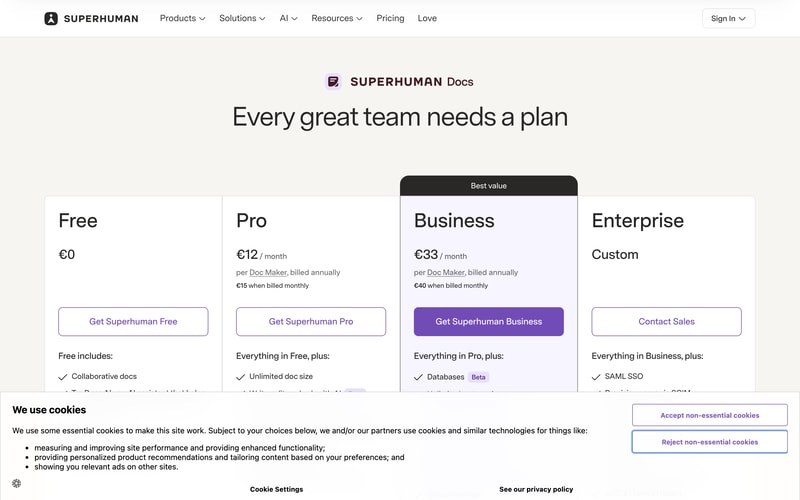
The name has changed. Every call to action on the pricing page reads “Get Superhuman Free”, “Get Superhuman Pro” or “Get Superhuman Business”, and the FAQ refers throughout to “Superhuman Docs”. Coda now sits inside the Superhuman family alongside Grammarly, and the plan cards list Grammarly and Go as included from Pro, with Mail added from Business.
Docs AI is marked Beta and is described as “available during Beta for Doc Makers”.
How Coda Works
- Doc Makers are the only billed role.
- Editors, Viewers and Guest Editors are always free.
- The model holds on Enterprise, per Coda’s own FAQ.
- Two paid tiers plus a free one, and a custom Enterprise.
- Grammarly, Go and Mail are bundled from Pro upward.
- Removals give account credit, not refunds.
Coda Pricing
Captured from Coda’s pricing page in July 2026 on the euro price list.
| Plan | Annual (per Doc Maker/mo) | Monthly | Saving | Key additions |
|---|---|---|---|---|
| Free | €0 | €0 | — | Collaborative docs, connected tables, formulas, automations |
| Pro | €12 | €15 | 20% | Unlimited doc size, 30-day version history, custom branding and domains |
| Business | €33 | €40 | 17.5% | Databases, unlimited automations and version history, private folders, doc locking |
| Enterprise | Custom | — | — | SAML SSO, SCIM, audit events, SOC 2 Type 2, HIPAA |
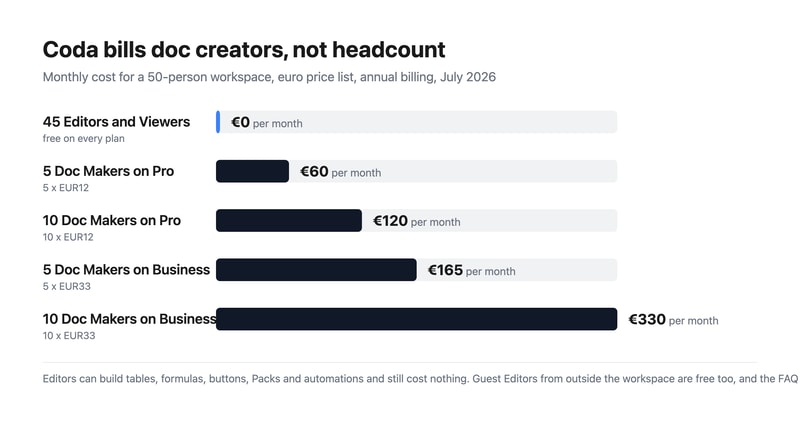
What actually decides your cost:
- Count your doc creators, not your team. Coda’s FAQ is explicit: “Editors and Viewers are always free”, and “at the end of each billing cycle, you will be billed for the workspace based on the number of Doc Makers in it.” A Doc Maker creates docs and templates and manages folders; an Editor does almost everything else — tables, views, formulas, buttons, Packs, automations — for nothing.
- The free roles are unusually capable. This is not a viewer-only tier dressed up. An Editor building a formula-driven tracker with automations is doing the substantive work of the platform and is not billed for it. Compare that with Notion or Airtable, where an editor is a paid seat.
- Outside collaborators are free too. Sharing a doc externally adds the recipient as a Guest Editor, who can edit content in that doc but cannot manage pages or browse the workspace. Guest Editors cost nothing, so client and contractor collaboration does not inflate the bill.
- Enterprise keeps the model. The FAQ states plainly: “Even on Enterprise, you pay only for Doc Makers.” Enterprise adds SAML SSO, SCIM provisioning, audit events, a SOC 2 Type 2 report and HIPAA compliance rather than changing how you are counted.
- Business is a 175% step up from Pro. €33 against €12 buys databases, unlimited automations and version history, private team folders, page locking and cross-doc actions. Pro’s automations are not stated as unlimited, so heavy automation users should establish the Pro limit before assuming they can stay there.
- Cancelling gives credit, not money back. Coda’s FAQ: “When you remove members or cancel your plan, we’ll apply a prorated credit onto your account you can use for future charges in your workspace.” That credit is usable inside the workspace, not refundable to your card.
Who Should Use Coda
- Teams with few builders and many readers. The clearest case — the pricing model is designed exactly for this shape.
- Operations and product teams. Connected tables, formulas and automations replace a spreadsheet-plus-doc sprawl.
- Agencies and consultancies. Guest Editors are free, so client collaboration costs nothing.
- Organisations needing compliance. SOC 2 Type 2 and HIPAA on Enterprise.
It fits poorly for teams where everyone creates docs, since every one of them is a billed seat; for buyers who need mature, non-beta AI, given Docs AI’s Beta labelling; and for anyone unsettled by an in-progress rebrand.
Honest Pros and Cons
Strengths
- Editors and Viewers are free on every plan, including Enterprise.
- Free Editors can build tables, formulas, buttons, Packs and automations.
- Guest Editors from outside the workspace are free.
- A genuinely capable free tier with connected tables and automations.
- Grammarly, Go and Mail bundled from Pro upward.
- A 20% annual discount on Pro.
Limitations
- The product has been rebranded to Superhuman Docs mid-flight.
- Business costs 175% more than Pro.
- Docs AI is still labelled Beta.
- Pro’s automation allowance is not stated as unlimited.
- Cancellations yield account credit, not refunds.
- SSO and compliance reporting require Enterprise.
Coda Alternatives and How It Compares
- Notion is the closest competitor, charging per member rather than per creator.
- Airtable is stronger as a database, with per-seat editor pricing.
- ClickUp and monday.com approach the same ground from project management.
- Smartsheet targets enterprise work management with a spreadsheet metaphor.
- Google Workspace covers documents far more cheaply without the database layer.
- Confluence, Slite and Nuclino compete on team wikis and documentation.
For a broader survey, browse our document creation directory.
The Verdict
Coda’s pricing model is the best thing about it, and after a month of reviews spent pointing out where headline rates mislead, it is a pleasure to report one that works the other way. You are billed for Doc Makers only. Editors and Viewers are free, and so are Guest Editors from outside your workspace — on every plan, with the FAQ confirming that “even on Enterprise, you pay only for Doc Makers.” Crucially, the free roles are not spectators: an Editor can build tables and views, write formulas, configure buttons, add Packs and set up automations. A fifty-person team where five people create documents pays for five seats.
Set against per-member competitors, the difference compounds quickly. That same fifty-person workspace costs €60 a month on Pro or €165 on Business, where a tool charging per member would bill all fifty. If your organisation has a handful of builders and a long tail of people who read, comment and edit within existing docs — which describes most operations, product and marketing teams — this is the cheapest serious option in the category by a wide margin.
Two things to note before committing. The product is being rebranded: every button on the pricing page now reads “Get Superhuman”, the FAQ calls it “Superhuman Docs”, and Grammarly, Go and Mail appear as bundled products from Pro upward. Anyone evaluating “Coda” should know they are buying into the Superhuman family, and that Docs AI is still labelled Beta. And on the commercial detail, removing members or cancelling produces a prorated account credit rather than a refund — usable for future charges in the workspace, not returned. Neither undermines the central point, which is that Coda charges for the people building and lets everyone else in free.
FAQ
How much does Coda cost?
On the euro price list captured July 2026: Free at €0, Pro at €12 per Doc Maker per month billed annually (€15 monthly), and Business at €33 billed annually (€40 monthly). Enterprise is a custom quote. Crucially, you are billed only for Doc Makers — Editors, Viewers and outside Guest Editors are free on every plan.
What is a Doc Maker in Coda?
The only billed role. Coda’s FAQ defines Doc Makers as members who “create new docs and templates, create and manage folders to organize the workspace”, plus doc administration such as adding pages, changing titles and icons, and configuring locking. Editors, by contrast, “can edit content and collaborate in existing docs and pages, including adding tables and views, constructing formulas and buttons, adding and configuring Packs and automations” — and are free.
Are Coda Editors and Viewers really free?
Yes. The FAQ states “Editors and Viewers are always free”, and billing is based purely on the number of Doc Makers in a workspace. External collaborators become Guest Editors, who can edit content in docs shared with them but cannot manage pages or browse the workspace, and they are free too. The model holds on Enterprise, which the FAQ confirms explicitly.
Is Coda now called Superhuman?
Effectively, yes. Every call to action on the pricing page reads “Get Superhuman Free”, “Get Superhuman Pro” or “Get Superhuman Business”, and the FAQ refers throughout to “Superhuman Docs”. The plans also list Grammarly and Go as included from the Pro tier, with Mail added at Business, so Coda now sits within the wider Superhuman product family.
Does Coda refund unused time if I cancel?
Not in cash. Coda’s FAQ states: “When you remove members or cancel your plan, we’ll apply a prorated credit onto your account you can use for future charges in your workspace.” So downgrading or removing Doc Makers produces workspace credit against future billing rather than money returned to your payment method.

Compare Coda with other popular tools in the same category.
Coda has allowed us to move giant multi-spreadsheet solutions to single Coda doc solutions that allow for much better collaboration and transparency. Not to mention all the easy-to-use automation for pushing updates to Slack, etc. Coda also allows you to use formulas within the body of a page, not just inside of a table. This is amazing for adding real-time figures inside of a sentence or at the top of a page where everyone can quickly check of what's happening with the larger tables that live throughout the doc.
The bar has been a little high for some of our less tech-savvy clients. But with Coda, we'll usually make a simple How To Manual where we can even include GIFs on how to do simple actions, and a lot of our clients have come to love Coda because of it. Many things that I disliked have been addressed one by one as Coda is constantly releasing new features. Things like collapsable accordion-like sections and easy drag and drop are a couple of examples of updates that have made me trust that Coda is continually working to make their product great.
We're consolidating tons of information, streamlining data input, automating boring tasks, and letting everyone collaborate inside a single doc. This saves everyone a lot of time — Coda is much more flexible than (sometimes multiple) spreadsheets when it comes to making changes, so we can easily adapt to client needs. Coda table columns are all semantic, and any formulas referencing them are updated when the column name changes. Comparing this to a spreadsheet, it saves so much time and is so much more intuitive than trying to reference Col AW in Col BC

Better UI than Notion, Faster than Notion, and Automation!
Mobile app is bit slow but has a great user interface
I manage all my personal data and business docs through Coda, Coda offers an automation with API and it works super great if you need any automation process for your data.
Easy to build out real app ideas and interactions as easy as you’d build a table
Can’t scale up a full app by paying for more memory use - but this is totally understandable
Built a few apps - imagine that spot where a doc doesn’t need a ton but could be more of an app - collect receipts, track clients, create a funnel, etc -
You can do everything with coda. I use to be a Evernote Customer, but Coda is incredible. Yo can have every kind of notes.
Maybe that den't have a native mobile app already.
It is like my second brain, I write everything of my life right there
All of Coda fits together. You start with basic clickable features, then witness a formula here and there, then realize the language is actually simple and logical and then you find yourself building small custom app-like docs for your team. Coda found the sweet spot between docs, databases (cross references! views!) and apps (interactive filtering! custom buttons! integrations!). It is easy to start, and I am probably still far from what can be done.
Sometimes the highly interactive and contextual user interface (which I like very much, in general) gets in the way. There are still some traps. "Time" is actually a "Date and time", with the date set to zero. And Now() function gives time, but also with the date included. Comparing time values leads to some confusion. I would also like to have generated views (a table populated automatically from different tables, without setting up automations). Still no proper forms (where data flows both ways, e.g. with a formula-based selectbox. All the things I dislike are solvable, and given the speed of the development, they will probably disappear eventually.
Simple information systems, where a spreadsheet would just be inconvenient (require too much formulas, extensions, obscure hacks and learning&cooperation from other team members).
I love the beautiful way you can present all kinds of different information. I've worked in Google spreadsheets for years and years, and while it took me a little while to love Coda more because it's a little different, I am obsessed and loving using Coda for tracking so much information. We've created an entire accounting system that allows us to track our expenses and revenue SO MUCH EASIER than Spreadsheets. I've created a coordination system for matching people with resources to people in need and I've trained several other people on it who all are amazed at how much it can do and how easy it is to use.
It's a little hard to understand when you first log in - but even that they are always working on.
Organization of information is so easy this way We've created a tracking system for thousands of sponsorship across 100+ people, allocating those sponsorships to the right person and the correct percentage, emailing them a notification of that sponsorship with the click of one button, and providing reports for us on the backend. It was a ton of information that has become so easy to manage and present to many different people and groups.

Though it takes a little work to get used to the features and tools of the program, once you know your way around Coda, it becomes an extremely powerful and useful document. It has become the one-stop-shop for everything my Team needs, replacing several other programs with one unified platform.
One of the few things that's frustrating about Coda is that sometimes very intuitive commands you want to have your documents do or carry out have to be "coded" into the program or find work arounds to have the document implement them. Thankfully, though, is that there is a responsive support team and awesome community that helps answer those questions.
Coda has become, as mentioned above, the one-stop document for everything we do at work. We had data spread across multiple platforms, for example: Google Docs and Sheets, Microsoft Word and Excel, and other third party programs. Coda has given us the functionality of all of these in one document and allowed us to keep better track of our animal and product data, as well as inventory tracking and discussion forums when we're not in our work building.
Having the power of a database with flexibility of a doc. It allows for storing, interacting and presenting data on a single platform.
iPhone app could use a performance upgrade.
Nearly all administration for managing construction company. Coda and Zapier paired together allow me to create a platform that all managers can interact with their relevant data in a single location.
I love how you can take quick-fire notes but still make them look not just okay but presentable immediately. The ease in which you can present the same data set to each scenario saves so much time for our team and allows us to collaborate more effectively than ever.
There are some times when creating a new bullet point in a table that it’s awkward to return space and create a new one. You have to figure out a certain way to create it and it’s not the most intuitive.
With working from home so much at the moment it makes collaboration really easy. It also fills in the gaps for some of our reporting; it’s great having all the stats in one place instead of across all the systems.
You can combine text documents and tables in one space. No need to open separate documents. You can use various combinations of views and options and formulas to virtually create any kinds of documents from simple text to project management.
There are still some rooms to improve at the UI and UX part. It would be nice if users can navigate documents like they navigate files and folders using a file explorer. And for first-time users, there is a bit of learning curve to be able to use Coda optimally.
Instead of opening many applications, now I can work (almost) solely using Coda. From managing a daily to-do list to managing student's scores and attendance to planning classes to preparing teaching materials.

Coda is a super-doc. It takes the best of Docs and Spreadsheets and comes up with a whole new level of automation, trigger, control abilities that makes a Coda doc as powerful as an app.
The formatting options are less. Wish I can bold the headings. No Dark Mode yet. No way to properly print the docs. But, the best part is that the Coda community is buzzing and the product managers are quick and smart to address the requests.
I have been using it for a variety of jobs. From text documenting, making to-do list, project plans, tour planning, self journal, etc. The fact that you can create a near app like doc with no-code (Only Coda is required :)) is simply mindblowing!

The capacity of easily managing docs like databases. We use it to keep track of the projects and tasks of our team. I like how tables conect and how you can have different views of them in different pages. Thus, you can have multiple lists using the very same table by filtering each view and hiding/unhiding columns. On the other hand, formulas are very easy to learn and you can relate them to other products like Excel or Power BI.
The mobile app is very unstable. I logges out very often, and docs are slowly loaded. I do not use it very often on my phone since it is not that good. I feel like i will lose too much time waiting. It still does not have enough format/design options (though they announced it will be enhanced soon). Then, docs might seem very dull. I have tried to find some sort of progress bar. Since I use it for project management, that ould be very useful. I would like to be able to open rows more easily. It'd be nice if you could add a button to open them.
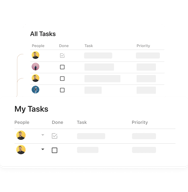
We were having problems tracking our projects and tasks because most apps didn't fit our needs. Now we can tell our app how to work. Excel would do the job, but we needed a more friendly interface. Coda has given us that ability. In our case, we divide our work in areas, then projects, then tasks and sub-tasks. We also have a "My tasks" view that varies depending on who is using it. We can also have alerts when the due date is drawing near. We can see projects separately and see how many tasks have been done, how many are pending and add new ones. We also see our team's productivity.
We recently started using Coda to help our customer service team make sure we are followed up with all of our customers and all issues are resolved. So far it has been great! Super easy to use and very helpful for our team. It is nice, at the end of the week we can resolve any unresolved issues.
So far we have had no major issues to report with Coda. We are still pretty new users but from a new user perspective, I wish there was more of a 'guide' or tips and tricks. Since I am a new user it would be nice to learn some of the shortcuts to make things even easier.
With Coda, we can create a clear list of any customer issues. This helps us not only make sure that these issues get resolved but now we can see if there is any consistency with issues so if we need to fix something on our back end we can.
We can create unique tools using Coda that include elements like sliders, pivot tables, and buttons, which makes it simple to customize documents to meet our unique demands for teamwork. Also, the ability to create complex workflows with custom formulas and the automation of repetitive tasks allows us to better manage our projects.
The loading speed of larger pages can occasionally be an issue, causing a slowdown in the user experience, and that's something I find inconvenient.
Coda offers a platform full of collaborative features, such as interactive dashboard creation and task list integration. In addition, real-time collaboration tools, along with advanced formula and custom block features, have elevated our productivity.

Arrangement of pages into folders and different views of tables and data.
It perhaps is not for individual use and is mostly meant for collaboration and teams.
When we have very scattered documentation, we look to get it sorted and organized in Coda. Most of the non-tech team members find it very easy to use.
The breadth of integrations is second to none. This allows my documents to be dynamic and constant evolving.
The amount of tools available within coda can be overwhelming at first.
One stop shop for all internal stakeholders (no more updating 3 different sheets)
The best thing about Coda software is that it gives and provides a free trial of the platform for all to test it properly before purchasing it. The refresh rate of the software is amazing, it updates the latest details of the work and projetcs on the portal so quickly and with accurate details. Also it reminds about the deadline of the project and about the remaining tasks also. This is the best feature of it. With this it was so easy to create and import the documents for future also, teh docs saved in this are accessible at any time. So easy to collaborate with all our team members and let us to do the work in groups. As many people can be added in this portal. There are number of good scale of features on this available for smooth and amazing workflow.
The plans of the software are quite expansive and needs to pay extra if you require the advaced features which are not included in the plan of it. This makes unaffordable for small business runners and enterprises.
Documents preparation for our projects , online meetings and for the official doc preparation also is software has helped us alot to do our work easily. Its helping us to manage our team data and the tasks details all at one place. Centralised our data procurement and document creation work.
Just about how powerful the software can be! It's adapted to the way my team works and how the company works, we've been able to build Sprint Systems off of this. Integrating Coda into other sources of data such as Hubspot has been a great help as well. The entire company uses this every day, and we're built off of Coda practically!
I would so that Coda's most recent update has created a rift for users. -- That being you need to be a Doc Maker yourself to add and manage Pages in a Doc -- as Pages themselves can be as powerful as Docs.
Visibility over team workload. Communication between different teams.
Is easier and more enjoyable to use than Microsoft Office or Google Drive. They continue to add more features regularly.
Sometimes I need to put together more formalized documents so I have to do that outside of Coda.
Coda is solving an organization, sharing information with stakeholders, and work efficiency.
The simplicity of coda added to the customization that you can do is the best thing. Packs and formulas permit you to do whatever you want inside coda, from simple calculations to complex integration with other apps.
I wish that more permissions levels could exist for editors, without needing more doc makers.
It is an all-in-one place permitting various types of integration between data and users.
I started using Coda back in 2021, and I chose it over Notion as its reviews and tutorials showed a more customizable solution to build a personal knowledge hub.
I didn't find a particular feature that I disliked; the issue I found that applies to all the tools that allow you to create hyper-personalized documents is that I ended up spending way too much time tweaking these documents instead of actually being more productive.
I wanted a centralized knowledge base that I could assemble in a way that was intuitive to my way of thinking and working. The idea is to have a repository of best practices, SOPs, ideas, and projects that help me keep on top of things without constantly switching between apps.
Coda is a great platform that has helped me tremendously by being updated with every new tasks and projects given to me by providing a task updater. It's to-do lists helps me in knowing the pending tasks. Its other features has helped me a lot as well professionally so it is a great platform to use.
Coda lacks few integration techniques and features. For example, I wanted to upload certain documents from Google Drive and other storage platforms such as Box and Dropbox but was unable to do so seamlessly and cycle around a long process.
Coda has been a pleasure and a true delight to use in every field of mine, ranging from professional to personal. Coda provides tons of features that are really helpful in making my notes, being updated with daily tasks and works, and a lot more. So in terms of being updated and staying up to mark, Coda has helped our organization tremendously by letting us create a group and collaborate with each other on various tasks together.
What I liked about Coda software is I had the choice to decide if I want to purchase it or not as it comes with a free plan. The various options along with the templates which are customisable as well provided were another plus as they helped me create my content easily. Coda also comes with top grade features and tools such as workflow automation, formula editor, document management, etc. In conclusion, Coda is helpful to analyse one's team performance by monitoring what an individual is doing at a certain point of time .
Personally, I found the prices of Coda a bit steeper when compared to other platforms, and for a beginner, it is slightly difficult to operate. The non-presence of a desktop app and cloud storage is another minus as neither cannot generate a large user base nor can anyone access files from any device. Some bugs also present in the website. For example, taking time to load mobile website, not being properly, optimised et cetera. Coda also doesn't have feature to import files from third-party software. Also the graphics are mediocre.
In my opinion, if someone is searching for management platform, in search of creating different types of files, such as spreadsheets, databases documents, coda is the most efficient platform, the option to analyse my team's performance, create files and the customisable templates is an effective and time saving feature which helps me fast track my work.
My organization has various departments with complex tasks to be performed by every department, so it is difficult to keep a track of every department and the progress done by them. So to tackle this situation I came up with Coda which helped me in assigning and managing almost each and every tasks, projects and more seamlessly and showcase my role as a manager. So for workflow management Coda has been a truly exceptional platform for me. I also write in important notes and set out clear objectives for my team.
I was really disaapointed when I went through its subscription planning which I thought would be really affordable for me, but unfortunately it was not. The ability to import documents and files from third part platforms was not well optimized as I was not to do so seamlessly. Sometimes we need to perform some tasks that are really graphics focused, but Coda is not the best platform for doing so.
Coda has been a truly fascinating platform for me in terms of managing my team and their progress, so for me it is truly one of my favorite tools to play with. The ease of doing is what according to me distinguishes Coda from other management platforms. The smooth and easy to adapt to interface was what made it easy for me to know each and every feature of its such as OKR, carry out surveys and more. I was able to connect and increase the efficiency of my team many folds, all thanks to this platform. So overall this platform has been a real piece of delight for me.
I love that I can keep all of my meeting notes and goals in one spot. It's easy to use as a manager, when I meet with my direct reports and keep all of my notes in one spot.
It's a bit clunky to copy and paste and create new meeting dates. Simpler copy-paste functions would be great!
Coda takes the place of general Google Docs and keeps everything organized and easily shared.
I really like how easily searchable Coda makes all added resources. The collapsable sections make it simple to find the sections you are searching for and drill down into the specific information you need.
I wish the formatting options for texts and inserting images was better. Formatting text to strikethrough, be a different font, ect, is not as intuitive as other tools and inserting images/other media into a Coda section is not easily done.
Coda allows our leadership team to collaborate on projects, set meeting agendas, assign a rotation of ongoing tasks, and input knowledge resources for our team and share them out to our team easily. Coda is an easy knowledge resource to keep updated and current when processes and workflows change
It offers a comprehensive range of tools and formulas that let you work with and analyze the data in your documents. Coda offers robust capabilities that can assist you in effectively managing and analyzing your information, from straightforward computations to complex data processing. It excels in fostering teamwork among members.
It may be pricey compared to other productivity tools on the market. Although it provides excellent versatility, there might be some modification restrictions. Advanced customization choices need technical know-how or coding expertise.
By enabling me to develop specialized documents, apps, and workflows that gather data and procedures in one location, it aids in resolving the issue of fragmented information. Offering real-time editing, commenting, and work assignment options encourages team collaboration.
The best way to organize and streamline your work, processes, notes, and projects. A must- have. Very customizable and adaptable. Unlike many platforms, which only allow you to create checklists or spreadsheets, Coda is completely open-ended, and adaptable to the nature of your work.
The platform can be slow and clunky at times, especially if there is a lot of data in your doc. Notion is a comparable platform, and is more fluid and fast. Unable to send people links to specific pages/ tables- the person will see the entire doc. Limited ability to export to other formats (e.g. exporting to PDF, word, excel) unless you are willing to use packs, which are not accessible to people with non- technical backgrounds. Can only edit the doc if you sign up for an account, which makes it difficult to get buy-in for this platform from teams and workplaces that have never seen this platform before.
Organizations and individuals are increasingly being asked to do more at work. People manage more tasks and more complexity in their workday. Projects are more ambitious, complex, and collaborative. Coda makes managing, organizing, and streamlining this mass of work easy. This is the main, if not the only, tool you need to rely on to get things done.

The notes features are robust with the ability to easily add rich content and integrate with Jira.
The mobile app seems to be missing key features like uploading pictures.
It's making project management easier by helping me coordinate amongst the working groups.

Coda formulas are the most flexible I know. Buttons, actions, and Coda Packs are mindblowing.
Coda is harder to adopt by new users, that's because they prefer to use Notion instead.
In Coda, you can build a complex web app. Is true that it is limited in design but for company internal use is very good.