

Unclaimed: Are you working at Confluence?
Confluence Reviews: 4.1/5 — Solid Choice
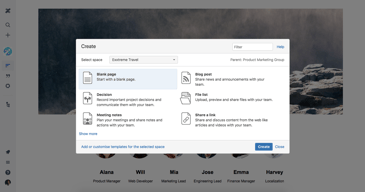
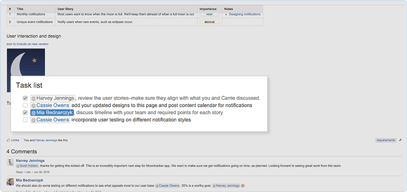
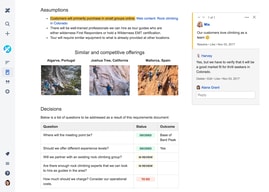
Confluence is a collaboration and knowledge management platform. It is often used by teams to create, organize, and share content within organizations in a seamless and centralized way. Confluence offers tools such as knowledge base creation, document collaboration, as well as task management tools that allow teams to work together more efficiently. It also provides a central hub where users can share and collaborate with ease.


| Capabilities |
API
CLI
|
|---|---|
| Segment |
Small Business
Mid Market
Enterprise
|
| Deployment | Cloud / SaaS / Web-Based, Desktop Mac, Desktop Windows, On-Premise Linux, On-Premise Windows |
| Training | Documentation |
| Languages | English |


Compare Confluence with other popular tools in the same category.

Very easy to use with a HUGE amount of tutorials and tooltips. I could not ask for more
A few too many settings are behind a paywall. I would at least like the ability to set privacy levels without paying, but I understand
It is a wonderful way to write wikipedia style guides for new software as well as track who is working on what.

I like the interface of the platform and how intuitive it is while maintaining all the technical documentation of project. We can store code flows as well and do live changes
I dislike that sometimes the clustering is required but no such smart clustering is provided by confluence. Also I dont like the thumbnails of certain areas. They seem outdated
We use it to store the technical documentation of our project. Along with it we use it to store the code flow and algorithms behind each and every pipeline. It is really beneficial while sharing all details with clients
Confluence is a great tool for any company but particularly start-ups that need ways to standardize information sharing. You can easily create shared learning spaces and locations for different teams, policies, and company segments.
I would like more robust tools for creating a table of contents and easier ways of sharing what information is sourced where without having to click into it. Additionally a more robust integration with Google Drive for organizing files housed in different locations so they are easy to find in Confluence. Additionally adding system reminders every 6 months to a year to remind users to update the information and make sure it's up to date on certain pages (with notifications that it was last updated x date).
Solves a lot of organizational problems, creating a one-stop-shop for company information. Easy to share and easy to learn how to use - it's an excellent source for new employees or employees moving to different segments internally.
The Analytics part.I can review the most popular content and most active users.The calendar is also very helpful because we can turn COnfluence into a project manangement system.
Sometimes the platform is very slow when knowledge base pages have a huge amount of data. Hopefully in the future we can have a lighter interface that can handle the huge amount of data.
Multiple, we have a all in one platform, project management, team calendar, knwoledgebase, team tasks. We use this daily and our productiviy has grown and we can concentrate on work rather than searching for word docuemnts and excel.
In a professional setting, it is a nice and secure way for you and your peers to collaborate on and view documentation. It is easy to create, format, manage and share documents. Plus since it is part of the Atlassian suite, it easily integrates with their other tools such as the Jira task tracking tool.
One setback of the tool is that it lacks a good search feature. It can be difficult to search for a particular document that you are looking for if you can't remember where exactly it resides.
I use Confluence in a professional setting to manage all of our proprietary documentation. We plan projects, document product requirements, user feedback, and meeting notes within this tool.
Confluence allows our organization to consolidate our documentation into one software - this is essential when using other Atlassian products such a JIRA to enable team members to refer to all relevant information.
There isn't much criticism I can direct towards Confluence. We have had some team members experience difficulty finding the desired documentation when searching for an issue using only keywords.
The benefits from using Confluence are vast; in a mostly-remote work environment, providing access to all technical documentation to team members worldwide is crucial to our operations.
Confluence is so far the best tool I use for my daily tasks. It is very well organized tool for keeping documentation like test plans and test checklists. The tool is very reliable.
There are no points that I can mention concerning the improvements. The tool has a great design and is very simple to use. I found no downsides that need to be improved.
Confluence helps me solve documentation keeping issues and tracking. Its very comfortable to keep and track the testing and development process with Confluence.
I like how easy to use this platform is. It has lots of detail and ways to easily trackwork performance. I like that the links are user friendly and easy to share with all teammates so that we can all contribute.
I really don't have any dislikes about confluence. I have really enjoyed the platform. I think maybe some of the tools related to building Gantt charts could be better but overall I'm very happy with the platform.
I am helping to manage projects that span across a variety of function using this platform. We keep detailed notes in timelines enable to make sure that projects are going as planned.
The templates that are easy to use, easy to be viewed by colleagues, easy to piblish information, easy to keep information private, blog page for internal use, collaborating on the same document, its all amazing! You can connect witb jira and do tasks there. The way you can use it has no boundaries.
I really have nothing to object. I mean its one of those platforns you cabbot find something bad to say about it. They improve constantly, they are agile and make our teams agile, share ideas, share products, information, processes.
Interdepartment communication, sharing of knowledge, of proposal, of proceses, of news, details, be them images, videos, updates, tables, links. The best part is that everything is organized.

If your enterprise uses bitbucket, Jira, then confluence will be your obvious choice to maintain your application documentation. Because all these three apps are by attlasian the inetgration between them will be seamless.It's really easy to use and also has versioning feature. You can link your bitbucket, Jira everything in your documentation.
The page-load is a bit slower at times. If you are using all of the Atlassian products, then only it would be good for you. Need more orientation items like numbering.
We are using confluence for maintaining all our client documentation, including application overview, design documents, Jira information, etc. It's like our Wikipedia of all our application information.

1) Wide array of text editing tools 2) Integration with other Atlassian tools, especially Jira helps in pulling out data automatically 3) Has features to track views on a page.
1) The editing tools aren't exhaustive. Would have loved spell check, font selector, font size selector etc 2) Hasn't yet automatically integrated with Trello - another Atlassian product and a far simpler task management tool than Jira
1) Using it to document projects 2) Using it to create internal knowledgebase for the organisation 3) Using it for giving project updates to stakeholders 4) Using it to show sprint reports by integrating with Jira
Easy to use for wiki and share it across the organization. Easy integration with other atlassian tool sets like Jira. Mentions and notifications works great. Compared to other wiki tools, this stands aside for sure.
Permissions can be challenging. It is easy to miss that the document you share is not protected. Notification mechanisms for an open page would be ideal,
Engineering documentation are easy to make and share. Several templates are available which can ease up the process. Using this product can be effective for improvng productivity.
To say that Confluence is essential to our workflow is an understatement. We use Confluence to store all of our department's information so that we can easily refer back to them. I don't think we could function without the use of Confluence.
If I had to choose something I dislike about Confluence is how it updated the way you edit pages. Since I've been using this for years, I got used to the older way to edit pages. The old editing ways just seemed to make more sense, but maybe it's just my personal preference.
Confluence helps streamline our workflow because we can easily refer back to important information that's essential to our work. Everything we have questions about or need to look up, it's in our Confluence pages!

It has variety of templates which serves right purpose of documentation and makes it easy to write, read and navigate. Best part, It has options to find quick with various tags and formats.
Pages where architecture designs are added using gliffy diagrams take lot of time to load and also difficult to version out.
Best to do project documentation with stakeholders, architecture and product roadmap. We are also using to store design decisions, Monthly status and risk meetings.
I find Confluence easy to use for collecting my thoughts, documenting research, and providing resources to my team/company. It's easy to add content, but also easy to share links and find what I need with the handy dandy search functionality. I can easily make a page or space private, limit the audience or open it up to everyone. Easy to manage access. I love how people who have view-only access can post comments/questions about content without messing up my work. I can "watch" a Confluence page and be notified when changes are made.
I wish it were easier to format my content. I also wish, I could take content from a Word document and paste it into Confluence while keeping the exact same format as the Word document. For example, if my Word document contains bullets, I copy/paste into Confluence, the pasted bulleted formatting is funky and requires clean-up.
When I store my notes in Confluence, it takes me less clicks to find what I want versus if I store it in Sharepoint or One Drive. For the Microsoft products if I haven't saved the links to my favorites, I have to find the app > the folder > the documents. It's just easier to find what I need in Confluence. And the search function makes it WAY easier. My company is beginning to use Confluence more and more for policy and how-to docs to help with new hires and for training purposes. We don't have to give special access to folders ... our users have access and can just search and use it.
The easiness of finding information makes the difference in organizing your responsibilities and finding THAT info you´re looking for hours without seeing it, had helped me a lot before.
The price can be a bit tough to chew, but it offers what it promises, and honestly, it's a fair deal, just not very available for every kind of company (the paid version at least) regardless of the size.
Finding information, organizing the data we have, informing changes on routine, mapping information useful links, payment tips — Onboarding for new colleagues and third parties if needed.
It is excellent for hosting team documents. I also love integration with Jira.
Nothing, I love the product and use it daily.
We needed a team site that could host a team page, connect with our Jira boards, and host other documents we have, and Confluence is perfect for all of this.

This is the best platform to manage the documentation for any kind of task done in your organization. Suppose you have to implement the API for backend then you can provide all the documentation related to request payload , attached with JIRA ID and also these documentation can be shared via page URL. There we can also upload the image for our application related to that task. Other users can view and add their comments if they have any queries related to that task.
Search is not that up to the mark; if i m searching any keyword from old documentation then it doesn't give the desired result based upon the keyword search. If you search for the exact complete title, then it gives the result.
1. Documentation for any story / task done. 2. Share the documentation with other team members 3. Communication on the documentation can be done at one place 4. This documentation can be attached in JIRA for future or current reference

Easy to manage all kinds of internal documents and content. Access controls can be controlled down to the smallest level, and accountability for contributors is well-established.
Nothing. It's the perfect platform for internal documents and content.
We manage the "paperwork mess" with Confluence. It serves many use-cases from project documentation to employee guidance, to knowledge bases. We have managed to use Confluence effectively with JIRA to streamline our workflow processes and make information more accessible at all levels of the organization.
That people are able to share projects, tag each other for tasks and the transperency of confluence.
A way to instant message within the page.
Sharing documents, setting team agendas, taking notes during meeting and collaboration.
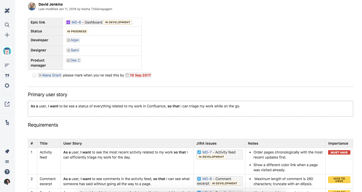
Confluence helped me to organize the project requirements documents efficiently and able to manage all the attachments specific to the life cycle of the project.
It contains a lot of functionalities, Can be minimized, and if possible, can introduce a lite version by removing the unwanted functionalities.
Design documents and test documents are updated periodically, and it helped me to manage the documents efficiently.
The fact that I can organise my ideas and contents, for my team to see and edit at anytime.
Nothing so far, but of more tutorials can be given to help beginners understand basic parts better
Generating ideas and contents with team members to bring this to life and helps with note taking and keeping

when I started working as Technical Analyst and project manager, I have to write technical documentation, which usually involve business requirements, I think this is the best tool to create these sorts of documents with requirements.
i think the only problem i faced using this was the setting of bullet points in sections when you create a table, also I believe more options related to design should be added
Maintaining Technical documents on a single place, making versions for a document which can easily help you evaluate certain tasks.
I like how customizable the tool is, and how easy it is to build out new pages or entire sections.
It took a little while to become familiar and comfortable with the layout. I felt overwhelmed by the structure of information at first, but of course, that's customizable. Tooltips could be helpful for first-time users.
Disseminating knowledge internally across a growing organization.
Confluence is the best documentation tool that allows you to collaborate with a broader group keeping the security constraints in mind. Easy to update and loaded with automation
Just one thing that when you copy-paste the information, it misses the best format.
The relevant source of information can be easily connected to Jira. It has a professional set up which makes it easy for any layman to create a organised documentation investing less amount of time

Easy to use, notification through email and update option
Structure and hierarchy not easy to maintain
Project documentation and sharing it with multiple stakeholders like 1 common platform
Able to customize and collaborate as a team
Only one person can edit a page at a time
Centralizing customer support templates. Beneficial to have everything in one place for the team
It is a valuable repository of our most valuable information. It is easy to find and edit pages. Staff comments and questions are logged against the page and add another layer of insights.
It is a great platform. Can not think of any improvement.
A repository of valuable information that can be easily accessed and shared with clients/ teams.
Confluence makes it easy for my team and I to manage and collaborate on team documents.
Sometimes the hotlinking can get a bit wonky and you get lost.
We host our company-wide wiki on Confluence and all of our many teams are managing their own pages and company pages.
The ability to edit simultaneously with another user.
Having to edit and publish the page each time.
Project Management notes