

Unclaimed: Are you working at Dashlane?
Dashlane Reviews: 4.5/5 — Highly Rated
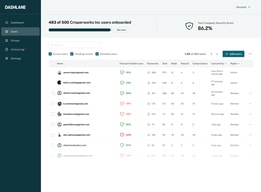
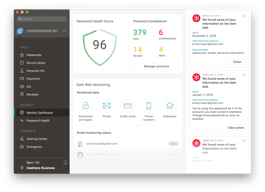
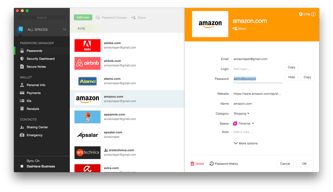
Dashlane is a simple and easy-to-use paid password manager that also comes with a free version. It’s available as a desktop app for both Apple and Windows computers, and a mobile app that works on both Android and iOS. All necessary security features you would expect from a password manager are available on Dashlane, with a host of additional features, including CPN for WiFi protection, dark web monitoring, automatic password changer, emergency access features, and advanced two-factor authentication and biometric login.

| Capabilities |
AI
|
|---|---|
| Segment |
Small Business
Mid Market
Enterprise
|
| Deployment | Cloud / SaaS / Web-Based, Desktop Mac, Desktop Windows, Mobile Android, Mobile iPad, Mobile iPhone |
| Support | 24/7 (Live rep), Chat, Email/Help Desk, FAQs/Forum, Knowledge Base, Phone Support |
| Training | Documentation |
| Languages | English |





Dashlane recommends Premium at €4.00 a month for one person. Friends & Family costs €6.05 a month for ten. That means the family plan is cheaper than two Premium subscriptions — €6.05 against €8.00 — so the break-even is two people, not five or six. At ten it works out at €0.61 per person per month, 85% below the plan Dashlane badges as “RECOMMENDED”.
- What it is: A password manager with autofill, dark web monitoring, a VPN and scam protection.
- Best for: Households — the family plan is the value, and it starts paying at two people.
- Pricing: Premium €4.00/month, Friends & Family €6.05/month for 10, both billed annually. Verified July 2026.
- The honest catch: There is no monthly billing option, and the free plan is not on the pricing page.
What Is Dashlane?
Dashlane stores and autofills passwords, passkeys, payment details, secure notes and IDs across unlimited devices, adds dark web monitoring against a continuously scanned breach corpus, and — newly — real-time scam protection. It holds a 4.5-star average across more than 300 Findstack reviews.
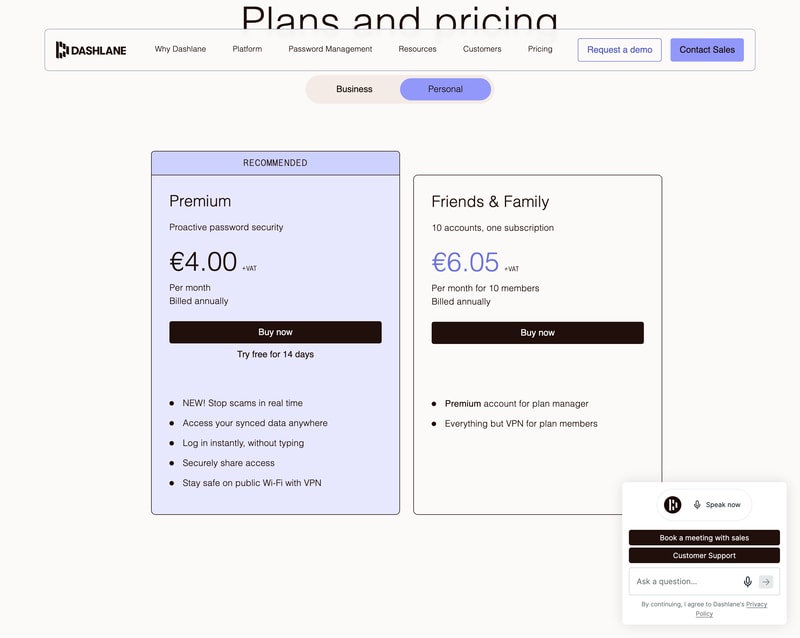
The pricing page splits into Personal and Business. Personal has two plans; Business has three, and one of them is not a password manager at all — more on that below.
How Dashlane Works
- Two personal plans, Premium and Friends & Family.
- Ten accounts on one Friends & Family subscription.
- Annual billing only — no monthly option offered.
- The VPN is manager-only on the family plan.
- A free tier exists but is absent from the pricing page.
- 14-day free trial on Premium.
Dashlane Pricing
Captured from Dashlane’s plans page in July 2026 on the euro price list, reading both the Personal and Business tabs. All prices exclude VAT.
| Personal plan | Per month | Per year | Members | Per person/year |
|---|---|---|---|---|
| Free | €0 | €0 | 1 | €0 — 25 passwords |
| Premium | €4.00 | €48.00 | 1 | €48.00 |
| Friends & Family | €6.05 | €72.60 | 10 | €7.26 |
| Business plan | Per user/month | Includes a password vault? |
|---|---|---|
| Credential Protection | €4 | No — detection and response only |
| Password Management | €8 | Yes |
| Enterprise | Custom | Volume-optimised |
What actually decides your cost:
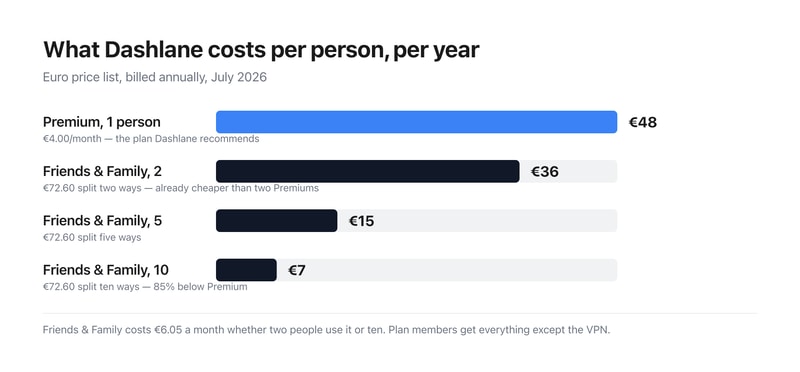
- The family plan wins at two people, which is much earlier than these plans usually break even. €6.05 for ten accounts against €4.00 for one means two Premium subscriptions (€8.00) already cost more than the full family plan. Split ten ways it is €0.61 per person per month — €7.26 a year each against €48. If there is anyone else in your household with passwords, Premium is the wrong purchase.
- Members get everything except the VPN. Dashlane states it plainly on the card: “Premium account for plan manager. Everything but VPN for plan members.” So the plan manager holds the only VPN entitlement, and the other nine get the full password manager without it. Worth knowing if the VPN is part of why you are buying.
- There is a free plan, and it is not on the pricing page. Dashlane’s plans page shows only Premium and Friends & Family. A separate page offers a free account covering up to 25 passwords synced across unlimited devices, with autofill, the password generator and breach alerts. Twenty-five is genuinely tight for anyone with a normal number of accounts, but it is a real free tier and you have to go looking for it — the pricing page will not tell you it exists.
- There is no monthly billing option at all. Both personal plans say “Billed annually” with no toggle to switch. So the entry commitment is €48 or €72.60 up front rather than a small monthly charge — an unusually firm stance in a category where monthly billing is standard. The 14-day trial is what stands in for it.
- On the business side, the cheaper plan is not a password manager. Credential Protection at €4 per user per month sits left of Password Management at €8, and the comparison table marks it with a dash against Secure Vault, AI-Powered Autofill, Password Generator, Secure Sharing, Password Health dashboard and SSO/SCIM integrations. It detects and responds to credential risk; it does not store credentials. If you want Dashlane to manage business passwords, the price is €8, not €4.
- Prices exclude VAT. Every figure on the page carries a “+VAT” marker, so a European buyer should add their local rate before comparing against competitors quoting inclusive prices.
Who Should Use Dashlane
- Households of two or more. The clearest case by a distance — the family plan wins immediately.
- People with fewer than 25 passwords. The free tier covers you, if you can find it.
- Anyone wanting a VPN bundled in. Included with Premium and for the family plan manager.
- Businesses needing credential risk detection. Credential Protection is a distinct product, not a cheap vault.
It fits poorly for anyone who wants monthly billing, which is not offered; for solo users comparing on headline price, since €48 a year is mid-market; and for businesses shopping the €4 tier expecting password management.
Honest Pros and Cons
Strengths
- Ten accounts for €6.05 a month — the family plan is excellent value.
- A genuine free tier, if a small one.
- Unlimited devices on every plan, including free.
- A VPN included with Premium.
- Dark web monitoring against a continuously updated breach corpus.
- 14-day free trial, no card commitment up front.
Limitations
- No monthly billing on either personal plan.
- The free plan is absent from the pricing page.
- 25 passwords is a tight free ceiling.
- The VPN is manager-only on Friends & Family.
- Credential Protection has no vault despite sitting at the cheaper price.
- All prices exclude VAT.
Dashlane Alternatives and How It Compares
- 1Password is the closest competitor on polish and family pricing.
- NordPass competes hard on price with a similar feature set.
- LastPass remains widely used, with a longer breach history to weigh.
- Bitwarden is the open-source option, with a free tier far more generous than 25 passwords.
- Keeper and RoboForm round out the category at comparable price points.
For a broader survey, browse our password manager directory.
The Verdict
Dashlane is a strong password manager, and the interesting thing about its pricing is that the plan it recommends is usually the wrong one. Premium carries the “RECOMMENDED” badge at €4.00 a month for a single user. Friends & Family costs €6.05 a month and covers ten accounts — so two Premium subscriptions (€8.00) already cost more than the entire family plan. The break-even is two people, not the five or six you might assume, and at ten members it works out at €7.26 per person per year against €48. Unless you genuinely have nobody to share with, the family plan is the default choice.
Two things the pricing page does not tell you. A free tier exists — up to 25 passwords, synced across unlimited devices, with autofill, the password generator and breach alerts — but it appears only on a separate page, not among the plans. Twenty-five passwords will not cover most people, so this is a starting point rather than a destination, but it deserves to be on the page. And there is no monthly billing option at all: both personal plans say “Billed annually” with no toggle, so the real entry price is €48 or €72.60 committed up front. The 14-day trial substitutes for the ability to pay month to month.
The business tab needs reading carefully for a different reason. Credential Protection at €4 per user per month is not a password manager. It sits to the left of Password Management at €8, which invites the assumption that it is the cheaper vault — but the comparison table marks it with a dash against Secure Vault, autofill, the password generator, secure sharing, the password health dashboard and SSO/SCIM. It detects and responds to credential risk across your organisation; it does not store credentials. Businesses wanting Dashlane to manage passwords should budget €8 per user per month, plus VAT, and treat the €4 figure as a different product that happens to share a pricing table.
FAQ
How much does Dashlane cost?
On the euro price list captured July 2026, excluding VAT: Premium is €4.00 per month and Friends & Family €6.05 per month for ten members, both billed annually — €48.00 and €72.60 a year respectively. There is no monthly billing option. On the business side, Credential Protection is €4 per user per month, Password Management €8, and Enterprise is quoted.
Is Dashlane Friends & Family worth it?
Almost always, if more than one person will use it. At €6.05 a month for ten accounts it costs less than two Premium subscriptions at €4.00 each, so it pays off from the second user onward. Split across all ten it is €0.61 per person per month — €7.26 a year against Premium’s €48. Members get everything except the VPN, which stays with the plan manager.
Does Dashlane have a free plan?
Yes, though it does not appear on the pricing page. A free Dashlane account covers up to 25 passwords, passkeys, payment details, notes and IDs, synced across an unlimited number of devices, with autofill, the password generator and breach alerts included. The 25-password ceiling is restrictive for most people, but the plan itself is real and permanent rather than a trial.
Can I pay for Dashlane monthly?
No. Both personal plans display “Billed annually” with no option to switch, so Premium commits you to €48 and Friends & Family to €72.60 up front, plus VAT. Dashlane offers a 14-day free trial on Premium instead, which is the only way to use the paid product without an annual commitment.
What is the difference between Dashlane’s €4 and €8 business plans?
They are different products. Password Management at €8 per user per month is the password manager — secure vault, autofill, password generator, secure sharing, password health dashboard, SSO and SCIM. Credential Protection at €4 provides risk detection and response, phishing detection and SIEM integration, and Dashlane’s own comparison table marks it as having none of the vault features. It is not a cheaper version of the same thing.

Compare Dashlane with other popular tools in the same category.
We migrated from LastPass and it was a relatively painless experience. Retaining the full password history has saved me a few times so far. Syncing users and groups from Active Directory is also a great time saver.
I'm not a fan of the chatbot on their website. It never seems to fail over to a real person when the bot can't provide an answer.
Dashlane is the perfect too to safeguard our personal and business data while online. It's ease of use as a password manager is top notch.

password management on my Android and browsers with Password Generator
Not all apps on my phone recognize that Dashlane can fill in the login information - Verizon
Password strength and volume of passwords
I can create one complex password for each website or application, and I don't want to remember it.
Password synchronization between the web and the app would be more quickly.
I have the highest security possible using a different and complex password for each website and application.
Dashlane is an excellent password manager and has a stellar record of no security incidents like some well-established competitors. I really like the team management feature ( we use the business version ), which allows centralized control and enforcement of policies. The dark web monitoring is a great feature too. I was notified of the recent Trello breach in a matter of hours.
The user interface is friendly for tech savvy users, but for regular business users, it could be better. It could also include an self-assessment about repeated password, weak passwords, etc From an admin perspective, it would be great to have the possibility to audit the users in the account for the same features mentioned in the above paragraph.
Avoids the temptation of regular uses to create simple passwords or reuse them
We have 3 employees, and use Dashlane to store all passwords. The password generator means we have complex and, most importantly, unique passwords for all different sites. The system monitors for leaks on the darkweb and notifies us if a website we have a password for is hacked or whatever, we then go in and change the password. It automatically prompts when we change a password, so the system is updated, and we have a sharing centre where we can share passwords with each other, we can even do this such that the other staff member can have dashlane fill the password but doesn't actually know what it is - so they can't write it down! Autofill of website info like name, address, payment details is good, and we have a button embedded into the Chrome browser. I also have it on my phone and it works well there too. Recommended.
Nothing really, it works well, can't fault it.
Increased security and improved speed of logging into websites, plus sharing passwords with other employees - this also allows us to immediately remove access if a staff member leaves, and makes changing passwords easy. The password generator is great.
The interface is very streamline. It's not difficult to navigate through the various options for the software. It's really convenient that it is available on multiple platforms.
It doesn't integrate the administrative console well into any browser that's not Google Chrome. I have traditionally used Safari, but it's not a good option when I cannot administer from that browser.
Secure password and note management.
Cost-effective and feature-rich and secured password management solution. The best thing about it is you pay less for a lot of features available on competitors. One upside is it also comes with a complimentary Hotspot VPN which helps secure your connectivity.
No option to remove unused seats on the admin portal.
Dashlane helps in solving the unsecured password management issue.
Ability to store and generate passwords. Very easy to use and implement. Dashlane is a must have as part of my day to day.
If I am forced to share what I dislike about Dashlane, it has to be that some websites don't play well with password managers (like banking websites) and it would be good to know or get a prompt that Dashlane might not work well for these websites based on user feedback or failed login attempts data.
Ability to store, manage and retrieve passwords across various websites and SaaS tools.
I like the ability to generate unique, super complicated passwords and save them within the app. Also, I can share passwords across devices and with other people, as needed. I use Dashlane multiple times a day, if not hourly!
Occasionally, the plugin gets annoying and won't stop trying to prompt for a password, when there's actually no password needed.
I'm able to share passwords across my business that are super complicated without confusing my team mates. Also, when someone leaves the team or no longer needs a password, I can simply remove them and they no longer have access.
all the app is very nice, i love the security
no explican bien los planes, me gustaria mejor informacion
las cantidades de contraseñas
Easy to use on multiple device, even phones Rapid integration for new user
Difficulties to do reporting, maybe it due to our pricing plan
Password protection

Simple yet powerful. It gives powerusers plenty to work with while still being intuitive enough for the average user to use.
Nothing really. They're always open to feedback from the users and suggestions for new features which are implemented fairly quickly all things considered.
It saves all my passwords in one place which I then use across all my devices and their browsers. Being a web developer this is essential to do my job quickly and securely, since afterall I'm handling clients' sensitive accounts data most of the times. It also has many other useful features I use almost on the daily, things like: Premium Hotshield VPN included in my Business plan, secure notes, personal IDs & other info, Credit Cards, Dark Web monitoring for my accounts, password sharing on a per-user and role basis, etc.
Apart from its security track record, Dashlane is simple to use and with its features including autofill helps with user adoption. This is supported by the customer sucess team who work with businesses as part of the implementation to drive this all as part of the implementation. Training videos and documentation is straight forward. The trust.dashlane.com is a one stop page for all compliance. It ticks all the boxes. Dashlane is also progressive in its continuing release of curated features making the product a great investment moving forward.
Not much to dislike as it does exactly what it needs to do. The additional functionality is on the roadmap.
Securely sharing and managing passwords and sensitive information such as credit cards, notes etc. Monitoring the dark web for breachs to get on top of any potential risk. Increased password complexity and password hygiene. Autofill assisting with completion of forms with consistently correct information. Support security for business and home. Additional security through a simple VPN when traveling or working remotely.
Permissionable controls for my team members The ability to use Dashlane on all my devices High levels of industry leading security protocols Being able to categorize and permission off certain credentials
I wish there was a 2FA option provided by Dashlane for Master Account Login that didn't require me to use a different service
Being able to collaborate real time with my team members across the globe without worrying about sacrificing credentials and security is revolutionizing how we work and makes me feel like our business is secure.
It's secure. The security whitepaper and practices are the best. As a medical clinic, protecting my patient's data is not only an ethical obligation, it carries a lot of legal risk for me. I use dashlane all day, every day.
Unfortunately they have progressively degraded their support for hardware token 2-factor auth. I'm not sure why, as they previously had an implementation, but not that is removed.
Allows me to use complex, long, unique passwords across the web, providing maximum security.
It's a great way to keep up with my (very secure) passwords!
When the autofill feature does not work.
Cross-company collaboration when single passwords are required.
I love that a user can have both personal and business passwords stored in separate areas in the same account. It is so easy to share business passwords with colleagues. I also like how easy it is to access payment methods and know that they are secure. When we had questions about using Dashlane for our business it was so easy to connect with a real person at customer support. They worked with us until a solution was found. As we have hired new employees, they have found it very easy to learn Dashlane and incorporate it into their daily routine.
Downsides of using Dashlane are that some websites no longer allow passwords to prefill.
Dashlane keeps our passwords secure and also lets us know when we have weak passwords, or when employees are reusing passwords.
The majority of the time, Dashlane works perfectly and quickly.
Can be slow at times, and sometimes fills in the wrong field. These events are quite rare, however. Billing, however, is a bit unclear. There's no way to see billing history on the dashboard.
Password sharing is fast and easy.
The prompts that Dashlane provides when you're on a new site or when you're saving new information are very helpful. It keeps everything organized on the go instead of having to manually enter the information on their website.
Pricing. I'm currently under my work's account so not personally paying for this. I would likely choose not to pay for this personally if I were to leave my company.
Keeping our work sensitive information secure when it comes to login usernames and passwords. It has provided a fast and easy way to login to the several platforms we use without comprimising our security.
I have used Dashlane for Teams for 2 years. Dashlane has allowed me to share client information and passwords with my remote team in a way that is easy and simple to do. I definitely recommend it whether you are an individual or a team.
I have multiple clients for whom I write grants. Each grant portal requires an email and password, but unfortunately grant funders often use the same portal system. Unfortunately, after setting up passwords for this client, it became difficult to differentiate between the portals for different clients. I worked around this by creating usernames that correspond to the client and grant portal. Despite this difficulty, I definitely recommend it.
Confidentiality when saving and/or sharing passwords with others. This allows me to do so in a way that is safe for everyone involved. I would recommend it for any business who needs to share this information.

I like that my collegues can share any password at any time. That I don't have to remember it. That I can access it at any time from the account. That multiple links can be attached to the same password
I dislike that there is no way of distinguishing healthy links, passwords, environments, users. Maybe there should be an intelligent way of naming the password container based on the user and name of the site or page, and using favicons to identify them easier.
Dashlane is saving all the passwords for me and gives me the passwords while visiting the page. We share the same password amongst us. I don't have to look for the passwords or worry about their protection.
In no time, I can access all my passwords.
There is no function for generating an MFA code (e.g. Google Authenticator).
Store access data centrally and share it with work colleagues.
Saves all passwords in a secure vault that can also be shared with other users; use of generated secure passwords and can also save other types of data.
On the phone app anytime you move away from it you have to log in newly.
Keeping passwords and data secure and the generation of secure passwords. Also the ability to easily share login data with others.
Passwords generator is really convinient. It's easy to generate a 24 caracters password for every account and having unique password on each site.
The sharing managing force to open app in another tab, it would be so helpful to see and manage sharing in the first mini window.
Dashlane solve the pain of remembering passwords for hundreds of accounts, let me have one unique password for each and so upgrade my security.
Dashlane bietet sowohl für Business als auch privat eine passende Lösung an.
Beim Teilenvorgang von Passwörtern kann es manchmal eine Stunde dauern, bis es beim Gegenüber im Account sichtbar wird.
Wir benötigen keine unsicheren Listen mehr und können PWs sicher aufbewahren.
Dashlane is very helful for our office team of 14 people. It's easy to use, and easy as an administrator, but very powerful and intuitive.
I can't think of a lot to dislike. I'll update the review if I can.
Security breaches, wasting time for employees finding passwords, and so much more. We are much more productive as a team, which has helped our bottom line quite a bit.

I love Dashlane; It helps me to store all my login credentials. It offers an autofill feature which is very beneficial whenever I log in. And the best thing is that It is available on computer and mobile both. And also provide the browser extension.
I haven't found anything wrong with it. I like it; this is an excellent and easy-to-use application.
Dashlane helps me to store my passwords. After using it, I don't have to remember my passwords. I can simply log in with the help of dashlane's autofill feature

The best part about this tool is that we can view, copy, generate, save and autofill logins and forms as you browse the internet. This tool is easy to use and hard to hack which makes us feel safer while using this application
The only thing I dislike about this application is that it's expensive, and the Free trial only allows 50 passwords. So this might give an organization to switch to a different password Manager.
The UI, Usability of Dashlane is fantastic. It Generates solid passwords that are hard to hack and Offers easy-to-use password management. It is worth more than just a password management application. Solves the problems quickly of keeping track on old passwords, Websites and auto-filling the form helps us to get into this application's reusability!
Dashlane's password manager helps free my mind from remembering 1,000 passwords. I can be at peace knowing my account information is safe and secure.
Dahlane can sometimes be finicky with sharing passwords internally with other co-workers.
As a business we have accounts with many different technologies and sites. Dashlane allows us to be secure while not having to remember every single password.

I love how easy it is to use, cost effective, and very easy for my team to operate. The personal/business differentiation with the passwords is a nice touch as well.
There isn't much not to like about Dashlane. I used to use a competitor and was reluctant to move my services, but after security issues with the previous platform, I made the jump to Dashlane and have not been upset with the decision.
As a team we have to share passwords, and this makes things easy and secure. We dont have to send user/pass of client sites, or our own, anymore. Now everything is secure, and easy to manage.