

Unclaimed: Are you working at Figma?
Figma Reviews: 4.7/5 — Highly Rated
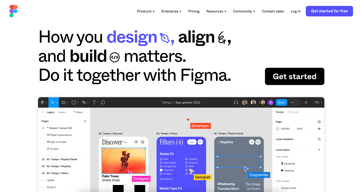
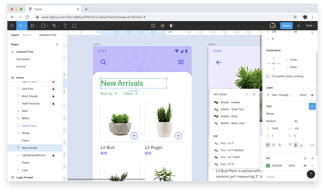
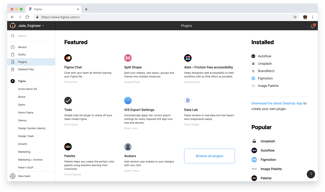
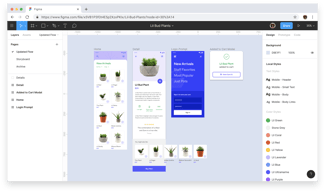
Figma is a feature-loaded design tool with tools designed to help users mockup, edit and design websites. The platform takes a more collaborative, cloud-based approach to design, which means it allows team members to design simultaneously and give each other continuous feedback as they work. This makes collaboration simpler and more effective. A free plan is available on Figma, however, premium plans offer more extensive tools and robust capabilities for web design and development as well as collaboration.
Figma is also often used as Wireframing of choice in UI/UX Design and Product Management tech stacks.

| Capabilities |
API
|
|---|---|
| Segment |
Small Business
Mid Market
Enterprise
|
| Deployment | Cloud / SaaS / Web-Based, Desktop Mac, Desktop Windows, Mobile Android, Mobile iPad, Mobile iPhone |
| Training | Documentation |
| Languages | English |
Figma Pros and Cons
- A free plan is available.
- Premium plans are more affordable than the Creative Suite.
- Collaborative tools allow developers and designers to work together.
- Figma is a feature-rich platform with robust capabilities for mocking up websites.
- Figma only concerns itself with the design aspect; you’ll still need web developers to create and implement the necessary code using other software.



I like how you can collaborate in real-time through the browser without having to download additional software. Figma runs smoothly, and since you can use it in the browser, it never crashes.
There are some limitations when using the tool and it does not have as many features as AdobeXD. For example, there are fewer options for animating your prototype.
I am creating design solutions using Figma to give users the best experience they deserve. Some benefits include increased efficiency and increased collaboration.
It's easy to use, easy to collaborate with others. It gives you easy access to look at CSS code.
Sometimes, it's hard to know the shortcuts
It's a perfect prototyping tool, ideal for teams. It's the best for design. I'm always using this tool for checking the paddings and spaces between elements.
It is the one tool that every Ux Ui Designer needs.
The possibility of duplicating the file if you have the project link is annoying and not very private.
To have a single tool for designing my digital products
O painel de Inspect é bem completo e que, de forma simples e intuitiva, dá todas as informações necessários para os desenvolvedores.
A falta da funcionalidade de post-it dificulta a interação com os desenvolvedores pois somente os comentários as vezes não é suficiente.
Acompanhamento do desenho de interface para desenvolvimento de telas. Contribuição com comentários sobre o layout das páginas.
Absolutely love how versatile the tool is. I used to use Canva for all my needs, but Figma allowed me to take it up a notch. 10/10 recommend.
It's a little difficult to use at first when you're just getting started but easy to learn, regardless.
I've solved how to make images more vector-focused and precise. The precision is great.
The ability to collaborate with other people on a project at the same time is really useful for me.
You have no choice to be on the internet to access it. You can't download it from my understanding.
It is a great tool when it comes to work on a project with other people. Saved me a lot of time for a free tool.
Being able to collaborate and review designs in real-time is super helpful for my team. It also combines a lot of features from other top UI/UX design tools.
Sharing files can sometimes be a bit of a hassle.
Being able to quickly and easily export assets is fantastic. Also, being able to add comments to sections of the designs is really helpful.

I think the best thing is that its Free, It's easy to build an Application User Interface and create a user experience for your Application, this will also help to decide the WorkFlows for your application
* It should be more flexible in terms of integrations with different other tools, like Google and Miro
Creating a Design and Workflow which can shared with all team members and clients on RealTime basis, its based on cloud which is the best part which means its much much safer to use.

The first and the main advantage of this tool is that it's free. But nevertheless it has lot of tools to simplify life of designers. Components give you ability to change same particular parts simultaneously in all makets for all devices. Great devices simulator. Lot of hotkeys to arrange elements. Grids for arranging elements are also very useful.
Sometimes it stucks and need internet connection to save your project. Components with different icons for different cases not so easy to implement. I should put all icons in single component and then turn them on/off in particular cases. Additional difficulties is for one component for different screen sizes - need to copy previous design in separate project, recreate components, adjust components for mew size and then put them back to the main project. In most cases components become the pain.
Adaptive web and mobile design. Gift cards. Logos design
Figma feels like using Illustrator, except it's completely online and collaborative.
It's focused more on web design than illustrations. Not unusual to use another app to make logos or fancier illustrations, though Figma is still capable.
The back-and-forth of design iterations for websites is already a lengthy process. Figma makes the process way easier by making it easy to collaborate and discuss.

Prototype, wireframe, UI design, UX design,
not at all now figma is one of the best tools for uiux designer
design, uiux design, printing , mobile app, web app, logo, branding, banner, brochure, card
I love the aspects of online collaboration, easy design system creation, and seamless file export. The fun emojis and comment feature is an added plus!
The inability to export videos (.mp4) files from the software is a hindrance, since I often have to record screen to generate videos of my prototypes.
At my current job, it has been exceptionally transformational in convincing key stakeholders to invest in digital customer experiences. It provides them with a vision of how the software we design would look and feel like, and has been crucial in helping us secure funding for our prototypes.

I like to much the interactive components, because this able us to make prototype with many interations in a screen
I dislike the branch feature is disabled on professional type account.
the Figma able us to create a uniform design across all teams.
Live collaboration. Full vector editing. Synced component libraries. Slick prototyping. And it's all UX-first, built from the ground up for distributed teams, so there are no weird workarounds or hacks. Plus, given it's effectively a webapp, updates roll out frequently, so the tool always stays/feels relevant. Even better is that PM and Engineering teams don't need to pay for another tool to get access to what they need in Read-only mode. It's a gamechanger of a product.
Said updates can sometimes break things if you're not careful. Performance can suffer with large files, but with some creative page management, you can mitigate this issue. Payment plans are a little confusing, especially as it relates to design system management on the Enterprise plan; it can be unclear what the benefits of upgrading are.
I build your run-of-the-mill wireframes, high fidelity designs and UX prototypes - the bread and butter of a UX designer's work. I also do graphic design and craft icons, all without switching tools. I save so much time by not having to use multiple tools, export redlines, and save multiple versions of a file. It's incredible.

Figma does great work on component-based design and prototyping. We were also using Miro to manage teamwork. Together with FigJam, we now manage everything from here.
It's slow when I share a screen from zoom while collaborating. I think they are solving this problem day by day.
We use it as a brainstorming center for mobile application design and team. We finalize all prototyping methods here by gathering our work in Figma.
Foremostly, the tool being a web-based one makes it a very powerful alternative to memory-heavy software. Intuitive UI, top-notch collaboration & sharing capacities, quick prototyping & demonstration—have made Figma nearly replace all the other general-purpose design tools.
Even after being a web-based tool, Figma by no means is lighter on your machine. It nearly hangs your PC if you do not download its web app. Optimization could be surely made on that front.
Figma is our go-to tool for nearly all the Design and UI/UX requirements currently. We only shift to other tools, if the requirement is very specific and beyond the scope of Figma, such as making an animated GIF, or editing videos.

Figjam eliminated the need for third-party collaboration tools. Audio just got added; it is a time saver and gets rid of all the meeting clutter. I love that Figma has options for different pages. The implementation of rulers is simply amazing..
Component states are hard to create. Performance and scrolling on mac are far smoother as compared to Windows. I have problems sorting and managing my projects; all projects keep appearing in recent and clutter my screen. Animation is far superior in adobe XD
We use Figma to create wireframes and test out functionality before our product goes into production. It helps us improve designs and saves us a lot of time before heading to development.

There are so many praises that I can sing about Figma. From the software being totally free, to the easy and simple interface but what truly makes Figma great is the community tab. Expert and professional sharing files that none of us even in the best world you have ever have access to. You can learn anything from the UX or UI field by just playing with these files.
I would say that sometimes I wish that Figma could auto-generate design systems for us or the grids would be easier. But that just me.
Figma just makes me a better designer. The community out there really helps me serve my clients better.
Real-time collaboration is very helpful while working in a remote environment. Also, as a developer, Figma helps you with code snippets of the designs.
- The mac application is a bit heavy, though there have been significant improvements lately, it still consumes a lot of CPU/memory resources. - There is no good way to check Figma designs on an iPad or mobile phone. Even a read-only mode for mobile/tablets would have been really great.
We are building user experiences with Figma. Through Figma, our designers are collaborating with each other in a much richer way. Our design systems have been set in Figma for everyone to reuse.
I really like Figma for team collaboration. UX/UI designers are able to quickly and easily share their work with higher management.
There's nothing I dislike about Figma. It has been a really helpful platform.
Mainly problems related to UX/UI design.
Figma has lots of positive points. I can't even list them all, but my favorite is: - The simultaneous sharing interface; - The auto-layout; - The tools for development; - The possibility to create and update components in an easy way.
I don't have any negative points for Figma. It keeps developing every day, and it's an excellent software for Ux.
I create web and mobile interfaces and share with devs, create layout studies, share prototypes in usability tests, etc.
Easy to understand components follow my cursor when clicking on a profile icon Component tree and details open on click of component
Not having grouping option and it creates problem while we create multiple screens in single file taking too much memory should optimize at the memory level
UI/UX screen to visualize feature and create a web page on that

I was looking for wireframe sketcher tools on the internet. Since I am a professional SQA and BA, I need initial interactive mockups to design for my development team. Then, I read over the internet how Figma worked like a charm for other professional organizations and achieved fantastic product designs. I researched how to use it, got tons of tutorials on the internet and youtube platform. As soon I jumped into it and exploring it, I instantly fell into love with it. The ease of use, flexibility, and auto-save features are incredible.
Are you serious? There is nothing to dislike about it. You can only love this free tool; tons of tutorials are there on the internet. Once you use it, you will only love it.
Time-saving, unique, and futuristic interactive designs for my web and mobile applications, what else do you need?
You only need one tool to design and prototype, no need to export your design to another tool to check the interaction.
I have not found something I really dislike. I sometimes have to redo stuff but I consider that a learning journey.
I am currently designing an app for employees and managers to perform their HR tasks
I like the prototyping feature of Figma that is the most useful and awesome feature.
I don't like user experience like the user will not be able to find where to export images how to download what ration this is some of the things
I am solving the bridging gap between designers and developers using Figma that made me realize that it helps lots of people

As an engineer I enjoyed the collaborative aspect of Figma more than the others our team has tried. I don't often create a design myself but I'm asked to view and give input all the time, and share with my team. Figma makes that a lot easier.
Nothing really. Even the price is better than the others we have tried, so it's hard to say no to it.
Cross-team collaboration most of all. It's streamlined feedback and communication big time, which speeds up our iteration process.
Ability to collaborate smoothly, testing mobile apps with ease, importing sketch/other design files
working with components, animating, auto-layout are pretty complex subjects
creating visual artefacts to share a common language amongst the team.
The possibility to collaborate in design
Sometimes it's a heavy application to run
Figma was a great tool to create and prototype solutions, not only to show the prototype but as an exhibition tool for the results.

Easy to use and extract design assets. It even offers some CSS styling.
In some cases, it can be challenging to change the asset
It allows previewing the designs in a web browser, so it's straightforward to share interactive mockups with clients.

The tool is very easy to use after learning the basics. It's really cool that I can create a simulation to go through an application idea in Figma. It's extremely valuable.
Nothing about Figma stands out and poor design, I am very happy with it.
Creating demos and app simulations. It's also great for general image editing.