

( 565 )
iSpring Suite Reviews: 4.6/5 — Highly Rated
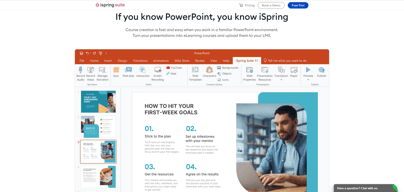
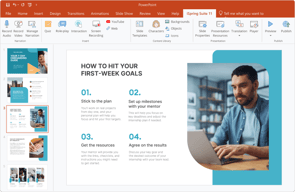
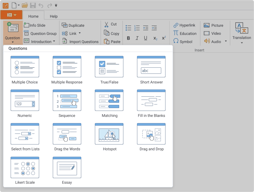
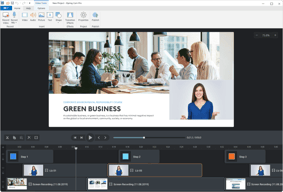
iSpring Suite is a perfect authoring toolkit for those who need to create diverse eLearning content quickly, with no previous experience in course development or special training. The software works as a PowerPoint add-in, so you can build courses in the familiar PPT environment. You can start with an existing presentation and enrich it with more advanced learning content: quizzes, screencasts, video lectures, role-play simulations, and interactions.
To allow you to create polished courses even faster, iSpring’s Content Library includes over 134,000+ royalty-free templates, characters, locations, icons, and buttons. iSpring Suite also comes with a shared drive for content collaboration. You can store all your content and collect feedback on it from your team in a shareable online space.
| Company | iSpring Solutions Inc |
|---|---|
| Year founded | 2001 |
| Company size | 201-500 employees |
| Headquarters | Alexandria, VA |
| Social Media |

| Segment |
Small Business
Mid Market
Enterprise
|
|---|---|
| Deployment | Desktop Windows, On-Premise Linux |
| Support | 24/7 (Live rep), Chat, Email/Help Desk, FAQs/Forum, Knowledge Base, Phone Support |
| Training | Documentation |
| Languages | English |




Having the ability to author content within a familiar setting (PowerPoint) simplifies the task and allows us to create content efficiently.
When dealing with larger video content, processing of files takes a long time.
We are able to create our own company-specific content with ease and do not require outside vendors.

The best is that you can add and use all your PowerPoint materials. So, you don't need to do this one more time.
I hope that in 2024 will be full support to Polish language. Not only as an interface but also in text that you write in the quiz and other.
We save a lot of budget by using iSpring Suite in house. Before that we need to order all in agency, so cost and time saving right now are visible.
With the help of ispring suite I can directly interact with PowerPoint and easy to integrate with other applications too that helps best for me and my team. The implementation set up in ispring was easy beginners can also implement with out any external support. The customer support offers by ispring suite was great. and it also have regular updates with many more functionalities. I personally use ispring suite application daily.
No, everything in ispring suite was great
Using ispring suite is truly engaging. It keeps boredom away and sparks my enthusiasm by using this application. Even beginners find it as user friendly, it allows them to create course with minimal experience
It has almost everything that I need in an elearning development tool without the large price tag, and it is easy to learn and use. It works very nicely with PPT, and it adds lots of functionality. The final product adapts to the user’s device without having to do any additional work. It generates modules that integrate with all the LMSs that I work with and can also send me emails with students’ grades from the quizzes. It has many user interface controls and numerous different interactions that I cannot find in other tools. They also have fantastic support that answers any question really quickly. I have been teaching online for two decades, and this is my tool of choice for developing my asynchronous courses. I also give talks to other professors on how to develop high-quality online courses, and this is the tool that I recommend.
It does not give me access to a programming language (like Javascript) that would allow me to develop algorithmic questions (questions that would have different numbers and names for each student to avoid cheating). But I believe they will add this capability sometime in the future.
I am a higher education professor who teaches face-to-face, hybrid, and online. I use it to develop all of my asynchronous courses. I also use it to develop support material for my face-to-face and hybrid courses. I can develop material very quickly and easily. I have also given talks at several international conferences on how to develop high-quality online education, and this is the tool that I recommend.
Creating content is easy and it looks professional. Without having experience in design, I was able to convert my classroom training online in an engaging way - there's so many options!
Nothing - if I have a question, support has been amazing and some of my suggestions have already been implemented!
It's a time saver for our trainers and employees! It appeals to our team and makes learning fun, engaging, consistent and effective.
iSpring Suite is best for its user-friendly interface, the implementation setup was very easy for beginners too. I always receive great response from their customer support team. iSpring Suite has comprehensive set of features making it a best choice for e-learning. Integration of iSpring with power point makes me a continent choice. the all features in iSpring makes me to use daily
No, everything was great. Remain dedication to continuous improvement and aim to deliver even better assistance in the future.
iSpring suite solve many problems related to e-learning. iSpring suite save time by providing comprehensive solution. It provides me more engaging learning experience
Uploading course materials is incredibly easy - I have spent a couple of weeks taking all of our Zoom recorded content and created courses for our members. It has gone very smoothly, and as a small organization, it is essential that it doesn't take a lot of time, or require extra support. I have only had to contact support once, and they answered my question via chat immediately. I look forward to seeing what other features I can use as we continue to move forward in implementation.
I have not yet found anything I do not like!
We needed one space to house our training for our members, and iSpring has solved it for us!
I like that it is very user friendly and that I can create interactive powerpoints and quizzes with the platform. Also, if I ever have a question about the funtions of the iSpring, there is a very helpful page showing all that you can do with it, along with quick and understanding customer service! I have never had an issue they have not solved. I use iSpring every day and have reached out multiple times with questions that were answered in a very timply manner.
There is not much to dislike. I learned the software quickly because my new job purchased it for my role. It was easy to learn and get right to work using it.
iSpring is closing the gap in the company that we had before when it comes to retention in the field, creating a whole new onboarding process, and creating interactive videos and quizzes that the new hires would actually sit through and learn.

iSpring has allowed me to create learning experiences I have only dreamed of. We've been able to make highly rated, engaging system training by replicating the hands on use a learner would do to complete their job functions. We've made trivia questions, role-plays - you name it. The ROI of this tool is enormous - you get templates, an image library, translation, quizes, and more all in one place. My favorite part is that it is all done through PowerPoint which makes create exceptionally easy and fast. I can crank out courses very quickly and the quality is top notch. Very happy with it!
There are not a lot of downsides. One inconvenience I find is the need to adjust the player and settings each time, which is not difficult but could be streamlined a bit more. Also, there are so many settings and options in the quizzes tool that it could be easy to forget to change a small thing before publishing. The basics are extremely easy, but the things I do with iSpring are a result of heavy learning and trial and error.
The need for quality, custom SCORM courses that play well in our LMS.
The integration of iSpring Suite functions directly in PowerPoint is probably the most important feature for our team, since we were used to creating our learning content in PowerPoint. It is very easy to generate SCORM and upload the file into our LMS. The implementation was fast and easy, we did it on our own, without any support from the iSpring Support Team! And by the way, the Customer Support offers great and free webinars on a regular basis, and it is always well organized, we can improve the way we work and share new ideas. The numbers of characters, backgrounds, objects, and icons help us to create dynamic content that makes the learner more focus to follow their courses because it is not boring! We use iSpring Suite as the authoring tool, I personally use it almost daily since the last 4 years. It is very stable and iSpring also offer regular updates with new functionalities. Try it and you will love it!
In the content library, where we found all characters, icons, objects, backgrounds and slide templates for design, we cannot do a multiple selection, we must add them one by one. It would be more efficient if we can select all that we are looking for in one-time.
iSpring Suite help our business to create nice and dynamic learning content efficiently. Our customers are using our LMS platform more often, they enjoy the new design of the learning content.
I love using iSpring and have begun suggesting among the rest of our company that we use it more for other departments such as HR (onboarding) and technical training. I was able to use PowerPoint and easily integrate the interactive elements like quizzes, role-play activities, etc. I had only a few hiccups that I figured out were user error. The text-to-speech option for audio narration is fantastic and perfect for a training course. Having that all within one service is so easy and streamlined and works great.
I have not found any downsides to using iSpring. I can't wait for what features are to come; I simply wish I had more time to work on eLearning course development as my day job!
iSpring allows me to create a course in SCORM format that will upload to our LMS. It makes it easy for me to take a program I already know (PowerPoint) and create the content directly within that platform, rather than having to learn a new one.
With e-learning tools, companies make lots of claims but iSpring delivers. Our company has boatloads of PPT slides and iSpring Suite helps to quickly transform them into something far more engaging and useful. It's not hard to learn. Love it!
Haven't run into a downside yet. It saves a lot of time.
ISpring helps our team to turn slides into useful and engaging e-learning courses for our LMS that allow our healthcare partners to have a reliable place to come for training
Super easy i like how it gives you lots of options
nothing , i have not ran into any issues that i do not like
training
I really just like the ease of use, great customer support, and quick integration with our needs.
There are not many things I dislike, and most are so little they don't really matter. Just things that I do that make it harder than it needs to be.
ISpring has helped our company make great courses for our LMS. We have found that we use it for all of the courses that are built
the integration with PowerPoint and the logic of using it's features.
I had problems after recording a course that I reviewed and looked fine but when someone took the course the video froze
I wanted to find an easy tool to author courses on my own using PowerPoint and iSpring meets those needs
I love that iSpring is easy to use and that there are lots of backgrounds to use for my videos.
I wish there were more prerecorded voiceovers so it did not always have to be my voice.
iSpring is helping make our training look professional and it is making sure that the training is consistent for all staff.

So easy to use. Very intuitive interface so that even the most technologically inept person can build courses. And, if all else fails, their online resources are comprehensive and easy to follow. But most of all, their human support is best-in-class -- timely, thorough, empathetic. They truly take ownership for your problems and pursue solutions as if they were their own. Best support bar none.
There are a few quirky things that come with working with PowerPoint. And, common to building courses in general, there are a lot of moving parts.
Creating customized courses from a template. Needs to be easy to use and cost effective.
Great customer support. Very easy to use
Almost no. Just try keep the same name of product e.g last time iSpring book, now ispring flip
Convert dull and static training powerpoint to more enggaging content.
I innitially dowloaded the free trial of ispring, but after starting on my project i could tell that it was exactly what i needed. The interface used is highly comprehensive and user friendly making even the most dificult tolls and edits doable for someone with little to no previous experience and the best is that i can keep my content even if i were to eventually cancel my plan.
I like the idea of concurrent seats , but the fact that it cannot be accessed at the same time is a little inconvenient and that is why we opted on just getting the full seats.
we had a training sytem, but for the purpose that we wanted to have e-learnign modules that combine videos, quizes and selfpaced learning the other program was not being useful as it had a segmented approach(you had to go out of videos to go back to power point) andi spring allows us to have it all on the same place and deliver a high end training to our staff.
Customer Service, natural text to voice, ease of use withing powerpoint, customization
Nothing, it's been easy to use. Really like it.
We needed an easy to use authoring tool. iSpring Suite was a great solution. I am able to make professional looking trainings with their text-to -speech and their annimation.
I enjoy using iSpring Suite because of its ease of use, short learning curve, and good product support.
The only constructive feedback I have about iSpring Suite is pricing.
It is helping me communicate and train others on different topics.
It is embedded in Powerpoint. So you can take advantage of the strong points of Powerpoint and the strong points of I-spring. From all other authoring tools I have used, it provides the best value for money and ease of use
I don't think there a lot of things not working well. I would suggest maybe to include more templates in the offering. Also on of the few things that do not work 100% properly is that: 1. When you insert narration, sometimes the first 0,5 secs are delayed, 2. When you Manage narration the zoom bar does not appear right from the beginning.You have to the powerpoint first and then reaccess the narration menu
It allows to create e-courses based on Powerpoint presentation easily and with very good quality. The output, either in I-spring suite, or in other LMS or as standalone, is always playable in every browser. Mobile and tablet support is great, too
Simple to use and very good helpdesk, both commercial and technical
Actually nothing, this after comparing to other similar products
We make post graduate courses for MD who have not much time, so e learning is a useful way of instruction

What I like most is the ease of use of iSpring. I especially appreciate the "text to voice" -- so easy to use!!!
No loving the pricing. Of course I am sure its not a coniencience that some of the things I needed to do, werent included in the free or lower cost plans.
1 - making a LMS package in SCORM 2004 format & 2 - text to speak
I like iSpring because it has introduced me to a new style of making courses. It allows me to add knowledge checks within the course and voiceovers to my content!
There is definitely a learning curve when transitioning to iSpring Suite for creating courses. There were multiple times where I lost my VO, quizzes, and interactions in a SCORM after saving it.
Since some clients prefer SCORM file format courses, Spring has helped in making that possible for them and easier for us to create the courses as well because the process for creating the courses is pretty straightforward once you get the hang of it!
The application is easy & intuitive to use.
Range of character expressions/emotions in roleplay are limited.
Makes learning materials interactive & engaging.
I like that iSpring gives me many tools to allow me to think outside the box when creating content for my presentations and training courses.
This may be our own internal security systems, but there are times when I've created a deck using Spring and then saved it to our network drive. When I go back to it later, the "text to voice" feature did not save.
Much of the training we need to do involves a lot of content. The interactions feature and the text-to-voice feature allows me to deliver this content in a more condense way.
iSpring is so easy to use, the interface is great and the interactions are awesome.
The cost is a little high for my budget but it is worth it.
ISpring is allowing me to produce learning materials very quickly for my LMS.
It is easy to learn and access to make awesome course content and quizzes.
There is a learning curve, and you must spend much time on the training information.
Our department needed to share training for outside contractors. iSpring made creating a professional orientation possible.
The support I got from Karina was wonderful.
I think the suite is great. No issues with it so far.
Building training and coverting to SCORM