
( 277 )
Unclaimed: Are you working at Landingi?
Landingi Reviews: 4.5/5 — Highly Rated
“Turn more traffic into revenue” – this is what’s at the heart of Landingi’s unique proposition as a landing page builder. A number of leading brands and businesses, marketers, and agencies rely on Landingi’s drag-and-drop solution to quickly create, launch, test, and optimize marketing landing pages. It boasts of more than 400 landing page templates for a range of industries – from real estate, education, e-commerce, healthcare, and SaSS just to name a few. All designs are focused on conversions, customizable to your brand, and responsive across all screen sizes. On top of landing page templates, Landingi also offers several modules for light boxes, pop-ups, and forms to convert traffic into leads and leads into sales. Seamless integrations with other marketing tools such as Google Analytics, HubSpot, and ActiveCampaign are also available.

| Capabilities |
API
|
|---|---|
| Segment |
Small Business
Mid Market
|
| Deployment | Cloud / SaaS / Web-Based |
| Support | 24/7 (Live rep), Chat, Email/Help Desk, FAQs/Forum, Knowledge Base, Phone Support |
| Training | Documentation |
| Languages | English |
Landingi Pros and Cons
- Landingi has a simple design process
- It’s very affordable even for smaller companies
- It has over 300 landing page templates available
- There are limited customization options
- Lower-tier plans have limited features
- It needs to make its landing pages more mobile-friendly





Landingi’s €24 plan allows 2,000 visits a month — about 67 a day across every page you run. For a landing page builder, whose entire job is receiving paid traffic, that is a very small number. Anyone spending meaningfully on ads will exhaust it in the first week, and the next tier is €109. The entry price is real, but it describes a plan for testing an idea rather than running a campaign.
- What it is: A landing page builder with A/B testing, analytics, and AI generation, sold for conversion rate optimization.
- Best for: Marketers and agencies running campaigns who need pages faster than a web team can ship them.
- Pricing: Build €24, Optimize €109, Scale €209, Enterprise from €1,050 per month on annual billing. Verified July 2026.
- The honest catch: A/B testing requires Optimize at €109, four and a half times the entry price.
What Is Landingi?
Landingi builds standalone landing pages outside your main website — the kind you point an ad campaign at, iterate on weekly, and retire when the campaign ends. That separation is the point: marketing gets to publish and test without going through whoever owns the website.
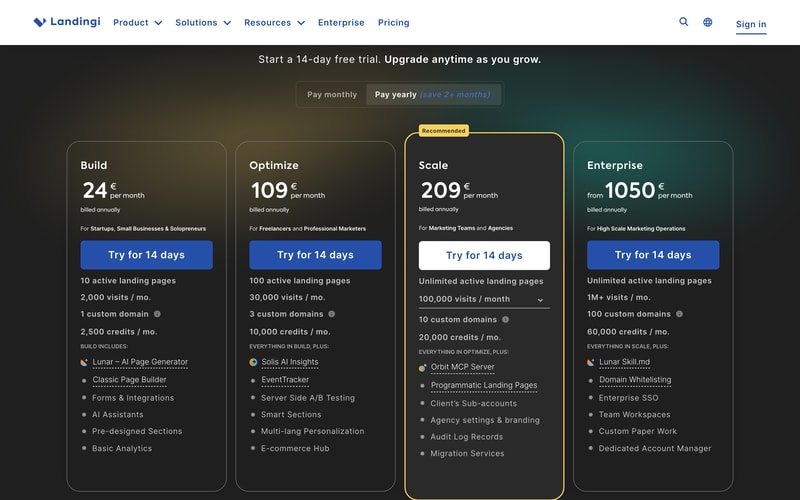
The 2026 lineup leans heavily on AI and, notably, on agent access. Build includes an AI page generator; Optimize adds AI insights; Scale ships an MCP server, and Enterprise adds a published skill file. Landingi is among the first tools in this category to treat AI agents as a first-class client rather than a marketing line, which is worth knowing if your team is building agent workflows.
Traffic is the meter. Every tier is defined by monthly visits before it is defined by features.
How Landingi Works
- Visits are the primary meter — 2,000, 30,000, 100,000, then 1M+ per month.
- Active landing pages ladder too — 10, 100, then unlimited.
- A/B testing starts at Optimize, not on the entry plan.
- Custom domains are limited — 1, 3, 10, then 100.
- Credits are a second meter — 2,500, 10,000, 20,000, 60,000 a month.
- Scale’s visit allowance is adjustable via a dropdown on the plan card.
Landingi Pricing
Captured from Landingi’s pricing page in July 2026 in euros, reading both billing toggles.
| Plan | Yearly (per mo) | Monthly | Visits/mo | Pages | Domains |
|---|---|---|---|---|---|
| Build | €24 | €29 | 2,000 | 10 | 1 |
| Optimize | €109 | €139 | 30,000 | 100 | 3 |
| Scale | €209 | €269 | 100,000 | Unlimited | 10 |
| Enterprise | From €1,050 | From €1,350 | 1M+ | Unlimited | 100 |
What actually decides your plan:
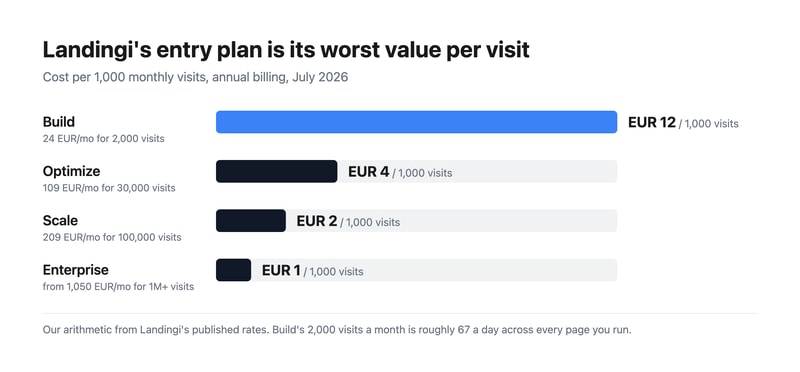
- Translate the visit allowance into a daily number before anything else. 2,000 a month is about 67 visits a day across all ten of your pages. A modest ad campaign at a €1 click cost spends €67 a day to exhaust it. Build is a plan for validating a page, not for running traffic to one.
- Per visit, Build is the worst value on the page. €12.00 per thousand visits against €3.63 on Optimize — Build costs 3.3 times more per visitor than the tier above it. That inversion is unusual and it means the cheap plan is only cheap in absolute terms.
- A/B testing is an Optimize feature. Server-side A/B testing, EventTracker, and smart sections all sit at €109. For a product sold under conversion rate optimization, testing being absent from the entry tier is the most consequential gate on the page — you can build pages on Build, but you cannot optimise them.
- One custom domain on Build. Agencies and anyone running pages for more than one brand need Optimize’s three, or Scale’s ten.
- Scale is where agencies start. Client sub-accounts, agency branding, audit logs, and migration services all arrive at €209 — that tier is built for people running pages on behalf of others.
- Annual billing saves more than advertised. The toggle says “save 2+ months”; it works out at 2.1 months on Build, 2.6 on Optimize, and 2.7 on Scale. Accurate, and understated at the top.
Who Should Use Landingi
- Performance marketers running paid campaigns. The clearest case, at Optimize or above where testing exists.
- Agencies managing client campaigns. Sub-accounts, branding, and ten domains at Scale are built for exactly this.
- Marketing teams blocked by a web queue. Publishing without engineering involvement is the core value.
- Teams experimenting with AI agents. The MCP server at Scale is genuinely ahead of the category.
It fits poorly for low-traffic or occasional pages, where the visit meter makes the entry plan poor value; for full websites, where Webflow or Wix are the right tools; and for teams already paying for a marketing platform, where HubSpot and GetResponse include landing pages.
Honest Pros and Cons
Strengths
- Unlimited pages from €209, with 100 already at €109.
- Server-side A/B testing, which is more reliable than client-side flicker.
- Genuine agency features — sub-accounts, branding, audit logs.
- An MCP server and skill file, unusually forward-looking for the category.
- An honest annual discount, slightly better than the 2+ months advertised.
- A 14-day trial on every tier.
Limitations
- 2,000 visits a month on Build — roughly 67 a day.
- Build costs 3.3× more per visit than the tier above it.
- A/B testing requires €109, on a conversion optimisation product.
- A 4.5× jump from Build to Optimize with nothing between.
- One custom domain on Build, which rules out multi-brand use.
- Two meters run at once — visits and credits.
Landingi Alternatives and How It Compares
- Unbounce is the best-known specialist, with strong testing and generally higher prices.
- Instapage targets enterprise advertisers with personalisation and post-click analytics.
- Leadpages is the cheaper small-business option with a simpler builder.
- GetResponse and HubSpot Marketing Hub bundle landing pages into wider marketing platforms.
- Webflow gives designers real control if you have someone who can use it.
For a broader survey, browse our conversion rate optimization directory.
The Verdict
Landingi does the core job well. Marketing teams that need to publish and iterate on campaign pages without waiting for a web queue get exactly that, server-side A/B testing is more trustworthy than the client-side kind, and the agency features at Scale — sub-accounts, client branding, audit logs — are real rather than nominal. Shipping an MCP server on a mid-tier plan also puts it ahead of most of the category on agent access, which will matter more over the next year than it does today.
Price it from the visit meter, not the plan price. Build’s 2,000 visits a month is about 67 a day, spread across all ten pages it allows. That is enough to validate a concept and nowhere near enough to run a campaign — if you are buying a landing page tool, you are buying it to receive paid traffic, and paid traffic exhausts 2,000 visits quickly. The arithmetic makes the point plainly: Build costs €12.00 per thousand visits against Optimize’s €3.63, so the cheapest plan is more than three times the most expensive per visitor.
The second gate matters just as much. A/B testing starts at Optimize at €109, four and a half times the entry price. On a product sold under conversion rate optimization, that means the entry plan builds pages but cannot optimise them, which is half the reason to use a specialist tool rather than your website builder. Treat €109 as the honest entry price for campaign work, take the annual billing — the saving is 2.6 months on that tier, better than the “2+” advertised — and reserve Build for testing whether the product suits you at all.
FAQ
How much does Landingi cost?
Captured in euros in July 2026: Build €24 per month on annual billing, Optimize €109, Scale €209, and Enterprise from €1,050. On monthly billing those become €29, €139, €269, and from €1,350. Monthly visit allowances are 2,000, 30,000, 100,000, and 1M+ respectively, with a 14-day free trial on every plan.
How many visits does Landingi’s cheapest plan include?
2,000 per month, which is roughly 67 visits a day across all ten landing pages the Build plan allows. For a tool whose purpose is receiving paid traffic, that is a small allowance — a modest ad campaign will use it within days. Optimize at €109 raises it to 30,000 visits a month, which is the first realistic allowance for running campaigns.
Which Landingi plan includes A/B testing?
Optimize at €109 per month on annual billing. The Build plan at €24 includes the page builder, AI page generation, forms, and basic analytics but not server-side A/B testing, which arrives with Optimize alongside EventTracker, smart sections, and multi-language personalisation. Since testing is the main reason to use a dedicated landing page tool, Optimize is the practical entry price for campaign work.
Is Landingi’s annual billing worth it?
Yes, and slightly more than advertised. The toggle promises “save 2+ months”, and by our arithmetic from the published rates it works out at 2.1 months on Build (€29 monthly against €24 annually), 2.6 months on Optimize, and 2.7 months on Scale. That makes annual billing worthwhile for anyone staying beyond roughly ten weeks.
What is Landingi’s MCP server?
It is an interface that lets AI agents interact with your Landingi account directly, included from the Scale plan at €209 per month, with a published skill file on Enterprise. Very few tools in this category ship agent access at all yet, so if your team is building AI workflows around campaign creation it is a genuine differentiator — though it sits two tiers above the entry price.

Compare Landingi with other popular tools in the same category.
The templates are nice and easy to customize. I love that the program remembers my brand colors. This program integrates with mailerlite which is a big plus for me.
I have to make adjustments for mobile usage. This can be problematic for new tech challenged users.
Landingi helps me help my clients who struggle to build out pages for their business! I love sharing tools with my facebook group which helps them grow.

Split testing built in is a killer and necessary option
I loved that it was drag and drop simple. I want the button here, it's here. On paper that's nice, but in actuality, structuring the page became a bit of a hassle. Essentially, I had to make MORE decisions in designing the page - sometimes creativity thrives with a few constraints (and expected page flow. Also, traffic limits.
Needing to create and test various pages on the fly.
The drag and drop editor is relatively easy to use. They have an active facebook group where you can ask questions and troubleshoot issues you are having.
You have to edit both desktop and mobile versions of the page. Some pages are not mobile friendly and can take a lot of work to get them to look right. Lack of high-quality templates is also an issue but they regularly add new templates.
Makes creating landing pages fast and relatively easy. You can also do split testing and can duplicate pages you have designed easily,
I bought it on an app sumo sale. Honestly I just need to try it out more. I use a competitor for my office, but I want to use this for my own funnels
It just seemed foreign to me at first. Some of the controls aren’t as intuitive as I’d likd
Quickly making Landing pages. It’s a little weird but it does work
There are some very nice Themes and customization is relatively smooth.
The need to edit separately for desktop vs mobile. You can get one looking great, switch the view, and the other looks terrible.
It currently utilizing due to desktop vs mobile disparity
I like landingi and haven't used it much but i think this is something that's really cool and i'm hoping to build my brand websites on landingi in the future
To be honest.. i haven't really used it much
Brand Pages

Landingi is fairly good at setting up SOMETHING quickly, meaning if you need just a page for email capture or whatever else, it can be created within minutes. With a little extra time, I think it can look pretty good. Also, customer support to get an SSL cert was great.
Landingi is not easy to fully customize and lacks full screen background images (as far as I can tell). It's not as simple or as pretty as other tools such as Squarespace or Wix. Additionally, it was initially confusing to me trying to setup an alternate landing page for my site; I created a separate landing page which was assigned a new link, and I could not link my old domain to it, even when I tried to deactivate the existing page.
I needed a simple website up (just to have something up) and was able to get a landing page with a simple form put together in just a few minutes. So far I'm not sure that there has been a big benefit, because I didn't really *need* a landing page, I just wanted *something* up temporarily.