( 277 )
Unclaimed: Are you working at Landingi?
Landingi Reviews: 4.5/5 — Highly Rated
“Turn more traffic into revenue” – this is what’s at the heart of Landingi’s unique proposition as a landing page builder. A number of leading brands and businesses, marketers, and agencies rely on Landingi’s drag-and-drop solution to quickly create, launch, test, and optimize marketing landing pages. It boasts of more than 400 landing page templates for a range of industries – from real estate, education, e-commerce, healthcare, and SaSS just to name a few. All designs are focused on conversions, customizable to your brand, and responsive across all screen sizes. On top of landing page templates, Landingi also offers several modules for light boxes, pop-ups, and forms to convert traffic into leads and leads into sales. Seamless integrations with other marketing tools such as Google Analytics, HubSpot, and ActiveCampaign are also available.

| Capabilities |
API
|
|---|---|
| Segment |
Small Business
Mid Market
|
| Deployment | Cloud / SaaS / Web-Based |
| Support | 24/7 (Live rep), Chat, Email/Help Desk, FAQs/Forum, Knowledge Base, Phone Support |
| Training | Documentation |
| Languages | English |
Landingi Pros and Cons
- Landingi has a simple design process
- It’s very affordable even for smaller companies
- It has over 300 landing page templates available
- There are limited customization options
- Lower-tier plans have limited features
- It needs to make its landing pages more mobile-friendly





Landingi’s €24 plan allows 2,000 visits a month — about 67 a day across every page you run. For a landing page builder, whose entire job is receiving paid traffic, that is a very small number. Anyone spending meaningfully on ads will exhaust it in the first week, and the next tier is €109. The entry price is real, but it describes a plan for testing an idea rather than running a campaign.
- What it is: A landing page builder with A/B testing, analytics, and AI generation, sold for conversion rate optimization.
- Best for: Marketers and agencies running campaigns who need pages faster than a web team can ship them.
- Pricing: Build €24, Optimize €109, Scale €209, Enterprise from €1,050 per month on annual billing. Verified July 2026.
- The honest catch: A/B testing requires Optimize at €109, four and a half times the entry price.
What Is Landingi?
Landingi builds standalone landing pages outside your main website — the kind you point an ad campaign at, iterate on weekly, and retire when the campaign ends. That separation is the point: marketing gets to publish and test without going through whoever owns the website.
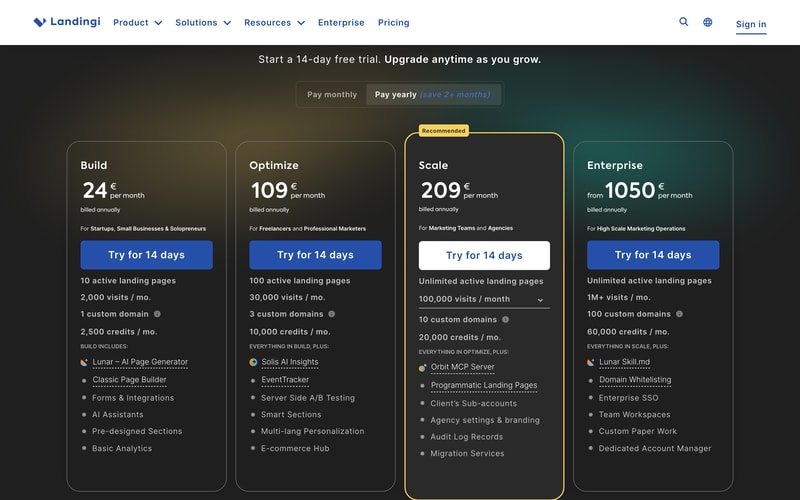
The 2026 lineup leans heavily on AI and, notably, on agent access. Build includes an AI page generator; Optimize adds AI insights; Scale ships an MCP server, and Enterprise adds a published skill file. Landingi is among the first tools in this category to treat AI agents as a first-class client rather than a marketing line, which is worth knowing if your team is building agent workflows.
Traffic is the meter. Every tier is defined by monthly visits before it is defined by features.
How Landingi Works
- Visits are the primary meter — 2,000, 30,000, 100,000, then 1M+ per month.
- Active landing pages ladder too — 10, 100, then unlimited.
- A/B testing starts at Optimize, not on the entry plan.
- Custom domains are limited — 1, 3, 10, then 100.
- Credits are a second meter — 2,500, 10,000, 20,000, 60,000 a month.
- Scale’s visit allowance is adjustable via a dropdown on the plan card.
Landingi Pricing
Captured from Landingi’s pricing page in July 2026 in euros, reading both billing toggles.
| Plan | Yearly (per mo) | Monthly | Visits/mo | Pages | Domains |
|---|---|---|---|---|---|
| Build | €24 | €29 | 2,000 | 10 | 1 |
| Optimize | €109 | €139 | 30,000 | 100 | 3 |
| Scale | €209 | €269 | 100,000 | Unlimited | 10 |
| Enterprise | From €1,050 | From €1,350 | 1M+ | Unlimited | 100 |
What actually decides your plan:
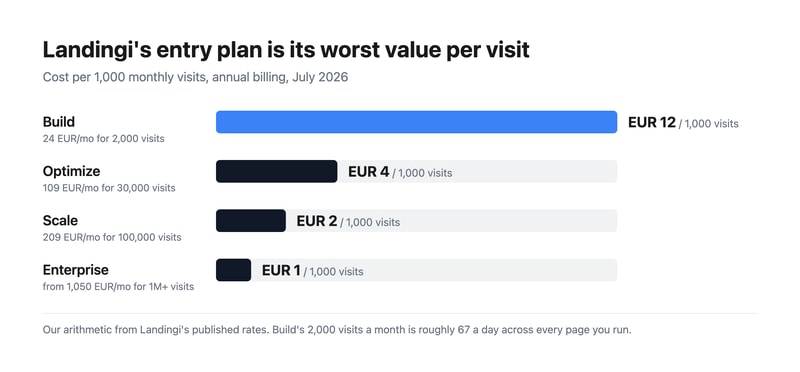
- Translate the visit allowance into a daily number before anything else. 2,000 a month is about 67 visits a day across all ten of your pages. A modest ad campaign at a €1 click cost spends €67 a day to exhaust it. Build is a plan for validating a page, not for running traffic to one.
- Per visit, Build is the worst value on the page. €12.00 per thousand visits against €3.63 on Optimize — Build costs 3.3 times more per visitor than the tier above it. That inversion is unusual and it means the cheap plan is only cheap in absolute terms.
- A/B testing is an Optimize feature. Server-side A/B testing, EventTracker, and smart sections all sit at €109. For a product sold under conversion rate optimization, testing being absent from the entry tier is the most consequential gate on the page — you can build pages on Build, but you cannot optimise them.
- One custom domain on Build. Agencies and anyone running pages for more than one brand need Optimize’s three, or Scale’s ten.
- Scale is where agencies start. Client sub-accounts, agency branding, audit logs, and migration services all arrive at €209 — that tier is built for people running pages on behalf of others.
- Annual billing saves more than advertised. The toggle says “save 2+ months”; it works out at 2.1 months on Build, 2.6 on Optimize, and 2.7 on Scale. Accurate, and understated at the top.
Who Should Use Landingi
- Performance marketers running paid campaigns. The clearest case, at Optimize or above where testing exists.
- Agencies managing client campaigns. Sub-accounts, branding, and ten domains at Scale are built for exactly this.
- Marketing teams blocked by a web queue. Publishing without engineering involvement is the core value.
- Teams experimenting with AI agents. The MCP server at Scale is genuinely ahead of the category.
It fits poorly for low-traffic or occasional pages, where the visit meter makes the entry plan poor value; for full websites, where Webflow or Wix are the right tools; and for teams already paying for a marketing platform, where HubSpot and GetResponse include landing pages.
Honest Pros and Cons
Strengths
- Unlimited pages from €209, with 100 already at €109.
- Server-side A/B testing, which is more reliable than client-side flicker.
- Genuine agency features — sub-accounts, branding, audit logs.
- An MCP server and skill file, unusually forward-looking for the category.
- An honest annual discount, slightly better than the 2+ months advertised.
- A 14-day trial on every tier.
Limitations
- 2,000 visits a month on Build — roughly 67 a day.
- Build costs 3.3× more per visit than the tier above it.
- A/B testing requires €109, on a conversion optimisation product.
- A 4.5× jump from Build to Optimize with nothing between.
- One custom domain on Build, which rules out multi-brand use.
- Two meters run at once — visits and credits.
Landingi Alternatives and How It Compares
- Unbounce is the best-known specialist, with strong testing and generally higher prices.
- Instapage targets enterprise advertisers with personalisation and post-click analytics.
- Leadpages is the cheaper small-business option with a simpler builder.
- GetResponse and HubSpot Marketing Hub bundle landing pages into wider marketing platforms.
- Webflow gives designers real control if you have someone who can use it.
For a broader survey, browse our conversion rate optimization directory.
The Verdict
Landingi does the core job well. Marketing teams that need to publish and iterate on campaign pages without waiting for a web queue get exactly that, server-side A/B testing is more trustworthy than the client-side kind, and the agency features at Scale — sub-accounts, client branding, audit logs — are real rather than nominal. Shipping an MCP server on a mid-tier plan also puts it ahead of most of the category on agent access, which will matter more over the next year than it does today.
Price it from the visit meter, not the plan price. Build’s 2,000 visits a month is about 67 a day, spread across all ten pages it allows. That is enough to validate a concept and nowhere near enough to run a campaign — if you are buying a landing page tool, you are buying it to receive paid traffic, and paid traffic exhausts 2,000 visits quickly. The arithmetic makes the point plainly: Build costs €12.00 per thousand visits against Optimize’s €3.63, so the cheapest plan is more than three times the most expensive per visitor.
The second gate matters just as much. A/B testing starts at Optimize at €109, four and a half times the entry price. On a product sold under conversion rate optimization, that means the entry plan builds pages but cannot optimise them, which is half the reason to use a specialist tool rather than your website builder. Treat €109 as the honest entry price for campaign work, take the annual billing — the saving is 2.6 months on that tier, better than the “2+” advertised — and reserve Build for testing whether the product suits you at all.
FAQ
How much does Landingi cost?
Captured in euros in July 2026: Build €24 per month on annual billing, Optimize €109, Scale €209, and Enterprise from €1,050. On monthly billing those become €29, €139, €269, and from €1,350. Monthly visit allowances are 2,000, 30,000, 100,000, and 1M+ respectively, with a 14-day free trial on every plan.
How many visits does Landingi’s cheapest plan include?
2,000 per month, which is roughly 67 visits a day across all ten landing pages the Build plan allows. For a tool whose purpose is receiving paid traffic, that is a small allowance — a modest ad campaign will use it within days. Optimize at €109 raises it to 30,000 visits a month, which is the first realistic allowance for running campaigns.
Which Landingi plan includes A/B testing?
Optimize at €109 per month on annual billing. The Build plan at €24 includes the page builder, AI page generation, forms, and basic analytics but not server-side A/B testing, which arrives with Optimize alongside EventTracker, smart sections, and multi-language personalisation. Since testing is the main reason to use a dedicated landing page tool, Optimize is the practical entry price for campaign work.
Is Landingi’s annual billing worth it?
Yes, and slightly more than advertised. The toggle promises “save 2+ months”, and by our arithmetic from the published rates it works out at 2.1 months on Build (€29 monthly against €24 annually), 2.6 months on Optimize, and 2.7 months on Scale. That makes annual billing worthwhile for anyone staying beyond roughly ten weeks.
What is Landingi’s MCP server?
It is an interface that lets AI agents interact with your Landingi account directly, included from the Scale plan at €209 per month, with a published skill file on Enterprise. Very few tools in this category ship agent access at all yet, so if your team is building AI workflows around campaign creation it is a genuine differentiator — though it sits two tiers above the entry price.

Compare Landingi with other popular tools in the same category.
What stands out most about Landingi is its user-friendly interface and the drag-and-drop editor, allowing for easy customization of landing pages without needing coding skills. The wide variety of templates makes it versatile for different industries, simplifying online marketing efforts significantly. This combination of simplicity, flexibility, and quality is what I find most appealing about Landingi.
While Landingi offers a lot of strengths, one aspect that could be improved is the pricing strategy, which might be a bit steep for some small businesses or individual entrepreneurs just starting out. The free plan is greatly appreciated tho. Overall it's a great platform.
There is no need for technical expertise. With the drag and drop feature, I've been able to create beautiful landing pages in less than an hour which is really efficient.
The platform provides a page builder that allows you to access and use the landing page creation feature without requiring any prior knowledge. Access to templates that can be used depending on your purpose and application. Tools for monitoring website performance, statistics on traffic, control and other key indicators
There are no such.everything is as transparent as possible
no
Łatwość użytkowania i intuicyjne funkcje
Nie ma takich rzeczy. Wszystko działa ok i bez problemu
Tworzenie stron sprzedażowych

I loved how easy and user friendly Landingi was to use. I was able to easily put together a landing page that looked professional in a few hours. Super happy with the way it turned out.
Adding a domain was a little complex, but I attribute that to my skills and not the software.
Landingi is allowing people who don't know how to write code a way to create beautiful landing pages.
Świetnie, że mają darmowego landinga, dzięki któremu można wypróbowac wszystkie funkcjonalnosci.
Chcialabym, żeby w opcji licznika byla mozliwosc zmiany ceny produktu po uplywie czasu
Landingi ma niemalze wszystkie funkcjonalnosci, ktorych potrzebuje do sprzedazy produktu cyfrowego
Landingi offers an intuitive interface that allows for quick and easy creation of attractive landing pages. I particularly appreciate the extensive template library, which enables even those without design experience to craft professional-looking pages. Additionally, the flexibility of the editing tools allows for customization of every page element to suit individual needs, which is crucial in building personalized marketing campaigns.
Despite its many strengths, Landingi could improve its functionality regarding integration with certain external tools and platforms. Sometimes the integration is not as seamless as I would expect, requiring extra work or workaround solutions. Also, more extensive support for advanced SEO features would be beneficial.
Landingi has streamlined the process of creating and managing landing pages. It saves me significant time and resources, which I previously spent on more complex web development tools. The ease of creating visually appealing pages has increased engagement rates and improved the overall success of my campaigns. It's a valuable tool for quick deployment of marketing strategies and testing new ideas.

Ease of use, ux and set of features. It can be daily used software.
Somtimes interface looks heavy, but it is always in this type of software
Smart and lean landing pages creation
Very easy to use, support is great, you can develop your brand in different ways, and it's easy to integrate with other platforms, I strongly recommend Landingi to everyone
Everything is great, can't thing of any downsides at Landingi
If you want to market and sell digital products with quick and easy-to-implement solutions, then Landingi is a great way to do it.
It's super easy to use, even if you don't have any coding skills.
It only lacks a possibility to create a whole website on the plaftorm. However it's landing pages oriented so nothing to complain about.
It helps to create landing pages even if you don't have coding experience. Anyone can make a good landing page with it.

It is really easy to use a built in drag and drop builder.
Customization of contact forms that I can insert in my landing page.
We don't have a huge inhouse team to build websites for our products to collect the leads. It is easy to made website even if you are project manager - there is no need to hire a webdeveloper to achieve what you want.
Landingi has a lot of integrations with other stuff. It is very easy to use and implement. I think i'll use it in projects on monthly basis.
I didn't notice any downsides yet. Landingi is good looking and has enough features for me.
Very quick landing page creator. Easy lead generation.
Landingi is an easy to use, creative and beginner-friendly landing page builder with an array of features that fill so many gaps in other builders. My landing page was easy to build and customise. I cant wait to make more for the other needs of my business!
I wish there was more onboarding support resources available. Although I found my onboarding call with the team extremely helpful and insightful
I currently use a Shopify website and struggle using their pre-built themes to represent my brand. Landingi has the ability to fully customise the page to my brand colours, fonts and imaging.
The drag and drop builder is super easy as is the integration to your own website.
There is a good range of templates, but there could always be more.
Landingi let's us create very high qualitylanding pages quickly.

Intuitive drag-and-drop interface, ability to plug in my own domain, helpful support and handy AI features.
I don't think there are any. Any problems I had were instantly handled by the support team
We can spin up landing pages for our webinars, and it works as a handy extension of our main website.

It offers a user-friendly interface and a wide range of customization options. The drag-and-drop editor makes designing landing pages extremely easy, even for those with limited technical skills. It's really simple to implement and integrate with several payment gateways. I use it on a daily basis and I really appreciate the AI option for generating SEO descriptions. What's more, the customer service is exceptionally customer-friendly and answer all the questions without any delay.
I can't think of anything that I dislike.
The online forms you can build in Landingi are very user-friendly and help us a lot with tracking new leads.
When I look for a software tool I look for ease of use, low learning, and most important great customer support. landingi has provided all of that and more. I am appreciative of them as they have provided the support and tools I need to provide my customers landing pages.
I really have not found anything to critize, and really have not found a down side. - If I had I send them a message and it is usually added or a solution given.
having good landing pages
Easy UI, drag and drop functionality, quick implementation of landing pages.
Nothing - from manager's perspective platform is easy to navigate and use.
A quick way to get the landing page done (with a rebuild components)
Drag & Drop functionality, templates, mail campaign intergration, heatmap, support.
None, it's been a great tool for us. Pricing is fair, support is good.
Lead Capture/Microsite creation used in conjunction with google/facebook marketing
Landingi is easy to use and has all of the features that we were looking for.
When you need to add/disable a feature, it isn't always clear.
Building a landing page and capturing leads is extremely simple with Landingi.
It's easy and intuitive to you. The design elements are all you need. Tracking is easy to set up.
Nothing in particular - minor glitches but nothing any different to using Leadpages
I was using Leadpages but the cost was very prohibitive. I switched too landingi and have been impressed with the functionality at a fraction of the cost of leadpages
Simplicity, good price, high quality, very good and fast technical support, constant product development
Very rarely, but integration problems do occur
I mainly use it to create landing pages for webinar registratiThe speed of creation allows me to quickly validate my campaigns and optimize marketing activitiesons, as well as for product promotions and Google Ads campaigns.
Easy to navigate and use. As well as their customer support being on top of things and being readily available whenever you need them.
That they are just landing pages, but still has not stopped us from using them for over a decade.
Their availability has improved as well as the user experience overall.
Looking something easy to use? Full of useful fetures? Easy to integrate and implement? Use Landingi.com!
There could be more tutorial on the page. :)
Troubles with builder on my webpage.

I'm using Landingi for like 6 or 7 years now and still love it. It's super simple not just to create landing pages, but for me (as an consultant and agency owner) it's also super easy to manage, copy and A/B test all of them.
For a long time the only one thank you page I was able to create (so trip wire funnels were hard to implement) was a downside for me, but it's not a thing anymore.
For an agency owner it's a great way to quickly copy projects from the past and use it again for new cliecnts. You don't have to build it from scratch. Also it's much easier to cooperate with clients, they need to just create one subdomain and you're ready to go.
Easy to use and very affordable pricing. Customer support is amazing and quick. Very easy to intergrate with google and others.
Cant think of any right now. Maybe some more options for templates.
they are helping me get lead for low CTR.
Strona Landingi.pl została mi polecona kilka miesiecy temu i nie bez podstawnie. Łatwość obsługi jak i liczba szablonów pozwala na szybkie stworzenie landing page.
Nic nie znalazłam, wedle mojej opnii strona działa bez zarzutu
Strona pozwala na bezproblemowe i szybkie stworzenia landing page.
Good templates, easy to use, friendly pricing.
A few minor glitches in the app when uploading images
Landingi is helping me test out a product concept
Easy to bulit landing page great support - client service is very helpful integrations
a bit too weak e commerce - there is hard to sell products that need to eb downloaded
Problem with facebook miniature for my webinar - it was a technical issue not connected to landingi itself
I love it!!. The feature that I liked the most was incorporating a payment button on the landing page, for me and my company it has been very useful. Also, it's a simple tool and pretty effective, super stable, and trustful.
Nothing relevant comes to my mind. In my case, with almost no experience, I was able to make a pretty good landing page, maybe incorporating more language options like Spanish would be great.
The main problem that Landingi solved for me and my company was finding a landing page that offered the integration of a payment button that was very easy to do. Also, Landingi is a very comprehensive tool to fill our marketing/sales needs
Ease of use, reliability, support and professional services available on demand.
Can't see request logs when leads are posted to external CRM's. A wish-list, not a problem for us.
Built landing pages fast to move quick of proof of concept.