

Unclaimed: Are you working at MeisterTask?
MeisterTask Reviews: 4.5/5 — Highly Rated
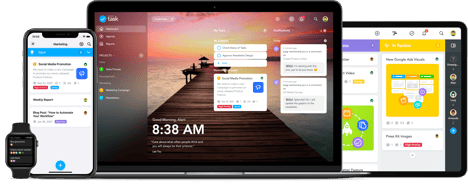
MeisterTask is a web-based task and project management tool built for agile project management. It features an exceptionally designed user interface, with intuitive functionality and seamless integrations with other tools. The platform is customizable, with the option to view projects following Kanban-style project boards, and other key features that help streamline the work process.

| Capabilities |
API
|
|---|---|
| Segment |
Small Business
Mid Market
Enterprise
|
| Deployment | Cloud / SaaS / Web-Based, Desktop Mac, Desktop Windows, Mobile Android, Mobile iPad, Mobile iPhone |
| Support | 24/7 (Live rep), Chat, Email/Help Desk, FAQs/Forum, Knowledge Base, Phone Support |
| Training | Documentation |
| Languages | English |

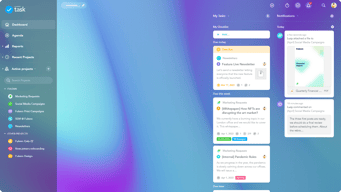
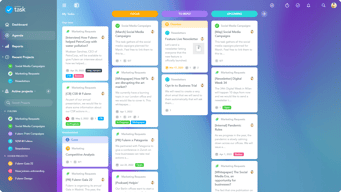
Able to make multiple categories and show your progress of things are need to work on, started working on, alomst done and complete.
Is there a mobile app? If so need to look into and if not they need one created now!
I am a graphic designer but moving into the creative lead Position and there are a lot of task I do now and new tasks I will be doing.

MeisterTask allows the project to include the best practices of a kanban style task manager. It is a Management system with automation and delegation across integrations.
Many items such as Categories and people, once set up in one project are not transferable as a template to the other projects and must be input manually. Importing and exporting these would save setup time. A simple example would be to have a Project template for Agile Methodology with Scrum/Sprint selections that sets effort, duration and estimates as task goals.
Having a single list of my organizations tasks with due dates and responsibilities gives oversight and the ability to set and adapt priorities.
It is very easy to keep track of all of the tasks and projects to be completed
The app does not always refresh to real time
It is easy to keep projects organized and they do not go missing or undone
I like that it has the timer feature to track how much time I spend on projects.
Sometimes the timer has been buggy. I also wish there an easier way to break down tasks into even smaller categories, and then also view those smaller broken down tasks more easily, since those are typically the tasks that will actually get checked off throughout the day. Having small things to check off would help to feel more productive. I should not I don't use the default columns "open", "in progress", and "done". I find I need to categorize my tasks so I use those columns for that.
It helps break tasks down into categories, and easily assign them to others. There is also room for commenting, which helps with collaborations.
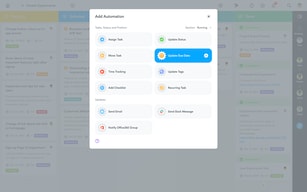
Automations, they make it so easy to auto label or assign things in a column.
Not enough of our company uses it. so there is a push to use trello instead.
This help provide a kan ban flow for our work.
Easy to use. Intuitive. Appreciate the different sorting capabilities and deadline reminders.
The software crashes about once per week in my experience on Google Chrome, so sometimes the tasks I add are not saved.
Organization, logistics, sharing task progress with teams

Easy to add tasks, cloud sync across devices, comments and team collaboration
Can't prioritize tasks in the dashboard view No Gantt/velocity type views
Personal task tracking across work streams
The team functions are great! The desktop version is amazing and helps us plan out all of our merch launches.
Sometimes loading times are slow. Also it is hard to go back and search the timeline past a week for who has contributed. Better employee tracking would be very helpful. Mobile could be better.
Team built merchandise development. Easy to get thoughts in projects and separate out shirt designs etc. It has been more organized and less chaotic to develop merch with the separate tasks and columns we use for different design stages.
project Service is good The design is really good and the connection with the app is very convenient and it is convenient for me to check the work in one day.
There was nothing particularly objectionable about it. However, it would be nice if it works with Google Calendar and is easy to use. It would be nice to have a calendar with you in the app.
any way good service
I love the project mode: it makes you able to create difference internal catalogue in which you can expand your working and scheduling possibilities. It can be easily and deeply customised, with colours and icons. I love the motivational homepage with famous people quotes. I conserve them all in a Meistertask list!
It has some problem with sync sometimes and when I switch between my platforms I often have to recheck and resync before starting to work. Mac application is heavy to be used, and it takes a bit starting and uploading. Some bugs in completing and archiving tasks.
I have created event-oriented projects, such as Xmas gifts and Xmas dinner planning, and I advised a customer of mine to use it for a home inventory: every project is a room, and every inside column is a library shelf. She was amazed!
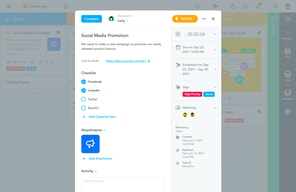
MeisterTask is visually appealing. I can invite an unlimited amount of members to join a project. I like that I can add checklists and due dates to each card on a project, similar to Trello.
I was hoping that MeisterTask would provide various ways to review a project because it is so visually appealing. It would be nice to see an overview of tasks for a project in a calendar mode, for example, or to see all tasks that belonged to a certain "tag" or category. Users who don't want to be limited to a kanban system may want to look elsewhere.
MeisterTask has helped me organize my projects and break them up into easy-to-manage tasks. I am better able to see the big picture and how to get there. I can keep checklists, notes to myself, and assignments all in one place.
I enjoy the versatility of being able to keep tabs and collaborate on projects using not just my Apple devices, but my Apple Watch as well.
For some reason when I get notifications of updates in a conversation thread, I can never find the conversation I was notified of directly, instead I have to browse the notifications tab. occasionally I see weird hiccups like that that makes getting the latest updates on a project a bit cumbersome.
Solving our project collaborative efforts as they pertain to managing social media campaigns.
I like that the functions offered by the tool allow you to do each project separately and thus keep track of each one in an individual way, thus improving the development and progress of said projects, besides having very dynamic and useful solutions for you to develop in the best way your projects.
I had no problems using this tool I would say that my biggest drawback is that when you are going to designate a task, you have to choose a specific member of the work team or leave it labeled automatically as unassigned and then it is difficult to re-adjust that detail
It is an excellent organizational tool to manage several projects at the same time which gives you many benefits and helps to improve the performance of the working group
It has pretty design and it's very easy to create projects, set deadlines, etc.
I can't reorganize stacks of cards (vertical columns) in the projects; after i once marked task as completed by accident i couldn't go back, no undo option
projects tracking help
Assigning task feature is pretty helpful, usage is easy. Also it has great performance in all devices.
I don't like the notifications screen/area in opening. It looks like irrelevant space from the application. Wallpapers are not necessary.
Planning the project, especially in co-working.
The card system is easy. It offers the ability to add dates, share with others. Everything you'd expect.
I upgraded to a paid level because I wanted to manage more boards than the free version allowed. However, I learned after upgrading that EVERYONE collaborating with me had to be upgraded if I wanted to use the upgrade features in my boards. I contacted customers support and they refused to issue a refund even though it was less than a week after I paid. Disappointing.
Helps with collaboration, deadline setting, and a good mobile app to do this in addition to desktop.
is an excellent tool that has multiple functions that allows you to attach or place notes and tasks in each email, which allows keeping a more practical and dynamic follow-up of emails that have important or relevant information. It also allows you to keep emails separate allowing you to have a virtual filing cabinet
is a very practical and dynamic tool that makes it easy to handle, I think the only major or main drawback is that each task must be assigned specifically or this is automatically marked unassigned
is I think that the best tool to manage projects in a very dynamic and simple way which allows to manage this application is very practical and simple
I like being able to track the progress of a certain project. The fact that you can tag other members of your team regarding an issue in great. By Tagging them in a post or comment to a task they will be notified
Message notifications are not set up by default. If someone doesn't know how to set up their account properly, they might miss out on messages or notifications leading to projects not getting done
Keeping track of what other staff should be doing is a great advantage. It allows you to track the progress of company tasks as well as what other employees may be working on.

I am using MeisterTask for over three years (Professional licence). App is nice looking, minimalistic, without any fancy features. Working with Zapier solves some of its limitations. I like the way notifications and alerts work. The workflow they present is easy to follow and requires almost no effort to see all of the “action triggers”.
It has a lot of bugs, e.g. the comments did not save on the mobile app, desktop app was as slow as living Internet Explorer meme - still annoying but minor issues. Since May 2020 - at some point the companies switch from user & money friendly to money only friendly. This is what happened to MeisterTask. They changed the licence for any new user and limited them to participate with more than 3 projects. Otherwise you need to pay over €8/user/month. There is no "small team" licence for €2-4 like Freedcamp Basic or Google Suite. Ridiculus. And now we are looking for something to migrate to. Maybe Freedcamp or maybe back to Trello.
It helped to monitor the workflow. Using its built-in alerts helped to save the time because you don't need to navigate manually for the most urgent issues.
MeisterTask is a great project management tool that allows you to keep track of your tasks as well as providing transparency with other group members on joint tasks/projects. The homepage has inspirational quotes and images, and overall great interface.
Some of the other project management tools are a bit more detailed and better structured, but for being free it’s a great to.
We’re utilizing MeisterTask for project management and organization for personal and corporate tasks. Because of the interface you can manage both easily.