

Unclaimed: Are you working at MeisterTask?
MeisterTask Reviews: 4.5/5 — Highly Rated
MeisterTask is a web-based task and project management tool built for agile project management. It features an exceptionally designed user interface, with intuitive functionality and seamless integrations with other tools. The platform is customizable, with the option to view projects following Kanban-style project boards, and other key features that help streamline the work process.

| Capabilities |
API
|
|---|---|
| Segment |
Small Business
Mid Market
Enterprise
|
| Deployment | Cloud / SaaS / Web-Based, Desktop Mac, Desktop Windows, Mobile Android, Mobile iPad, Mobile iPhone |
| Support | 24/7 (Live rep), Chat, Email/Help Desk, FAQs/Forum, Knowledge Base, Phone Support |
| Training | Documentation |
| Languages | English |

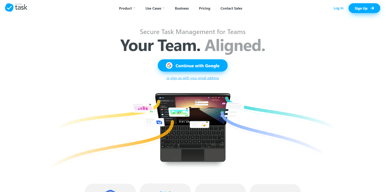
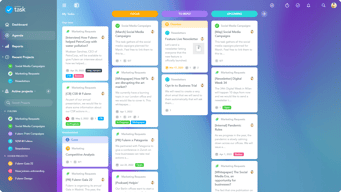
The UI is very friendly, intuitive and pleasant on the eyes. The free version was powerful enough for our small team to manage tasks.
Took a little bit to get used to their home page layout, looks something like desktop? Once I got over it, the experience inside is top notch.
It allowed us to manage tasks and communicate more efficiently with counterparts that are across the pond.

Its fremium version is just great as you can have as much as projects you want to! Use with other programs. I use with Meister Mind Mapping. Mindmeister. Your whole agenda can be on one screen so nothing is left to chance. Checklists can be set up and then added as necessary. Due dates can be added.
The training isn't available on the app, but they have been exceptional to work with. They do have a training website. But the moment I ask a question, they have an answer back to me. Honestly, I feel I have a relationship with them and it has just been in the communication efforts they have given. Tasks ordering according to date would be a great feature as well. I would love to invite a "Viewer" without permission to contribute to a project or give permission to a task in the project. The bottom horizontal scroll bar is SUPER hard to click accurately because it's so skinny. Plus, since it disappears when you're not moused over it, most people don't even know it's there, and they all complain that they can't easily reach columns that are too far to the right of the page. Make it NOT disappear, and please make it taller so that it's easier to click and drag.
It really helps to save the time while you're working, not to miss the deadline as an educational company
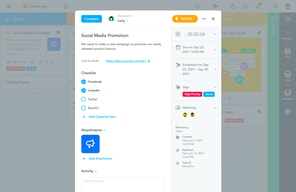
The functionality of MeisterTask is mostly intuitive and easy for most people on my team to use. I like that we can update settings or information in one section and be able to update other sections either through automation or by simple selection tools. The brainstorming tool stands out to me as something that is very useful that can quickly outline ideas and assign tasks formally within projects.
Some of the more advanced features can be complicated for some people to manage. There are so many different components and information panels that it can get confusing understanding which tools to use and how to use them best for our particular needs.
I personally stay more in touch with my team and am better informed about project tasks and due dates with MeisterTask. I can track who is assigned to particular tasks and have a useful overall picture of a project plan that allows me to work more productively towards meeting our group's ultimate goals.
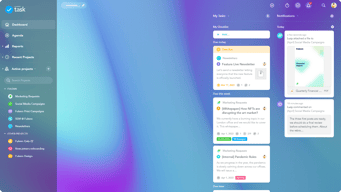
First and foremost, the dashboard and overall interface has a crisp design that's easy to navigate. There are distinct and colorful sections and panels that really stand out and help me to quickly identify projects, tasks and sub items. MeisterTask has dynamic Kanban boards, calendars and other highly visual tools that allow us to stay organized and flexible. We can easily change task details and give status updates that reach everyone in real time. MeisterTask can be integrated with other office and productivity tools we use like Google Drive and Slack.
There are some usability issues that we dealt with at the beginning that took some time to get used to. There are many panels to deal with, which can be overwhelming and confusing at first. Using MeisterTask via the mobile app isn't as intuitive as the browser-based version. We can't use the browser-based version without an internet connection.
Our team uses MeisterTask to assign and stay on top of project tasks. It has really helped to streamline planning activities and serve as a hub for status updates and communication. We can smoothly add files through our computer or online storage accounts, which simplifies the logistics of file sharing. I personally have met deadlines more often and generally have less stress and confusion by using on MeisterTask.
I loved that the software allowed me to make task goals for larger projects, assign these responsibilities to team members and track the progress of the larger projects.
I dislike that the software does not show the task goals for larger projects on the main screen. I wish I was able to also track the progress of these smaller goals.
MeisterTask has made our projects more organized and punctual because the team is clearly aware of all the projects that need completing and what exact steps are necessary in order to complete them.
I found MeisterTask whole looking for accessible project management software for our upcoming office move. It’s simple, fairly intuitive, and with the free version, all managers have the ability to add, delete, and modify tasks.
Although it’s *fairly* intuitive, there are some things that could be improved. I would like to be able to make a sub list for multiple step tasks that are grouped with other like tasks. The ability to check off without crossing off.
We needed an inexpensive, simple solution to organize tasks associated with moving a business with internal resources.
The flexibility and User interface. Its email updates are easy to follow up with.
Lack of integration with major CRM's or contact management systems that could help in using it as a sales funnel for example. It would be fun to use it like that.
Follow up on admin and project initiatives with several of my colleagues.
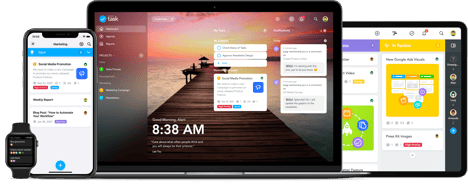
The clean and modern visual design. The ease of use. The fact it has various versions of a desktop app, mobile apps, web with chrome extension makes it easy to edit info on the go. Really good free version, a fair pricing structure in general for what you get.
would be nice to have a timeline view of the tasks that are either to do or pending. Click on a timeline icon in the right corner and a drop down timeline would appear above the kanban tasks (or substitutes the kanban tasks into a timeline view, so you can see the due dates clearly of each task). Something like teamweek.com. Or a more inelegant (manual) solution but perhaps more feasible in the short term would be an integration with teamweek so you could import meistertask cards for a timeline view.
day to day tasks of my startup. centralize communication between freelancers and my small team.
The ease of use on the platform, multiple integrations and the fact that its free and non limiting makes this a great Task Management tool that can rival trello.
Really hard to say, as my experience with this has only been for a few months. May need some time to go through this, but so far, there hasn't been any truly big pain points, as I'm working within a startup and the inevitable fact of utilizing our resources to the bone :)
We needed a way to track updates to the website, social media, content and other deliverables for our product. With a small team that is bootstrapping the idea, we wanted to use a program that was going to be there long term, but at the same time was flexible enough to grow with us as we grew with the program. It's nothing like investing months into a program to realize that it dosen't fit anyone's needs anymore, or that the company shut its doors becuase they weren't able to secure future funding :( Fortunately, with this product, not only could we grow with the free user base, but we also saw an opportunity that this wouldn't be taken away from us due to their low cost of more detailed benefits each month. As long as it didn't break the bank with us, we would be fine and honestly, with this product, it's really helped our idea validation as well as our bottom line :) This program is perfect for small to medium sized teams who want to track multiple tasks and keep people updated in an easy to use interface, with attachments and other notes to make sure our productivity stays efficient. Great software.

The integration with mindmeister, allowing me to assign and manage to-dos. I also like the interface a lot.
I do wish they had a direct integration with google apps.
Managing time and to - dos. Increased awareness of projects, deadlines, and specifics.
I liked this as a whole package but assigning task is the feature i was trying to find in many apps but i didn't find in any, so MeisterTask is one stop solution for my needs.
I have been using this from a long time and i haven't find anything to dislike yet.
We are managing tasks, assigning tasks so that everyone on team gets to know what he has to do, plus you can assign it with a time limit, so that the person you assigned any task can know what amount of time they have to complete it.

I like the ability to change the status of tasks and assign them to team members. Though not all team members were advocates of this method of record-keeping, I found it a useful way to organize my thoughts and keep the project on task.
I can't say there is anything that I dislike about it. I only used the free version so there may have been a lot more features that I could have taken advantage of.
I used it to keep track of several projects, including the organization of our team's participation in tradeshows, organizing a course we taught to teachers at a middle school and organizing the development of course materials for our STEM training program.
I use it as a light CRM tool and it works well
A bit off from what we really need but it does the trick.
Keeping track of reminders and to do items.

What I like most about MeisterTask is that if offers me a fully customizable panel, where I can organize all the sections and order them as I like best, I can move the sections of Completed Tasks, pending, planned and delayed. Also, another thing that I like about MeisterTask is that it offers me a section where I can work as a team, I can post the task that is in progress and several of my colleagues can participate in the elaboration of the planned task. The teamwork section is surprising beacuse it allows us to complete tasks much faster and with mutual support.
The notification system that MeisterTask offers me for my mobile device is a bit slow to send notifications at the right time. On several occasions, I have viewed too late when new tasks have been placed for me or for my workgroup, because it takes a while for MeisterTask to send the notification to my cell phone or computer. I think that MeisterTask should improve the notification system, to be able to be notified at the exact moment and to be able to complete the tasks at the right time.
Currently, we use MeisterTask to be able to manage all the tasks within our work zone. I'm totally satisfied with the results that MeisterTask has given me in the administration of my tasks, because it has helped me to be able to visualize all the pending tasks and to be able to keep an order in all the tasks that remain to be completed. In addition, with MeisterTask I can also keep an order of the completed tasks and the due dates of each task. MeisterTask is fascinating to use, it keeps me organized with my entire work area.
It has become an excellent ally for us when helping us organize our projects in a much more agile way, the fact that it has a 100% customizable main board is perfect for me to evaluate and place everything in a very orderly way and simple, in such a way that all the members of the work team can be informed about the development of the activities, the fact that its interface has a fairly "user friendly" design is perfect for navigating throughout the entire application without presenting no kind of setback, the fact that I can configure my boards as private seems very practical, especially when there are several boards and I do not require that all users have access to all the boards, its ease of use is also something that plays a lot in its favor, since it allows us all to use it without any inconvenience, in fact learning to use the application is something or quite simple and straightforward.
None, I have no complaints about this application, everything worked perfectly for us, which seemed a complete surprise to us since we have had bad experiences with similar applications where they promised us many good things, but in the end everything turned out to be great lie, on the other hand with Meister Task it is not the case since it has really fulfilled everything it has promised.
It has been very helpful to us to organize our projects in a much more practical and simple way, by allowing us to have an interface that allows us to organize, manage, plan and monitor the activities of our project in a very simpler, simpler and more efficient, in such a way that we can respond appropriately to any problem or concern that may arise during the execution of our activities, giving us the opportunity to accommodate everything in a much more efficient way.

MeisterTask has a free version that offers plenty of features that keep you on the platform.
I wish there was a more robust note section for each project.
MeisterTask allows me to keep my projects organized without a complicated UI, and allows me to sync across multiple devices, all on a free account if needed!
Meistertask is easy to use, without any complication and headaches to manage my daily task and improve the productivity on my side-projects. I could create different projects and manage them in separate workspace. The workflow is smooth, UI is friendly and the good news is that it's free to use for basic usage in your startup and SME, without any limitation and push to upgrade to their pro plan.
Although it's free to use, the features are basic and you can't have too much control to organize your daily tasks. There isn't any option to set priorities for tasks (Wich you should do it via tags), also the sorting system of the task is not so advanced. So If you are in a growing stage of your startup it couldn't be the best choice.
I'm using MeisterTask to: 1- Manage my daily tasks apart from my startup. It's amazing to improve my productivity and have a board to manage everything in one glance. 2-As task management in my side-project and collaborate it with my colleagues, which is working remotely with me on our startup.

Customisable dashboard, tags for ease and defining relation with other tasks One task cannot be assigned to 2 members
You can not duplicate tasks from one board to another board
It made my life easier with customised dashboard and setting due dates
Simple and light UI/UX, weekly project updates, and general integrations available.
The functionality of leaving comments and describing tasks is very primitive.
Ecommerce Project issues and development tasks.

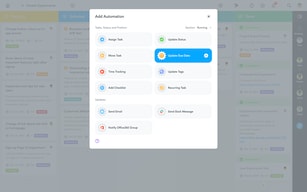
How easy it is to automate assigning tasks throughout a workflow
Limited spreadsheet import options when setting up projects
Jobs with multiple hands and tasks changing hands a lot
The add-on with the Microsoft solution and the desgin of the application.
Few tips inside the card. Small bugs for editing card.
I'm no longer be lost for organize my works and know now when task is due

I love the customization of Meister Task, particularly with task automation, checklists, tags, etc. It offers the right amount of features for me to manage my small team for both routine and ad hoc assignments and project. They also offer very flexible This product also integrates decently with Mind Meister, their mind mapping software and they have an Outlook add-in to easily and conveniently set up tasks. Their android and desktop apps are well developed and maintained with a nice steady stream feature enhancements and updates. I've not been able to test their new scheduling feature. Unfortuantely, this is only offered with their enterprise liscenses at this time.
I wish checklists could be configured for recurring task templates. Also a dark mode would be very much appreciated on all platforms.
Great way to track recurring tasks and monitor project objectives completions. I use it for nearly all my different workflows. Also works pretty great for a personal task tracker too!

UX/UI is great, easy to understand. You can easily use it for project/team management. It gives you clear insight on how tasks are being managed, by whom. Section for comments can help you to be on track of every task, without the necessity to ping team members and ask for explanations. Drag and drop option is neet and helps you to transfer tasks from tab to tab pretty fast. Frontpage is amazing with its UX, you can easily navigate through multiple projects, can see a live feed of notification at the same screen as well.
It would be good to have an option to separate specific columns into sub-columns. It will help to diversify tasks inside same big task. When you check the completed area, you can only archive the task, and it's not clear how can you extract it back if you need it again. Regarding timer - it could be better organized in terms of being available all the time since the atm of speaking timer is reset once you change tab. This feature can increase visibility of how long one of the tasks is being in the same state, and it can help teams figure out bottlenecks, and investigate further on how to resolve those bottlenecks. A notification system when someone is tagged in comments can be better organized.
Recruitment pipeline metrics. When you have a high amount of candidates and a distributed team its easy to follow in which state are current candidates are atm. The comment section is helping you to be on top of the game and reduce time spent in clarifying candidates with team members in person.
I like that this app helps me stay organized and prioritize my tasks. I’m a list maker and use it for work and for personal tasks.
Nothing. I find it helpful all around at work and at home.
I helps me to not forget things that need to get done!
Ability to create, review and reorganize my tasks on multiple devices.
Premium version is a little pricy. A more affordable version for single user should be offered.
My daily as well as weekly activities. Creating a backlog
Ability to create tasks from Spark email.
Way to create a combined board of items with the same status from different projects.
Ability to manage lots of customers.

MeisterTask allows for an easy and intuitive organisation of tasks and projects, with on click integration with the most used softwares.
Free version has some significant limits, first of which is lack of access to customer support.
Much better management of ongoing tasks, both in house and at work. It’s become part of our household everyday routine.

Clean design and lots of agile features. Due date, number of tasks and tags are all visible on task card.
Font size is very large, would like to zoom smaller to take up less screen space and not have to scroll to see all sections.
Helps me prioritize tasks and see what I haven't started yet, what's WIP, what I'm waiting on, and what I've completed. It's great if you want to implement agile marketing but don't have budget for a traditional agile development/Kanban project management application.

The flexibility and the amount of features that allows me to create projects, Intelligent data and tasks that can be monitored with access to my laptop and my phone instantly. I love the app and how i have been able to use it in every organisation I move to.
not having more control over the layout and over all UI change to my desire. Many designers and business users will agree.
Many, from CRM, Projects scope and journeys and more. The amount of flexibility and KPIs that can be created.

I like using Meistertask because its integration with Bitbucket. We can get some task marked done as we commit and push our work to bitbucket. We also like integration with storage like Google Drive and Amazon AWS.
We don't know what to dislike. But sometimes we got dashboard that not loading correctly when our connection is slow. We should do hard refresh to get it running well again.
3 years ago, we started using Meistertask to manage our project. Since our team is remote working, we need manage task to focus on. Then we realize that using Meistertask, our productivity improved than we using chat services like Telegram or Whatsapp.