

Unclaimed: Are you working at ngram?
ngram Reviews — Pricing, Features & The Honest Take
ngram is an AI-powered, web-based video creation platform that converts raw content (screen recordings, documents, PDFs, URLs, images, and text) into polished, branded videos. Using agentic AI, ngram researches content, generates scripts and storyboards, applies voiceover and motion graphics, edits footage, and exports multi-format outputs. The workflow is user-directed: provide audience, goal, and destination and ngram adapts structure, pacing, and tone while letting users preview script and storyboard before rendering.

| Capabilities |
AI
API
|
|---|---|
| Segment |
Small Business
Mid Market
Freelancer
Enterprise
|
| Deployment | Browser Extension, Cloud / SaaS / Web-Based |
| Support | Chat, FAQs/Forum, Knowledge Base |
| Training | Documentation |
ngram Pros and Cons
- Context-aware generation that adapts tone and pacing to target audience
- Storyboard/script preview avoids wasted renders
- Brand kit and multi-format export from a single project
- Self-serve credit-based pricing with custom enterprise options
- Blog Partner Program offers a generous entry point for publishers
- Web-only (no native mobile app) limits on-the-go capture
- Collaboration features (team workspaces, comments, version history) listed as coming soon
- Advanced security controls, analytics, and enterprise integrations are on the roadmap
- Relatively sparse independent user reviews compared to established competitors
- Smaller built-in stock media library compared to some rivals
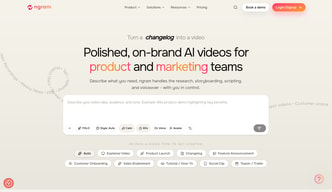
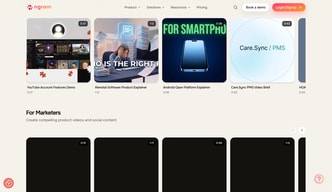






ngram is an AI video creation platform that turns product docs, prompts, URLs, and screen recordings into finished, on-brand videos, aimed at product and marketing teams rather than filmmakers. If your bottleneck is producing a steady stream of product demos, feature announcements, and social clips without hiring an editor, ngram is built for exactly that job. If you need cinematic, timeline-level control, it is not.
- What it is: An AI video creation tool (generation from source material), not a manual timeline editor like Premiere Pro or Final Cut.
- Best for: Product, marketing, sales enablement, and customer success teams shipping demos, tutorials, and launch videos at volume.
- Pricing: A free plan (with watermark), then paid plans from $23.20/month billed annually. Verified on ngram’s pricing page in July 2026.
- The honest catch: Independent testing rates the scripts and captions highly but flags voiceover range and motion graphics as merely “functional, not cinematic.”
What Is ngram?
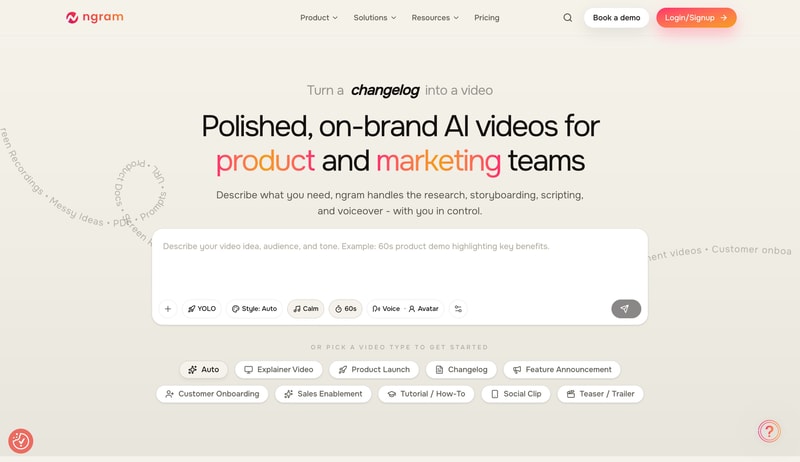
ngram is a browser-based AI video creation platform. Its tagline, “Polished, on-brand videos for product and marketing teams,” is an accurate description of its scope. Rather than giving you a blank timeline, ngram takes source material you already have (PDFs, product URLs, screen recordings, documentation, or a plain prompt) and automates the parts of video production that usually eat the most time: research, storyboarding, scripting, and voiceover.
That framing matters for setting expectations. ngram positions itself as an AI product demo video platform, not a traditional editor. If you are comparing it against manual tools, see our best video editing software guide for that category. ngram sits in the adjacent AI-creation space, where the goal is generating a watchable video fast rather than crafting every frame by hand.
ngram’s site features customer logos from companies including Veeva Systems, DocuSign, HubSpot, Zapier, and Rocket Mortgage. As with any vendor logo wall, treat those as marketing signals rather than independently verified case studies.
How ngram Works
ngram’s core workflow follows a clear, staged path: idea to script to storyboard to video. You give it inputs and context (the audience, the goal, the destination, and the tone), and it adapts structure, length, and pacing to fit.
The staged approach is the part most worth understanding, because it addresses the biggest frustration with AI video tools. In an independent hands-on review, the reviewer highlighted that seeing the script and storyboard before generating the final video prevents costly re-renders. Instead of waiting for a full render and discovering the pacing is wrong, you iterate at the cheap stages with instructions like “shorten scene 2.”
Key capabilities, per ngram’s product pages:
- Multi-format input: Prompts, PDFs, URLs, product docs, and screen recordings become the raw material for a video.
- Automated scripting and voiceover: ngram writes the script and generates narration, with editable text throughout.
- Brand consistency: A BrandKit applies your logos, colors, and fonts across exports so videos stay on-brand.
- Multi-aspect export: A single project can export to 16:9, 9:16, and 1:1 for different channels.
- Screen-recording editing (listed as a developing feature): auto-cutting dead air, smart zoom on interactions, cursor emphasis, and step labels without touching a timeline.
ngram Pricing
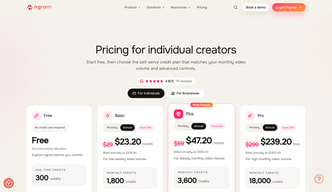
ngram uses a credit-based model with a free tier and three paid plans. Prices below were verified on ngram’s pricing page in July 2026. Annual billing is discounted roughly 20% versus monthly.
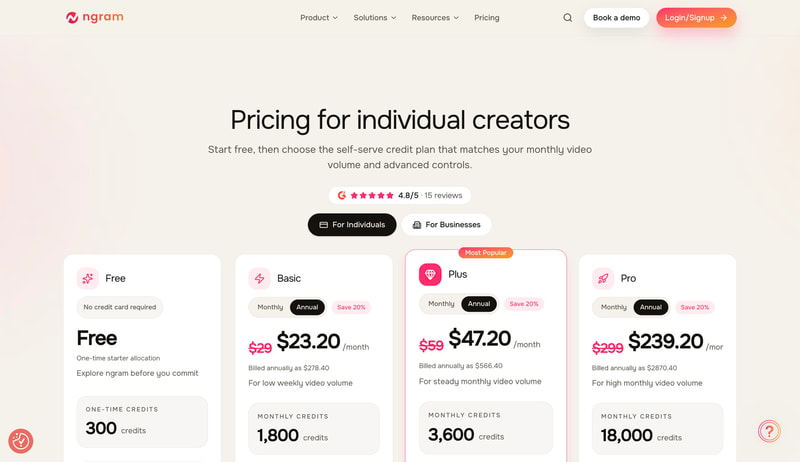
| Plan | Monthly | Annual (per month) | Monthly credits | AI generation limit | Export quality |
|---|---|---|---|---|---|
| Free | $0 | $0 | 300 (one-time) | 30 sec (or 5 min AI editing) | 720p, watermarked |
| Basic | $29 | $23.20 | 1,800 | 3 min (or 30 min editing) | 720p |
| Plus (most popular) | $59 | $47.20 | 3,600 | 6 min (or 60 min editing) | 720p, 1 BrandKit |
| Pro | $299 | $239.20 | 18,000 | 30 min (or 5 hr editing) | 1080p/4K, unlimited BrandKits, team access |
A few honest notes on ngram pricing:
- The free plan is genuinely usable for evaluation, but the 720p watermarked export and 30-second generation cap mean it is a trial, not a production tool.
- Credits are the real currency. “Minutes of AI generation” is capped per tier, and heavier use is metered through credit top-ups (for example, 1,000 extra credits for $15 to $20 depending on plan). Model your expected volume before committing, because generation minutes are limited even on paid plans.
- You may see a “$17.40/month” figure quoted elsewhere online. We could not reproduce it on ngram’s live pricing page, where the cheapest paid option is $23.20/month billed annually. Verify the current number yourself before budgeting around it.
Who Should Use ngram
Based on its design and feature set, ngram is a strong fit for:
- Product marketing teams that need to ship feature announcements, launch videos, and changelog clips on a recurring schedule.
- Product teams producing onboarding walkthroughs and in-app feature explainers.
- Sales enablement and customer success teams that want repeatable, on-brand demo videos without a dedicated video editor.
- Startups and founders who need presentable product videos but cannot justify an agency or an in-house editor yet.
It is a weaker fit if you are producing cinematic marketing films, brand story pieces with a specific art direction, or anything where a human editor’s frame-by-frame control is the point. For screen-heavy tutorials specifically, it is also worth comparing against dedicated capture tools covered in our best screen sharing software guide.
Honest Pros and Cons
The strengths and weaknesses below combine ngram’s documented features with findings from independent hands-on testing. We have flagged which is which.
Strengths
- The staged workflow reduces wasted renders. Reviewing script and storyboard before generation is a genuine time-saver and, per independent testing, one of ngram’s standout advantages.
- Script and caption quality are rated highly. The independent review scored script quality around 8.5/10 and subtitle accuracy around 9/10, requiring minimal cleanup.
- Brand consistency is built in. BrandKits keep colors, fonts, and logos consistent across exports, which is exactly what marketing teams need for volume production.
- Multi-aspect export from one project saves the manual reformatting that eats time when repurposing a video for LinkedIn, shorts, and landing pages.
Limitations
- Motion graphics are functional, not cinematic. Independent testing rated visuals around 7.5/10, describing them as “clear for business videos but not cinematic,” with scenes occasionally needing regeneration.
- Voiceover has limited emotional range. The same review noted the AI narration “can sound slightly flat” and lacks the range of premium voice tools.
- Scripts can skew generic or marketing-heavy and sometimes need technical simplification and a sharper opening hook, per the reviewer.
- Generation minutes are capped on every plan. Even paid tiers meter AI generation time, so high-volume users should budget for credit top-ups.
- Not built for film-style work. ngram itself positions the tool for business product videos, not narrative or cinematic content.
ngram Alternatives and How It Compares
The honest framing is that ngram competes in the AI product-demo video space, not against manual editors. If you are weighing ngram against other tools, these are the most common alternatives and where each tends to fit. Pricing for competitors changes often, so treat the notes below as positioning and confirm current rates on each vendor’s site.
| Tool | Best for | How it differs from ngram |
|---|---|---|
| Loom | Quick, unpolished screen walkthroughs | Fast to record and share, but light on AI scripting, storyboarding, and brand polish |
| Synthesia | AI avatar/spokesperson videos, training | Presenter-led talking-head videos rather than source-to-demo generation |
| HeyGen | AI avatar presenter and localization | Also avatar-first; strong for multilingual spokesperson videos |
| Descript | Transcript-based editing, podcasts | Edits existing recordings via a text transcript rather than generating from docs |
| Traditional editors | Cinematic, frame-level control | Full manual timeline control; see our best video editing software guide |
A caution when researching ngram alternatives: many “best AI video tool” roundups that rank ngram first are published on ngram’s own blog, or on articles that list no criticisms at all, which is a signal they may be promotional. When evaluating ngram vs Loom, Synthesia, or any other option, weight independent hands-on reviews and your own free-plan testing over any single ranked list, including this one.
The Verdict
For product and marketing teams that need to ship a high volume of demos, onboarding clips, and feature announcements without an editor, ngram is a credible, reasonably priced option, and the free plan makes it low-risk to evaluate. The staged idea-to-storyboard-to-video workflow and built-in BrandKits are the real draws.
Set expectations on output, though. Independent testing rates the scripts and captions highly but calls the motion graphics and voiceover “functional, not cinematic,” so ngram is a fit when speed and brand consistency matter more than polish. If you need cinematic control, a traditional editor is the better tool. The short version: excellent for volume product video, not a replacement for a human editor on high-end work.
FAQ
Is ngram free to use?
ngram has a free plan with 300 one-time credits, up to 30 seconds of AI generation, and 720p exports that carry a watermark. It is suitable for evaluating the tool but not for shipping production videos, which require a paid plan starting at $23.20/month billed annually.
Is ngram a video editor?
Not in the traditional sense. ngram is an AI video creation platform that generates videos from source material like docs, URLs, and screen recordings. It automates scripting, storyboarding, and voiceover rather than offering a manual, frame-by-frame timeline. If you need timeline editing, a conventional editor is a better fit.
What are the best ngram alternatives?
The closest alternatives depend on your goal: Loom for quick screen recordings, Synthesia or HeyGen for AI avatar presenter videos, Descript for transcript-based editing of existing footage, and traditional editors for cinematic control. ngram’s differentiator is generating a full demo from docs and recordings automatically.
What is ngram best for?
ngram is best for product and marketing teams producing a high volume of product demos, feature announcements, onboarding walkthroughs, and social clips on a recurring basis, where speed and brand consistency matter more than cinematic polish.

Compare ngram with other popular tools in the same category.
Sorry, no reviews are available for this product yet.
Be the first one to review ngram !