

Unclaimed: Are are working at Wondershare Filmora ?
Wondershare Filmora Reviews & Product Details

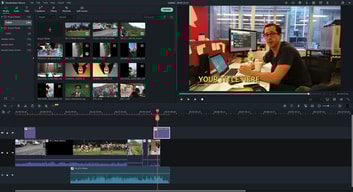
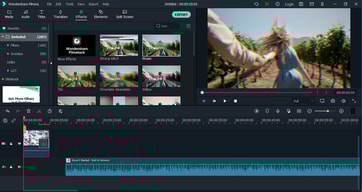
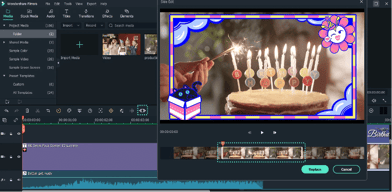
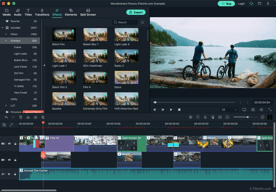





This software is included of tools that can be used to create videos and the high-quality design can be exported under various standards. This software creates the videos required for all the lectures in our organization and we are able to run this very well on the computers in our organization. Most importantly, this software is very easy to editing and creating with, even for the inexperienced and This is without a doubt the simplest but best video editing software
No problem, it's one of the most popular video editing software among our students. But it would be great if a device like an Audio noise filter was included here.
This software is currently used in 33 computers in our computer labs and the after-sales service of this software is very good. It creates supportive presentation videos for all our lectures and sometimes we use it to create commercials. We do not see any issues with this software, such as some problems with creating videos (Stuck and automatically close issue). Due to this, this software became popular in our company

Facilidade de uso e as funcionalidades que disponibiliza
Não tenho nada que não goste neste software. Talvez poderia dar uma desconto melhor nos preços
não tive nenhum problema com a filmora
Filmora is a very easy to use application with various options including effects to add, cutting, trim, adding text, etc, all are very easy to options with usually one click and further adjustments. Filmora is a free application, there are very few applications which provide all the effects and options for free. Filmora lets you choose songs from the library and provides various free songs which make it easier to edit your video with various sound effects.
The most disappointing thing about the application is that it keeps on crashing while editing, and doesn't even let you save your half-done project, and then you have to redo your project from the starting which is really disappointing. And sometimes the application crashes after the work is done and you are halfway saving your project.
The application has been helpful in saving my time as it is a very user-friendly application. it helps you make you do your work in less time and without spending much money which is very impressive
It is an amazing application, it allows you to create professional-level videos without any pay. the application is full of options which one might find difficult to operate with, the best thing about the application is that u can perform various / use features for free, for which one has to pay for on other applications
The application sometimes creates problems which are really disappointing. The add song feature from your library doesn't show you all the songs present in your library, it sometimes even creates a problem by crashing down mostly when the project is finished. this makes you do the work all over again as it doesn't even let you save your project.
it is a user-friendly app, it lets you create amazing videos in a go, filmora has been very easy to use application. it is really useful when you need an urgent project done. The application lets you do all the work on your smartphone so it is very convenient and helps in finishing projects before time
I'm in love with Filmora because of how easy it makes my life when it comes to creating videos for my company. It's infinitely easier to make any video look high quality and sharp, in every way! There are so many ready-made templates, and all the settings are beautiful.
I don't dislike anything, except that in comparison to FilmoraPro, Filmora is less precise.
With FIlmora, I'm solving my problem of taking forever to make a professional video for the corporate YouTube channel. I no longer have to spend several painstaking hours making the simplest of edits. Instead, I get high quality for low effort and limited time! It's amazing.

Filmora9 is one of my favorite video editing programs by far. Everything you need for a project is right there and easily accessible. Filmora9 is a straightforward program, and there is very little guesswork involved when it comes to learning how to use it. It's perfect for pros and beginners! Where it's editing and stitching video clips, manipulating audio, or recording your screen, Filmora9 gets the job done.
There is nothing I dislike about Filmora9. This video editing program really has it all, although if you are looking for something more complex or precise, I wouldn't recommend it to you.
Before I purchased Filmora9, I used cheap or free video editing programs, such as iMovie. It was very difficult to make my videos look professional and it took hours to make a simple video. The resolution of my videos was low, even though my footage was high quality. After using Filmora9, my editing skills have vastly improved, and my clients are happy with the results!
Undoubtedly Filmora is the best choice in the market when it's compared to all the applications that I have used to edit videos. One of the reasons for that is the interface of filmora is heavily organized and sections are arranged in an easily identifiable manner. Even for a beginner, there won't be any issues when getting familiar with the software. Apart from all the advanced editing features, filmora is enriched with useful effects, transitions, and overlays to make the perfect video output.
Filmrola uses an unacceptable amount of processing power when a video is getting rendered. It causes other running programs to crash and to be nonoperative. But it is worth to mention that while editing the video it does not create any additional pressure if we compare it with other leading applications.
We have used filmora to edit and make videos for occasions such as video presentations, farewell situations, etc.
The speed of editing, and the amount of transitions and filters. Alsonthe render speed is very good.
The speed of proxy creation can be improved.
I can edit and produce my YouTube videos in a couple of hours, respect the competitor software (premiere, Vegas).
El programa permite la edición de video de manera bastante profesional, es posible adicionar el audio que desees así como modificar sus características, también permite implementar algunas técnicas para adicionar muy buenos efectos, es bastante intuitiva, de muy fácil uso, en internet se pueden encontrar muchos tutoriales para poder hacer uso de los diferentes efectos de video que se pueden crear con el programa, cuenta con varios marcos pre establecidos que le dan un toque especial a la presentación del video, es posible seleccionar entre muchos de los que dispone el programa, es muy facil el poder adicionar clips de video o archivos de audio.
Se debe manipular bastante la aplicación para poder aprender algunos detalles para su uso, en ocasiones al momento de agregar clips de video entre otros resulta un tanto engorroso, para evitar esto se debe realizar un zoom a la pista de audio o clip de video para poder encajar de mejor manera los archivos y editarles más fácilmente, puede ser de utilidad contar con un monitor bastante grande
Este programa nos ha permitido elaborar videos con el recuento de actividades desempeñadas en la organización, de esa manera poder difundir con el personal a nivel nacional, ha sido posible también elaborar videos de inducción para personal lo que posibilita en no estar presencialmente en múltiples locaciones para poder difundir cierta información

What is incredible about Filmora is that anyone without prior knowledge of video editing can easily learnt o create and edit videos on Filmora. It has a sleek interface that makes it easy for anyone to understand. Coming from a Vegas Pro user, I believe Filmora to be more friendly towards users and makes it easier to add effects that new users might want.
The pricing for Filmora is not an issue as a $60 dollar price tag for lifetime use I believe it to be fair. However, there is a subscription based price that goes at around $100 that offers stock films. Even though they allow unlimited use of these stocks by paying the subscription, having to pat an annually fee just won't cut it for me. Maybe it they offers a monthly subscription at lower price I would consider as I do not edit videos that often. Maybe for a constant video editor it would be best.
Creating short marketing video ads to attract potential clients and show the services being offered as well as using the software to create quick tip videos.