

Unclaimed: Are you working at Capcut?
Capcut Reviews — Pricing, Features & The Honest Take
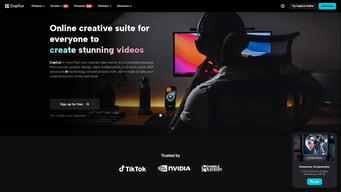
CapCut is a versatile and user-friendly video editing application developed by ByteDance, the company behind TikTok. It is designed for both amateur and professional creators, offering a comprehensive suite of editing tools that cater to a variety of multimedia projects. Available on mobile devices (iOS and Android), as well as desktop and web platforms, CapCut enables users to create and enhance videos with features like cutting, merging, and applying effects.

| Segment |
Small Business
Mid Market
Freelancer
|
|---|---|
| Ease of use |
Beginner
|
| Deployment | Cloud / SaaS / Web-Based, Mobile Android, Mobile iPhone |
| Support | Knowledge Base |
| Training | Videos |
| Languages | English |






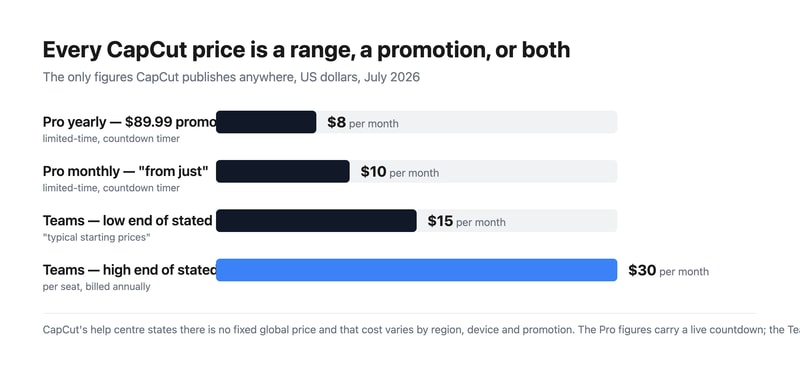
CapCut has no pricing page. Its help centre explains why: “Instead of a fixed global price, CapCut offers flexible subscription options tailored to different users,” with cost varying “depending on your region, device, and available promotions.” The only numbers published anywhere on the site sit on a promotional page — “from just $9.99” monthly and “from just $89.99” yearly — both stamped Limited-time offer beside a live countdown clock. For Teams, CapCut’s own article gives a range: “typical starting prices range from $15–$30 per seat per month.”
- What it is: A free-to-start AI video editor from ByteDance, on mobile, desktop and web.
- Best for: Social video creators who want capable editing without paying anything to begin.
- Pricing: Pro from $9.99/month or $89.99/year, promotional. Teams $15–$30 per seat. Verified July 2026.
- The honest catch: Prices vary by device, so the same subscription can cost different amounts on iOS, Android and desktop.
What Is CapCut?
CapCut is ByteDance’s video editor — the one that grew alongside TikTok and became the default for short-form social video. It runs on Android, iOS, desktop, iPad and the web, and has expanded well beyond cutting clips into AI image and video generation, auto-captions, text-to-speech, custom voices, background removal and retouching.
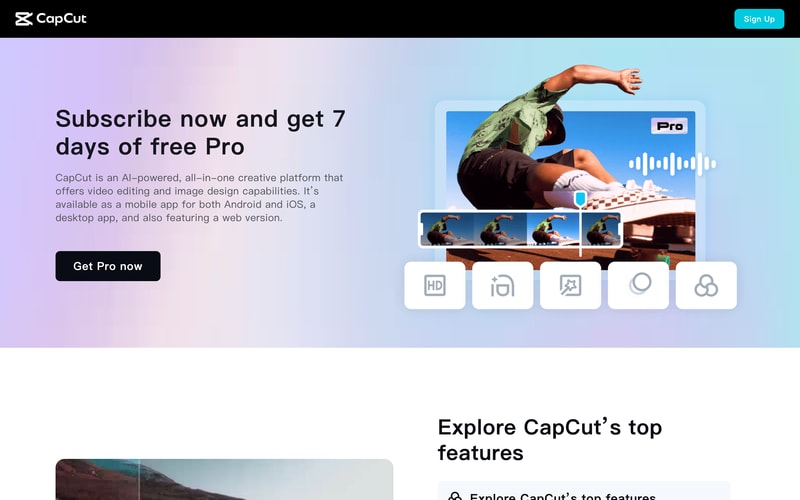
The free tier is the real product for most people, and it is unusually complete — most core editing works without paying. Pro unlocks effects, transitions, video templates, auto cutout, AI points and cloud storage.
On 25 March 2026 CapCut restructured its plans. Its notice is direct: “previous pricing is no longer available for new subscribers”. Pro was upgraded — AI points from 550 to 1,200, cloud storage from 100 GB to 1 TB — and a cheaper Standard plan was introduced beneath it for “editing enthusiasts”.
How CapCut Works
- There is no published price list, by design.
- Cost varies by region, device and promotion, per CapCut’s own help centre.
- The visible figures are promotional, with a countdown timer.
- Pricing rose in March 2026; the old rates are closed to new subscribers.
- Three consumer tiers now — free, Standard, Pro.
- Teams pricing is given as a range, not a figure.
CapCut Pricing
Captured from CapCut’s subscription page and help centre in July 2026 in US dollars. CapCut publishes no rate card; these are the only figures it states anywhere.
| Plan | Stated price | How it is stated |
|---|---|---|
| Free | $0 | Permanent, no card |
| Pro, monthly | “from just $9.99” | Limited-time offer, countdown timer |
| Pro, yearly | “from just $89.99” | Limited-time offer, countdown timer |
| Standard | Not stated | Introduced March 2026 |
| Teams | “$15–$30 per seat per month” | “Typical starting prices”, billed annually |
What actually decides your cost:
- The absence of a price list is the finding. Across the products surveyed here this month, every other vendor publishes something — even the quote-only ones name tiers. CapCut’s help centre states plainly that there is no fixed global price. That is a legitimate strategy for a consumer app sold through three app stores, but it means you cannot compare it against anything without opening the app on your own device, in your own country, today.
- “Varies by device” is the clause to understand. The same Pro subscription can cost different amounts on iOS, Android, desktop and web, because app-store commissions differ and platforms are billed separately. If price matters, check more than one — subscribing through the web version is frequently cheaper than through an app store.
- Both visible prices carry a countdown. $9.99 monthly and $89.99 yearly are both labelled Limited-time offer with a running clock. Neither is presented as a standing rate, and both begin with “from just”, so treat them as the floor of a promotion rather than what you will pay at renewal.
- The yearly promotion saves about 25% against the monthly one — $89.99 against $119.88 for twelve months at $9.99. That holds only while both promotional rates are live.
- Prices went up in March 2026 and the increase is disclosed. CapCut’s notice explains that Pro was upgraded and “the pricing has been adjusted to reflect the expanded value”. Existing subscribers on old rates keep them; new ones cannot get them. The upgrade itself is substantial — AI points more than doubled and cloud storage went up tenfold.
- Teams is quoted as a range in CapCut’s own words. “$15–$30 per seat per month when billed annually, but exact figures depend on your location and selected plan.” A twofold spread on a per-seat price makes budgeting a five-person team anything from $900 to $1,800 a year.
Who Should Use CapCut
- Social video creators. The clearest case — built for short-form, and the free tier covers most of it.
- Anyone starting from zero. No card required, no time limit, genuinely capable free editing.
- Mobile-first editors. The mobile app is the strongest of any major editor.
- Creators wanting AI tools bundled. Auto-captions, text-to-speech, background removal and generation in one place.
It fits poorly for anyone who needs to budget precisely, given the absence of published rates; for professional colour and audio finishing, where DaVinci Resolve is free and far deeper; and for teams wanting a firm per-seat quote before committing.
Honest Pros and Cons
Strengths
- A genuinely capable free tier with no card and no expiry.
- Available on mobile, desktop, iPad and web, with one account.
- AI tools bundled rather than sold as add-ons.
- 7 days of free Pro on subscribing.
- The March 2026 upgrade was real — AI points and storage both rose sharply.
- The price change was disclosed with an explanation, not quietly applied.
Limitations
- No published price list anywhere on the site.
- Cost varies by device, so the same plan has several prices.
- Both visible prices are promotional, with countdown timers.
- Teams pricing is a range, spanning twofold.
- Standard plan pricing is not stated at all.
- Old rates are closed to new subscribers.
CapCut Alternatives and How It Compares
- Descript edits video by editing the transcript, with published pricing.
- Filmora is the closest paid desktop competitor for consumer editing.
- DaVinci Resolve is free and vastly deeper for colour, audio and finishing.
- Clipchamp is Microsoft’s browser editor, bundled with Windows.
- VEED and Kapwing are the browser-first options for quick social edits.
- InVideo and Pictory focus on AI-generated video from text.
For a broader survey, browse our video editing directory.
The Verdict
CapCut is the most widely used social video editor in the world for good reasons. The free tier is genuinely complete — most core editing works without paying anything, on mobile, desktop, iPad and web from one account — and the AI layer covering auto-captions, text-to-speech, background removal and generation is bundled rather than sold separately. For anyone making short-form video, it is the obvious starting point and often the finishing point too.
What it will not tell you is what it costs. CapCut’s help centre states there is no fixed global price, that cost varies by “region, device, and available promotions”, and directs anyone with questions about subscription cost to contact support. That is defensible for a consumer app sold through three app stores — but it is unique among the products reviewed here this month, and it has a practical consequence: you cannot compare CapCut against a competitor without opening it on your own device, in your own country, on the day you intend to buy. The device clause in particular deserves attention, because subscribing through the web version is often cheaper than through an app store.
The two figures that do appear — “from just $9.99” monthly and “from just $89.99” yearly — both sit under a Limited-time offer banner with a live countdown. Neither is presented as a standing rate, and both start with “from”. Meanwhile CapCut Teams is quoted in its own help article as “$15–$30 per seat per month”, a twofold spread that makes a five-seat team anywhere between $900 and $1,800 a year. To CapCut’s credit, the March 2026 price rise was announced openly with an explanation, and the accompanying upgrade was real — AI points went from 550 to 1,200 and cloud storage from 100 GB to 1 TB. But if you need to know what a subscription costs before you commit to one, you will have to find out for yourself.
FAQ
How much does CapCut cost?
CapCut does not publish a fixed price. Its help centre states that pricing “can vary depending on your region, device, and available promotions” and that “instead of a fixed global price, CapCut offers flexible subscription options”. The only figures shown anywhere on the site, captured July 2026, are “from just $9.99” per month and “from just $89.99” per year for Pro — both labelled as limited-time offers with a countdown timer.
Why does CapCut cost different amounts for different people?
Because pricing varies by region, by device, and by whatever promotion is running. Subscriptions bought through the iOS App Store, the Google Play Store, the desktop app and the web version are billed separately and can carry different prices, partly reflecting app-store commissions. Checking more than one platform before subscribing is worth the few minutes it takes.
Did CapCut raise its prices?
Yes, on 25 March 2026. CapCut’s notice states that “previous pricing is no longer available for new subscribers” and explains the increase as reflecting an upgraded Pro plan. The upgrade was substantial — AI points rose from 550 to 1,200 and cloud storage from 100 GB to 1 TB — and a cheaper Standard plan was introduced beneath Pro at the same time.
How much does CapCut Teams cost?
CapCut’s own help article gives a range rather than a price: “typical starting prices range from $15–$30 per seat per month when billed annually, but exact figures depend on your location and selected plan.” Only the team owner can purchase, and free trials may be available for new Teams accounts. Auto-renewal is enabled by default.
Is CapCut’s free version good enough?
For most social video work, yes. Core editing, trimming, captions and export all work without paying, with no credit card and no time limit. Pro unlocks premium effects, transitions, video templates, auto cutout, a much larger AI point allowance and cloud storage. Subscribing also gives seven days of Pro free, which is the practical way to find out whether you need it.

Compare Capcut with other popular tools in the same category.
Sorry, no reviews are available for this product yet.
Be the first one to review Capcut !