

Unclaimed: Are you working at Campaigner Email?
Campaigner Email Reviews: 3.7/5 — Good for the Price
Campaigner is an email marketing and automation platform that enables businesses to create, send, and manage effective email campaigns. It features a drag-and-drop editor for designing emails, advanced segmentation for personalized messaging, and automation workflows that trigger emails based on user actions. Users can optimize campaigns with A/B testing and access detailed analytics to track performance metrics. With integrations to platforms like HubSpot and Salesforce, along with 24/7 customer support, Campaigner is a versatile tool for enhancing email marketing strategies.

| Segment |
Mid Market
Enterprise
|
|---|---|
| Ease of use |
Intermediate
Advanced
|
| Deployment | Cloud / SaaS / Web-Based |
| Support | Chat, Email/Help Desk, FAQs/Forum |
| Training | Documentation |
| Languages | English |







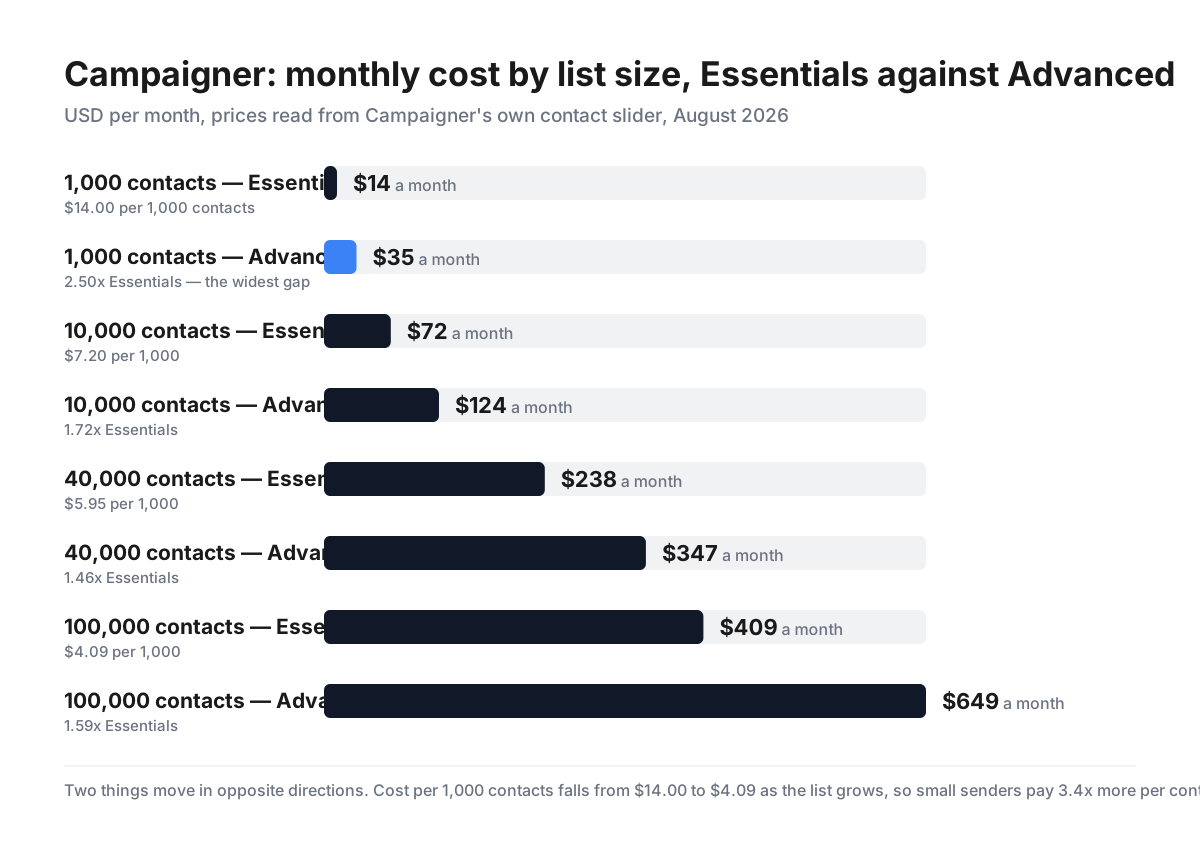
Campaigner publishes its whole price curve on a slider, which makes two things visible that most email platforms leave buried. The first is ordinary: cost per contact falls steeply with scale, from $14.00 per 1,000 contacts at a 1,000-contact list to $4.09 at 100,000. The second is not: the premium for the Advanced tier — the only one with automation — is widest at the smallest list. At 1,000 contacts Advanced costs 2.5× Essentials; at 40,000 it costs 1.46×. Automation is proportionally most expensive for the senders least able to afford it.
- What it is: An email marketing platform with automation, segmentation and SMS.
- Best for: Mid-size senders who need multi-path automation.
- Pricing: From $14/month at 1,000 contacts; scales with list size. Verified August 2026.
- The honest catch: Automation requires Advanced, and it is priciest on small lists.
What Is Campaigner?
Campaigner is an established email marketing platform covering campaigns, automation, segmentation and reporting, with a separate transactional SMS/MMS product alongside the marketing one.
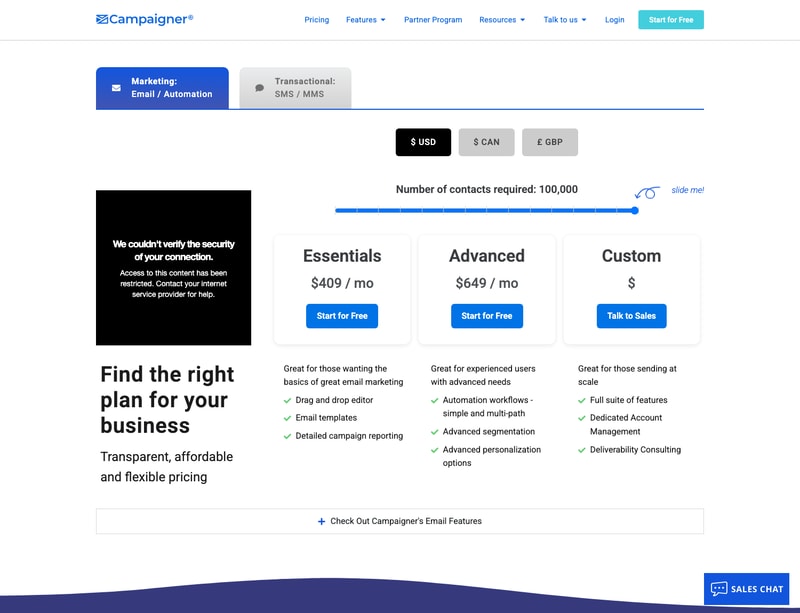
It sells three tiers. Essentials covers the fundamentals — drag-and-drop editor, HTML editor, email templates, detailed campaign reporting, A/B experiments, dynamic content, merge fields, content blocks, conditional content and RSS feeds. Advanced adds the things that make a platform rather than a sender: automation workflows, both simple and multi-path, advanced segmentation and advanced personalization. Custom is quote-only, adding a dedicated account manager and deliverability consulting for high-volume senders.
Two details worth noting up front. Campaigner offers a genuine currency selector — USD, CAD and GBP — rather than guessing from your IP, which several vendors in this review series do not. And both published tiers offer “Start for Free”.
How Campaigner Works
- Priced by contact count, adjustable on a slider.
- Three tiers — Essentials, Advanced, and quote-only Custom.
- Automation is Advanced-only.
- Currency selector for USD, CAD and GBP.
- Free start on both published tiers.
- Separate SMS/MMS transactional product.
Campaigner Pricing
Read directly from Campaigner’s own contact slider, in USD per month.
| Contacts | Essentials | Advanced | Advanced premium | Essentials per 1,000 |
|---|---|---|---|---|
| 1,000 | $14 | $35 | 2.50× | $14.00 |
| 2,500 | $24 | $47 | 1.96× | $9.60 |
| 10,000 | $72 | $124 | 1.72× | $7.20 |
| 15,000 | $109 | $192 | 1.76× | $7.27 |
| 25,000 | $158 | $258 | 1.63× | $6.32 |
| 40,000 | $238 | $347 | 1.46× | $5.95 |
| 70,000 | $349 | $499 | 1.43× | $4.99 |
| 100,000 | $409 | $649 | 1.59× | $4.09 |
What actually decides your cost:
- Automation is Advanced-only, and it costs most — proportionally — on the smallest list. Essentials has no automation workflows at all. To get them you move to Advanced, which at 1,000 contacts means $35 against $14 — 2.5 times the price. At 40,000 contacts the same upgrade is 1.46×, and at 70,000 it is 1.43×. A small business wanting a welcome sequence pays the steepest relative premium in the entire price list. If automation is why you are shopping, price Advanced from the start rather than budgeting from the $14 headline.
- Cost per contact falls by 3.4× across the range. $14.00 per 1,000 contacts at a 1,000-contact list, $7.20 at 10,000, $4.09 at 100,000. This is normal for email platforms, but it is worth seeing plainly: the smallest senders pay the most per subscriber, and growth is rewarded steeply. Between 1,000 and 10,000 contacts — a tenfold increase in list — the bill rises only about fivefold.
- The curve is not perfectly smooth, so check your own number. The Advanced premium falls from 2.50× to 1.43× as lists grow, then ticks back up to 1.59× at 100,000. Essentials’ per-1,000 cost likewise dips at 10,000 ($7.20) before rising slightly at 15,000 ($7.27). Because pricing moves in bands rather than a clean formula, the sensible move is to set the slider to your actual list size and read both tiers rather than interpolating from the numbers here.
- List size, not send volume, is the meter. Pricing is set by contacts stored, so a large list emailed rarely costs the same as a large list emailed daily. Pruning inactive subscribers is therefore a direct cost saving as well as a deliverability one — at 100,000 contacts, cutting 20,000 dead addresses saves real money every month.
- Essentials is a capable sender, just not a marketer. It includes the drag-and-drop and HTML editors, templates, A/B experiments, multivariate testing, dynamic content, conditional content, merge fields and RSS feeds. That is more than a bare tier usually offers — the gap to Advanced is specifically automation, advanced segmentation and advanced personalization, not basic capability.
- Custom is where deliverability support lives. A dedicated account manager and deliverability consulting are Custom-only, alongside the full feature suite. For senders at a scale where inbox placement is a revenue issue rather than an annoyance, that is the tier — and it is quote-only, so expect a sales conversation.
- The currency selector is a small but real courtesy. USD, CAD and GBP are selectable rather than assigned. Elsewhere in this review series we found vendors geo-pricing with no override, and one charging the same numeral in euros as in dollars — about 15% more for European buyers. Campaigner lets you choose.
-
The affiliate link lands on a campaign page, not pricing.
/go/campaigner-emailreturns 200 and resolves through PartnerStack totry.campaigner.com/powerful-email-marketing/with the partner key intact. Attribution works correctly; the destination is a marketing landing page rather than somewhere you can compare tiers, so you will need to navigate to pricing yourself.
Who Should Use Campaigner
- Mid-size senders needing automation. The Advanced premium is most reasonable from about 25,000 contacts.
- Businesses wanting multi-path workflows. Simple and multi-path automation both sit on Advanced.
- Senders who also need SMS. A separate transactional product covers SMS and MMS.
- UK and Canadian buyers. Native GBP and CAD pricing rather than a conversion.
It fits poorly for very small lists that need automation, where the 2.5× premium bites hardest; for senders who mail infrequently, since pricing follows list size rather than volume; and for anyone wanting a permanently free tier, which this is not.
Honest Pros and Cons
Strengths
- The full price curve is public via the contact slider.
- A genuine currency selector — USD, CAD, GBP.
- Essentials includes A/B and multivariate testing, often withheld elsewhere.
- Conditional and dynamic content on the entry tier.
- Cost per contact falls to $4.09 per 1,000 at scale.
- Free start on both published tiers.
Limitations
- No automation whatsoever on Essentials.
- Advanced costs 2.5× Essentials at 1,000 contacts.
- Priced on list size, not sends.
- Deliverability consulting is Custom-only.
- Custom pricing is quote-only.
- The affiliate link skips the pricing page.
Campaigner Alternatives and How It Compares
- Mailchimp is the default for small senders and includes basic automation lower down.
- ActiveCampaign is the automation specialist, generally at a higher price.
- Campaign Monitor competes closely on design and templates.
- beehiiv targets newsletters and creators rather than general marketing.
The Verdict
Campaigner does something genuinely useful with its pricing page: it puts the entire cost curve behind a slider, so you can read the real price at your own list size instead of extrapolating from a headline. More platforms should.
What that transparency exposes is a structural point worth understanding before you buy. Automation lives only on Advanced, and the cost of moving there is not constant — it is 2.5× Essentials at 1,000 contacts, 1.72× at 10,000, and 1.46× at 40,000. In other words, the smaller your list, the more disproportionately you pay for the feature that most distinguishes a marketing platform from a mailing tool. A 1,000-contact business wanting a welcome sequence faces the worst ratio on the page; a 40,000-contact business faces the best. If automation is the reason you are here — and for most people evaluating an email platform, it is — budget from Advanced, not from the $14 that leads the page.
The other curve runs the usual way and is worth knowing in absolute terms: $14.00 per 1,000 contacts at the bottom against $4.09 at 100,000, a 3.4× difference. Since the meter is list size rather than sends, that also makes list hygiene a direct financial lever — culling unengaged subscribers cuts the bill immediately, which is a rare case of the commercially sensible thing and the deliverability-sensible thing being identical.
Credit where it is due elsewhere. Essentials is not a hobbled tier — it carries A/B and multivariate testing, dynamic and conditional content, merge fields and RSS, which several competitors reserve for higher plans. The gap to Advanced is specifically automation and segmentation, honestly drawn. And Campaigner offers a real currency selector across USD, CAD and GBP rather than deciding for you by IP address.
Set the slider to your actual number, read both tiers, and decide on the Advanced figure. That is the price of the product you are actually buying.
FAQ
How much does Campaigner cost?
It depends on list size, and Campaigner publishes the whole curve. At 1,000 contacts, Essentials is $14/month and Advanced $35. At 10,000 it is $72 and $124; at 40,000, $238 and $347; at 100,000, $409 and $649. A quote-only Custom tier sits above both. Prices can be shown in USD, CAD or GBP, and both published tiers offer a free start.
Does Campaigner’s cheapest plan include automation?
No. Essentials has no automation workflows at all — those begin on Advanced, along with advanced segmentation and advanced personalization. Essentials is well equipped otherwise, including A/B and multivariate testing, dynamic content, conditional content, merge fields and RSS feeds. If you need a welcome series, abandoned-cart flow or any triggered sequence, Advanced is your actual starting price.
Why is Campaigner’s Advanced tier relatively more expensive for small lists?
Because the two tiers converge as lists grow. At 1,000 contacts Advanced costs 2.5× Essentials ($35 against $14). By 40,000 contacts the same upgrade is 1.46× ($347 against $238), and at 70,000 it is 1.43×. The absolute gap widens but the ratio narrows, so a small sender pays the steepest relative premium for automation. Anyone under about 10,000 contacts should weigh that ratio carefully against competitors that include basic automation at entry level.
Is Campaigner priced on contacts or emails sent?
Contacts. The slider on its pricing page sets the number of contacts, and the price follows from that regardless of how often you mail them. That means a large, rarely-mailed list costs the same as a large, heavily-mailed one — so removing inactive subscribers reduces your bill directly, in addition to improving deliverability.
What does Campaigner’s Custom plan add?
The full feature suite, plus dedicated account management and deliverability consulting. It is aimed at senders operating at a scale where inbox placement materially affects revenue. Pricing is not published — Custom is a “talk to sales” tier — so expect a quote rather than a rate card.

Compare Campaigner Email with other popular tools in the same category.
Importing and managing contacts was fairly simple, as was the email design process.
They were more expensive than similar options, and their customer service was not great.
We used Campaigner to send out email marketing campaigns to current and potential customers one to two times a month.
Campaigner's best feature is their email campaign metrics. It's super simple to read and see who clicked, percentages, etc.
Campaigner has many faults but the most glaring one is lack of email templates.
We were using campaigner to reach our CRM, we found it to be a good enough email platform as far as delivery goes.
Decent click-rate data and email summaries that give a good idea on how well your emails are performing. The interface is also not too hard to understand or work with day to day.
The back-end is kind of a mess. Things constantly break and customer service is none too helpful. They often times don't give you a timetable or if they do, it's often not within the time period they have quoted. In this past week, the entire system has been down or unusable on a daily basis for hours at a time. Error messages are frequent and received with little explanation.
The entirety of our email outreach is done with Campaigner and so far the system's ills have not prevented us from maintaining our marketing campaigns and timelines. I realize that our processes could be streamlined and more automated with some of the features Campaigner provides but the inconsistencies of the system give us pause.
It's easy to learn how to use and send emails. I'm not an extreme marketing guru, so the product works well for my skill level.
The product crashes, in the afternoon it goes down and runs extremely slow. There is always some sort of error message. You have to refresh the page constantly to get anything to work.
It gets the job done, but not as efficiently as I'd like.
Email Design is quite easy and there are different choices
Customer service, there is not support at all. It is easy to upgrade but it's impossible to downgrade or cancel the service. Spam and unsubscribe it's impossible for people that receive the email campaign. The testing of the email is not realistic. The active contacts are not realistic.
It's easy to read the analytics of the email although they are not realistic and they and it's not possible to verify them
I honestly can say for very few softwares/platforms that there was nothing positive about them - Campaigner is awful with no redeeming qualities
Support is supposedly 24/7 but it was rare that i would get an answer by chat or email in a reasonable time. My dedicated account manager never got back to me and same with his IT. When first signed up there was a major glitch on their end and took weeks for them to figure it out (think Google Chome not being compatible with their software) and it did not seem like they had a fix planned so this issue could still be present. This is an expensive, junky ESP which does not work and has terrible support.
To send emails to our users but the platform was glitchy and would not work - we realized no benefits i would avoid this ESP at all costs - look into Convertkit or Mailchimp for two excellent alternatives
Nothing. Customer service is horrible. Tool does not work. Even when willing to pay a penalty won't let you out of contract. Emailed CEO and President about issues, no response. Not even sure this is a legit company.
Templates almost impossible to use. Auto responders and workflows have bugs that prevent them from working. Spent countless hours over 4 months trying to get this to work and many calls with their customer success team and nothing was ever resolved. Complete sunk cost.
Email Marketing Automation
- Quick access to campaign performance reports and data - Ease of uploading graphics and contact datasets - Easy to send test emails
- Ambiguity of error messages when the system has identified an issue with the email content OR contact database. The message is visible only for a few seconds, telling you only that "Your account has been blocked" and "Contact customer service". Is the issue the content of the message? The data? My payment status? No clue! - Discourteous and powerless Customer Support. Even if they manage to identify the issue, they can't do anything to resolve it. They may put you on hold for 5 minutes while they "analyze the problem" then return to let you know that someone will respond my email within 24 hours. - 24-hour turnarounds for every exchange of information with follow-up customer service. This means that days can go by before you can send your email campaign. Meanwhile, you're trying to convince Cust Support to help you use the services that you've paid for. - Ambiguous terms of service. When you sign up for a subscription, they do not let you know how you are limited in the number of records hosted AND in the number of sends you can initiate. - Hard to un-subscribe. If you call and ask to terminate your account, you're told that someone from the account management team will get back to "within 24 hours". We had to cancel the credit card we were using to avoid getting auto-renewed. - Online design templates are horrible to work with and use long-deprecated HTML tags.
Business objective: Send emails on behalf of our commercial clients to execute lead generation campaigns. Benefits - Once we overcame the issues mentioned, the emails were sent as expected.
This system was very easy to learn and fairly intuitive.
While most systems will never have everything you want exactly how you want it, I was very disappointed that Campaigner does not have an easy method to export clickers or viewers from a single campaign let alone a variety of campaigns. You can accomplish this but it's tedious in that you have to setup filters to do so. From a business perspective rather than feature perspective, I'm beyond disappointed in the pricing plans and billing habits. If you have a plan that allows up to 10,000 contacts you will get automatically bumped up to the next pricing plan if you go one single contact over your plan limit. Now this may seem like something that is easily avoidable but it really isn't because you never know how many of your contacts might get rejected for something like being a duplicate or it hard bounces. (The hard bounce notice is a nice feature of the system to let you know if you have some contacts that are no longer any good but it complicates things when you are trying maximize the number of usable contacts on your plan). To make matters worse, if you reach out to try to dispute the extra charges, Campaigner won't reverse them nor will they change your plan back down until the next billing cycle. They will pro-rate you and charge extra when you want to increase your plan but they won't give you that same courtesy when you want to lower your plan. I think this is really bad customer service and angered me enough to cancel and use a different provider.
We are attempting to engage our audience more in order to get them at least to the top of the sales funnel and ultimately nurture them through the sales funnel. I've only been using the system for 4 months though.
Website layout, helpfulness of customer service on a Saturday AM.
I signed up for Campaigners free trial to give it a whirl. I found it odd they needed a Credit Card for it but I needed to try all different kinds for work so I entered it. I received two emails from Campaigner about sending my first campaign and another one like it. I decided their service wasn't for us but the website wouldn't let me cancel an account, remove my billing info, or give me any options about not continuing so I figured it was no big deal. A month later they charged my credit card. There were no emails about my free trial running out and certainly no emails about how my credit card would be charged. I understand there are "Auto Renewals" and things like it out there, but I have never came upon one that didn't email you about it or give you any warnings whatsoever.
None.

I'm really not a fan of this software, but I will say the color options are phenomenal. The themes are great color schemes and the example text is very visually appealing. However, the examples look better than the finished products. It also fairly easy to manage email lists. Importing new contacts is a simple process and sending emails to our clients is easy.
It is difficult to use. I have a hard time with the themes. The drag and click feature is not affective. It takes a few tries to get the material into the right position. Images need to be confined to an extremely small space, and often times, it sends out grainy photos.The text can only be two sizes, headlines, and body text. For quick and effective emails, this is not the greatest program.
I haven't really found this software to be useful to the business. Emails bounce, and the company has gotten a very large unsubscribe rate when using this marketing too;.
I was excited to see the low price, and was lured in to pay a prorated amount on the $50 service.
I signed up for the service, purchased the $50, 5,000 contact package, and uploaded about 3,500 contacts that signed up for my email list after checking out on my website. Immediately, my account was restricted for possibly including email addresses that did not voluntarily sign up to be on my list. There was no indication that such a check would take place before purchase. Confused, I decided to play around with the email creation software. The interface was clunky, slow, unresponsive, and unimpressive. It took me about an hour to create a basic email blast. Anyway, I figured that I can't send my email so I may as well try another service. I signed up for another service and had an email sent to my customers within 30 minutes of sign up. Fast-forward to later that night, and Colin Stacey - a supposed CRM - emails me asking for proof of my contact list and informing me that in the future I will be tasked with proving further proof. This is a huge inconvenience to me, and as such I informed him that I went with another provider and asked for a refund (I had not used any of their service yet! Not even sent an email!). His response? "I have cancelled (didn't even spell canceled correctly) your account for policy violation. As per the terms and conditions, all monthly fees are non-refundable: (insert terms of use url here)". Stay away. Terrible service. Colin, you really are a jerk and I hope my prorated $23 only keeps you and your company afloat for a short while - I'm sure you'll both end up on the scrap heap before too long.
Email marketing. Campaigner did not do a good job for me.
Can segment list is a good thing, but you have to do it manually. Can preview email, but actually sends differently.
Everything feels manual. Doesn't have great mobile optimization - if at all.
Mass email is the problem solved. Benefits are provided with limited information. We can't measure much outside of CTR and Open Rates.