

Unclaimed: Are you working at Campaigner Email?
Campaigner Email Reviews: 3.7/5 — Good for the Price
Campaigner is an email marketing and automation platform that enables businesses to create, send, and manage effective email campaigns. It features a drag-and-drop editor for designing emails, advanced segmentation for personalized messaging, and automation workflows that trigger emails based on user actions. Users can optimize campaigns with A/B testing and access detailed analytics to track performance metrics. With integrations to platforms like HubSpot and Salesforce, along with 24/7 customer support, Campaigner is a versatile tool for enhancing email marketing strategies.

| Segment |
Mid Market
Enterprise
|
|---|---|
| Ease of use |
Intermediate
Advanced
|
| Deployment | Cloud / SaaS / Web-Based |
| Support | Chat, Email/Help Desk, FAQs/Forum |
| Training | Documentation |
| Languages | English |







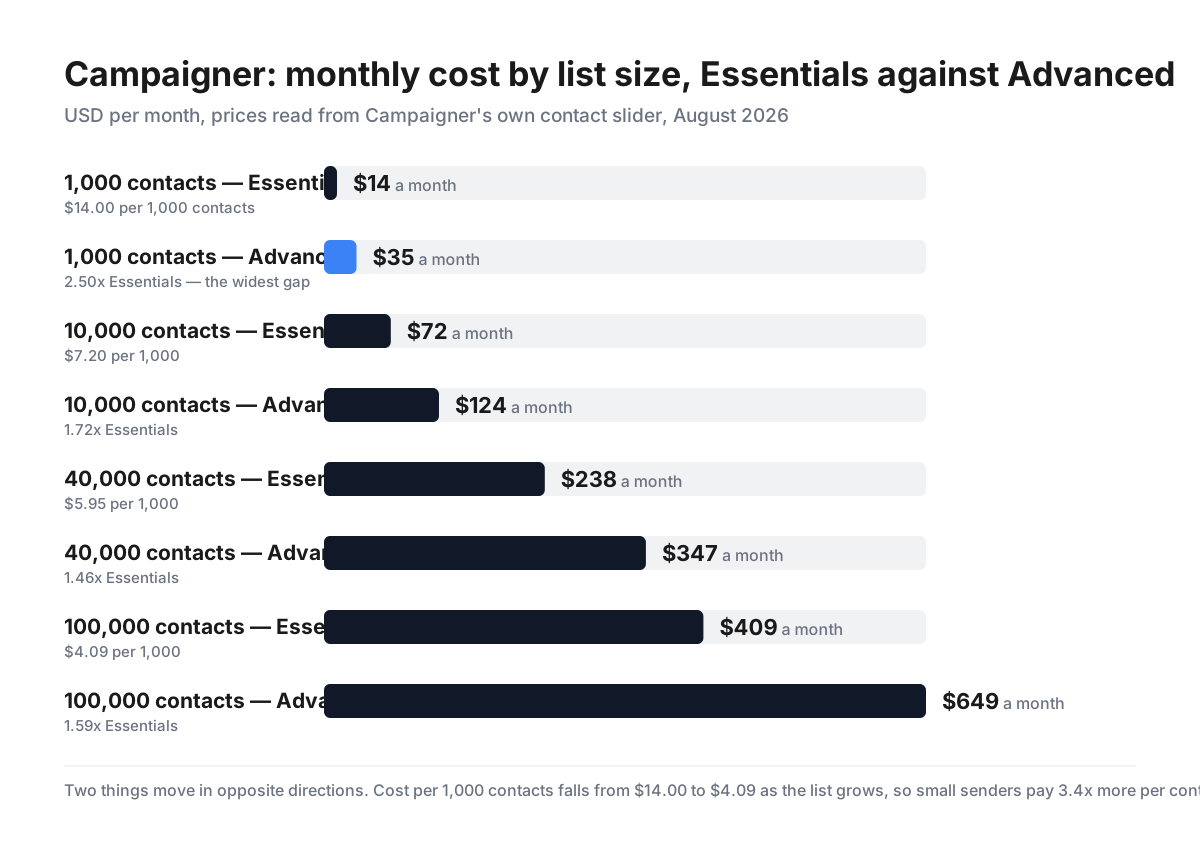
Campaigner publishes its whole price curve on a slider, which makes two things visible that most email platforms leave buried. The first is ordinary: cost per contact falls steeply with scale, from $14.00 per 1,000 contacts at a 1,000-contact list to $4.09 at 100,000. The second is not: the premium for the Advanced tier — the only one with automation — is widest at the smallest list. At 1,000 contacts Advanced costs 2.5× Essentials; at 40,000 it costs 1.46×. Automation is proportionally most expensive for the senders least able to afford it.
- What it is: An email marketing platform with automation, segmentation and SMS.
- Best for: Mid-size senders who need multi-path automation.
- Pricing: From $14/month at 1,000 contacts; scales with list size. Verified August 2026.
- The honest catch: Automation requires Advanced, and it is priciest on small lists.
What Is Campaigner?
Campaigner is an established email marketing platform covering campaigns, automation, segmentation and reporting, with a separate transactional SMS/MMS product alongside the marketing one.
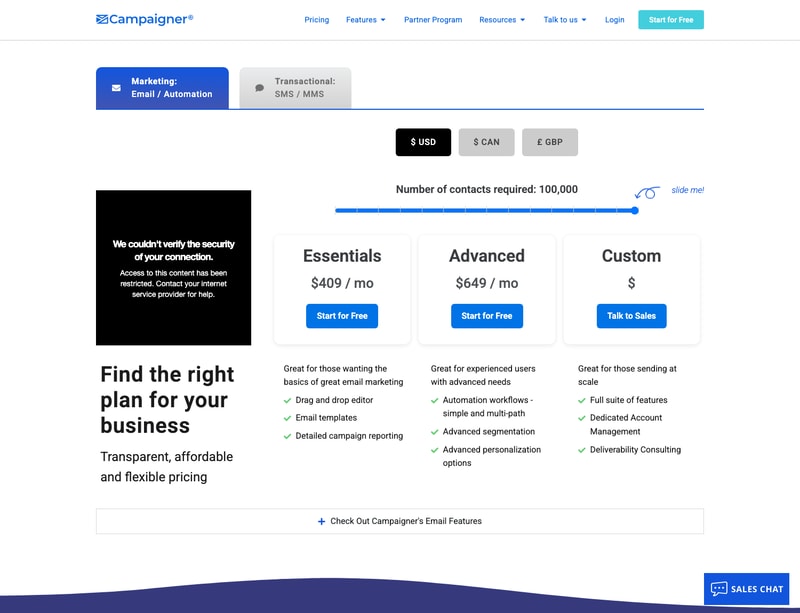
It sells three tiers. Essentials covers the fundamentals — drag-and-drop editor, HTML editor, email templates, detailed campaign reporting, A/B experiments, dynamic content, merge fields, content blocks, conditional content and RSS feeds. Advanced adds the things that make a platform rather than a sender: automation workflows, both simple and multi-path, advanced segmentation and advanced personalization. Custom is quote-only, adding a dedicated account manager and deliverability consulting for high-volume senders.
Two details worth noting up front. Campaigner offers a genuine currency selector — USD, CAD and GBP — rather than guessing from your IP, which several vendors in this review series do not. And both published tiers offer “Start for Free”.
How Campaigner Works
- Priced by contact count, adjustable on a slider.
- Three tiers — Essentials, Advanced, and quote-only Custom.
- Automation is Advanced-only.
- Currency selector for USD, CAD and GBP.
- Free start on both published tiers.
- Separate SMS/MMS transactional product.
Campaigner Pricing
Read directly from Campaigner’s own contact slider, in USD per month.
| Contacts | Essentials | Advanced | Advanced premium | Essentials per 1,000 |
|---|---|---|---|---|
| 1,000 | $14 | $35 | 2.50× | $14.00 |
| 2,500 | $24 | $47 | 1.96× | $9.60 |
| 10,000 | $72 | $124 | 1.72× | $7.20 |
| 15,000 | $109 | $192 | 1.76× | $7.27 |
| 25,000 | $158 | $258 | 1.63× | $6.32 |
| 40,000 | $238 | $347 | 1.46× | $5.95 |
| 70,000 | $349 | $499 | 1.43× | $4.99 |
| 100,000 | $409 | $649 | 1.59× | $4.09 |
What actually decides your cost:
- Automation is Advanced-only, and it costs most — proportionally — on the smallest list. Essentials has no automation workflows at all. To get them you move to Advanced, which at 1,000 contacts means $35 against $14 — 2.5 times the price. At 40,000 contacts the same upgrade is 1.46×, and at 70,000 it is 1.43×. A small business wanting a welcome sequence pays the steepest relative premium in the entire price list. If automation is why you are shopping, price Advanced from the start rather than budgeting from the $14 headline.
- Cost per contact falls by 3.4× across the range. $14.00 per 1,000 contacts at a 1,000-contact list, $7.20 at 10,000, $4.09 at 100,000. This is normal for email platforms, but it is worth seeing plainly: the smallest senders pay the most per subscriber, and growth is rewarded steeply. Between 1,000 and 10,000 contacts — a tenfold increase in list — the bill rises only about fivefold.
- The curve is not perfectly smooth, so check your own number. The Advanced premium falls from 2.50× to 1.43× as lists grow, then ticks back up to 1.59× at 100,000. Essentials’ per-1,000 cost likewise dips at 10,000 ($7.20) before rising slightly at 15,000 ($7.27). Because pricing moves in bands rather than a clean formula, the sensible move is to set the slider to your actual list size and read both tiers rather than interpolating from the numbers here.
- List size, not send volume, is the meter. Pricing is set by contacts stored, so a large list emailed rarely costs the same as a large list emailed daily. Pruning inactive subscribers is therefore a direct cost saving as well as a deliverability one — at 100,000 contacts, cutting 20,000 dead addresses saves real money every month.
- Essentials is a capable sender, just not a marketer. It includes the drag-and-drop and HTML editors, templates, A/B experiments, multivariate testing, dynamic content, conditional content, merge fields and RSS feeds. That is more than a bare tier usually offers — the gap to Advanced is specifically automation, advanced segmentation and advanced personalization, not basic capability.
- Custom is where deliverability support lives. A dedicated account manager and deliverability consulting are Custom-only, alongside the full feature suite. For senders at a scale where inbox placement is a revenue issue rather than an annoyance, that is the tier — and it is quote-only, so expect a sales conversation.
- The currency selector is a small but real courtesy. USD, CAD and GBP are selectable rather than assigned. Elsewhere in this review series we found vendors geo-pricing with no override, and one charging the same numeral in euros as in dollars — about 15% more for European buyers. Campaigner lets you choose.
-
The affiliate link lands on a campaign page, not pricing.
/go/campaigner-emailreturns 200 and resolves through PartnerStack totry.campaigner.com/powerful-email-marketing/with the partner key intact. Attribution works correctly; the destination is a marketing landing page rather than somewhere you can compare tiers, so you will need to navigate to pricing yourself.
Who Should Use Campaigner
- Mid-size senders needing automation. The Advanced premium is most reasonable from about 25,000 contacts.
- Businesses wanting multi-path workflows. Simple and multi-path automation both sit on Advanced.
- Senders who also need SMS. A separate transactional product covers SMS and MMS.
- UK and Canadian buyers. Native GBP and CAD pricing rather than a conversion.
It fits poorly for very small lists that need automation, where the 2.5× premium bites hardest; for senders who mail infrequently, since pricing follows list size rather than volume; and for anyone wanting a permanently free tier, which this is not.
Honest Pros and Cons
Strengths
- The full price curve is public via the contact slider.
- A genuine currency selector — USD, CAD, GBP.
- Essentials includes A/B and multivariate testing, often withheld elsewhere.
- Conditional and dynamic content on the entry tier.
- Cost per contact falls to $4.09 per 1,000 at scale.
- Free start on both published tiers.
Limitations
- No automation whatsoever on Essentials.
- Advanced costs 2.5× Essentials at 1,000 contacts.
- Priced on list size, not sends.
- Deliverability consulting is Custom-only.
- Custom pricing is quote-only.
- The affiliate link skips the pricing page.
Campaigner Alternatives and How It Compares
- Mailchimp is the default for small senders and includes basic automation lower down.
- ActiveCampaign is the automation specialist, generally at a higher price.
- Campaign Monitor competes closely on design and templates.
- beehiiv targets newsletters and creators rather than general marketing.
The Verdict
Campaigner does something genuinely useful with its pricing page: it puts the entire cost curve behind a slider, so you can read the real price at your own list size instead of extrapolating from a headline. More platforms should.
What that transparency exposes is a structural point worth understanding before you buy. Automation lives only on Advanced, and the cost of moving there is not constant — it is 2.5× Essentials at 1,000 contacts, 1.72× at 10,000, and 1.46× at 40,000. In other words, the smaller your list, the more disproportionately you pay for the feature that most distinguishes a marketing platform from a mailing tool. A 1,000-contact business wanting a welcome sequence faces the worst ratio on the page; a 40,000-contact business faces the best. If automation is the reason you are here — and for most people evaluating an email platform, it is — budget from Advanced, not from the $14 that leads the page.
The other curve runs the usual way and is worth knowing in absolute terms: $14.00 per 1,000 contacts at the bottom against $4.09 at 100,000, a 3.4× difference. Since the meter is list size rather than sends, that also makes list hygiene a direct financial lever — culling unengaged subscribers cuts the bill immediately, which is a rare case of the commercially sensible thing and the deliverability-sensible thing being identical.
Credit where it is due elsewhere. Essentials is not a hobbled tier — it carries A/B and multivariate testing, dynamic and conditional content, merge fields and RSS, which several competitors reserve for higher plans. The gap to Advanced is specifically automation and segmentation, honestly drawn. And Campaigner offers a real currency selector across USD, CAD and GBP rather than deciding for you by IP address.
Set the slider to your actual number, read both tiers, and decide on the Advanced figure. That is the price of the product you are actually buying.
FAQ
How much does Campaigner cost?
It depends on list size, and Campaigner publishes the whole curve. At 1,000 contacts, Essentials is $14/month and Advanced $35. At 10,000 it is $72 and $124; at 40,000, $238 and $347; at 100,000, $409 and $649. A quote-only Custom tier sits above both. Prices can be shown in USD, CAD or GBP, and both published tiers offer a free start.
Does Campaigner’s cheapest plan include automation?
No. Essentials has no automation workflows at all — those begin on Advanced, along with advanced segmentation and advanced personalization. Essentials is well equipped otherwise, including A/B and multivariate testing, dynamic content, conditional content, merge fields and RSS feeds. If you need a welcome series, abandoned-cart flow or any triggered sequence, Advanced is your actual starting price.
Why is Campaigner’s Advanced tier relatively more expensive for small lists?
Because the two tiers converge as lists grow. At 1,000 contacts Advanced costs 2.5× Essentials ($35 against $14). By 40,000 contacts the same upgrade is 1.46× ($347 against $238), and at 70,000 it is 1.43×. The absolute gap widens but the ratio narrows, so a small sender pays the steepest relative premium for automation. Anyone under about 10,000 contacts should weigh that ratio carefully against competitors that include basic automation at entry level.
Is Campaigner priced on contacts or emails sent?
Contacts. The slider on its pricing page sets the number of contacts, and the price follows from that regardless of how often you mail them. That means a large, rarely-mailed list costs the same as a large, heavily-mailed one — so removing inactive subscribers reduces your bill directly, in addition to improving deliverability.
What does Campaigner’s Custom plan add?
The full feature suite, plus dedicated account management and deliverability consulting. It is aimed at senders operating at a scale where inbox placement materially affects revenue. Pricing is not published — Custom is a “talk to sales” tier — so expect a quote rather than a rate card.

Compare Campaigner Email with other popular tools in the same category.

It a very easy to use platform and our company use this product to increase B2B sales and we are getting good numbers of clients through its email marketing feature.
Customer support is great but need a call support number for faster response
It helps to save the cost of email marketing. The marketing templates are great. This is helping to save our money because it has low cost packages.
Campaigner Emails are best to generate more revenue and for good growth of business and also it is best for customer retention as well as to keep customers engaged with your brand.
Sometimes many images are only used for increament of sales only. Rather than only sales based emails one should also use informational emails also to increase customer engagement with your brand.
Campaigner emails solves most problems for any business. It help into delivering good results for brands by using personalizations and engagibg contents for their customers.
Easy to do automation for customized templated to auto schedule the mail based on customer behaviour, The best part of the game changer
Nothing much for dislikes, As per our business its best fit this campaigner Email
Customized Automation email to improve the conversion rate
With the help of this platform, a market can be created with a lot of customer demand. Email marketing software can promote my products attractively. It helps to maintain an effective customer list and conduct campaigns for them.
My campaign emails often end up in spam. 100% delivery to the customer's inbox is not perfect.
With the help of this platform, I have developed a good relationship with my customers. Its user interface is designed very simply so that even users with limited technical knowledge can use it very easily.
I am a very low tech person so I very much appreciate being able to call Campaigner customer service whenever I get stuck. They never fail to be patient, kind and helpful. They never treat me like the tech challenged person that I am.
I very much wish Campaigner would make it easier to add pictures to the emails. It takes me forever to figure out how to put a picture in my emails. I know I'll eventually figure it out so I don't call customer service but if they made it easier I sure would appreciate it.
As head of a non profit I periodically send out emails to our supporters to inform them and to raise money for our group.

It's very easy to compose the mail.It's authenticity is very easy and gives the unique experience.
Popularity among the professional people's are very low. Peaple don't understand.
Combined and group mail in one go. That's a very good part.
We can share a lot of content with our readers without spending too much time doing it. Campaigner is so user friendly just about anyone can do it! We have been using campaigner for a few years now and are completely satisfied.
Once in a while a reader will contact me to say their email quit showing up in their inbox. This is an issue with the readers server, so I have to trouble shoot to help them find our email but 99% of the time it gets fixed. Campaigner has always offered solutions and has been patient throughout the process.
Time efficiency which is absolutely necessary.

I like Campaigner Email a lot since it is too useful to develop my electronic mails, it gives an incredible volume, without any kind of difficulty
I do not find any fault, it is an excellent product with a wonderful interface
is a tool that is very useful that facilitates communicating with customers in a very easy and long-range way
Have been using Campaigner for almost 2 years without any issues. Any time I need help, I just call.whenever I have an issue. The cost is very reasonable as well. There are cheaper options but they don't have as much support.
I really don't have anything that I dislike about this product.
It's a great way to reach out to our clients, leads and employees when we want to send an email. We have received good results from the email blasts and the templates are very easy to use.
Campaigner Email is anything but difficult to set up and use. With Campaigner Email it is anything but difficult to plan and convey high volume messages effortlessly. Each bulletin we send to our clients contains a "share bar".This share bar empower beneficiaries of our advertising messages to impart our email to their contacts on informal communication stages like Twitter,Facebook,Linkedin and Google+. Prompting more individuals becoming more acquainted with about our administrations ,while giving us a medium to expand our email membership list.
There isn't anything that we don't like. Our experience has been nothing but great ever since.
The measure of time spared in making Email Campaigns is astounding and we have seen spikes in deals utilizing Campaigner Email since we're ready to connect with potential purchasers and customers that we would some way or another not have the capacity to reach.
Is easy to use and convenient. Will work for any workshop.
There no thing about Campaigner email that I dislike.
Well in my opinion keeps us in track and great xomunication
So easy to learn! And very easy to import contacts!
They could provide more templates. I don’t love the ones they have.
Keeps us in contact with our customers
I like the fact that it automatically sends out emails to our subscribers so that we do not have to enter every individual email after a customer has signed up for our newsletter
Not much to dislike about this program, I have not met any flaws with it at the time
We are solving the problem of time management. This is a benefit because we do not need one of our employees to send the email to everyone individually and add them to the group as they sign up for our email service
Easy to use and send out emails. I was pleased with the efficiency
When I had a problem, it was a wait to get the help that I needed
Solved mass emailing advertisements
I loved being able to send mass messages to multiple people
There was nothing I disliked about it. It was amazing
I realized it helps to do campaigns through email marketing

Campaigner is the easiest email software we have ever used; quick, user-friendly, and economical
There's nothing at this time that we don't like about Campaigner
Getting our message out to more people in a quick manner
Ease of use and support always available when needed. When you do need support they are fast and effective in making everything work.
Nothing! Compared to the system we are on and have mandated to us by Nissan Canada (One-To-One) Campaigner is more cost effective and allows us the ability to create what we want with our own tools, images etc.
When we send out a campaign, we see the analytics immediately after it is sent, allowing us to follow the progress and to see if it is working! We are able to contact those we want to target by the results even closer.
I am a one man operation and do not know HTML so I very much appreciate how user friendly this is. I previously used another email service but when I copied and pasted from MS word or email into their format I had a large amount of time cleaning up the issues and my emails still came out distorted and subsequently very unprofessional looking.
Nothing, Campaigner is the perfect email solution for my company!
Very easy and user friendly. The amount of time it takes me to create an email or campaign!
Campaigner was the only service that provided the personalization/segmentation tools that we needed.The platform has allowed us to effectively segment and regularly distribute high volume emails in a timely fashion, with click-through and response rates that are undoubtedly higher than the industry average. We have seen unparalleled growth in our email distribution list, growing from 1 million to 7 million + active users in just three years. Email marketing used to be a chore for us in the past, but since using Campaigner we no longer feel like our email marketing programs another boring tasks to check off our to-do list. Our team now enjoys building the email campaigns and are excited to see the reports once they roll in. We are excited to continue to see what Campaigner can do for our business!
There isn't anything that we don't like. Our experience has been nothing but great since we first signed up.
Campaigner has helped us boost click and open rates. Its also been a monumental factor in our list growth over the past three years.
With any project it’s important to have data to report back on the success/fail. Campaigner makes it’s so easy for our team to evaluate the email campaigns sent to our customers. Over the years we have learned about our customers in ways we couldn’t have imagined. This platform has literally blown our email marketing out of the water. We also worked with their design team to build email campaigns that fit our brand perfectly. We couldn’t be more pleased with the success we have seen since moving onto the platform in 2016.
Nothing comes to mind at this time, everything has been satisfactory.
Campaigner has helped us grow our contact list by 156% since our email campaign launch back in 2016.
Campaigner has been our biggest weapon in fighting through a fierce battle for ground and revenue. As an enterprise level customer, we've had the privilege to work with a number of Campaigner experts who have helped boost or YoY growth by 144%. The biggest contributor to our success, has been the powerful segmentation and workflows feature. By having the ability to automate promotional emails with customers who meet a certain criteria, it has blown all other marketing streams out of the water with respect to ROI and has been so lucrative, it's caused us to hire a specific team, strictly for our email campaigns.
Nothing that we can think of at this time.
We sell high priced motorized items $1600+ and enticing customers to return has been a challenge. We use Campaigner to target people who have purchased certain products and trigger emails to be sent after certain anniversaries with accessories/tune ups that we feel they may need. Huge game changer.
The segmentation feature allows me to effectively target my customers. The platform is easy to use and the support team is very helpful when I need help or have questions. I have also taken advantage of the professional services offered at Campaigner and worked with the design team to build a beautiful template that reflects my business.
I would love to see a few more construction themed templates already built in the product but other than that everything has been great!
In the past I did not have the tools to effectively target my customers. I was blasting my customers with all the same email campaigns which resulted in low opens and clicks. After segmenting my list my opens and clicks increased by 25% in the first month.

I have been working in Campaigner since 2011 and find the tool highly easy to use, and the platform grows based on today's latest marketing technologies. There are a lot of great features.
We've had some high pricing due to email overages, but that is certainly not Campaigner's fault - however, there may be more cost effective options out there, but I do not want to change because I like their features very much, and have been using for years.
Sending out a variety of email campaigns, with the ability to A/B test
Ease of use of the website and being able to schedule campaigns at any time.
The labeling of campaigns can be simplified a bit more for clarification.
We have a better response rate from our customers with the platform.
User-friendly, time- efficient, amazing customer service
The layout could have more design options
Dissemination of reports to external subscribers
Easy to use interface. Easy to manage list and deployment is even easier
I don't dislike anything but my company went to a different platform so had to quit.
Managing contacts were tough but it became easy with campaigner.
At a small but growing company, Campaigner tends to be the best bang for the buck. You dont pay per send, just a flat monthly fee for unlimited sends. The subscriber caps are a lot higher for the money than Mailchimp and Bronto. This is good for ecommerce making under 1MM per year.
Nothing that I can think of, has a very CLEAR interface.
Unlimited Monthly Eblasts.
The ease of use and navigation through the dashboard has really been a helpful side of the campaigner email, these makes me want to introduce people to this tool.
After everything email campaigner is capable of it still lacks some deep insights or analytics options if I want to get a deeper idea of how one of my campaigns is running.
So I'm working as a creative assistant at a marketing agency and we've been using all sorts of email campaigning tools since forever, the Email campaigner seems to me one of the easiest to setup and use moreover we have all the functionalities that we need barely one tap away.

I was looking for email marking campaign tool, where I would be aboe to track all Analytics. Found this Campaigner Email, from the very first day, I got me. Now I use this for all my clients email marketing.
Initially, it was tough to understand, maybe because I was new email marketing. but now after using it for a while, I find it easy and go to use.
Campaigner Email solved my email marketing problem like perfect template, schedule, data uploading, automation email, data analysis, all kind of Analytics. It helped in all my email marketing campaigns.
The product is easy to use and has a high delivery rate, which makes it a fast and efficient way to get work done.
The list uploading process is not as user-friendly as other products, which could be improved.
Time efficiency which is absolutely necessary.