

Unclaimed: Are you working at CloudTalk?
CloudTalk Reviews: 4.3/5 — Solid Choice
CloudTalk is a cloud-based contact center solution that ensures companies transition to a more flexible communications system for better customer coordination and contact. The brand is known for serving a lot of bluechip organizations and offers more than 140 national phone numbers. CloudTalk’s features offer access to real-time analytics on agent performance, connecting remote teams to a single contact center and an entire system backed by impressive network capabilities.

| Capabilities |
API
|
|---|---|
| Segment |
Small Business
Mid Market
Enterprise
|
| Deployment | Cloud / SaaS / Web-Based, Desktop Mac, Desktop Windows, Mobile Android, Mobile iPad, Mobile iPhone |
| Support | 24/7 (Live rep), Chat, Email/Help Desk, FAQs/Forum, Knowledge Base, Phone Support |
| Training | Documentation |
| Languages | English |



CloudTalk’s Starter plan caps outbound calling at 500 minutes per user per month. Essential, €4 more, makes it unlimited. Five hundred minutes is roughly 25 minutes of talking a day — a figure any sales or support agent passes before lunch. Paying 16% more to remove the cap entirely is not a close decision, which makes Starter difficult to recommend to anyone who actually makes calls.
- What it is: A cloud contact centre platform — calling, routing, dialers, and AI voice agents.
- Best for: Outbound sales and support teams calling across Europe, on Essential or above.
- Pricing: Starter €25, Essential €29, Expert €49 per user monthly on annual billing. Verified July 2026.
- The honest catch: The parallel dialer add-on is €39 per user — more than the entire Starter plan.
What Is CloudTalk?
CloudTalk is a cloud calling platform for teams that make and take a lot of calls: local numbers in 160-plus countries, number porting, IVR and skill-based routing, call recording, dialers, and — increasingly — AI voice agents that handle calls autonomously.
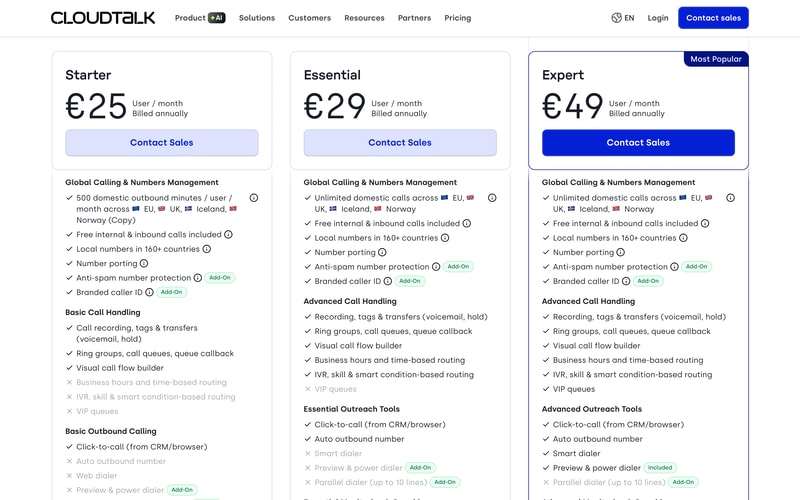
Its geographic framing is explicitly European: unlimited domestic calls “across EU, UK, Iceland, Norway” is the headline inclusion from Essential upward, which makes it a natural fit for European operations and a less obvious one elsewhere.
Every plan says Contact Sales despite the published per-user prices, so there is no self-serve route.
How CloudTalk Works
- Priced per user, per month, billed annually.
- Starter caps outbound at 500 minutes per user; Essential and Expert are unlimited domestically.
- Routing intelligence starts at Essential — IVR, skill-based and smart routing.
- Dialers are largely add-ons, priced per user on top.
- AI voice agents are metered by minute, from €99 for 200 minutes.
- Every plan requires a sales conversation.
CloudTalk Pricing
Captured from CloudTalk’s pricing page in July 2026 on the euro price list with annual billing.
| Plan | Per user/mo | Outbound minutes | Routing | Dialers |
|---|---|---|---|---|
| Starter | €25 | 500/user | Basic only | Click-to-call; power dialer as add-on |
| Essential | €29 | Unlimited | IVR, skill and smart routing | Adds auto outbound number |
| Expert | €49 | Unlimited | Adds VIP queues | Preview and power dialer included |
Add-ons: power dialer €15/user · parallel dialer €39/user · call intelligence €9/user · branded caller ID from €0.07/call · AI receptionist from €99/mo (200 min) · AI specialist from €349/mo (1,000 min)
What actually decides your plan:
- The €4 step from Starter to Essential is the easiest decision on the page. Five hundred outbound minutes a month is about 25 minutes a day. An agent whose job is calling will exhaust that in a morning, and Essential removes the cap for a 16% increase. Starter only makes sense for people who receive calls rather than make them — inbound and internal calls are free on every plan.
- Essential is also where the platform becomes a contact centre. Business hours and time-based routing, IVR, and skill-based and smart routing are all absent from Starter. Without them you have a phone system, not a routed one.
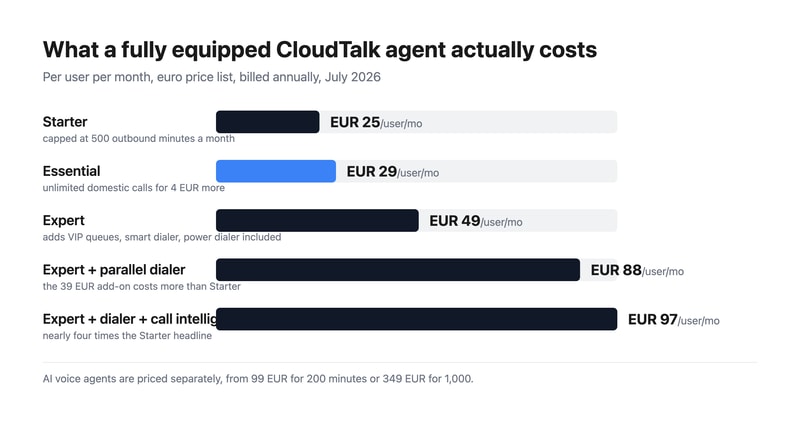
- The parallel dialer costs more than the entry plan. €39 per user per month, against Starter’s €25 and Expert’s €49. It remains an add-on even on Expert, so an outbound team wanting parallel dialing on the top tier is looking at €88 per user before anything else.
- Add the numbers you will actually use. Expert at €49 plus the parallel dialer at €39 plus call intelligence at €9 comes to €97 per user per month — close to four times the Starter headline. The power dialer at €15 is the one add-on Expert includes.
- AI voice agents are a separate meter. €99 a month for 200 minutes works out at €0.495 per minute; €349 for 1,000 minutes is €0.349 — a 30% better rate at the larger package. Neither is included in any plan.
- Nothing is self-serve. All three tiers route to Contact Sales, so budget evaluation time even though the prices are published.
Who Should Use CloudTalk
- European outbound sales teams. The clearest case — unlimited domestic calling across the EU, UK, Iceland, and Norway from €29.
- Support operations needing real routing. IVR, skill-based routing, and queue callback from Essential.
- Teams deploying AI voice agents. CloudTalk prices them openly by the minute, which many competitors do not.
- Businesses needing local numbers widely. 160-plus countries covered on every plan.
It fits poorly for teams making few calls, where Starter’s cap might suffice but the platform is oversized; for heavy parallel dialing on a budget, given the €39 add-on; and for non-European operations, where the unlimited-calling geography is less useful.
Honest Pros and Cons
Strengths
- Unlimited domestic calling from €29, across EU, UK, Iceland, and Norway.
- Free internal and inbound calls on every plan, including Starter.
- Local numbers in 160+ countries at every tier.
- Published add-on prices, so the real total is calculable.
- AI voice agents priced by the minute, with a clear volume discount.
- Power dialer included on Expert rather than sold separately.
Limitations
- 500 outbound minutes on Starter — about 25 minutes a day.
- The parallel dialer costs €39 per user, more than the entry plan.
- Routing intelligence requires Essential, not Starter.
- A fully equipped agent costs around €97 per month.
- Every plan requires contacting sales.
- AI voice minutes are entirely additional to the seat price.
CloudTalk Alternatives and How It Compares
- Aircall is the closest competitor for sales and support calling, with strong integrations.
- Nextiva is a full unified communications platform, stronger on US business telephony.
- RingCentral is the large incumbent covering voice, video, and messaging.
- Quo (formerly OpenPhone) is the shared-inbox option for small teams sharing numbers.
- Grasshopper suits solo operators wanting a virtual business number.
- Dialpad competes directly with AI-led calling features.
For a broader survey, browse our contact centre directory.
The Verdict
CloudTalk is a solid choice for European teams that spend their day on the phone, and the reason is geographic: unlimited domestic calling across the EU, UK, Iceland, and Norway is a genuinely useful inclusion if that is where your customers are, and local numbers in 160-plus countries cover the rest. Free internal and inbound calls on every plan, including the cheapest, is a further good decision.
The plan choice is close to made for you. Starter caps outbound calling at 500 minutes per user per month — about 25 minutes a day — and Essential removes the cap entirely for €4 more. For anyone whose job involves making calls, that is not a trade-off worth thinking about. Essential is also where the routing intelligence lives: business hours routing, IVR, and skill-based routing are all absent from Starter, so the entry tier is a phone system rather than a contact centre. Treat €29 as the real starting price.
Then price the add-ons before you compare CloudTalk with anything else, because they are substantial. The parallel dialer is €39 per user per month — more than the entire Starter plan, and 80% of Expert — and it remains an add-on even at the top tier. An outbound team on Expert with parallel dialing and call intelligence is at €97 per user per month, roughly four times the Starter headline. CloudTalk deserves credit for publishing all of those rates openly, including per-minute AI voice agent pricing at €99 for 200 minutes or €349 for 1,000. The numbers are all there; they simply need adding up before the sales call rather than after.
FAQ
How much does CloudTalk cost?
On the euro price list captured July 2026 with annual billing: Starter €25 per user per month, Essential €29, and Expert €49. Add-ons are priced separately — power dialer €15 per user, parallel dialer €39 per user, call intelligence €9 per user, branded caller ID from €0.07 per call, and AI voice agents from €99 per month for 200 minutes. All plans require contacting sales.
What is the difference between CloudTalk Starter and Essential?
The most significant difference is calling volume: Starter includes 500 outbound minutes per user per month, while Essential offers unlimited domestic calls across the EU, UK, Iceland, and Norway — for €4 more per user. Essential also adds business hours and time-based routing, IVR, skill-based and smart routing, and an auto outbound number, none of which Starter includes.
How much are CloudTalk’s dialers?
The power dialer is €15 per user per month and is included on the Expert plan. The parallel dialer, which dials multiple lines simultaneously, is €39 per user per month and remains an add-on on every plan including Expert. That makes the parallel dialer more expensive than the entire Starter subscription, so outbound teams should price it before choosing a tier.
How does CloudTalk price AI voice agents?
By the minute, in packages. The AI Receptionist starts at €99 per month for 200 minutes, which works out at about €0.495 per minute, and the AI Specialist starts at €349 per month for 1,000 minutes, or roughly €0.349 per minute — around 30% cheaper at the larger volume. These are additional to the per-user plan price on every tier.
Can I buy CloudTalk without talking to sales?
No. All three published plans — Starter, Essential, and Expert — show a Contact Sales button rather than a checkout, despite carrying per-user prices. That means a sales conversation is required regardless of tier, so factor in evaluation time even though you can calculate your likely cost from the published rates in advance.

Compare CloudTalk with other popular tools in the same category.
It's very intuitive and easy to manage...
Technical issues (server disconnection for ex.)
Calls are recorded, cloudtalk distributes the calls evenly between me and my peers.
Very simple user interface, very nice app to call. Is a simple way to fast calling to my clients. I see my all call, duration, I can play and listen to my all calls. Is a very good options.
I and my colleges try use CloudTalk in our company, but we need a better sound with earphones, because person who talk with us hear a noise and we need a talk a very loud. (We try a different types oh earphones, and it's still a sound is a very low quality, (quality of sound better if we call with same earphones from phone, but if we call from PC, quality very low).
I can call to many persons per day. (about 50-70) I can see my progress, I dont, need multitasking, I see all need stuff to my work in one app.
Auto recognition of numbers. Tracking of calls.
Sometimes bad connection with the client. The client can not hear me properly all the time. I dial and I the time is running without hearing the dialling in 30% of the cases, then I have to restart.
Bad phone connection. Costs for calls to Switzerland.
Great service when it works! We have had a few bugs along the way, but when it is working, great service and easy to use!
Can not find voicemails easily, sometimes the connection is bad
Connection issues and voicemail retrieval

Everything went smooth from the very beginning. CloudTalk team was very helpfull with the setup and onboarding. Solved our pain. We can more focus on doing our business and still have whole overview of it.
Cannot integrate into other software which might be usefull.
We increased efficiency in our team.
I like that there is a dashboard with additional features which allows me to conduct more in depth tasks, I am also a fan of being able to answer calls with a single click.
I dislike that I cannot change the ringtone. I dislike the manner in which calls are ended, there is no tone or sound to indicate the call has ended. I also dislike that there is no tone/beep to indicate that the call has begun when answered as other similar products do produce a bell to indicate the person on the other line can hear you.
I can easily transfer calls, for more detailed issues I can solve issues on the dashboard in my web browser.
Great app, i started using it at work of businessman and it made my job easier. I connected it with CRM system and it works perfect. Integration went smoothly, without any problems and it making calls easy. It´s possible to monitor the performance of employees and analyze their communication. Today i´m using this app as fantastic tool with fast communication without any problems with clients. Definitely recommend.
Very good app whitch is very intuitive and easy to use but it has some worst pages. Sometimes it has more difficult integration and it does my job a little bit harder. A little bit negative is also that this app has higher price.
integration with CRM - i use it for calling to my clients
Upsides of Using CloudTalk: -It has International calling capability -It has a mobile app available for iPhone users -It identifies who's logged in or not for internal users -There is Caller ID -I like the fact that most calls are recorded automatically is readily available for listening -Easy to use; straightforward interface, userfriendly -Dashboard is very useful and has all the information I need
Least Helpful / Dislikes -The status showing if people are online/offline is not always accurate -The application malfunctions regularly (maybe bugs) -Calls are not being routed correctly sometimes -Callers wait for a long time waiting when they are transferred -Caller ID names not accurate -No mobile phone app available for Android users - please create soon!!!
Benefits: -I can go anywhere with the handy mobile app on my iphone and still take business calls while mobile -I can listen to the recordings anytime and go back to them when necessary -I can easily connect with guests and colleagues and this drives more value into the business.
I like that Cloudtalk records the phone conversations, it allows me to go back and see exactly what was said, instead of relying on my hasty notes. I also like the sync feature we use with pipedrive, it makes communicating with my colleagues much easier.
Nothing, so far - I wish I could delete calls out of my feed, but that might be an admin feature I don't have. Sometimes the syncing to pipedrive can take a little while, which means I have to go back and merge activities manually.
It helps my colleagues and I know exactly what each person is saying on the phone, so we can figure out exactly what outreach we can continue
simpleness and usage of this software was very convenient
installation wizard was diffulct for our company
international calls

Cloudtalk offers simple yet powerful solution for both small and large enterprises.
Customer support could use some more work in terms of how useful or polite they are.
As a financial institution we needed to easily record our phone calls, however Cloutalk offers much more - mostly as a good solution for multi-national call center.
I have been testing a lot of voip service companies for a long time. A few weeks ago I met Cloudtalk and used their services for free for 14 days. In my opinion, there is a very good service. I plan to use their services in the future.
I think the cost of international calls is quite expensive. I suggest that prices should be reduced.
Sometimes the connection is not made while calling to different numbers. I would like to eliminate this.
CloudTalk has a good Voicr Quality its very good for Small Companys.
The Loading Screen where i need to wait more then 2 Mins
Its a very good Software with Pro and Contra
Ease of use and overall user friendly that makes it a breeze dor daily usage.
Some minor quirks which needs fixing to make it a true stand out among the competition.
Makes it easier to quickly dial multiple phone numbers that otherwise would be tedious using a phone.
Easy to use, tags are great and works well with hubspot.
Is slow, Line can be poor , doesnt update hubspot correctly.
slow and poor line connetion
Automatic Voicemail Drop, auto logging of calls, makes life quicker. Auto SMS is great.
Doesn't always update dispositions The Cloudtalk Chrome extension renders chrome unusable a lot of the time. A better system too add numbers to the smart diallier would be better.
It makes calling a large volume of numbers per day easier than individually copying and pasting each number. I've noticed a 50% improvemenent in my productivity.
I'm able to reach a lot more numbers. Usually, close to half of my calls aren't reachable because of the sim coverage.
The most annoying part is the lag when communicating. The call receiver doesn't get the information in real time. It takes about a second or two.
Management analyze the calls and provide feedback and corrections. CloudTalk also helps us reach more leads creating more quality calls.
It can be used to call anywhere. And is easy to navigate
Network glitches, and people can't really hear me sometimes
Calling out clients, and organizing the calls.
You're writing the time zone before we call -> good to know which time it is when we call a customer in his country. We can listen our call. The audio quality is good.
The internet connection impact a lot the quality of the call. Sometimes cloudtalk take time to open. Sometimes the call does not work. Sometimmes our number appear wrong on the client phone.
We can call any country. We can even write sms. We can listen our call. We can send voice message. We can use differents number to call. We can use cloudtalk on our phone and on the computer.
The best is you can call anyone by business work without having your own number. It's easy to use and don't need to spend so much time to understand how to start with it.
The system is not working perfectly and by the way you're not able to check time the others workers spend on the phone or who is answering something or in a call.
Problems with the customer service in my business but as I said I guess they need to improve a lot their system cause tracking calls by cloudtalk was not so accurate.
I think it has a clear interface, efficient enough.
Nothing in particular, I had no issue using it so far.
Good tool for calls, efficient to call quick when finding a number on a page
Cloudtalk is easy to connect and get started, just a simple click and you are online. It got a simple to use user interface and good calls quality.
No option to filter who is online or idle, or create a group with my team just to monitor those contacts. the app keeps freezing to my colleages and me. The missing calls and received calls info is laggy and misses some calls sometimes.
Unfortunatelly it's not solving any problem at the moment

Automatic recording of all the calls is extremely useful working in sales. Allows for call reviews and feedback. The call quality is always very good with stable connection.
Call notes don't save unless the 'done' button is clicked before the end of the call. Call rejections are operating across the team, so one person ends call for all
many inbound sales enquiry calls were being missed with the previous network-calling provider, since switching it is much easier to track this and ensure as few calls as possible are missed
No doubts the best part of cloudtalk is the simple way you can manage the countries to wich your agents can call and which can't and you don't need any special license like in other apps such as Aircall.
They are not so clear about the cost and the billing. In the beginning, their sales agents tell you you can pay for minutes "as you go", and once you are with the account manager about to sign the contract it turns out you don't have any other option but prepaid minutes, so you have to calculate the minutes per month you're going to call for each country and if you spend more minutes the price is so much higher than the one the sales agents told you. In a company like the one I work on we don't know the minutes we are using for each contry per month, it depends of the clients, so it is so annoying we have to pay for minutes that may be we're not going to use, and pay a very high price for minutes we need just because "we didn't see it coming".
We use cloudtalk to call clients from all over Latin America and Spain, and is so useful that we don't need to have local number to call them like in other cloudcalling apps.
Buena señal y calidad de sonido, se graban las llamadas
Hay retraso en el tiempo de llamadas y el oyente le llega la información con 3 segundos despues
Tener comunicación con los clientes y tener grabaciones de ello
Easy to setup and simple to use. I don't feel like i had to do anything any differently on my mobile to make and receive calls.
App seems to log me out each evening, and I sometimes forget to log back in the next day.
Being able to add work calls to my personal mobile - so not having to carry 2 phones or miss calls.
The ease of use, the drag and drop vizualizer..
The limitations of the callback feature, the mobile app
I initially wanted cloudtalk and liked it because it was more capable than grasshopper or dialpad, but not as complicated as twilio.
Pretty smooth operation. A little tough to understand at first. But overall pretty simple to use.
The onboarding process was frustrating. If I knew I had to jump through so many hoops, I would have reconsidered signing up.
Power dialing. Especially with simplicity
The credit is automatically topped up once it's too low. Plus the ability to leave notes for your Colleague.
There is no continue to dial button. The current options I feel, does not cover all the base
It allows easy calling list management where multiple employees can call the same list at the same time.
The dial automation allowing me to double the number of calls
Extracting data from cloud talk can be very time consuming
Being able to rate the calls afterwards with emojis