

Unclaimed: Are you working at Salesflare?
Salesflare Reviews: 4.8/5 — Highly Rated
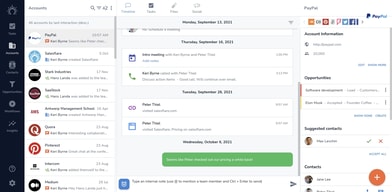
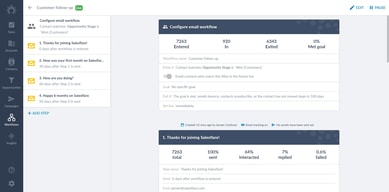
Salesflare allows users to automate data entry as it gathers insightful data on customers based on social media profiles, emails, calendars, phones, company databases, and professional email signatures. The platform is used to help generate and effectively follow up leads, backed by features such as sales tracking and email tracking to send personalized emails. Social integrations and sales analytics are built-in within the system and are available on Windows, Mac, Linus, iPhone, iPad, and Android devices.

| Capabilities |
AI
API
|
|---|---|
| Segment |
Small Business
Mid Market
Enterprise
|
| Deployment | Cloud / SaaS / Web-Based, Mobile Android, Mobile iPad, Mobile iPhone |
| Support | 24/7 (Live rep), Chat, Email/Help Desk, FAQs/Forum, Knowledge Base, Phone Support |
| Training | Documentation |
| Languages | English |
Salesflare Pros and Cons
- Quick and simple to get setup with your new service
- Intuitive backend for all users
- Insights into customer relationship strengths
- Tons of automation options for streamlined teams
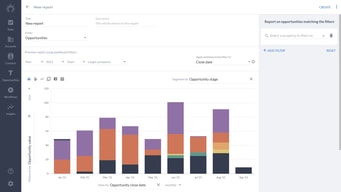
- Access to useful analytics and reporting features
- No email builder for custom designs
- Limited flexibility for enterprise companies






Compare Salesflare with other popular tools in the same category.
As a solopreneur, I really like Salesflare for its intuitive interface and seamless integration with my email and calendar. It saves me valuable time and effort by automatically filling out my address book and tracking all interactions. The sales pipeline management feature is especially useful for managing my sales activities effectively. With its excellent value and free trial option, Salesflare is the perfect choice for me as a solopreneur looking to streamline my sales processes. I'm glad to be using it.
One issue I've encountered is that when using the Pabbly automation tool to integrate Google Sheet with Salesflare, I've experienced some fields not working as expected in Salesflare. This has resulted in the inability to add Google Sheet values into Salesflare automatically. I'm hopeful that the Salesflare team will address and resolve this issue, as it's impacting the seamless integration of these tools for my business needs.
Thanks to Salesflare, I have been able to maintain strong customer relationships. I particularly appreciate the opportunity panel, as it enables me to gain insights into the current status of my leads. I find all of these features highly valuable.

The integration and automation with google email
I can't think of any limitations whatsoever
Keeping contacts and accounts up to date, tracking opportunities
Congratulations to all the "brains" behind Salesflare: the most affordable yet powerful, versatile and user-friendly B2B CRM. The killer feature: the Linkedin add-in to create in one click accounts, opportunities and contacts in your Salesflare CRM while you browse on Linkedin ! Vividly recommended for all consulting/advisory small and medium businesses. There exists other CRM solutions, not as good but more expensive: Salesforce for instance
I do not dislike anything. The only improvement would be to have the integration of the Linkedin messages to have a full view of your interactions in Salesflare, since they are already SO GOOD to integrate Linkedin. BUT this would require Linkedin (Microsoft) to open his system
Monitoring of lead generation AND deal sourcing Benefits: - remove low added manual input thanks to Linkedin integration - Visual check of pipelines (customer lead and deals + other stakeholders) - Easy creation and customization of pipeline (No need of an external consultant)

As a solopreneur specializing in compliance consulting, having the right CRM tool is more than just a convenience—it's essential. And for over 6 years now, Salesflare has been that essential tool for me. It's not just a part of my business operations; it's a cornerstone of my success. The intuitive and user-friendly nature of Salesflare is what initially drew me in. Its clean and straightforward interface makes managing clients as simple as it gets. The automation features are a lifesaver, freeing up valuable time that I can now invest in my clients rather than in repetitive administrative tasks. One feature that I particularly appreciate is Salesflare’s seamless email integration. It allows me to keep track of all my conversations and interactions with clients with meticulous precision. This level of organization is invaluable in my line of work, ensuring that nothing slips through the cracks and that every client interaction is productive and meaningful. The customer support team at Salesflare is a cut above the rest. They're not just quick to respond, but also deeply knowledgeable and genuinely invested in my success. It feels like having an extended team dedicated to supporting my business. Salesflare’s commitment to continuous improvement is something I deeply respect. They are constantly evolving, adding innovative features and refining the existing ones, showing a dedication to excellence that resonates with my business philosophy. In essence, Salesflare is more than a CRM for me. It's a steadfast partner in my consulting journey, empowering me to manage and grow my client base with unprecedented ease. I genuinely can't envision running my business without it.
Honestly, it's challenging to pinpoint something I dislike about Salesflare, as it aligns so well with my business needs. If I had to choose, I'd say that my only 'complaint' is that I wish I had discovered it sooner! Its impact on my business has been so profoundly positive that I can't help but wonder how much more I could have achieved had I started using it earlier.
Salesflare addresses key challenges in my consulting business, enhancing efficiency and organization. It simplifies client management, allowing me to effortlessly track interactions and maintain a structured workflow. Its email integration and user-friendly interface efficiently manage the vast amounts of data and communication I handle daily. The automation features of Salesflare save me significant time, reducing manual input and freeing me to focus on high-quality consulting services. Additionally, its ongoing updates ensure that I'm always equipped with the latest tools, supporting my business's growth and adaptability. In essence, Salesflare has streamlined my operational processes, saving time and enhancing client satisfaction, which is vital for the success and scalability of my services.
Using Salesforce day to day makes working so much simpler. Everything is laid out in an organized way that makes everything easily accessible and just a click away.
There isnt really anything I dont like about it.
Saleforce solves the problem of keeping daily tasks organized and makes my day run so much smoother.

Easy to use, great integrations, all necessary features for SMBs
Nothing so far. The regular update and improvement makes it reliable
CRM. Insights into leads and customers, and the miltitude of integrations are just amazing
The simplicity of the platform is great but also the powerful features are a huge benefit. Support team are great when called upon too.
It's very difficult to find fault in Salesflare. If I was pushed then I would say that reporting could perhaps be improved. But at the moment it pretty much covers what I need for my business
Management of sales pipeline. Automated outreach. Marketing Segmentation.
Great CRM for small businesses with all the essential features, at an affordable price.
Nothing so far, I've been very happy with it.
It allows me to manage my sales pipeline effectively.

In five minutes I have all my contacts uploded and ready to use. The workflows earned me money the first day! It will become your favorite sales tool.
It took me too long to find them in the sea of CRM's
It's the most intuitive thing out there and when you get stuck, the help desk really helps. They treat you like a real person and not just a "user"
It's great to have a CRM that works in the background. It's like having a sales assistant by your side helping you to stay organized and on task.
The time it takes to enter the information into the system, but once that does the process is easy!
Keeping track of all my leads whiles reaching out to them in a systemized way.
What I like the most about Salesflare is the ability to organise everything in a very simple and clear way, they have a very intuitive interface.
No hay nada que no me guste, añadiria algunas cosas pero me gusta como esta la herramienta actualmente.
Tener todos mis contactos organizados para asi cerrar ventas de forma sencilla.

It´s easy to use, the integrations are crazy good. Also the workflows safe me 1M hours per years. I can run the full pipeline and I never loose a sale. Thanks to the team for making it amazing
I hope they can make an app for customer support connected with the crm
Is helping me to have all my leads in order. I love them
Their API os easy to integrate, works like a charm and their ux is easy to understand and made our sales team improve their work
Nothing at the moment, salesflare works good in all aspects
We have created different pipelines that are automatically enriched through our user registration funnel so our sales team can manage the opportunities easier and better
Simple UI, not overloaded with unnecessary features. Easy settings and powerful API. And the price is really low.
The UI of custom fields could be improved a little bit, but it's a minor thing
It helped manage the prospecting client list and send follow-up mail chains.
Salesflare helps organizations automate processes so they can work more efficiently and effectively. The company also provides modules and trainings that will simplify the life of the customer to navigate the tool.
Having said that, it would likely be more difficult to integrate with larger companies, since it is designed for freelancers, consultants, and small teams. In particular, the user interface for contacts could be improved
Integrating their product with other sales and prospecting tools and products is one of their strengths.
It's simple and to the point. Whereas other CRM tools are overwhelming (1000 features, with a lot of workarounds that get the job half done), Salesflare is focussed and excels at the features it provides. Since onboarding onto salesflare, we've accelerated our automated email reachout and have catpured all our CRM data into this tool.
Honestly not much.. we have the integrations we require with other tools.
Salesflare helps us automate our reachout to new leads, track and record all the information on our existing clients, analyze our client portfolio. The level of support we receive is also super high, with answers to any question in <1hr and tailored solutions to problems (e.g., integration wiht different tools)
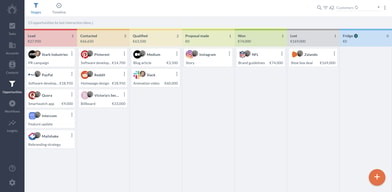
I really like the dashboard that shows me opportunities, it's great to see all my business at a glance.
I wish the accounts would create themselves more through automation, rather than me populating it manually.
Organizing my leads and getting a view at a glance of my pipeline
Easy to use but powerful - Minimal input required LInkedn interfaces - easy to use Powerful -Google and Outlook integration
Not a lot - I am very picky the note-taking and the task management could be a little slicker but more than ok Tag Management could be improved
We are a small startup that requires low maintenance but is functionally robust - Sales flare covers all things that we need to grow our business now and in the future. Very happy with our choice
I have used Salesflare for a few months now, and I cannot say enough GREAT things about it. It makes tracking emails, calls, and clients a breeze. I love their workflows (email campaign), opportunities (flow chart for sales), and their customer service and support; they have always gotten back to me quickly. I highly recommend Salesflare to anyone looking for a CRM; it is far superior to all others!
I love everything about Salesflare. There is nothing that I do not like about it.
It is saving me a ton of time! And the small fee they charge per month is well worth every penny. From Sales Engagement tracking, to a CRM, Salesflare does it all!
We have moved over from hubspot to find a program that better supports automatic lead generation. We have moved from a system that cost our sales team time and now have a system that reduces time, keeps track of leads better and enables better collaboration. Shivila and Bruno have been great also.
so far so good. You could perhaps argue that some of the custom fields arent in depth enough, or importing data is a little basic, however the system is meant to be simple for the sales team which this is.
Giving a simple to use sales pipline that has rendered our excel sheets useless. Automatic email gathering and information gathering
Salesflare works pretty good to track all our Sales activities! I like it.
Honestly, there is nothing to criticize properly...
It tracks all our leads perfectly and we always have a proper overview about our current sales status.
Overview snapshot of sales and projects.
Tracks some contacts with no relationships.
Captures client information suitable for performance analysis. Valuable for building a record of communications without searching through emails.

The automatic fill-ins are great, but the reminders of when to communicate to the prospect & suggestions of what (subject) to communicate to the prospect about are fantastic! This keeps me so much more focused on my tasks!
I wish a tool existed that automatically could find prospect's phone numbers.
My administration tasks previously would pile up like; my unwashed laundry. Salesflare solves that with automatic fill-ins + reminders of when to contact prospects!

What I like about Salesflare is that it’s easy to use and it has helped me streamline my sales effort. It’s intuitive enough to understand people I interact with and I don’t have to waste my time creating contacts for them, Salesflare does it for me. The workflow feature is so easy to use for mass emails and I love the email tracking and link tracking feature it comes with. Also, they have excellent support!!
There is not much I dislike about Salesflare except that it is available only in English at the moment - which I hope can change soon.
It helps us keep all of our leads in one place in the sales pipeline. The software provides a very good overview and centralized location for all customer information and interactions, allowing me to quickly access critical information and make informed decisions. They also come with a sidebar for linkedin and email so, it’s really easy to work from these platforms as well. Overall, it’s helping us be on top of our sales game :)
It's so incredibly easy to use it has so many customizable features.
Nothing!!! After 3 years! It was awesome.
All of them
For myself, the way Salesflare automatically manages emails (I have 10 years' worth of Gmail business use) makes following up with current and potential customers nearly effortless. And follow-up is, in my opinion, the most difficult part of sales. I have used (and paid for) more than half a dozen CRM programs. With those programs, I typically spent more time trying to learn how to use the CRM program than I spent communicating with customers. With Salesflare, I was "up and running" in less than 30 minutes; something I found rather astounding. Instead of dreading interaction with my CRM, I actually look forward to using Salesflare. At this point, I feel like I have "finally" found the CRM I have been trying to find for the past 2 decades.
So far, I have not had any problems. The tech support has also been excellent.
The way Salesflare manages emails via "accounts and contacts" is so elegant, it makes keeping track of customers and potential customers a pleasure, rather than "a constant source of anxiety".
Salesflare allows you to send email chain communication to multiple people at once. What does that mean: - I can send up to 2,000 people a day the same email; I can have the system set up to send a follow-up email within a certain amount of days based on the parameters I set. - I can add attachments if I want, and the system can track if someone opens them. -Most importantly, the emails look like they came from me! Unlike other platforms that send the email "On Behalf of" you, or has their branding all over the bottom, Salesflare emails only have your information and the information you want!
I really like Salesflare, and honestly there is nothing I do not like about it.
Any sales job requires you to keep track of your leads, the stages they are in, and all your communication with that lead. Salesflare streamlines this process by allowing you to send multiple email chains that track how your lead interacts with your communication and will remind you if you have not contacted a lead. The emails they send on your behalf look no different than an email you would send personally. They also integrate with multiple other platforms, which is great. Lastly, they can look up emails you might not have, which is another great feature!

The dashboard is very helpful. Also like the GUI and ease of moving prospects through the sales process.
There is only one thing and that is the conversion rate algorithm does not seem to be accurate.
We keep all our leads in one place for the different streams of business. The predictive model for expected revenue is beneficial for forecasting.
The customer service is outstanding. The product is relatively intuitive and easy to use with great flows.
I have no complaints about Salesflare. The product was easy to use and had a great app.
It helped me easily track my contacts and where they were in my process.
1. No typing or clicking; finds publicly available information on its own and populates 2. Find official email of a prospect is a super helpful feature; no additional tool is needed 3. Saves 70% more time compared to Zoho and HubSpot. I have tried them both. 4. Great personalized email workflows help run nurture campaigns 5. Timeline view is fantastic. It gives you all history in sequence as it happened without any data entry efforts 6. Multiple pipelines and valuable reports 7. Happy with my decision to use Salesflare 8. All features work the same in mobile app
1. It Does not have a dark theme. The light theme hits the eye, and the text is hard to read 2. All is great so far for my use case
1. No leads are slipping off the radar. I had a bunch of them lost in the data, which I could re-activate and improve on the revenue 2. Better visibility on the progress 3. I am easily able to capture new leads that pass through while doing other tasks 4. Saves a lot of mental and physical time