
Unclaimed: Are you working at HubSpot Sales Hub?
HubSpot Sales Hub Reviews: 4.4/5 — Solid Choice
If you want to supercharge your sales process, Hubspot Sales Hub is a powerful and seamless solution that offers sales engagement tools, provides configure-price-quote (CPQ) functionality, and robust sales analytics that is essential for any growing business. Like anything within the Hubspot ecosystem, the platform is rooted in the brand’s powerful and reliable service platform, delivering more in-depth insight, better leads, and better solutions that teams can rely on.

| Capabilities |
AI
API
|
|---|---|
| Segment |
Small Business
Mid Market
Enterprise
|
| Deployment | Cloud / SaaS / Web-Based, Mobile Android, Mobile iPad, Mobile iPhone |
| Support | 24/7 (Live rep), Chat, Email/Help Desk, FAQs/Forum, Knowledge Base, Phone Support |
| Training | Documentation |
| Languages | English |


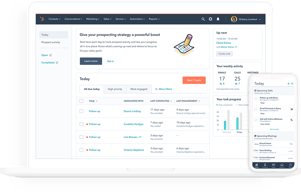
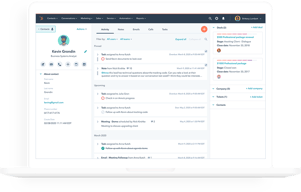


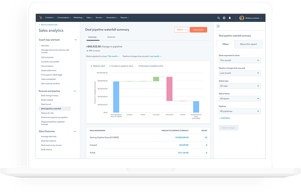





HubSpot Sales Hub has the best free tier in the CRM market and one of the steepest upgrade cliffs, and both facts matter equally when you evaluate it. Getting started costs nothing and the product is genuinely good. The question is not whether you will like it, but what happens to your bill when you outgrow Starter.
- What it is: A sales CRM platform built on HubSpot’s Smart CRM, with pipeline management, calling, sequences, forecasting, and AI agents layered on top.
- Best for: Teams that want a free or cheap start, and mid-market sales organizations that also use HubSpot for marketing and want one connected system.
- Pricing: Free for up to 2 users. Starter from $7/seat/month, Professional from $90/seat/month, Enterprise from $150/seat/month. Verified on HubSpot’s pricing page in July 2026.
- The honest catch: Professional and Enterprise carry mandatory one-time onboarding fees of $1,500 and $3,500 respectively, and Professional requires an annual commitment even if you pay monthly.
What Is HubSpot Sales Hub?

HubSpot began as a marketing software company and built its CRM outward from there. Sales Hub is the sales-facing product in that suite, sharing one contact database, the Smart CRM, with Marketing Hub, Service Hub, Content Hub, and Data Hub. That shared foundation is the strategic argument for HubSpot: if marketing and sales work from the same records, the handoff between them stops being an integration problem.
The free CRM is the reason most people encounter HubSpot at all. It is not a trial and not a crippled demo. Contact management, deal pipelines, email tracking, meeting scheduling, and basic reporting are available at no cost for up to two users, and HubSpot has kept that promise for over a decade. As a growth strategy it works because the free product is good enough to build a business on.
The independent ratings are strong and consistent: roughly 4.4 out of 5 on G2 across more than 12,000 reviews, and about 4.5 out of 5 on Capterra across more than 4,400. Ease of use is the most-cited strength on every platform. Pricing is the most-cited weakness on every platform.
How HubSpot Sales Hub Works
- Smart CRM as the foundation. Contacts, companies, deals, and tickets live in one database shared across every Hub. Buy Marketing Hub later and it reads the same records, with no sync to configure.
- Pipeline and deal management. Customizable pipelines and stages, deal tracking, and task queues. Straightforward and well executed, which is why non-technical teams adopt it quickly.
- Engagement tooling. Email tracking and templates, meeting links, and calling. Sequences for multi-step outreach are the feature most teams eventually need and the one most commonly reported as gated to higher tiers, so confirm its availability on the plan you are pricing.
- AI agents and credits. Breeze Prospecting Agent and Data Agent on Starter, Agent Hub on Professional, and AI transcript enrichment on Enterprise. These run on HubSpot Credits, a consumption currency priced at $9.00 per 1,000 credits on annual billing, with each plan including an allowance of 500, 3,000, or 5,000 credits.
- Analytics and forecasting. Conversation intelligence and forecasting arrive at Professional, alongside the Sales workspace. Deal splits, deal journey analytics, and pipeline approvals are Enterprise features.
The credits model is new enough to deserve attention. Bundled allowances sound generous until agents are used at volume, at which point AI becomes a metered line item on top of per-seat pricing. Ask what your realistic consumption looks like before assuming the included allowance covers it.
HubSpot Sales Hub Pricing
The list prices are only part of the cost. Figures verified in USD on HubSpot’s Sales Hub pricing page in July 2026.

| Plan | Price | Credits included | Mandatory onboarding | Key additions |
|---|---|---|---|---|
| Free | $0 | — | None | Up to 2 users, free marketing, sales, service, content, data and revenue tools |
| Starter | From $7/seat/mo | 500 | None | Calling, Breeze Prospecting Agent, Data Agent, intent signals, task queues |
| Professional | From $90/seat/mo | 3,000 | $1,500 one-time | Agent Hub, conversation intelligence, forecasting, sales workspace |
| Enterprise | From $150/seat/mo | 5,000 | $3,500 one-time | AI transcript enrichment, deal splits, deal journey analytics, lead form routing, pipeline approvals |
The details that decide your real cost:
- The onboarding fees are mandatory, not optional. HubSpot’s own pricing page states that Professional requires a one-time $1,500 onboarding fee and Enterprise requires $3,500. A five-seat Professional deployment is therefore roughly $5,400 in year-one subscription plus $1,500, and no competitor comparison that omits this is honest.
- Professional requires an annual commitment. The billing toggle on Starter offers monthly commitment. On Professional, the monthly option still commits annually. You are signing a year regardless.
- The Starter to Professional jump is more than 12x. From $7 to $90 per seat is the single largest cliff in mainstream CRM pricing. Know which specific feature is forcing the upgrade before you accept it.
- Current prices are discounted. Starter shows $7 struck through from $20 and Professional $90 from $100. Treat the lower numbers as promotional and check what renewal looks like.
- AI is metered separately. Credits at $9.00 per 1,000 on annual billing, on top of seats.
The free tier is genuinely free and genuinely useful, capped at two users. That cap is the real constraint, and it arrives quickly.
Who Should Use HubSpot Sales Hub
- Solo founders and two-person teams. The free plan is the best free CRM available, full stop. There is no reason not to start here.
- Small teams on Starter. At $7 to $20 per seat, Starter is competitive with any entry-level CRM and better connected than most.
- Organizations already running HubSpot Marketing Hub. The shared Smart CRM is a real advantage and the strongest reason to accept Professional pricing.
- Non-technical sales teams. Ease of use is HubSpot’s most consistently praised quality across thousands of reviews, and adoption is usually the hardest part of any CRM rollout.
It is a poor fit for high-volume outbound teams, who report the sequencing and dialing tooling as thinner than purpose-built sales engagement platforms, and for cost-sensitive mid-market teams that need Professional features but not the HubSpot ecosystem. In that second case, Pipedrive or Zoho CRM deliver comparable capability for substantially less.
Honest Pros and Cons
Strengths
- The best free CRM available. Not a trial, not crippled, and sustained for over a decade. For up to two users it is genuinely hard to beat.
- Ease of use. The most-cited positive theme on every review platform, and it translates directly into adoption.
- One shared database across Hubs. If you use HubSpot for marketing, the sales handoff is not an integration problem.
- Strong ecosystem. A large app marketplace, extensive documentation, and a deep pool of agencies and consultants who know the product.
- Starter is well priced. At the current $7 per seat it is competitive with anything in its class.
Limitations
- Mandatory onboarding fees. $1,500 at Professional and $3,500 at Enterprise, disclosed only in footnotes, and frequently omitted from comparison articles.
- The upgrade cliff is severe. More than a twelvefold increase from Starter to Professional, and the most common complaint in independent reviews.
- Annual commitment at Professional. Even the monthly payment option commits you for a year.
- AI costs are metered. Credits at $9.00 per 1,000 are a variable cost layered on top of seats, and consumption is hard to forecast in advance.
- Thin for high-volume outbound. Reviewers scaling SDR teams report limitations in sequencing and dialing that push them to specialist tools.
- Reporting can lag. Dashboard data trailing real-time activity is a recurring complaint, sometimes resolved only by upgrading.
HubSpot Sales Hub Alternatives and How It Compares
- Pipedrive is the strongest value comparison. Purpose-built for sales pipelines, far cheaper at the tier where HubSpot gets expensive, with no onboarding fees. Weaker marketing tooling.
- monday CRM offers more customization for teams whose process does not fit a standard pipeline, with a three-seat minimum to factor in.
- Zoho CRM typically undercuts HubSpot substantially at comparable depth, with a less polished interface and steeper configuration.
- Close and Salesflare are better suited to small outbound teams that need real calling and sequencing rather than a marketing-adjacent CRM.
- Salesforce is the enterprise comparison. More configurable and more expensive, with implementation costs that make HubSpot’s onboarding fee look modest.
For a broader survey see our guides to the best CRM software and the best free CRM software.
The Verdict
HubSpot Sales Hub is two products in commercial terms. Below Professional it is one of the best-value CRMs available, and the free tier is the single strongest starting point for a small team that has never used a CRM. Recommending it at that level is easy.
Above Starter the calculation changes sharply. Professional at $90 per seat plus a mandatory $1,500 onboarding fee, on a compulsory annual commitment, is a serious purchase that deserves a serious comparison. If you also run HubSpot Marketing Hub, the shared database usually justifies it. If you only need sales, Pipedrive or Zoho CRM will deliver most of the same capability for a fraction of the cost, and neither charges you to be onboarded.
The practical advice is to start free, move to Starter when you outgrow two users, and treat the Professional upgrade as a genuine buying decision rather than a natural next step. Identify the one feature forcing the move, then check whether a cheaper specialist tool solves it. And whatever you conclude, factor the onboarding fee into your comparison, because most reviews will not.
FAQ
Is HubSpot Sales Hub really free?
Yes, with a meaningful limit. The free plan supports up to 2 users with no credit card and no time limit, and includes contact and deal management, email tracking, meeting scheduling, and basic reporting. It is a genuine free product rather than a trial. The two-user cap is the constraint most teams hit first.
Does HubSpot charge an onboarding fee?
Yes, on the higher tiers. HubSpot’s pricing page states that Sales Hub Professional requires a one-time onboarding fee of $1,500 and Enterprise requires $3,500. These are mandatory and are additional to the per-seat subscription. Many comparison articles omit them, so factor them into any first-year cost estimate.
How much does HubSpot Sales Hub cost in 2026?
Free for up to 2 users. Starter starts at $7 per seat per month, discounted from a listed $20. Professional starts at $90 per seat per month, discounted from $100, plus the $1,500 onboarding fee. Enterprise starts at $150 per seat per month plus a $3,500 onboarding fee. AI features consume HubSpot Credits, priced at $9.00 per 1,000 on annual billing.
What are HubSpot Credits?
A consumption-based currency that powers HubSpot’s AI agents and features. Starter includes 500 credits, Professional 3,000, and Enterprise 5,000, with additional credits at $9.00 per 1,000 on annual billing. If AI agents are central to your workflow, model your likely usage rather than assuming the bundled allowance is sufficient.
Is HubSpot Sales Hub better than Pipedrive?
For teams that also use HubSpot for marketing, yes, because of the shared database. For teams that only need a sales CRM, Pipedrive is generally the better value: it is purpose-built for pipeline management, substantially cheaper at the tier where HubSpot jumps to $90 per seat, and it charges no onboarding fee.

Compare HubSpot Sales Hub with other popular tools in the same category.
one of the best features of hubspot the sequences, it helps us be on top of the clients head but i hope they can increase te limit, it will be easier as well if we can send sequence from our deal contacts. it's also way easier that we can sign the quotes through hubspot. i also love the meetings but sometime im having this issue that the contact is missing so i cant contact the client.
there is no list of the activity i did on the same day, i think it would help me to strategize my sales if i can see what i have done to keep my performance growing. it will also be nice if there will be reminders saying that you did a great job you are excelling from this maybe you can do more of this to improve your sales
it helps me to categorize clients that i should prioritize to be able to convert it to sales
How easy is it to navigate! I use it every day! The integration process from our old CRM to HubSpot has been seamless! So many great features to review activity!
We've had a minor inconvenience with the quotes in hubspot but it's in the works of optimizing.
Creates an enviornment to easily track deals, contacts, calls, and emails

HubSpot allows me to manage my outreach campaigns and contact/company information in one location. This cuts back on the dreaded toggle tax switching between programs.
The only real down side to HubSpot is if you are using the free version there are no sequence options or automation options.
HubSpot provides a one stop shop for contact management, email marketing, sales analytics and outreach automation. HubSpot is very user friendly and is more than adequate for my daily sales needs.

Easy to navigate and able to sync smoothly with other tools.
There are some glitch that needs to be fix, some contacts moved to a different owner for some reason but you have to make sure that you created the task to keep you on track.
Very Efficient and so many features.

The ease of use and the ease of tracking. Plus, the display of email chains so you can review is fantastic
It's a little cludgy when it comes to clean up, and the email notification system is slow
Hubspot was a great CRM that we used. I am sad that the company switched to sales force. Hubspot was easy to use, intuitive, and allowed us to track things that just seemed to be the smart things to pay attention to.

The fact the it is so simple to automate email campaigns. It has so many features to make changes to the mail and then to view the data about who viewed the mail amf who did not and what linkd did the prospect visit.Also to run large campaigns it has so easy features to automate.
There is nothing to dislike about hibspot.It is one of the best apps that can be used for marketing automation and for making the sales process easier anf reachouts efficient.
It is making it a lot easier to run mail campaigns and marketing efforts.It increases the chances of getting leads from hunting activities and the chances to get more revenue.Also tje number of prospects we can reach out to.
Sales Analytics features and the ability to track all deals.
Too many tabs all at once can be confusing at times the interface can be more user friendly.
Sometimes there could be viewing issues with regards to available permissions making it challenging.

Hubspot Sales Hub has been instrumental in bringing all things together. I have been able to have all the leads generated through marketing campaigns, inbound and outbound campaigns into deals and I am able to qualify them and move them into the next stages seamlessly. With the tasks feature, I can easily assign tasks to the sales reps to follow up with the prospects, update deals, and delegate them to others to ensure everything happens at the right time to have much healthy sales pipeline. With the meetings feature, I can easily add my calendar link in the emails and prospects can directly set up meetings with me. Overall, Hubspot Sales Hub is the one tool that made my life easier by having everything in one place.
The tool is really great but it's too expensive, especially if you have a big team. As you deal with more users and more contacts, your costs will soar up to a level that you feel dependent on the tool and can't go out of it.
Thanks to Hubspot, all the management team can have a greater visibility on what's happening with the leads that are added into the pipeline and we are able to streamline our sales structure in a better way.
I like the EASY TO USE character of HubSpot & the features of HubSpot
For me there is no downside. Not even a single one
It's an absolute joy to use HubSpot. It completely eradicates my laziness. I never get tired of using it.
The ease of accessing information relevant to my occupational duties
Sometimes the information isnt accurate and sometimes people are hard to locate. I would like to see a way to get current accurate information easier
It is giving me a platform to follow thru on contacts and keeps track of all my things i have to do, emails, outbound calls, etc.....
Hubspot sales has been super useful for conducting sales and following up with our clients
So far I have only been using it for a couple months haven't really found any dislikes yet
Tracking our sales and keeping track of leads. Helps to make follow-ups and reach our customer base
It's very easy to use. It helps me keep control over my contacts, It automatically creates contacts for me from any email I send. I can see when my contacts open my emails. I can log my calls.
I can't seem to find a way to store multiple phone numbers for a contact: it just imports one and doesn't tell me if it's their direct line / HQ number/ or mobile. But I am in the free version. I imagine this is solved in paid versions
It is helping me save time as a salesperson. I can import my contacts directly from zoominfo, I don't have to manually track emails, logging outbound calls is super easy and there is a calendar / scheduling function (like Calendly)
The integrations combined with the great UX makes this the best CRM on the market.
As more features get added sometimes it can be overwhelming to know which to use.
It keeps track of everything you could ever need and it is relatively easy to set up.
It's easy to create new deals and follow the sales process
The only negative thing is that it's so many options for everything and it was a long learning process.
Keeping track of dialogues and deals.
Speed and the details I can leave. As we
Links to my emails do not always work or marry to my account from Gmail
Good support for office for my Sales
The ability to track and measure our sales team's performance throughout the entire lifecycle of our prospects. Hubspot has helped us gain a lot visibility into our sales cycle and how we can improve our sales approach moving forward.
While the reporting capabilities are fantastic, there are still a few slight shortcomings if you want to get precise reporting without an Enterprise level account. Regardless, Hubspot's reporting capabilities are more than enough for the vast majority of small to medium-sized businesses.
Hubspot sales hub allows us to track things like how many leads our sales team is generating, how long it takes them to close a deal, what each rep's conversion rate is, as well as other important sales metrics.

it isn more organised and the task what we set up give reminders on timely basis wherein we do not miss on important calls
you guys should have an auto dialler feature for sales hub
reminders to call people ..so that we do not have to maintain any excel for that
Tout est inclus dedans pour gérer les ventes au quotidien ! Un indispensable ! Les automatisations de la pipeline sont bien faites et la compatibilité avec d'autres logiciels est top ! Le module est facile à prendre en main et intuitif, et le centre d'aide très fourni pour les points d'ombre.
Il n'y a pas de chose particulière qui me déplait sur Hubspot Sales Hub.
Toutes les opportunités, ventes, infos sur les clients et sur les transactions sont rangées au même endroit ! Et ça, c'est top !
HubSpot Sales Hub simplifies my sales life! From organizing leads to automated emails and insightful analytics, it's an all-in-one platform. Seamless integration with CRM ensures a smooth workflow, boosting my productivity and helping me close deals faster.
Navigating the learning curve can be a challenge. The extensive features, while powerful, may feel overwhelming initially. Some users find pricing a bit steep for small teams, impacting overall accessibility.
HubSpot Sales Hub streamlines my sales processes, centralizing leads, automating emails, and providing valuable insights. It boosts efficiency, helps me nurture leads effectively, and with integrated CRM, it's a game-changer for managing relationships, ultimately driving sales growth.

I love the cohesiveness of the platform and how easy they make it to keep track of your leads. You're able to have customized email templates, a sequence flow, reminders, tasks and automatic outreach. It eliminates hours out of my day.
I do not have any dislikes. There can always be room for improvement. Maybe they can include successful templates.
Instead of working with my accounts on an excel sheet, I am able to have them entered and tracked digitally. I love the organization that HubSpot brings. The email sequences save me a lot of time and I love the ease of the platform.
Great service - price is fantastic and really has met our needs.
There's not a whole lot to be honest. Best option.
Helping us organize our teams, and the leads we use.
the customization of the property field that can be used to search
the complexity of the reports dashboard.
organization

Hubspot is by far my favorite CRM it's very very user friendly. You can personalize so much, and target more people.
A little bit of added tweaks but honestly if you talk to hubspot who is very helpful there's almost always a way around it
The ease of creating templates, setting up sequences and all the automation to make it so much easier and hit more prospects.
Ease of Use Ease of, Implementation , Customer Support
There is no such downside of using the hubspot
managing leads
Sales management is good for clients details and getting revenue
evething is good , but need some for features
Following with thw clients
Great UI/UX, easy to navigate through all parts
Too much buttons that can be reduced but not a big problem
All our company events are created on Hubspot and all our outbound emails are linked to it
I get different views which makes my work easy
Nothing to dislike, just need to have the option where other leads could not be created with the same number
We can track our deals very easily

For being a very complete crm. As a manager, I can get an overview of the negotiation levels from the pre-seller to the closing with the business consultant.
I have nothing to complain about, so far I'm quite satisfied with the tool.
Because I have an overview of the business, I can quickly strategize to close more deals.
how friendly it is and its dashboards. Great to use and has a lot of functionallity
you need to read a lot to understand it very well
helps me create metrics and visualize the follow up for our sales reps
Follow up is easy in hubspot and lead management is also easy
as of now there is nothing that I dislike
to get revenue for the organizaton