

Unclaimed: Are you working at Coda?
Coda Reviews: 4.7/5 — Highly Rated
Coda is a document management solution for creating, editing, and viewing text documents and spreadsheets. , It also helps centralize all documents to ensure seamless efficiency between teams and comes with customizable templates that let organizations create personalized documents for meetings, brainstorming sessions, customer feedback, to-do lists, and market research. It features drag-and-drop functionality, which keeps functionality simple, and has numerous tools that offer role-based access.

| Capabilities |
API
|
|---|---|
| Segment |
Small Business
Mid Market
Enterprise
|
| Deployment | Cloud / SaaS / Web-Based, Mobile Android, Mobile iPad, Mobile iPhone |
| Support | 24/7 (Live rep), Chat, Email/Help Desk, FAQs/Forum, Knowledge Base, Phone Support |
| Training | Documentation |
| Languages | English |



Coda bills you for Doc Makers only. Editors and Viewers are free — on every plan, including Enterprise. An Editor can edit content, add tables and views, build formulas and buttons, and configure Packs and automations, and still costs nothing. So a fifty-person workspace where five people create docs pays for five seats. In a category where almost everyone charges per head, that is the most buyer-friendly pricing model reviewed here this month.
- What it is: A document creation platform combining docs, tables, formulas and automations — now sold as Superhuman Docs.
- Best for: Teams where a few people build documents and many people use them.
- Pricing: Free; Pro €12, Business €33 per Doc Maker monthly on annual billing; Enterprise custom. Verified July 2026.
- The honest catch: The product has been rebranded — every button on the pricing page says “Get Superhuman”.
What Is Coda?
Coda merges documents, spreadsheets, databases and applications into one surface: pages that contain connected tables, views, forms, formulas, buttons and automations, extended by integrations it calls Packs. It cites 40 million-plus people and 50,000-plus organisations.
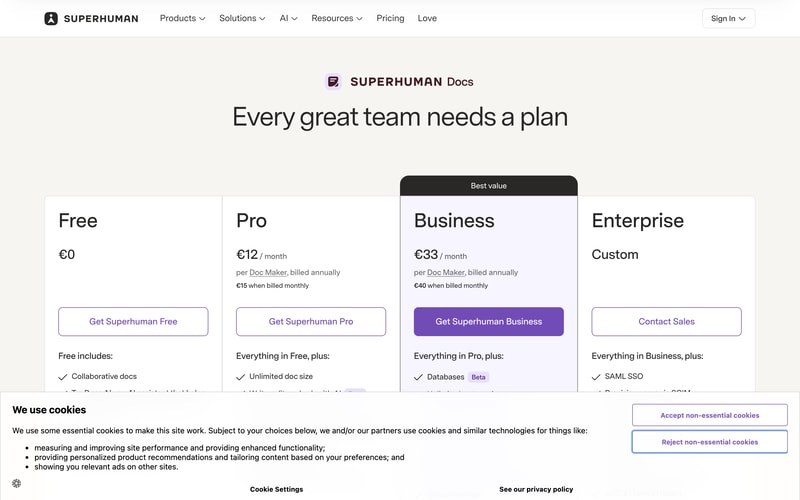
The name has changed. Every call to action on the pricing page reads “Get Superhuman Free”, “Get Superhuman Pro” or “Get Superhuman Business”, and the FAQ refers throughout to “Superhuman Docs”. Coda now sits inside the Superhuman family alongside Grammarly, and the plan cards list Grammarly and Go as included from Pro, with Mail added from Business.
Docs AI is marked Beta and is described as “available during Beta for Doc Makers”.
How Coda Works
- Doc Makers are the only billed role.
- Editors, Viewers and Guest Editors are always free.
- The model holds on Enterprise, per Coda’s own FAQ.
- Two paid tiers plus a free one, and a custom Enterprise.
- Grammarly, Go and Mail are bundled from Pro upward.
- Removals give account credit, not refunds.
Coda Pricing
Captured from Coda’s pricing page in July 2026 on the euro price list.
| Plan | Annual (per Doc Maker/mo) | Monthly | Saving | Key additions |
|---|---|---|---|---|
| Free | €0 | €0 | — | Collaborative docs, connected tables, formulas, automations |
| Pro | €12 | €15 | 20% | Unlimited doc size, 30-day version history, custom branding and domains |
| Business | €33 | €40 | 17.5% | Databases, unlimited automations and version history, private folders, doc locking |
| Enterprise | Custom | — | — | SAML SSO, SCIM, audit events, SOC 2 Type 2, HIPAA |
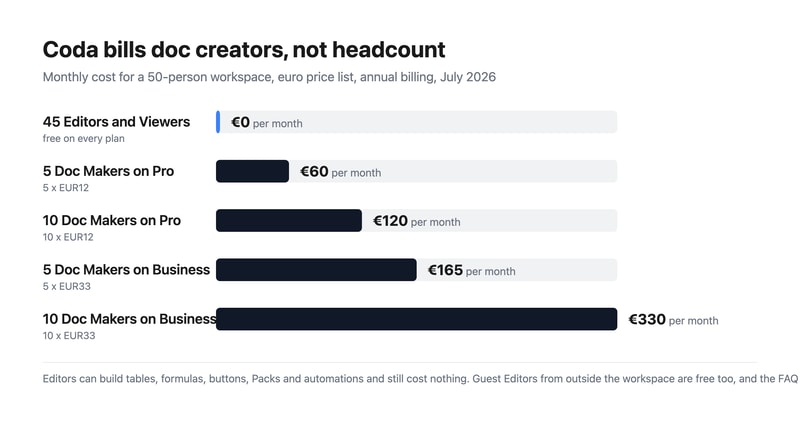
What actually decides your cost:
- Count your doc creators, not your team. Coda’s FAQ is explicit: “Editors and Viewers are always free”, and “at the end of each billing cycle, you will be billed for the workspace based on the number of Doc Makers in it.” A Doc Maker creates docs and templates and manages folders; an Editor does almost everything else — tables, views, formulas, buttons, Packs, automations — for nothing.
- The free roles are unusually capable. This is not a viewer-only tier dressed up. An Editor building a formula-driven tracker with automations is doing the substantive work of the platform and is not billed for it. Compare that with Notion or Airtable, where an editor is a paid seat.
- Outside collaborators are free too. Sharing a doc externally adds the recipient as a Guest Editor, who can edit content in that doc but cannot manage pages or browse the workspace. Guest Editors cost nothing, so client and contractor collaboration does not inflate the bill.
- Enterprise keeps the model. The FAQ states plainly: “Even on Enterprise, you pay only for Doc Makers.” Enterprise adds SAML SSO, SCIM provisioning, audit events, a SOC 2 Type 2 report and HIPAA compliance rather than changing how you are counted.
- Business is a 175% step up from Pro. €33 against €12 buys databases, unlimited automations and version history, private team folders, page locking and cross-doc actions. Pro’s automations are not stated as unlimited, so heavy automation users should establish the Pro limit before assuming they can stay there.
- Cancelling gives credit, not money back. Coda’s FAQ: “When you remove members or cancel your plan, we’ll apply a prorated credit onto your account you can use for future charges in your workspace.” That credit is usable inside the workspace, not refundable to your card.
Who Should Use Coda
- Teams with few builders and many readers. The clearest case — the pricing model is designed exactly for this shape.
- Operations and product teams. Connected tables, formulas and automations replace a spreadsheet-plus-doc sprawl.
- Agencies and consultancies. Guest Editors are free, so client collaboration costs nothing.
- Organisations needing compliance. SOC 2 Type 2 and HIPAA on Enterprise.
It fits poorly for teams where everyone creates docs, since every one of them is a billed seat; for buyers who need mature, non-beta AI, given Docs AI’s Beta labelling; and for anyone unsettled by an in-progress rebrand.
Honest Pros and Cons
Strengths
- Editors and Viewers are free on every plan, including Enterprise.
- Free Editors can build tables, formulas, buttons, Packs and automations.
- Guest Editors from outside the workspace are free.
- A genuinely capable free tier with connected tables and automations.
- Grammarly, Go and Mail bundled from Pro upward.
- A 20% annual discount on Pro.
Limitations
- The product has been rebranded to Superhuman Docs mid-flight.
- Business costs 175% more than Pro.
- Docs AI is still labelled Beta.
- Pro’s automation allowance is not stated as unlimited.
- Cancellations yield account credit, not refunds.
- SSO and compliance reporting require Enterprise.
Coda Alternatives and How It Compares
- Notion is the closest competitor, charging per member rather than per creator.
- Airtable is stronger as a database, with per-seat editor pricing.
- ClickUp and monday.com approach the same ground from project management.
- Smartsheet targets enterprise work management with a spreadsheet metaphor.
- Google Workspace covers documents far more cheaply without the database layer.
- Confluence, Slite and Nuclino compete on team wikis and documentation.
For a broader survey, browse our document creation directory.
The Verdict
Coda’s pricing model is the best thing about it, and after a month of reviews spent pointing out where headline rates mislead, it is a pleasure to report one that works the other way. You are billed for Doc Makers only. Editors and Viewers are free, and so are Guest Editors from outside your workspace — on every plan, with the FAQ confirming that “even on Enterprise, you pay only for Doc Makers.” Crucially, the free roles are not spectators: an Editor can build tables and views, write formulas, configure buttons, add Packs and set up automations. A fifty-person team where five people create documents pays for five seats.
Set against per-member competitors, the difference compounds quickly. That same fifty-person workspace costs €60 a month on Pro or €165 on Business, where a tool charging per member would bill all fifty. If your organisation has a handful of builders and a long tail of people who read, comment and edit within existing docs — which describes most operations, product and marketing teams — this is the cheapest serious option in the category by a wide margin.
Two things to note before committing. The product is being rebranded: every button on the pricing page now reads “Get Superhuman”, the FAQ calls it “Superhuman Docs”, and Grammarly, Go and Mail appear as bundled products from Pro upward. Anyone evaluating “Coda” should know they are buying into the Superhuman family, and that Docs AI is still labelled Beta. And on the commercial detail, removing members or cancelling produces a prorated account credit rather than a refund — usable for future charges in the workspace, not returned. Neither undermines the central point, which is that Coda charges for the people building and lets everyone else in free.
FAQ
How much does Coda cost?
On the euro price list captured July 2026: Free at €0, Pro at €12 per Doc Maker per month billed annually (€15 monthly), and Business at €33 billed annually (€40 monthly). Enterprise is a custom quote. Crucially, you are billed only for Doc Makers — Editors, Viewers and outside Guest Editors are free on every plan.
What is a Doc Maker in Coda?
The only billed role. Coda’s FAQ defines Doc Makers as members who “create new docs and templates, create and manage folders to organize the workspace”, plus doc administration such as adding pages, changing titles and icons, and configuring locking. Editors, by contrast, “can edit content and collaborate in existing docs and pages, including adding tables and views, constructing formulas and buttons, adding and configuring Packs and automations” — and are free.
Are Coda Editors and Viewers really free?
Yes. The FAQ states “Editors and Viewers are always free”, and billing is based purely on the number of Doc Makers in a workspace. External collaborators become Guest Editors, who can edit content in docs shared with them but cannot manage pages or browse the workspace, and they are free too. The model holds on Enterprise, which the FAQ confirms explicitly.
Is Coda now called Superhuman?
Effectively, yes. Every call to action on the pricing page reads “Get Superhuman Free”, “Get Superhuman Pro” or “Get Superhuman Business”, and the FAQ refers throughout to “Superhuman Docs”. The plans also list Grammarly and Go as included from the Pro tier, with Mail added at Business, so Coda now sits within the wider Superhuman product family.
Does Coda refund unused time if I cancel?
Not in cash. Coda’s FAQ states: “When you remove members or cancel your plan, we’ll apply a prorated credit onto your account you can use for future charges in your workspace.” So downgrading or removing Doc Makers produces workspace credit against future billing rather than money returned to your payment method.

Compare Coda with other popular tools in the same category.
adding docs to a blank sheet and importing excel sheets
Often when asigning for a task, they wouldn't receive it
Having all work in one place and a neat time line for our marketing calander
the intuitive manner in which is helps you to manage and create your documentation and specifications
it doesn't interface well with Jira/Confluence
its a product that is closer to what our Product Managers expect in terms of ideation, documentation and organizing creative thoughts
The dynamic way in which all items can be placed
The free version has a character limit that impacts the organization. It could be limited by "projects", example: 2 projects for the free version.
Organization of several files for projects and clients at the same time.
The versatility and flexibility which allows me to create and work with any kind of data and information I need to organize
There’s a steep learning curve. Also, the flow of information between docs can be better
Organize my research findings, create internal memos. Curate knowledge for my peers
I really like the formatting and organization in Coda, it's easy to use and the layout makes it easier to find information than on other platforms.
I don't like that my org limits doc maker capabilities due to the cost. I also do not like that tables automatically duplicate to create a 'view' of the other table. I'd rather that be an option I could select after pasting. Instead of 'duplicate data instead', it should auto duplicate the data and then offer 'create a view of data instead'.
Project management, I like being able to assign tasks to others.
It works foir anything you need, and the pricing model is great! Also, the templates (doc gallery) is impressive
It's more difficult to use than Notion, but it compensates with better functionality and way better templates
Planning stuff of my personal life and managing entire businesses
I love this software as it has quite surprising solutions, according to the issue of document generation for a profit-making profit in political and economic senses, when said idealization is finally executed, this system is programmed for deep and intelligent management of projects, which one of my favorite points in relation to Coda, is that it provides data of great labor importance, for the effective development of prototypes or products that are finished later, being of a wonderful proportion, since It proposes to us to support in areas of high executive degree or in the necessary production fields for the operation of said business establishment.
Since it is a software that is involved in the management of projects of high importance at a general level throughout the organization, it would be extremely useful if it would integrate functions more adapted to the functions that this system maintains designed, since one option for use is the accessibility of video conferences on this same platform, in order to discuss all the didactic and idealized points that were created in a more comfortable way, being a great idea, for a greater performance.
We can make it known that we use this software in a large proportion, due to its wide variety of functions that are very useful in most of the different fields of work that we maintain, more than anything it is executed in the analytical and development areas , for the integral production of digital products, as this software provides us with a solid project management, with a prudent solution in massive generations of documents for the embodiment of these ideas based on templates for a more flexible work, which has been possible notice an understandable result from the beginning of its implementation in the digital platform that we acquired.
I like this software because it offers very relevant use options that allow a versatile usability of the system, since we can create documents based on very well formulated templates for a more adequate and coherent informative work, while allowing speed for the development of these formats, adapting to the needs of companies, since they can exercise all their labor management from this system, as long as they depend on these objective functionalities, for their enactments and frequent operations.
Although it is a software that supports a wide variety of cases, it does not proceed with the availability of certain functions, which would increase productivity from this system, in an extraordinary way, but this option of great use, is at a negative disadvantage, which is a problem, as it not only presents this feature in compatibility, but many more that could increase performance and collaboration in organizations, and guarantee one job at a time.
It allows us to create powerful documents, with relevant information extracted for our most favorable benefit, which was implemented in the center of our organization, since its way of use is versatile, because we even use it in the logistics and analytics department , to collect well-promoted data with an informative base, highlighting that it is easy to create and modify them with end-to-end security, underlining that it is very flexible in most of its basic and advanced operations, which guarantees us each function that we generate with this program.
This unique and independent document manager brings with it a stable programmatic disposition, which has the established guidelines to formalize the joint mobilization of files, where the task of assisted management of projects, tasks, works and notes is facilitated, including professional Presentation tools. , tracking collaboration, idea management and feasible planning of programmatic functionality to maintain and establish stable workflows.
The part of the data emptying system is affected due to the fact that its real-time edition has tool connectivity problems, where these methods fail to impose their task execution methodologies correctly, which makes it more complex to develop An acceptable variability results for the company, this being a considerable aspect that should be corrected as soon as possible for errors in the company system.
Coda is used by my company to establish an objective resolution of problems, managing to structure the execution of a functional task in a high percentage, carrying out a particular document management, where its content is analyzed perfectly for the quality of its software. , allowing content management, inclusion of methods and ease of operational safeguard, being a powerful application for information configuration and presentation molding that has generated considerable progress for my company.
I like Coda in great quantity, because it integrates several of its functions in a single tool, as this guarantees a more controversial and versatile workflow at the same time, being totally effective, since it combines essential powers according to its Template-based document generation programming, as it adds the flexibility of a document, the hierarchy of a spreadsheet and the extensive utility of applications that operate on the system on a single new canvas, that is, it allows you to create files as powerful as an application, assimilating that I love for its design innovation in every aspect.
We can mention that it does not contain an adequate content management to carry out its great work, being a problem of great magnitude, since it does not maintain an update in this sector of the software, in order to improve its use, in terms of flexibility mainly, this tool allows to maintain an adequate control within the application, which it does not acquire in availability, misinterpreting all its design in general in a critical way.
We use Coda in our organization, mainly for its powerful functions of document creation, guaranteeing us quite successful presentations when viewed, it offers us tools for the elaboration of these formats, in a safe and effective way, it provides our teams with the tasks necessary to prosper the constant work of these individuals and the company, since from this generator we capture the main most beneficial projects that we acquire and we tend to carry out.
I like Coda immensely because it combines flexibility in its various essential functionalities of its design, such as the integration of a document, the power of a spreadsheet adapted to the company and the usefulness of the various applications in a just a new digital canvas, which allows making a note as powerful as a web application, highlighting that it has real-time editing tools in case an update of said transcribed text is needed.
It does not contain adequate content management, to imply precisely its primary functionality, including that its user interface likewise suffers from this design flaw in its main platform where there is more traffic flow from potential clients of the software, being confusing when offering its service, that is, it has little information, without excluding that it does not have the service version control tool available, being a problem frequently mentioned by Coda operators.
It is frequently used in my company for its main functionalities such as document and project management, since with this we can have a better initiative in terms of any idea formulated by our clients, it allows us to have quite considerable flexibility in relation to their fundamental applications providing us with ease of use in our platform in order to acquire a better movement of new users close to the fundamental function of our organization by offering them effective work.
Ability to automate task through the hole company with a single source of truth.
Custom scripting is not (yet) supported. This works increase the possibilities a lot
A single source of data through the hole company that help us in making better business decisions

Coda makes it super simple to go from a table (similar to a spreadsheet, but more intuitive) to a functional, communicative interface that contains other views, contextual text, and a number of powerful other tools. The community is incredibly helpful and the ability to make feature requests empowers users to really guide the direction that Coda takes.
Sometimes, it feels like the Coda team prioritizes features that make things easier for doc readers rather than document creators. The lack of one specific feature has made it almost impossible for me to do a number of things.
Resource allocation and scheduling for work, personal vacation planning with family and friends, CRM, etc. Coda empowers users to solve many problems with one tool.

The flexibility of the docs and the constant development the team puts into it.
If I want to do something a little more advanced it is a tat too difficult to figure out. The support team does, however, prove helpful.
I can control complex projects relatively easily, and get a better overview
The flexibility - you can do everything from planning, note-taking, journaling to product sprints on Coda.
Some features that product management tools provide like Asana are missing (e.g. adding followers to a task) and most importantly a good mobile app.
Personal planning, product planning, sprint tasks
We like the connectivity to various services which we already use. And the regular updates to help improve and partner with other 3rd party services. We are able to custom design a system which specifically suits our sales and ordering process.
We use numerous documents which serve different purposes within our business. At times it becomes frustrating to have to refresh or wait an hour for information from a different document to sync. A faster sync time would be preferred.
We are able to utilize both the desktop and mobile version for our employees who work remotely. They are able to use Coda to record their time sheets, send out invoices and automatically have their hours incorporated into our costing reports.
We use coda to organise the features of different SKU's and it does so in an easy to view way
i feel overall the platform could be more intuitive. it's not easy to pick up from scratch
We used another provider that was expensive, i believe. But coda is mainly used to store all features and functionality of different products
The number of templates you can use and make.
It's paid and it can be inaccessible to people who want to try it.
Coda is helping me organize my tasks, while also allowing me to write notes more efficiently.
The inerconnectedness of documents - easy to update multiple docs in one stroke. Many options for automation allow for quicker work and outputs Many different viewing capabilities help to display data back to stakeholders in a structured way.
Some features are little too robust - make it more complicated to set up a framework with no bells and whistles.
Being able to track multiple projects with many stakeholders in a easy to follow manner
Coda is great to use for integrating with other systems, managing projects, writing long form documents, and working with customers. I like having most of documents and work processes in one place. I use it everyday.
Coda takes some time to learn, and set up can take some time, but they have gone a long way in easing these issues with their templates , great community, support and service.
Coda solves the problem of managing multiple different work streams (meeting manageement, note taking management, project/product/program management, task management) in one place, for different customers and for internal usage.
I really like how comprehensive the feature offering in coda is. In the beginning I was skeptical given all kinds of notebook app all comes out together in a short sprint but eventually realized that coda is fully functional, has extensive support and solves lots of real problem in workspaces. One example is that I've been using it as a collaborative knowledge base that allow everyone in the company to conbribute too. Spending time learing coda really can speed up some misc daily tasks.
Some of the features need more simplification, like when I simply try to create a table to organize my ideas, I always have trouble.
- Collaborate note taking. - Easily setup a public code base that allow peoplo to contribute to. - Many integration options available.
I really like that the platform offers me a free plan to determine if it suits my needs I have access to numerous customizable options and a variety of templates. I can use incredible tools such as workflow automation and a formula editor. Additionally, it allows me to create my own custom templates. With its powerful collaboration tool, I Can easily monitor my team’s performance and task assignments. Overall, it offers me comprehensive and efficient solutions for content creation and collaboration. It's integration with other platforms was top notch.
I think the plan is slightly higher expensive compared to other platforms. I find it very difficult to use. I can’t use this on Windows. Additionally, I think providing cloud storage facilities would enhance the experience and allow for easy access to files on any device. I find bugs on the website and it is very slow I can’t import documents from other platforms. It is not optimized for mobile users, making it difficult to navigate on a mobile phone. It may not be ideal for graphics-intensive work compared to other platforms. The customer support was really lazy at times while contacting.
It is the management platform best for me who are in search of creating different types of files, such as spreadsheets, databases documents, and many more. I am glad that I use this platform with my team members for my company work. I was able to customize temples according to my needs, create files, and many more. It is a great platform for small to medium enterprises like ours.
I love that Coda comes with a free plan for users to decide if to take a subscription or not. I could create any content I desired easily with various templates and customizable features and options. This software provides many useful features such as workflow automation, formula editor, and many more which have helped me increase my productivity and save a lot of time. I also like the Coda because it shows me my entire team's performance on a single dashboard so that I can monitor it easily.
I found the subscription plan to be pricey and not worth the money. The usage was also not smooth, the user interface had lots of bugs and was laggy. I was expecting a good storage facility to store my files but I was disappointed. The software also takes a lot of time to boot which I find very annoying. It is not optimized for mobile and android devices which limits the number of tasks one can do on them.
I generally use Coda to manage my projects and monitor my team's performance. It also helps me to manage daily tasks. I also find it very useful for document creation and editing and for notes. Sometimes I even conduct surveys on Coda.

Best thing about Coda is it's easy to use interface and features such as intercative doc editor that allows me to add content seamlessly and organize it in multiple rows, columns for a neat presentation.
There's not much to dislike about the software given that it's purpose is to contain important organization docs across marketing & coding team.
We use Coda for maintaining day-to-day docs including blogs, marketing plan. It is also used by the tech team as a means to maintain multiple docs for internal usage.
Coda is a super flexible software that allows you to create and share information between the entire organization in a number of ways. The possibility of using formulas customized for your needs is what makes it even more amazing. Already used it for a number of reasons: team kanban, communication calendar, documentation, campaign history, etc. Truly amazing.
At first sight, Coda seems to be a bit tricky to use. You can, of course, use the basic settings and templates, but the really charming part of Coda relies on the formulas and custom set ups that aren't really user friendly if you're not a little bit familiar with some coding/liquid logic writing.
Coda is amazing for putting together team ecosystems where you can gather information from different areas in a single place and, thus, share knowledge between different people from the company. We use the tool to put together shared information, wiki files from the company and planning our overall strategy for our day to day work.

The search for a perfect project management tool ended with Coda for us. The versatility and usability of coda allowed us to unify data and follow the status of the work and led us to better team management.
Even though using coda is a delight, getting started can be tricky. Although it takes some time to adjust to the surroundings, several tutorials and starting points are available to aid in the process. The user experience of the mobile app can be enhanced.
At my job, Coda is used to improving management in a fun way. It is fantastic for keeping track of work progress. In my personal life, I use it to keep track of crucial details about my activities and to document them.

An infinitely programmable document and the ability to scale without compromising the structure. Combine with an active community to help seek out more ideas and solutions for my docs.
Lack of customizations to charts and how the data is presented. Lack of global support. As right now it is US-based; it is difficult to talk to someone live on the job because of the time difference.
It acts as a pseudo productivity app and perhaps as a proof of concept for the management system. Hence, it's easy to demonstrate an idea without having to invest in a dedicated development team.

I looked at a lot of knowledge management and project management tools for my editing agency. I'm a spreadsheet person, but using Excel meant not being able to share with my contractors. In my research, I found tools that either I couldn't afford or that didn't fit my business. Coda is spreadsheet based but with several different views and lots of functionality. By building my own tables and utilizing different views, I was able to create just what I needed to track Right Touch Editing's projects and share what I needed to. Thanks, Coda!
Learning how the Coda environment works takes some time. There are plenty of tutorials to learn from and templates to jump off from to help, but be prepared to set aside time to get comfortable in the environment. It's well worth the investment.
Coda helps me track my business more dynamically than Excel spreadsheets ever could. It lets users view data in the best way for them and allows them to connect data for a fuller picture with less clicking.
User friendly! - navigation is nice for the most part, faily easy to find the stuff Love the templates - use these in a consistent basis Support team gets back to me - very important!
- Limitation on the templates: I'm still in need of more formats such as simpler templates for Ops Goals, design of tables, overview tables and more - Not possible to make subpages visible for only a few people, all participants see the whole document regardless - Unable to move docs from one folder to another - Limitation on emoji icons - Need more basic features for editing images (such as powerpoint has: shadows, outline, shape, arrows, etc.) which forces me to edit it outside Coda and then copy paste it - Hard to manipulate tables, titles, etc.
Not sure?