

Unclaimed: Are you working at Dashlane?
Dashlane Reviews: 4.5/5 — Highly Rated
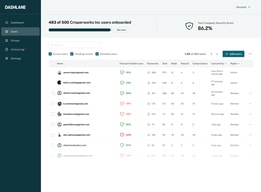
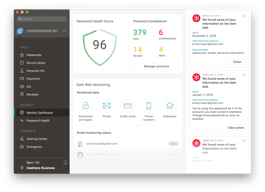
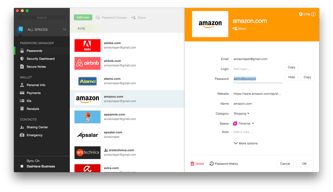
Dashlane is a simple and easy-to-use paid password manager that also comes with a free version. It’s available as a desktop app for both Apple and Windows computers, and a mobile app that works on both Android and iOS. All necessary security features you would expect from a password manager are available on Dashlane, with a host of additional features, including CPN for WiFi protection, dark web monitoring, automatic password changer, emergency access features, and advanced two-factor authentication and biometric login.

| Capabilities |
AI
|
|---|---|
| Segment |
Small Business
Mid Market
Enterprise
|
| Deployment | Cloud / SaaS / Web-Based, Desktop Mac, Desktop Windows, Mobile Android, Mobile iPad, Mobile iPhone |
| Support | 24/7 (Live rep), Chat, Email/Help Desk, FAQs/Forum, Knowledge Base, Phone Support |
| Training | Documentation |
| Languages | English |






Dashlane recommends Premium at €4.00 a month for one person. Friends & Family costs €6.05 a month for ten. That means the family plan is cheaper than two Premium subscriptions — €6.05 against €8.00 — so the break-even is two people, not five or six. At ten it works out at €0.61 per person per month, 85% below the plan Dashlane badges as “RECOMMENDED”.
- What it is: A password manager with autofill, dark web monitoring, a VPN and scam protection.
- Best for: Households — the family plan is the value, and it starts paying at two people.
- Pricing: Premium €4.00/month, Friends & Family €6.05/month for 10, both billed annually. Verified July 2026.
- The honest catch: There is no monthly billing option, and the free plan is not on the pricing page.
What Is Dashlane?
Dashlane stores and autofills passwords, passkeys, payment details, secure notes and IDs across unlimited devices, adds dark web monitoring against a continuously scanned breach corpus, and — newly — real-time scam protection. It holds a 4.5-star average across more than 300 Findstack reviews.
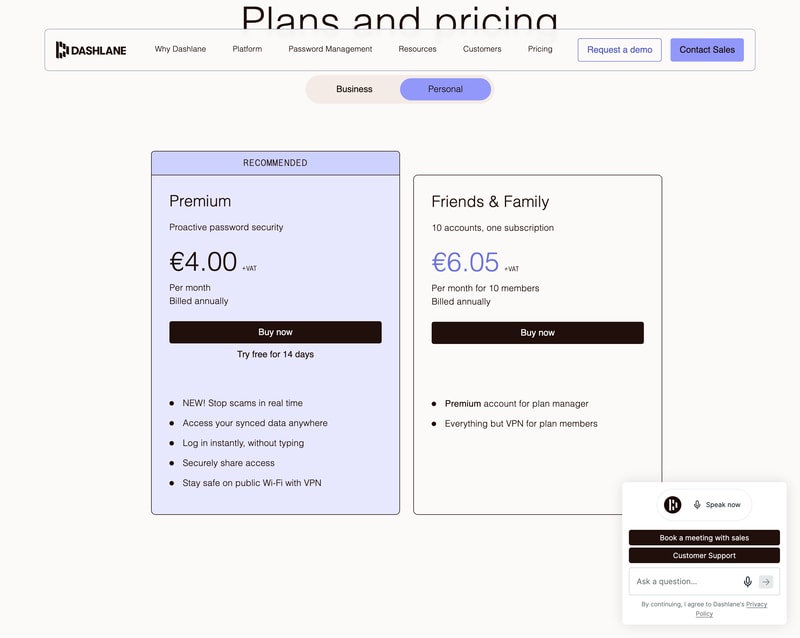
The pricing page splits into Personal and Business. Personal has two plans; Business has three, and one of them is not a password manager at all — more on that below.
How Dashlane Works
- Two personal plans, Premium and Friends & Family.
- Ten accounts on one Friends & Family subscription.
- Annual billing only — no monthly option offered.
- The VPN is manager-only on the family plan.
- A free tier exists but is absent from the pricing page.
- 14-day free trial on Premium.
Dashlane Pricing
Captured from Dashlane’s plans page in July 2026 on the euro price list, reading both the Personal and Business tabs. All prices exclude VAT.
| Personal plan | Per month | Per year | Members | Per person/year |
|---|---|---|---|---|
| Free | €0 | €0 | 1 | €0 — 25 passwords |
| Premium | €4.00 | €48.00 | 1 | €48.00 |
| Friends & Family | €6.05 | €72.60 | 10 | €7.26 |
| Business plan | Per user/month | Includes a password vault? |
|---|---|---|
| Credential Protection | €4 | No — detection and response only |
| Password Management | €8 | Yes |
| Enterprise | Custom | Volume-optimised |
What actually decides your cost:
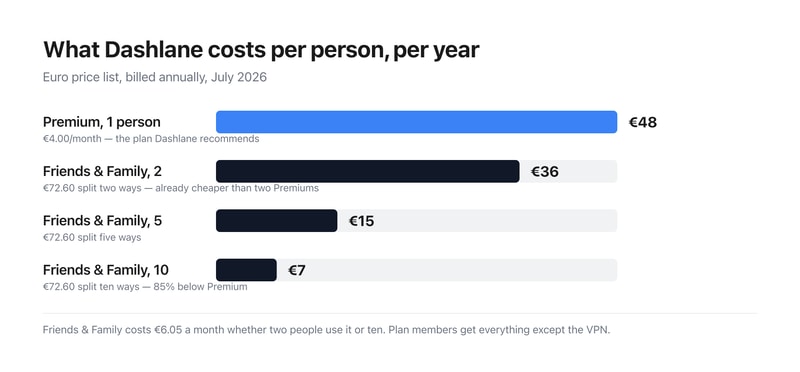
- The family plan wins at two people, which is much earlier than these plans usually break even. €6.05 for ten accounts against €4.00 for one means two Premium subscriptions (€8.00) already cost more than the full family plan. Split ten ways it is €0.61 per person per month — €7.26 a year each against €48. If there is anyone else in your household with passwords, Premium is the wrong purchase.
- Members get everything except the VPN. Dashlane states it plainly on the card: “Premium account for plan manager. Everything but VPN for plan members.” So the plan manager holds the only VPN entitlement, and the other nine get the full password manager without it. Worth knowing if the VPN is part of why you are buying.
- There is a free plan, and it is not on the pricing page. Dashlane’s plans page shows only Premium and Friends & Family. A separate page offers a free account covering up to 25 passwords synced across unlimited devices, with autofill, the password generator and breach alerts. Twenty-five is genuinely tight for anyone with a normal number of accounts, but it is a real free tier and you have to go looking for it — the pricing page will not tell you it exists.
- There is no monthly billing option at all. Both personal plans say “Billed annually” with no toggle to switch. So the entry commitment is €48 or €72.60 up front rather than a small monthly charge — an unusually firm stance in a category where monthly billing is standard. The 14-day trial is what stands in for it.
- On the business side, the cheaper plan is not a password manager. Credential Protection at €4 per user per month sits left of Password Management at €8, and the comparison table marks it with a dash against Secure Vault, AI-Powered Autofill, Password Generator, Secure Sharing, Password Health dashboard and SSO/SCIM integrations. It detects and responds to credential risk; it does not store credentials. If you want Dashlane to manage business passwords, the price is €8, not €4.
- Prices exclude VAT. Every figure on the page carries a “+VAT” marker, so a European buyer should add their local rate before comparing against competitors quoting inclusive prices.
Who Should Use Dashlane
- Households of two or more. The clearest case by a distance — the family plan wins immediately.
- People with fewer than 25 passwords. The free tier covers you, if you can find it.
- Anyone wanting a VPN bundled in. Included with Premium and for the family plan manager.
- Businesses needing credential risk detection. Credential Protection is a distinct product, not a cheap vault.
It fits poorly for anyone who wants monthly billing, which is not offered; for solo users comparing on headline price, since €48 a year is mid-market; and for businesses shopping the €4 tier expecting password management.
Honest Pros and Cons
Strengths
- Ten accounts for €6.05 a month — the family plan is excellent value.
- A genuine free tier, if a small one.
- Unlimited devices on every plan, including free.
- A VPN included with Premium.
- Dark web monitoring against a continuously updated breach corpus.
- 14-day free trial, no card commitment up front.
Limitations
- No monthly billing on either personal plan.
- The free plan is absent from the pricing page.
- 25 passwords is a tight free ceiling.
- The VPN is manager-only on Friends & Family.
- Credential Protection has no vault despite sitting at the cheaper price.
- All prices exclude VAT.
Dashlane Alternatives and How It Compares
- 1Password is the closest competitor on polish and family pricing.
- NordPass competes hard on price with a similar feature set.
- LastPass remains widely used, with a longer breach history to weigh.
- Bitwarden is the open-source option, with a free tier far more generous than 25 passwords.
- Keeper and RoboForm round out the category at comparable price points.
For a broader survey, browse our password manager directory.
The Verdict
Dashlane is a strong password manager, and the interesting thing about its pricing is that the plan it recommends is usually the wrong one. Premium carries the “RECOMMENDED” badge at €4.00 a month for a single user. Friends & Family costs €6.05 a month and covers ten accounts — so two Premium subscriptions (€8.00) already cost more than the entire family plan. The break-even is two people, not the five or six you might assume, and at ten members it works out at €7.26 per person per year against €48. Unless you genuinely have nobody to share with, the family plan is the default choice.
Two things the pricing page does not tell you. A free tier exists — up to 25 passwords, synced across unlimited devices, with autofill, the password generator and breach alerts — but it appears only on a separate page, not among the plans. Twenty-five passwords will not cover most people, so this is a starting point rather than a destination, but it deserves to be on the page. And there is no monthly billing option at all: both personal plans say “Billed annually” with no toggle, so the real entry price is €48 or €72.60 committed up front. The 14-day trial substitutes for the ability to pay month to month.
The business tab needs reading carefully for a different reason. Credential Protection at €4 per user per month is not a password manager. It sits to the left of Password Management at €8, which invites the assumption that it is the cheaper vault — but the comparison table marks it with a dash against Secure Vault, autofill, the password generator, secure sharing, the password health dashboard and SSO/SCIM. It detects and responds to credential risk across your organisation; it does not store credentials. Businesses wanting Dashlane to manage passwords should budget €8 per user per month, plus VAT, and treat the €4 figure as a different product that happens to share a pricing table.
FAQ
How much does Dashlane cost?
On the euro price list captured July 2026, excluding VAT: Premium is €4.00 per month and Friends & Family €6.05 per month for ten members, both billed annually — €48.00 and €72.60 a year respectively. There is no monthly billing option. On the business side, Credential Protection is €4 per user per month, Password Management €8, and Enterprise is quoted.
Is Dashlane Friends & Family worth it?
Almost always, if more than one person will use it. At €6.05 a month for ten accounts it costs less than two Premium subscriptions at €4.00 each, so it pays off from the second user onward. Split across all ten it is €0.61 per person per month — €7.26 a year against Premium’s €48. Members get everything except the VPN, which stays with the plan manager.
Does Dashlane have a free plan?
Yes, though it does not appear on the pricing page. A free Dashlane account covers up to 25 passwords, passkeys, payment details, notes and IDs, synced across an unlimited number of devices, with autofill, the password generator and breach alerts included. The 25-password ceiling is restrictive for most people, but the plan itself is real and permanent rather than a trial.
Can I pay for Dashlane monthly?
No. Both personal plans display “Billed annually” with no option to switch, so Premium commits you to €48 and Friends & Family to €72.60 up front, plus VAT. Dashlane offers a 14-day free trial on Premium instead, which is the only way to use the paid product without an annual commitment.
What is the difference between Dashlane’s €4 and €8 business plans?
They are different products. Password Management at €8 per user per month is the password manager — secure vault, autofill, password generator, secure sharing, password health dashboard, SSO and SCIM. Credential Protection at €4 provides risk detection and response, phishing detection and SIEM integration, and Dashlane’s own comparison table marks it as having none of the vault features. It is not a cheaper version of the same thing.

Compare Dashlane with other popular tools in the same category.
Most helpful - easy to setup & deploy, easy to share passwords securely, scoring can help maintain a higher level of security. Group shares are good for departments, and accounts are fairly easy to manage without hiccups as long as you're paying attention (specifically to the recovery options if you're an admin). The browser extension makes it easily usable for team members, and reduces the friction for them when they need to update or change pw's.
It will not work as fluidly when you tell it you don't want it to autofill on a particular site - it still comes back on. Doesn't sync very well with your phone, so hard to use it on mobile.
Our team had kept passwords in non-secure locations and had not shared with each other because they couldn't do that easily. Accounts & logins were opaque to anyone who wasn't in the know with a particular team.
I like how I haven't heard reports on security breaches throughout the length of my use. That's an A+ in my books. I also find it super easy to access and share with other people. I like how I can configure the password generator to make a variety of lengths and difficulties. It's also been a while since I've had to reset the password in my tools, and that's because I got Dashlane to remember everything for me.
I wish there were a way to easily create shared folders that I can share with a specific team. Let's say I have a folder fool of design tools and I can share them all with our designers.
It solves the problem of forgetting passwords and reduces the friction in sharing passwords with others. I feel like I'm more productive with the tool as I can just focus on more significant tasks and let this tool deal with all things passwords. Payments and forms are even less of a hassle because I can perfectly save payment and personal details of mine and that of other key persons in the organization.
The ease of use, easy to onboard coworkers and explain how they can / have to use Dashlane.
For some reason setting up biometrics instead of a master password is not working for me (MacOs 13.2).
Remembering many different passwords.
Mobile app use is very handy. Simply using biometrics I can easily insert credentials to most other apps and also on the browser. Generating and storing new paswords is simple too.
The browser extension could be a bit more advanced. For example, modifying stored credentials would be handy for the extension. Now I need to open the separate web app and modify them there.
It's easy to use for storing and using passwords. It also is suitable for enterprise use and we can centrally manage the user accounts and also monitor the password health statistics for all users.
Super secure and no-nonsense approach to managing passwords
Having to remember and enter master passwords every 14 days is a little troublesome
Dealing with password complexity conforming to various website requirements as well as dark web monitoring.
Dashlanes' investment and abilities across devices stand out daily, whether going from a work device to a personal one or changing operating systems/browsers – it's superb.
Call me outdated in 2023, but I miss their support of a desktop app for Mac/PC after they moved to browser support only.
Keeping passwords secure, unique and in one-place is all I ask from a password vault, and Dashlane is top-notch!

The browser plugin is very good and on most websites it can log you in automatically. The customer support is outstanding.
I'm looking forward to a completly master password-free Dashlane, but this is already in development.
We abandoned storing passwords in browsers on personal devices where it's not secure. It's great that you can distribute some "basic" passwords with one click when a new employee starts. Also, shaing passwords got a lot more easy.

I really like the simplicity of the platform. Pretty easy to use and share logins with others. Extremely helpful with our growing team in making sure that we have a secure method for sharing credentials with each other. Never had any issues or complaints from users.
Wish there was the ability to create folders of logins to share with different teams all at once rather than having to go through each login. We have hundreds of logins saved so it can sometimes be time consuming when we have to share with a new team. The ability to share secure notes that have attachments and the ability to customize the categories would also be nice enhancements.
Making it easier to share credentials, keep track of who has access to the credentials, and maintain them securely.
As an agency, Dashlane has helped us keep our passwords safe across our organization. It is very convenient since it works across devices. And the fact that it includes a VPN helps us stay safe when connected to unsecured networks.
When we first got Dashlane Business, it had a desktop application that would help you get logged into other applications installed locally. This is no longer the case. Since this feature was removed, we now have to open a browser in order to log into these applications.
For the most part, Dashlane works pretty seamlessly in letting us log into online accounts without issue. For a while, there was a time when there were issues with passwords not getting refreshed across devices, but that seems to have been getting better.
- easy give employees access to shared accounts - easy remove users and there access
- sometimes it looks like it takes a while before a shared password is found in the app
Sharing passwords and notes with employees.
I feel great confidence in storing passwords for our whole company in Dashlane. I also like that the VPN is included. The sharing feature is easy with individuals or groups as well.
Sometimes the autofill feature doesn't work as well but I've noticed that on some sites it all of a sudden starts to work so I can tell they are improving. The mobile app could be improved in terms of suggesting/generating passwords on mobile. There's a lot of clicks to do that and I wish it was as easy as it was on the desktop.
Keeping passwords secure, removing access when someone leaves, and having a built-in VPN.

Easy to share passwords between groups. Also very handy to have an authenticator inside the application. Mobile applications works very well to (iPhone user). Came from LastPass but never heard any leak from Dashlane!
When you want to remove an password which is shared with you by only group you need to share the item with yourself, than remove the share with the group and then remove the password. Thats not possible in bulk so sometimes it takes a lot of time to cleanup some passwords.
We have many passwords for business use and Dashlane is great when wanting to share your passwords internal. Also its easy use when you want to share some passwords with job titles like servicedesk, and you dont want them to see all the passwords which are only available for the engineers.
Sharing and revoking password access is great and essential for business/employer/employee use. The password search and browser plugins and phone app are great. Overall this is the best password manager I've ever used (I've tried 3 other major ones before finding Dashlane).
Sometimes duplicates password/logins are created. I think this is a glitch that will hopefully improve over time. Sometimes password/logins go missing or seem to be removed, which has caused us business disruption. I think this too is a glitch and hope it gets better over time as well (doesn't happen as frequently, but is quite alarming when it does). I wish there were a password/login compare tool to help safely cleanup my password/login library/list. I wish there were a way to display longer names, for example "America Frist C.U. - Bill's personal" vs "America First C.U. - Bill's business" vs "America Frist C.U. - Bill's Secure e-mail". Right now all three of these login/password names just appear as "America Frist C.U. - Bill". You have to either hover over each one or open each one in order to distinguish which is which. My previous password manager didn't have this issue.
Ability to share a password with an employee. Terminate that employee and remove that employee's password access at the same time.
A good password manager, can be managed centrally. Support is good. The main thing - the password manager is secure.
It was strange when they divided Dashlane Business into Business and Team versions...
Help to avoid writing down passwords on sticky notes...
Dashlane is easy to set up and very efficient to share passwords between colleagues. Dashlane is a very convenient password manager, the user administration is easy.
Honestly not a lot of things, If I have to find something I will see the UX, and maybe the lack of authenticator included in the extension: it could be nice to be able to generate 2 authentification factors directly from the chrome extension.
We are using Dashlane Business to exchange passwords between colleagues securely. We are also using it has a password vault for our users, to allow then to generate and use secure password
All passwords and information map from desktop to phone with ease.
It could be more informative of how to set up for other users.
The sharing and updating of secure passwords that multiple people need day-to-day.
Password sharing, group permissions and security scanners
Poor admin console, bad UI for group members
Share password across company and security scanners. Improve password security. We don't remember password anymore.
Very clear GUI, fast, cross-devices, useful "bonus" tools (darkweb monitoring, vpn...)
The Admin interface lack some functionalities : an extract tool of the users, a centralized view on the different domains...
The globalized weakness of passwords, the sharing of passwords
I like being able to access the website.
Sometimes it doesn't autofill when I want.
I don't have to keep my passwords on a different application.
It's quick and easy to retrieve a user name and password.
I sometimes get annoyed by it asking me to save passwords or asking to auto-fill in passwords but I can't fault it for doing its job. There is a feature to ignore a domain which has helped with this issue.
The problem we solved is having all of our passwords stored in one place. A benefit we realized is being able to share passwords with coworkers as well as "secure notes".

Speed of setting up and security of the platform.
No way to lock account if you leave your computer unlocked and walk away and PC is stolen.
Getting rid of paper trails of passwords laying around the office.
Dashlane makes it easy to create unique and complex passwords for all your accounts and easily saves them.
Does not work the same for all websites.
The best problem Dashlane solves is it easily creates complex passwords for all my accounts to guarantee no reused passwords.
Browser based plugin which saves credentials automatically. Random Password generator which helps to create non-dictionary based alpha numeric password.
Categorization is removed from browser plugin. This was part of desktop app.
Dashlane helped us to maintain credentials in more secure way. Also, it provides a dashboard of password strength.
The Web app. It makes it simple to get your saved passwords and generate new passwords on the fly.
I don't like how the password suggestions sometimes cover up username and password fields on some web pages.
Password sharing between teams and the used password/compromised password checkers have been fabulous for us! Allows us to be proactive and make our environment safer.
easy of deployment and use. Integration with SSO and AD.
mixing person password with business. Need to be able to better customize.
Strong password and password management for the enterpirse.
Once you have Dashlane set up, its easy and quick to log into websites to get your work done. No thinking is needed, and yet your logins/passwords are secure. You can do this from your phone app also.
Sometimes Dashlane tries to generate passwords for sites you do not want to remember. Then you have to click cancel a couple of times before you can continue on.
Our whole team makes sure that our sites and information are kept secure by using Dashlane. We can share passwords between teams - this is one of the best benefits of Dashlane.
Parity between extension and web app. Full-featured product. I like the control to remove icons at the site or page level as needed.
some headwinds migrating and registering some existing users with SSO. There's a case history.
Rogue spreadsheets with simple, reused passwords shared amongst employees are going away.
The password generator, the auto-save, the last password memory bank
I wish we could edit the passwords more in detail right away in the pop-up box vs. it just saving the password and username. Would also be great if the vault on the extension opened up all the features, not just the password.
password management security.

intuitive to help create and store passwords. I love that it helps suggest and create passwords for you. I love the option to store credit card information in there as well.
sometimes its autofill is not intuitive and gets in way when filling out forms. if it could ask you if you want to autofill before doing so that would be much better.
we are working on getting our employee base using this for everything to help secure all sites. so far finding it much easier to get around and logged into sites less lockouts.
Ease of implementation and ease of use. The solution dramatically simplified password management within our environment and eliminated the need to reset passwords to the 50+ accounts that I have to maintain.
End-user adoption can be a challenge within the organization if users are using spreadsheets or a browser-based password vault.
Dashlane improves end-user security while simplifying password management. The ability to audit password complexity and re-use for various accounts helps identify vulnerable accounts.