

Unclaimed: Are you working at DigitalOcean?



DigitalOcean Reviews: 4.6/5 — Highly Rated
DigitalOcean is a cloud hosting platform built to serve the needs of startups and established businesses. The software gives developers access to building, deployment, and scaling applications. The platform is best known for its flexible pricing structure and global data centers, as well as an easy-to-use, intuitive control panel.
| Company | DigitalOcean Holdings |
|---|---|
| Year founded | 2012 |
| Company size | 1001-5000 employees |
| Headquarters | New York, NY |
| Social Media |

| Capabilities |
API
CLI
|
|---|---|
| Segment |
Small Business
Mid Market
Enterprise
|
| Deployment | Cloud / SaaS / Web-Based |
| Training | Documentation |
| Languages | English |

A DigitalOcean Basic Droplet with 8 GB of RAM costs $48 a month. The same 8 GB costs about $7 at Contabo and roughly €8.49 at Hetzner. On price per gigabyte, DigitalOcean is around six times the cheapest credible option — and it remains the right choice for a large number of teams, because the gigabytes are not what you are buying.
- What it is: A developer cloud — Droplets (VMs) alongside managed databases, object storage, load balancers and Kubernetes, tied together by an unusually good API and documentation.
- Best for: Teams managing infrastructure as code, and anyone who will genuinely use more of the platform than the virtual machine.
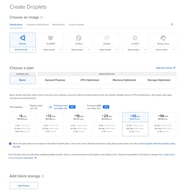
- Pricing: Basic Droplets from $4 a month; 4 GB / 2 vCPU at $20; 8 GB at $48. Dedicated-CPU families from $63. Verified August 2026.
- The honest catch: Backups are off by default and cost 20–30% extra, and if your Droplet is the whole infrastructure you are paying a large premium for capability you will never open.
What Is DigitalOcean?
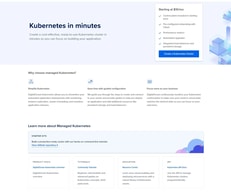
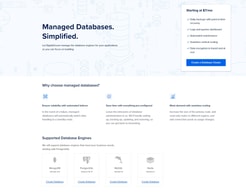
DigitalOcean is a cloud provider built for developers rather than enterprises. Its core product is the Droplet — a straightforward Linux virtual machine — but the reason people stay is everything arranged around it: managed PostgreSQL, MySQL and Redis, Spaces object storage, load balancers, managed Kubernetes, a first-class REST API, a mature Terraform provider, and a documentation library that has taught a meaningful share of the industry how to administer Linux.
That documentation is not a side benefit. Search almost any server-administration question and a DigitalOcean tutorial is near the top, usually correct, and usually dated. The company also dates its documentation pages — “Last verified 13 Jul 2026” appears on the recovery-console guide — which is rarer than it should be and worth something when you are following instructions at 2am.
DigitalOcean also owns Cloudways, which now brands itself “Cloudways by DigitalOcean” — relevant if you are comparing the two, because you are choosing between a raw cloud and a managed layer from the same parent.
How DigitalOcean Works
The Droplet families matter more than most people realise, and DigitalOcean is unusually clear about them.
Basic Droplets share vCPUs with other Basic Droplets. General Purpose, CPU-Optimized and Memory-Optimized are dedicated — no noisy neighbours, no contention. The company documents this distinction under a heading called “Shared CPU vs. Dedicated CPU” rather than burying it, which is more than most of the market manages. The dedicated families differ only in memory ratio: CPU-Optimized gives 2 GB per vCPU, General Purpose 4 GB.
Billing is hourly against a monthly cap, so a Droplet that runs three days costs three days and one that runs all month costs the advertised monthly figure. That only pays off if you create and destroy servers programmatically — and note that stopping a Droplet does not stop the bill, since reserved resources continue to charge until it is destroyed.
Storage comes in two forms. Droplets include local SSD; Volumes are network block storage sold separately. Volumes are capped at 10,000 IOPS (bursting to 15,000) and 450 MB/s, and — importantly — that performance does not scale with volume size. Buy Volumes for data that must outlive the Droplet, not for speed.
The Marketplace carries 409 solutions at the time of writing, including a dedicated AI Agents category, with n8n, Coolify and Ollama with Open WebUI all available as 1-Click Apps. Each has its own documentation page explaining what the image installs, which is the part competitors usually omit.
DigitalOcean Pricing
Verified August 2026, in US dollars:
| Plan family | Example | Price/mo |
|---|---|---|
| Basic (shared) | Entry Droplet | $4 |
| Basic (shared) | 4 GiB / 2 vCPU | $24 |
| Basic (shared) | 8 GB | $48 |
| General Purpose (dedicated) | from | $63 |
| CPU-Optimized (dedicated) | 4 GiB / 2 vCPU | $42 |
| Memory-Optimized (dedicated) | 16 GB / 2 vCPU | $84 |
| Backups | add-on | +20% weekly / +30% daily |
Two things to sit with. The dedicated premium is about 1.75× — a CPU-Optimized Droplet at 4 GiB / 2 vCPU is $42 against $24 for the equivalent Basic. And backups are not included. On a $4 Droplet the surcharge is about a dollar; skipping it is nonetheless how people lose projects, because the default is off and nothing prompts you.
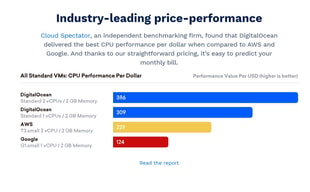
Measured as cost per gigabyte of RAM, Basic Droplets land at roughly $6.00/GB — the most expensive tier in our cheapest VPS index, where budget European hosts sit under $1.
Who Should Use DigitalOcean
Buy it if you manage infrastructure as code and will use the API, Terraform provider and managed services; if your Droplet is one node in a larger system rather than the system itself; if you want managed Postgres or Redis without operating them; or if you are learning Linux and want the best free teaching resource in hosting attached to your account.
Don’t buy it if your VPS is a single box running a single stack. At that point you are paying roughly six times the per-gigabyte rate of Hetzner or Contabo for a platform you will not open, and the honest advice is to take the cheaper server.
It is also not the best first VPS for a non-technical beginner, despite the documentation. A Droplet is a bare Ubuntu box with no control panel, so your first task is a shell session rather than a form — and backups being off by default is the wrong default for someone who does not yet know what they do not know.
Honest Pros and Cons
Pros
- Documentation and tutorials that are genuinely best in class, and dated so you can judge staleness
- Excellent API, CLI and Terraform provider — the reason hourly billing is actually usable
- Clear, documented distinction between shared and dedicated CPU families
- A deep Marketplace (409 solutions) with per-app documentation
- Out-of-band Recovery Console plus a Recovery ISO, so a firewall mistake is recoverable without a support ticket
- Managed databases, Spaces, load balancers and Kubernetes on the same bill
Cons
- Roughly 6× the cost per gigabyte of the cheapest credible European hosts
- Backups off by default at 20–30% extra
- No control panel on Droplets, so it is a poor fit for panel-oriented users
- Volumes capped at 10,000 IOPS regardless of size, which surprises people expecting NVMe speeds
- The Recovery Console can itself be blocked by an aggressive firewall rule, needing a temporary allow-all inbound rule to reach
DigitalOcean Alternatives and How It Compares
Against Hetzner — Hetzner is dramatically cheaper per gigabyte and its shared plans give more cores at the same memory. DigitalOcean answers with documentation, API maturity, managed services and a US-centric footprint. If you only need the VM, Hetzner wins on arithmetic; if you need the platform, it is not close in the other direction.
Against Cloudways — same parent company, and the specs line up exactly against the Basic Droplet ladder, so the markup is a near-constant ~2.2× (we break it down tier by tier in Cloudways vs DigitalOcean). Cloudways is the managed layer: you deploy an application and it provisions the server, with staging and backups included, from $14 a month for unlimited sites. Choose Cloudways if you want managed hosting and DigitalOcean if you want root and an API.
Against Hostinger — Hostinger is far cheaper on introductory pricing, includes a control panel and weekly backups, and is the easier first server. It has no comparable platform around the VM, and its advertised rates require long prepaid terms.
Against Liquid Web — Liquid Web sells managed infrastructure with a support organisation that will administer the server. DigitalOcean’s support covers the platform, not your stack. If you want someone accountable at 3am, that is a different product.
The Verdict
DigitalOcean is the most expensive way to rent a gigabyte of RAM in this comparison, and that framing is only damning if RAM is what you came for.
What you are actually buying is the surrounding platform — the API and Terraform provider that make hourly billing usable, the managed databases and object storage that mean you are not operating Postgres yourself, the recovery tooling that makes a firewall mistake survivable, and documentation that is better than everyone else’s combined. For a team managing infrastructure as code, that saves more engineering hours than the price difference costs, and the comparison against Hetzner’s arithmetic simply does not describe the decision being made.
For everyone else, the arithmetic is the decision. If your server is one box running one stack, and you will never call the API or attach a managed database, you are paying about six times the per-gigabyte rate for tooling that will sit untouched. Take the cheaper server and spend the difference on backups.
Whichever you conclude, turn backups on the day you create the Droplet. They are off by default, they cost 20–30%, and the moment you want them is the moment it is too late.
FAQ
How much does DigitalOcean cost?
Verified August 2026: Basic Droplets start at $4 a month, with 4 GB / 2 vCPU at $20 and 8 GB at $48. Dedicated-CPU families start at $63 for General Purpose and $84 for CPU-Optimized. Backups are an additional 20% of the Droplet price for weekly or 30% for daily.
Is DigitalOcean expensive?
Per gigabyte of RAM, yes — around $6.00/GB against under $1 at Contabo and Hetzner, roughly a 6× difference. Whether that is expensive depends on whether you use the managed databases, object storage, load balancers, API and Terraform provider that the price includes. If your Droplet is your entire infrastructure, you are paying for capability you will not use.
Does DigitalOcean include backups?
No. Backups are disabled by default and cost 20% of the Droplet price for weekly snapshots or 30% for daily. This is a reasonable default for teams who manage backups externally and a poor one for individuals, so enable them at creation time.
What is the difference between Basic and CPU-Optimized Droplets?
Basic Droplets share vCPUs with other Basic Droplets; CPU-Optimized, General Purpose and Memory-Optimized all have dedicated vCPUs with no contention. The premium is about 1.75× at equivalent specs — $42 versus $24 for 4 GiB / 2 vCPU. Dedicated cores are worth it for sustained load and wasted on bursty workloads.
Can I recover a Droplet if I lock myself out?
Yes. The Recovery Console provides out-of-band access that works regardless of your network settings, and a Recovery ISO lets you boot into a rescue environment to run fsck or chroot into a broken system. One caveat: an aggressive inbound firewall rule can block the console itself, in which case you temporarily allow all inbound TCP, fix the rules, and remove the temporary rule.
Does stopping a Droplet stop the billing?
No. Powering off a Droplet does not suspend charges, because the reserved compute, storage and IP allocation are still held for you. Only destroying it stops billing — and reserved IPs, Volumes and snapshots continue to charge separately until they are deleted too.

Compare DigitalOcean with other popular tools in the same category.

* Super easy to get up and running fast * UI/UX is clean & intuitive * Pricing is transparent * Competitive entry level price point * Only pay for what you use
* Support - It's impossible to get anyone on the phone. Tickets are answered in a 1 response every 24 hour cadence. If you're hosting a single, simple SMB website, where responsibilities are shared across a dedicated team, I can being happy with their support. They're really good at copy/pasting well written solutions to common problems. I had an SSH Key Authentication break and found it annoying that "there isn't any other authentication or access options we [DO] can offer" other than taking the server offline, removing the image, and asking me to manually redeploy from scratch. That was annoying, but I get it. Unmanaged hosting an what not. My issue was that I had to open up 4 tickets over the course of a month to get that answer. The first three were either not responded to or closed less than 24 hours after answering a question with a question. That seems to be common practice. Again, if you're sitting around at your computer just waiting for DO support to e-mail you, then that's ok. If you're spinning 14 different plates like Red Panda it's no bueno. * No Backup/Redundancy Features! - This is reason I chose to leave a poor review. I am currently a Master's Student at Harvard and had been a relatively content DO customer for a little over 2 years. In the midst of my month long struggle inability to SSH into the root directory of my server – which was going on in the middle of finals – DO had issues processing my payment (which barring evidence to the contrary was probably my fault). I responded saying: "I am interested in keeping my account open, but I need someone to help identify why I can't access my server. Can you please have someone get back to me?" At which time, they opened up a 5th ticket and seemingly unaware of the first 4 responded with: "Hey there, thanks for reaching out to us! What issues are you experiencing reaching the Droplet? We'd be happy to help in any way we can! :)" At this point, I'm working 18 hours a day between work and school, and decided to deal with it the end of the month, post exams. Turns out, that was a HUGE MISTAKE! Over a outstanding balance of $23.61 they shut down my server a few days after the above exchange, sent one automated e-mail, and then wiped the server clean 2 later. 2 years of work just vanished forever, completely unrecoverable. I'm not a complete moron. I had personal backups of my major projects, but I did loose a website I created using DO's 1-click WordPress install app. Lost 100+ hours of work and generated content. That whole site was probably less than a MB. I figured they'd at least backup their word press installs the same way most other providers do. Nope. I take responsibility for what happened. They were within their rights. I just think that's a stupid way of doing business. When I was evaluating providers in a professional capacity a few months, knowing how cavalier they are as a company towards their customers data didn't inspire a lot of confidence. 99 times out of 100 it wouldn't be an issue, but I'm not risking my business on those odds. The crazy thing to me is, I'd have paid $300 for that backup without batting an eye. I'd still do it 6 months later. Google for one understands this. Anyone notice what happens when you overload you Drive storage limits? They don't cancel your plan, delete your data, or ever stop you from uploading more. They just wait a few months until you drive folder is 370% full and then tell you your e-mail is going to stop working unless you make space or pay more money. That's smart business. And, I guarantee that when they lock user's out of their e-mail accounts they don't close the account or stop storing the data. I guarantee they keep all those e-mails as an incentive to pay.
I was looking for a one-stop shop location to host a myriad of personal development projects.