

( 24 )
Unclaimed: Are you working at EasyWebinar?
EasyWebinar Reviews: 3.8/5 — Good for the Price
EasyWebinar is a cloud-based webinar platform that supports real-time chat and event scheduling along with live streaming, multi-camera conferencing, customer onboarding and sales funnel management. Users can use the live webinar module to stream high quality, buffer-free videos and supports share-screen options, recording, and group meetings. Presenters can also stream videos from different time zones, which means visitors can register following the most convenient time based on their location. EasyWebinar also integrates easily with numerous third-party applications, including WordPress, MailChimp, YouTube, Aweber, PayPal, Stripe and WIX, just to name a few.

| Capabilities |
API
|
|---|---|
| Segment |
Small Business
Mid Market
Enterprise
|
| Deployment | Cloud / SaaS / Web-Based, Mobile Android, Mobile iPad, Mobile iPhone |
| Support | 24/7 (Live rep), Chat, Email/Help Desk, FAQs/Forum, Knowledge Base, Phone Support |
| Training | Documentation |
| Languages | English |
EasyWebinar Pros and Cons
- HD screen-sharing capable
- Supports integration with WordPress, MailChimp, GetResponse and other popular tools
- Basic plan supports up to 100 attendees
- More expensive versus other options, with it’s first paid tier at $79/month
- Requires an app download if you want to join a webinar via mobile








Compare EasyWebinar with other popular tools in the same category.
The layout is great, simple and easy to use. The tabs helps you to not forget any steps while planning things out. It's comfortable knowing you can change your mind and still being able to make a live webinar evergreen.
I dislike having to use a live chat on through a third party. While there is a live chat box, it would be easier using it on Webinar. Also a calendar would be helpful as well.
It provides a lot of different viewing times, which is great for the audience, and having control and my audience receiving a live experience is very helpful and beneficial.
What I liked most using Easy Webinar was the ease of setting everything up. With me not being the best at technology it was very user friendly and I could even figure it out. I really like the easiness and ability to set up the webinars.
After using this program for sometime in a previous postion I really have had zero issues with it. With all the updates and customer service this is a great product.
Benefits of this product that I have realized are a lot of instruction videos which made set up easy. And It was nice to have the option to send reminders from EasyWebinar to registrants.
The company my mom and I run love this product because of what we do. We do lectures for businesses, churches and organizations on ways to protect yourself. Since we do presentation lectures, then this platform is perfect with businesses across the US. We can perform from the comfort of our home.
The only thing that I can complain about this product is that it does not work very well with my smartphone, and I have a Samsung.
Like I said previously, we can lecture to people from the comfort of our home and reach a broader base.
Provide both automated and live webinars. Autoresponder integration, tagging, and easy payment options. Good reports and analytics.
its too costly and every one can't affords it....
I can reach with my audiences by using Easywebinar and get leads.
Setting up evergreen webinars is so simple that we've used several so far. We've seen such a fantastic return on investment after implementing a sales strategy that uses evergreen webinars that we now recommend this tool to anyone who asks about running evergreen webinars for their online business. This tool is an absolute must have for our business and any online business that's interested in making money and sharing their message while they sleep!
I learn best by watching help videos or reading a quick article so because of that I wish there were more help articles for different features. Their knowledge base is, unfortunately, a little sparse, but they make up for this with amazing customer service that is very responsive, knowledgeable, and helpful. We've even had a customer service representative offer to get on a live zoom call with us to walk us through a setup issue we were experiencing.
We've made a lot of money since implementing this tool in our sales strategy using a set it and forget it sales funnel with Facebook ads and have made multiple thousands of dollars in passive income since implementing it.
I like that the program is easy to navigate and makes participating in webinars a breeze.
Webinars often can take a while to do, but this program helps shorten the amount of time put into creating one.
Easy webinar helps us provide training to a larger group of people without having to increase the number of times we present to them. In the end saved time and money.
Easy to use and set up, even for someone not so tech savvy.
A bit pricey, so when it was first being implemented it didn't seem worth it.
Allows webinars with collaborators in different time zones more easily.

Once you know your way around the software, EasyWebinar helps you put your Webinar phase for leads on AutoPilot, this saves you a ton of time. It has various triggers for when integrating with email marketing software e.g. triggers for people who registered but didn't attend or attended, attended but left early, and so on... which helps you in sending more personalized follow-up campaigns. Also, they have scarcity features in Automated Webinar, which in my view is a must when you are having a Webinar be it Live or Automated.
There is nothing that I dislike about EasyWebinar.
We used EasyWebinar for creating Automated Webinars for selling Online Courses in our Business. EasyWebinar is easy to set up, it might take some time when you are doing it on your own. EasyWebinar has scarcity features that allow you to pop up links that you can time to appear when you are talking about an offer (you can add a countdown timer to it), this helps improve the conversions while the attendee is watching the Webinar.
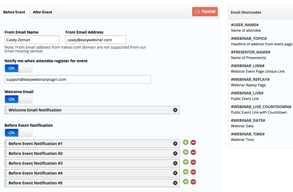
In my business, we have used this platform to create an online platform for virtual events. You can register guests, send automated emails to remind people the event is happing. We have also used this for a traditional webinar and its great for follow up as well.
Too many tabs you have to fill out. I have missed several things from time to time and has made me look bad with clients. I think there should be a sheet that you fill out and it auto-fills all the tabs.
A platform that allows me to host virtual events. I love the analytics I can get, including knowing how many minutes each person watched of my event.
The ease of navigating the software. Very user friendly.
No complaints at all. I along with my colleagues really liked this one in comparison to other programs we've used in the past.
Virtual meetings allow us to work from home.
